

 2006
2006

Articles from
Nisus Writer Express: A Good Word Processor, But Not For Web Work


Getting Organized and Planning Projects: Another Rich Vein of Mac OS X Software
One of the problems I have had in picking a personal information management (PIM) application has been the large degree of overlap among various related categories. For example, where does a “To-Do List” application end and a “Project Management” application begin? Or how about daily journal software and applications that organize your notes? And let’s don’t forget “sticky notes” applications, “shoebox” software, “scheduling” applications, “file storage” tools, and so on.
Truth is, a lot of these categories are slowly merging, and that’s part of what holds me up: Surely the ultimate convergence will be upon us soon, so just wait a little while longer. Yeah, right. The problem with this kind of logic is that convergence is a trend that never stops, and if you never dive in and pick something to help you manage information and/or get organized, you never will. The reason convergence keeps going is that each new software idea sparks another one. Both users and developers participate in this amazing dance, and ultimately we all end up winners. This is why I stress the importance of avoiding lock-in. Whatever you choose, try to make it one that won’t let you switch to another one in a year or two, if the avatar horse you’ve chosen peters out before the finish line. With that brief intro, I’m going to start a new series looking at a category of software commonly known as “Personal Organizers.” These differ from PIMs mainly in their strict focus on project management, with the humble “to-do” list being the foundation for all of them. In 2006, there has been a rush to market by developers wooing converts to the “Getting Things Done” approach to personal organization. GTD, as everyone seems to call it, is the brainchild of David Allen, whose website and rapidly growing “flock” come across to the unenlightened as a serious religious movement. Obviously (I think), it’s not that, but just having arrived from Mars, it looks that way to me. GTD has numerous champions in the Mac world—in particular the popular 43 Folders website, which I first came to know as a champion of Quicksilver. It turns out that 43 Folders champions Quicksilver because it’s such a useful tool in adhering to the “GTD way.” Whatever you may think about David Allen and the specifics of his GTD prescription, most busy professionals today are definitely in need of help in Getting Things Done. Whatever tool or approach helps you with that worthy goal is worth adopting, and the arrival of so many helpful personal organizer tools will hopefully help more of us “get a grip” on all the “to-do” lists we’ve got floating around in our brain. What I’m referring to as Personal Information Managers (PIMs) are more “jack-of-all-trades” in their approach, recognizing that to-do lists are one kind of information we need to manage, but so are software serial numbers, online store receipts, web bookmarks, journal notes, blog entries, and so on. I’m starting the series with a software package that could almost be considered a PIM, and in fact I almost added it to that other list this evening. But ultimately, Process by Jumsoft is a Personal Organizer. Its focus is on helping you get things done, not on helping you organize all the information you have scattered around the house or office.iTunes Volume: An iTunes Controller That’s Louder Than It Appears
Frictionless: To-Do/Project Software with Quicksilver/Mail Integration
Slashdot: Microsoft Bribing Bloggers With Laptops
Renkoo Thinks They Don’t Need Mac Users
DotFiles: Freeware Service App Toggles File Visibility
UnixServices: Turn Any Unix Command Into A Mac OS X App Service
GoodPage: A New WYSIWYG HTML/CSS Editor Debuts
FlyPath: A Finder Alternative That Flies?
WebKit Team Adds New CSS Methods for Text-Stroke
Windows Vista Set To Poison HD Video?
Interesting List of 10 Web-Based Operating Systems
MacResearch Website Tutorials Cover AppleScript, Cocoa
Art Text: Easy Text Effects
Clip Show: Upgrade Your QuickTime Player… for Free!
Classic Menu: Revive the Apple Menu in Mac OS X
Questions About Adobe’s Spry Ajax Framework
QueueMemo: Stickies Attached To Applications
Democracy: Podcast Client Opens Up Internet TV
CodeTek VirtualDesktop Pro: Is This Where Virtual Desktops Actually Work?
You Control Desktops: Will Spaces Make It Another Sherlock?
Leopard’s Spaces: Virtual Desktops for the Rest of Us?
I’ve been intrigued by the concept of virtual desktops since encountering them in a Unix system many years ago (I think it was an SGI Irix system), and then later when I set up Linux about 5 years ago to play around with that OS firsthand. Then, a couple of years ago I saw an early build of Virtue Desktops and thought it was pretty cool. I really loved the nifty transition effects and all the desktop customization you can do with Virtue.
However, Virtue seemed pretty flaky at the time, so I looked around to see what other virtual desktop environments there were for Mac OS X. To my surprise, there were several in addition to Virtue… including some commercial implementations. After trying all the free ones (I wasn’t interested in paying for this feature, since I didn’t even know if I’d like it), I decided Virtue was the best of the bunch.
But I also decided that Virtue’s flakiness was simply adding more time to my routine rather than helping me organize my work, and I finally broke down and decided to try You Control Desktops. Now, it may be a total coincidence, but just after I installed Desktops and restarted my system, the whole OS began to flake out, and I ended up having to trash my hard drive.
Needless to say, whether that was You Desktops’ fault or just a bad hard drive kicking in, it soured me on the whole idea of virtual desktops for awhile.
Then, when Apple announced in August that one of the premier features of its forthcoming Leopard OS would be a virtual desktop system called Spaces, I thought that maybe someone would finally get this thing done right on Mac OS X. Maybe the problem has been that the implementations I’d tried just weren’t intuitive enough, or right-featured enough, to be useful to me. I even said this out loud in an article of video snippets from the WWDC keynote that I published in mid-August.
 Apple’s initiative with Spaces also made me question my previous conclusion that virtual desktops were not worth the effort. If Apple is investing the energy to bring virtual desktops to “the rest of us” someone at Apple must believe that they are a user interface enhancement that will really benefit “us.”
So, I opened my mind once again to the idea of virtual desktops. As a member of the select Apple developer group, I’ve been getting the Leopard “seeds” as they’re released, and I’ve taken the opportunity to try out Spaces along with other new features of Leopard. Given my nondisclosure agreement with Apple, I’m not going to say anything about Spaces that isn’t revealed in Apple’s own presentation of it on the Leopard website. Instead, I’m going to spend a few minutes sharing my impressions of virtual desktops in general and of four other specific VD applications that are already available for Mac OS X:
At the outset, I’ll confess that my note-taking for this exercise wasn’t as rigorous as usual… I didn’t test for the same set of features in each application. Unfortunately, I can’t go back now and refresh my memory for the commercial products, because their demo licenses have expired. The reason for my relatively sloppy approach probably reflects my renewed conviction, after thoroughly testing Spaces, that for most computer users, virtual desktops are a waste of time and effort. Simply put, they’re an idea whose time has passed.
That’s a pretty harsh judgment, I realize, and one likely to make a good number of fellow geeks stop reading right here. After all, some users of virtual desktops feel strongly that they are highly valuable and necessary—for them. And I suspect that’s true. Given the probability for misunderstanding when expressing an opinion on a topic like this, I want to begin by exploring why virtual desktops arose in the first place and what benefits users get (or believe they get) from them. I also want to explore the expectations users have of virtual desktops like Spaces, in the very likely event that they’ve never actually used such a system themselves.
Virtue Desktops: A Terrific Open-Source Virtual Desktop Manager
PhotoStickies: Show Pictures or Movies on Your Desktop
ASM: Single Application Mode in a Menubar Switcher
Listz: Manage Personal Information Through Lists
Onlife: Automatically Stores and Indexes Your Daily Activities and Content
Dockless: Make Dock Apps Go “Poof!”
Jer’s Novel Writer: Word Processing for the Creative Writer
Time To Learn More About Microformats!
Creammonkey: Greasemonkey for Safari Slowly Gaining Traction
Actiontastic: Another GTD Tool with Quicksilver Integration
PodStat: MenuBar Item for Your iPod
NuFile: Freeware Adds “New File” Context Menu Item
PulpMotion: Blending Slideshows, Movies, and Animations
Don’t Miss David Pogue’s Satirical Video About Windows Vista
Ulysses: Not Really A Text Editor, Or…
WriteRoom: If TextEdit Were Full Screen and A Standard Cocoa Feature
SlingShot: Publish/Subscribe Tool Syncs Multiple Macs
KeyBindingsEditor: Freeware GUI for Managing Cocoa Keyboard Shortcuts
Audio Companion: Audio Recorder Designed for Vinyl Lovers
Scrivener: A PIM With A Focus on Writing
Selling Vista: Computerworld Makes This OS X Copy Sound Like Microsoft’s Idea
Computerworld Finds Picky Faults With Mac OS X
Groboto: Pure 3D Creativity!
MPFreaker: More Control of Your MP3 Tags, Lyrics, and Artwork
Disk Order: Another “Finder Killer” Bites The Dust
Firebug Lite: Simulate Firebug Calls in Opera and Safari
Mounty: A Really Fast Disk Mounter
Windows Expert Calls His Transition To Mac OS X “Superb”
Microsoft’s Windows Chief Allchin “Would Buy a Mac”
TextParrot: Listen to or Record Text with New, Affordable Computer Voices
Dragster: Drag/Drop File Transfer Docklet
ClipEdit: Freeware Editor for Text and Image Clippings
AppStalker: Keep Critical Processes on the Job
RadicalSqueeze: Free Zipware Does Basics Only
Process: Project Management, Tiger Style
ToDo: A Pair of Dueling To-Do List Apps
CalendarCreator Service: Add Events and To-Do’s to iCal
True Confessions of a Mac Software Addict
Hello, my name is Leland Scott, and I am a software addict. Put me in front of a cool-looking website with cool-looking software to download, and I’ll use my hefty Verizon FIOS bandwidth to have that sucker on my hard drive almost before Safari has a chance to warn me that the download might contain an application.
This didn’t used to be a serious problem… it was just a harmless pastime. But in recent years, Mac OS X software has been on a major growth spurt. Each year the problem gets worse. There’s a Windows user I know who has a similar problem, and I really don’t know how he copes. He developed a cool website to publish his thoughts and let the world know of his favorite Windows applications, called The Great Software List. He’s been doing this for years, and it shows: The site is well organized, and he clearly explains his standards for great software and why he’s chosen the ones he has. The author has 184 Windows applications on the list… these are the apps that have earned his highest 5-star rating.
When I think about how many mediocre Windows apps he has to wade through to find these gems, my head spins. Keeping up with the onslaught of Windows software releases has to be a more-than-full-time job. I’m assuming there are probably at least 5 Windows apps released for every Mac app these days… That’s purely a guess, and it’s designed to be on the low side of the assumed Mac-market-share-based hypothesis. I would go absolutely bonkers if I tried to download and demo any more software than I already do, which is simply overwhelming nowadays. I wonder if worries about viruses, spyware, and other malware keeps my Windows counterpart’s download addiction under some control? Maybe so…
Edgies: Super-Stickies on the Edge of Your Screen
Finder Window Manager: Perfect Gift for the Mac Control Freaks on Your List
Docktop: A Customizable Launcher Embedded on Your Desktop
QuickEffect: A New Freeware Core Image Effects Tool
DrawIt: Cool New Drawing Program for Mac in Beta Test
WeatherSnitch: A Weather Menubar App That Growls!
Background Gradiants with CSS
PhotoPresenter: This Amazing SlideShow App Also Builds Quartz Compositions
Rage WebDesign: A Complex, Powerful, and Daunting HTML Editor
Daily vX: FileMaker-Built Journal Takes Some Getting Used To
ZDNet Blogger Finds Apple Pro Laptop Cheaper Than Dell
Changes Meter: Freeware Monitors Hard Drive or Web Pages for Updates
MacGizmo: An Excellent Finder Preview While We Wait for Leopard’s “QuickLook”
Apple Publishes New “How-To” for Manipulating Quartz Compositions with JavaScript
Ghost Action: Yet Another GTD Tool Debuts
Midnight Inbox: Is New GTD To-Do List Manager Up To the Task?
Stapler: A Barely Functional To-Do List
Contrepoint: A Unique, Rails-Like Way To Build Static Websites
Protopage Adds Support for Safari
Google Sitemap Automator: Easily Create Sitemaps To Optimize Googlebot’s Site Crawling
EasyTask Manager: A New GTD App Raises the Bar on “To-Do” Lists
AudioSlicer: Split Your MP3 Files For Free
UltraMixer: Pro DJ Mixing Has Free Edition
krix: A visual music browser for Mac OS X
GimmeSomeTune: Highly Rated iTunes Freeware Fails To Impress
Ivy: Yet Another iTunes Controller, With Search
QuickTunes: Another Cool Freeware iTunes Assistant
Is OmniGroup’s OmniFocus Vaporware?
Cycling ‘74: An Amazing Non-Company And Its Amazing Creative Toolsets
ScreenSend: A Reliable Method of Screen-Sharing!
ThemePark Becomes Freeware, Adds Support for Intel Macs
Menufela: Haxie To Autohide Your Menubar
A Solution To Washed-Out h264 Video Exports
Constrictor: Not Just The Same Old Screen Captures
Finally! Someone Has Extended Prototype To Add A Scrollwheel Event Handler!
Measles: Why Shouldn’t Your CPU Monitor Be Fun?
Joomla! Gathers Steam as a Leading Open-Source CMS
One Finger Snap: Most Useful To Single-Button Mice Holdouts
EagleFiler: Gather All Your Information In An Organized File Cabinet
Posterino: Make Cool Life Posters and Postcards
Snippet Mind: Organize and Layout Your Diary
CNET’s Clientside Group Posts Mootools Primer/Tutorial
Smart Scroll X: Put Your Scrollwheel on Steroids!
One More Reason Why Discerning Mac Users Choose Safari Over Firefox
What If Growl Displays Were Just Little Web Pages?
If you’re a Mac user who’s  wandered in to this article and don’t know what Growl is yet, you might want to stop by that essential open-source project’s home page to get acquainted. Once your Mac starts Growling, you’ll understand how fitting it is that Apple’s naming all their OS X releases after large cats.
If you’re a Windows user, you’re still welcome to read up on Growl and why it’s become a standard component of so many Mac users’ desktops even though it’s still only at version 0.7.4. If you find Growl cool, too, you know what to do.
This article isn’t about Growl, though. It’s about Growl displays—the part of Growl you actually see when an event occurs you’ve asked to be notified about. You see, like many other cool apps nowadays (Adium, Synergy, Menuet, etc.), Growl is “skinnable.” Part of the fun—and the utility—of Growl is that users can customize the appearance of different kinds of alerts. In fact, Growl provides you with an astonishing degree of control over your customizing, and this flexibility is one of Growl’s coolest aspects. Using the Growl Preference Pane, you can:
- Set a default Growl style as your starting point.
- Customize certain aspects of each Growl style. Some styles let you set different attributes for up to 5 different priority levels.
- Assign a default style to each different application that’s registered with Growl. (Here’s a growing list of Mac OS X applications that now include support for Growl event notifications.)
- Override the default for any specific notification event, or for a given event priority.
With so many options, it’s no wonder that Growl users collect Growl styles like some Mac users collect system icons or desktop pictures!
Growl notifications can take several forms: Email, speech (using the Mac’s built-in vocal chords), or visual displays. The visual display types are roughly broken down into two kinds:
- Displays you build with AppleScript or xCode (those with the extension .growlView), and
- Displays that are basically just little web pages (those with the extension .growlStyle).
It’s the latter type I want to briefly shout about today.
NetFixer: Freeware Captures Whole Web Pages in One Shot
Perian: Free Plugin Expands QuickTime’s Range
iWebSites: Freeware Lets iWeb Create Multiple Sites, Separately
Ubercaster: The Final Word in Mac OS X Podcast Tools?
Weather Channel Widget: It’s A Must To Avoid
Prado PHP Framework: An Ajax-Powered Framework for PHP5
Script.aculo.us 1.7 Beta Adds Morphing To Effects Library
Ajax Framework Qooxdoo 0.6.2 Adds Support for WebKit/Safari 3.0
Lollygag Takes On Atlas as a .NET Ajax Framework
QT Bridge: QuickTime Resource Warehouse (in French)
STAMPot: Cool Utility ‘Stamps’ QuickTime Movies on Web Pages
Google Web Toolkit Now Supports Safari/WebKit
PAGEot: Freeware QuickTime Tool Helps Embed QT Files into HTML
MediaRage: Swiss Army Knife for Your Digital Libraries
Streampad developer adds Ajax page history support for Safari
iTunes Statistician: Get Data on Your Music Collection
iFinance: Easily Track Your Finances on Mac OS X
NoteMind: Mind-Mapping Meets Personal Information Management
Apple Publishes Developer Tips for Testing the Nightly WebKit Builds
Ballmer: Linux Users Owe Microsoft Millions
MacSlash | Why Are Macs More Secure?
LinkABoo: Bookmark and Link to Individual Mail Messages
Cast Life: A Stylish “Easy Podcast” Maker
Podcaster: Easy Tool for Making Podcasts
Ten Ways To Make a Podcast, Plus One
 In August 2005, I was all pumped up to make my first podcast, and the webosphere was full of great advice, new tools, and lots of encouragement from Mac zines and blogs. I was particularly excited to put together an "enhanced" podcast using the new iTunes extensions Apple had released earlier that summer. With enhanced podcasts, you can embed "chapters" into a single audio file, and mark each chapter with text and images. That way, when the podcast plays in your iPod or in iTunes, the text forms a set of hyperlinks so the user can hop from one part of the podcast to another, while your chapter pictures help set the mood. This was a great new publishing medium, and obviously publishers all around the world were excited to adapt their ideas to it.
The podcast tool market was still in its infancy a year ago, but already there were quite a few choices. There were fewer choices for doing enhanced podcasts, but I had no trouble finding a good piece of freeware for my experiment: ChapterToolMe was awkwardly named but easy to use, and in no time I had a podcast to submit to the iTunes music store.
The aim of my podcast experiment was to publish the latest mp3 snippets added to the Classic 45's "Jukebox," and I planned to include a brief, spoken narrative about each 45 rpm record. I used Soundtrack Pro to assemble the audio file, and that was the time-consuming part. Stringing the mp3 bits together didn't take too long, but getting the narrative just right did. After doing one, I decided I simply wouldn't have time to make a series out of this, and my life moved on to other creative endeavors. (To my surprise, I see that my original podcast is still in the iTunes inventory... you can find it by searching for "Classic 45s Jukebox" or perhaps trying this URL.)
A few months ago, I finally sat down and adapted my PHP script that updates the regular RSS feed for Classic 45's to create a new feed just for jukebox items, including an enclosure tag for the mp3 files. Then the project lay dormant until last week, when a possible method of automating the podcast process suddenly hit me.
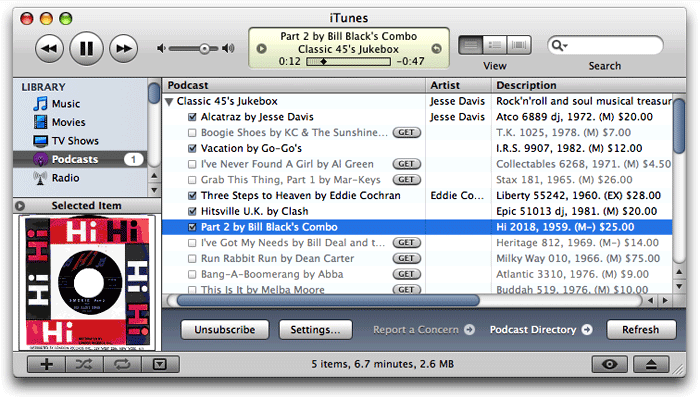 Rather than putting together one big audio file, with recorded narration, and then dividing it into chapters using an enhanced podcast tool, I could just release each mp3 file as a separate episode. Each episode could include the text narration and facts about the record, plus the label or sleeve scan I normally include on the site. I wasn't totally sure this would work, but it seemed worth testing. If it worked, I could release a podcast without eating away up any more of my precious spare time. When I pointed Safari to the mp3 feed I'd made earlier, it loaded the "podcast" right up, displaying the HTML and image content along with a link to the enclosed mp3 file for the last 36 jukebox items. I then went to iTunes and entered the feed URL as a new Podcast subscription, and lo and behold, iTunes also loaded the feed, even providing little
  buttons for subscribers to download each episode they want.
So, the concept seemed sound, and the next step seemed to be a tools review. Was there some cool new application that would help me with the project? Perhaps there were new capabilities of the podcast specification that I could leverage. Thus, the usual sequence of my life played out again: One project led to another!
Vodcaster: Freeware Tool Makes Podcasts and Vodcasts
Universal Music Group CEO Calls Non-Zune Owners “Thieves”
ProfCast: Turns Presentations into Podcasts
SimpleMovieX: Alternative to QuickTime Pro for Movie Editing
Flip4Mac WMV Player: Bend Windows Media To Your Will!
AppleInsider: Zune Not Playing Nicely With Vista
Zune’s Debut Spoiled by a Brief Shuffle on CNN
Les Posen Takes A Well Deserved Swipe at Powerpoint
Disco: A Smoking Disk Burner for the Mac
HyperEdit: A PHP and HTML Editor with Live Previews
iStat: Pretty Cool System Monitoring Freeware
Run: Yet Another Prototype-Based Animation Framework Enters the Race
Apple’s Technical Specifications for iTunes Podcasts (RSS)
PhotoLine 32: Can Ugly Software Make Beautiful Images?
All About LAME - History, Recommended Settings, Versions, and More
Inquisitor: Instant, Expanded Search for Safari
Life2Go: Turn Your iPod Into A PDA
ImageBrowser: Freeware Image Management Tool
Can We Resume The Antitrust Trial Against Microsoft Now, Please?
JavaScript Publisher Host Class: Deliver Objects To The Right Subscribers!
Widgets 1.0: W3C Drafts A Widget Spec
Desktop Transporter: Remote Desktop Client Now A Devon Product
Adobe Open Sources the ActionScript JavaScript Engine
An About-Face by Microsoft with Atlas?
MochiKit.Animator: An alternative to Moo and Script.aculo.us
NoteBook: A Popular, Innovative Notebook-Style Information Manager
Dossier: Another Full-Fledged Personal Info Manager for Mac OS X
Memoir: A Notebook-Style Information Manager
Texter: A New Kind of Word Processor Debuts
ScreenShot Plus: A Small Step Up From Built-In Screen Capture
iCash: A Cross-Platform Money Manager Worth Trying
Did You Know Zune Does Not “Play For Sure”?
Money: New Version of Jumsoft’s Money Worth A Look
Fidelity Market Monitor Widget: The Best Stock Market Widget Bar None
iData 2: A Different Approach To Personal Information Management
SOHO Notes: Multiuser Sticky Brain Replaces Baby Brother
Journler: Highly Rated Freeware Notebook Supports Multimedia Too Â
Mori: Another Personal Knowledge Management Tool
Dabble DB: A New Web 2.0 Data App That Goes Beyond Spreadsheets
ShutterBug: An Easy Way To Build Web Sites
QPict: A Powerful, Affordable Digital Asset Manager
Bitmap Layout Helper: Quickly Measure and Capture Image Area Coordinates
Adobe Chooses WebKit for Its Apollo Project
Inquisitor 3 for Safari Is Now Freeware
Dimensionizer: Contextual Menu For Sizing Images
Stattoo: An Alternative Dock for Information Feeds
Max: Create High-Quality Audio Files from CDs or Files
ClickPix: Create Your Own Desktop Pictures from Photos and Images
Video2Go: Another iPod-Video Conversion Tool
Jumpcut: Minimalist Clipboard Buffering for OS X
Amnesty Singles: Convert Dashboard Widgets for Desktop Use
Cooliris: Preview Links Without Clicking
How Many Firefox Extensions Does It Take To Make One SafariStand?
The title of this 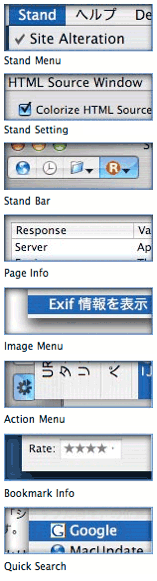 article is deliberately provocative: I don't know the answer to the question, and I don't really care. But having been there with Firefox many times, all I can say is that Safari plugins like SafariStand make me grateful that I don't have to find out. I've found it much easier to utilize and keep track of one plugin rather than keeping, say, six or more in sync and up-to-date.
Our culture is generally dominated by a "more is More" attitude, so that the browser with the most plugins is believed by definition to be the best horse to bet on. This is the same argument some Windows users have made for years with respect to their choice of operating system: I want to use the computer that has the most software to choose from. This argument is proven empty when you actually sit down and compare the quality of Mac software in a given functional category versus that of Windows software (don't take my word for it: Actually do it yourself sometime), and that emptiness carries over to the issue of browser plugins. Certainly, there are some software categories that you legitimately need access to a Windows PC for. But if you notice, nearly all such categories cover business, rather than personal, requirements, and they're for very narrow fields of interest indeed. The only personal software category where the Mac actually lags Windows is gaming, and I predict that the gap in gaming titles won't be nearly so large a year or two from now as it is today.
As far as the supposed dearth of plugins for Safari in comparison with Firefox, SafariStand is an excellent case-in-point. There are other excellent multifunction Safari plugins (Saft, PithHelmet, Safari Extender, for example), but I'm highlighting SafariStand because it's not only great, but also free. After all, if a Safari user finds they are starting to buy plugins, they really should consider paying for a browser that has dozens of plugins already built in, like OmniWeb. Being the cheapskate I am, I like free things, and SafariStand is one of my favorite freebies for Safari. Besides, most Firefox plugins are free, so it seems only fair to restrict this plugins conversation to those that Safari users can add without paying extra.
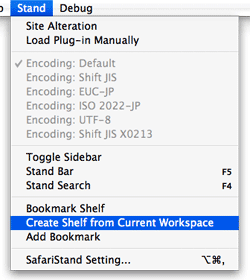 In this article, I'm going to focus on just a couple of the best bits from the latest SafariStand beta, which are just too wonderful to remain obscure from the Safari-loving hordes. But very briefly, here is a list of the main functions that SafariStand adds to Safari. To gather these functions into Firefox would require the gathering of a half-dozen or more separate plugins, each of which would have to be authorized and kept up to date, etc.
- Option to restore your last workspace, or any of the pages you had open, on launch.
- Add sidebar with thumbnail tabs.
- Customize search engines available in the standard Google search form.
- Automate "find" function without having to type Cmd-F.
- Add color labels to your bookmarks.
- Enable site alteration, customizing allowable plugins, images, JavaScript, style sheets, and more for any website.
- Colorize the HTML source window, and make it editable.
- Reorder tabs in a window (this is a native feature of Firefox and will be one in Safari 3.0).
- Use the "Stand Bar", a floating palette with searchable bookmarks and history, as well as customizable SafariStand folders and RSS feeds.
- Configure your "Bookmark Shelf," a floating palette that lets you build and access saved "workspaces," which are lists of sites you open up in a browser session and want to save for later use.
- Access one of the best "Page Info" stores now available for any browser.
- For any site you're visiting, easily see a list of all the cookies the site has set, examine their contents, and/or delete one or more of them.
WriteInOne: Multi-Document Text Editor Tries To Speak Many Languages
Photo Desktop: Nifty freeware puts pictures on your desktop
SOAP Client: Get Out There And Find Web Services!
Hazel: A Thoughtful Cleanup Assistant
Camouflage: Freeware Cleans Everything Off Your Desktop
Skype: Current King of VOIP for the Mac (Now With Video Too!)
Gizmo Project: Great Phone… If You Can Make It Work
PhotoReviewer: Quickly Preview and Filter Photos and Images
Schick: Bonjour File-Sharing Alternative
Desktop Picture Imperium: A Widget for Controlling Your Desktop Pics
iSquint: iPod Video Made Free and Easy
Ping!: Freeware Compresses PNG Files
JES Deinterlacer: Tools To Clean Up Your Mac Movies
Flapjax: New Super-JavaScript Language
With a 30% Annual Gain, Mac Market Share Shoots Up To 6%
Zune Is An Actual 4-Letter Word in Hebrew?
Interest in Macs Continues To Grow
Aqua Data Studio: Query and Data Model Analyzer
SQLGrinder: Mature Mac OS X Database Management Tool
PGnJ: Database Manager for Postgres and MySQL
DbVisualizer: New Version of Universal Database Management Tool
CocoaMySQL: The Absolute Best Tool for Managing MySQL Data on Mac OS X
What’s The Best Mac Database Tool for MySQL?
Although I’ve been  developing websites with MySQL for over 7 years now, until recently I had almost always used phpMyAdmin to manage my databases. phpMyAdmin is such an excellent web application and makes managing MySQL so easy that the only time I strayed was when it wasn’t available on the host server (which was very rare). When I needed a desktop MySQL client, I had turned to YourSQL, which I determined a couple of years ago was the best for me when connecting to MySQL from Mac OS X.
For various reasons that I won’t bore readers with here, I found myself needing a Mac desktop client for MySQL again recently, so I took the opportunity to review the market once again. What surprised me most, I suppose, is how many options there are for Mac OS X users who do a little light database work. (Caveat: I am by no means a database administrator, and my knowledge of SQL and MySQL is merely sufficient to develop web applications—meaning, I can build tables, relate tables, and build queries for those tables. The tools reviewed here are from this use case alone.) In the course of testing, I tried out nine different database apps:
Pref Setter: Terrific Upgrade To Search and Edit Your .plist Files
NFS Manager: Easily Set Up Your Mac As a File/Application Server
Gapminder: Amazing graphs, sobering facts
DeskBrowse: Freeware Embeds Browser in Your Desktop
Overflow: Another Launcher Enters A Crowded Field
Apple May Have New Google Cards Up Its Sleeve for Safari 3.0
Script Debugger: The Ultimate Applescript Developer Tool?
MOKit: Lots of Useful Interface Widget Enhancements for Cocoa
Kiwi: Finally a Kick-Ass IMAP Client for Mac OS X?
TestXSLT: Freeware Tool for Transforming XML Into HTML with XSL
XFlows: Build XML Publishing Workflows
Apple, Microsoft and the War Mentality
Dragonfly: Freeware Color Picker for Web Designers
Does Anybody Really Know What Their IP Address Is?
In our modern, interconnected, always-on age, knowing one’s IP address comes in real handy at times. Knowing your IP address isn’t quite as important as knowing what time it is, but it helps to have an IP clock handy when you need it.
I’ve dabbled with quite a few solutions to this problem over the last few years, and there are a large number of decent IP clocks available… most of them for free. In my IP ramblings, I’ve ruled out solutions that work only in the Dock and ones that put an IP address right in your menubar. I don’t use the Dock that much anymore (between Quicksilver, ClawMenu, Dashboard, and menubar widgets, I don’t need it), except in its application switcher form. And IP addresses printed directly in the menubar take up too much valuable space and are invariably ugly.
Cocser: Command-Line GUI Aggregator
BwanaDik: Another Ultimate IP Menubar Tool
IP: Menubar Utility for Your IP Address(es)
delicious2safari: Freeware imports deli.cio.us bookmarks into Safari in different ways
nView: View, Search, Sort Tab-Separated Data
Menulicious: A Better Delibar?
Color Blender: Finding Hex/RGB Values Just Got Simple!
Bacon: Free 3D Modeling for Renderman-Compliant Renderers
LiveQuartz: A Very Handy, Free Core Image Editor
Macintosh Explorer: Powerful File Manager for Mac OS X
CSS3 Previews: Glimpses of Exciting Web Design Options To Come
Style Master: Pro Power Over Your CSS Code
SurfRabbit: Customize Web Sites in Safari
Rendertests: Lots of useful browser testing here
Virtual Dashboard: Virtual Desktops for Dashboard
Amnesty Generator: Convert Google Gadgets to Dashboard Widgets
Zephyr: Menubar Task-Switching Freeware
SafariScript: Put A Script Menu in Safari’s Menubar
MiniSwitch: Define Multiple Sets of Preferences Within One User Account
Seriously Twisted ZDNet Writer Wants Ajax To Stay Out of Flash’s Way
Mephisto: New Blog Software Makes A Splash
Google Chief Praises Apple’s “Most Remarkable” Resurgence
Unobtrusive AJAX Star Rating Bar
Relaunch: Menubar Shareware Launches Apps in “Snapshot” Groups
Pod Comic Caster: Easy Podcasts From Any Image Set
Three New Safari 3.0 Tricks Are Producing Leopard Lust
You’ve heard about one or two of them, and you may even have seen a YouTube video of Safari 3.0’s tab tricks. But let me tell you, as part of my Building Leopard project, discovering Safari 3.0 has left me with an insatiable desire to work in Leopard full-time. There are three standout features that I really miss when I “degrade gracefully” to other modern web browsers on my Mac—and that includes Firefox 2.0x, Opera 9.x, and Safari 2.x as my regular web companions.
Even though Firefox has enough cool extensions to keep a software addict fed from now until next year, none of them match the upcoming features Apple has cooked up for Safari 3.0 in Mac OS X 10.5 (”Leopard”). Likewise, Opera and its talented development team is going to be left behind the curve for awhile, as are better-than-Safari wannabes like Shiira and OmniWeb on the Mac. (It took Microsoft 5 years to add tabs to its browser, and from the way they’ve implemented them, I still don’t think they quite get it. So, no, I’m not expecting any innovative new ideas in web browsing from Redmond any time soon.)
Ok, with a buildup like that, I can hear you Safari naysayers out there beginning to clear your throats in preparation for throwing out some canned dissults about Safari. Save ‘em.
I’m not sharing these in order to put down anybody else’s browser of choice (well, IE is so far down it’s hard to do anything else!), and I’m not suggesting they are going to revolutionize web browsing, even remotely. The ideas Apple has implemented are not so unique that the company should have taken out patents or anything. Rather, these are incremental innovations of the sort that keep the art of web browsing moving forward. It’s ideas like these that could potentially jog the minds of other creative programmers, who will then go off and imagine some other cool new enhancements for Firefox or Opera or Shiira or OmniWeb.
In the end, it’s all good for web surfers like you and me. (Hey! Are humans and martians who browse the web “web browsers”? If so, when do we get new features?)
I Know & Manage: Sophisticated Information Manager With a SQLite Backend
Life Balance: Software as Personal Coach
Assorted Geekery’s Fine Archive of AppleScripts
Senuti: One of Many Utilities for Transferring Songs from iPods
Sound Shuffler: Randomize Your System Alert Sounds
Textreme: Cleanup Toy for Text Files
iColors: Freeware web-design color meter
Slashdot: Apple Accused of “Upsampling” Low-Res Videos for iTunes
IMAP Idle Plugin: Implements IMAP’s IDLE extension for Apple Mail
Nifty Box: Shoebox Storage with Tagging
Desktopple: A Menubar Item To Cover Your Desktop
Writing on Your Screen: Digital Annotations Can Save Time, Trees
I’ve had an interest in 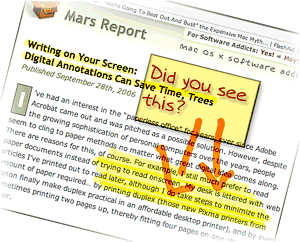 the “paperless office” for years, ever since Adobe Acrobat came out and was pitched as a possible solution. However, despite the growing sophistication of personal computers over the years, people seem to cling to paper methods no matter what great digital idea comes along. There are reasons for this, of course. For example, I still much prefer to read paper documents instead of trying to read onscreen. My desk is littered with web articles I’ve printed out to read later, although I do take steps to minimize the amount of paper required… by printing duplex (those new Pixma printers from Canon finally make duplex practical in an affordable desktop printer), and by even sometimes printing two pages up, thereby fitting four pages on one sheet of paper.
My preference for reading paper has more to do with portability than readability nowadays. I simply prefer to read in a more relaxed position than one can muster at a desktop PC, and I also like reading in places where even laptops are uncomfortable to use. (I didn’t say the toilet, mind you.)
One small area where little progress seems to have been made in eliminating paper involves marking up comments and other notes on paper documents. If I see a web article or some other electronic document and want to pass it along to a colleague with a few comments, my digital options aren’t great. I can forward the URL in an email, but then it’s hard to focus attention on the particular passage I want to comment on. I can take a screenshot and somehow include that in an email or word processing document and send it along. Or I can print it out and mark it up, then stick it in interoffice mail… or simply walk it over to my colleague.
But what if I could simply mark up a few comments right on my computer screen and then transmit a snapshot of that? Wouldn’t that be easier all around, and save paper as well?
Picture Switcher: Puts Desktop Picture Preferences in the Menubar
Yep: Finally! A Fun, Practical Vision of the Paperless (Home) Office
Fission: New Mac OS X Audio Editor Is A One-Trick Pony
Wengo: Open Source VOIP Alternative
InfoWorld’s Editor Backs Yager’s Estimate of Apple’s Enterprise-worthiness
Analyst Missing Secret Ingredient in iTunes/iPod Video Service: No DVD Involved
Rob Pegoraro does a great job balancing coverage of the Mac with that of Windows in his Washington Post tech column. However, I think he missed a key selling point in the iTunes video store launch when he wrote in a recent column that Apple’s new offering was “worth skipping.” Pegoraro gave two main reasons why the iTunes video store is uncompelling at the moment:
- There aren’t enough titles (though he concedes the titles that Apple’s rounded up are top-notch), and
- You can’t burn your purchased movies to DVD.
Pegoraro’s right about the iTunes store’s movie selection, although I had no trouble finding several I’d like to buy. But his second criticism about DVD’s is way off the mark. That’s because I believe the iPod will eventually make DVD’s obsolete in the same way that it’s making audio CD’s obsolete today.
A Clear Explanation for Why Windows Is More Vulnerable To Malware Attack Than Mac OS X
Windows XP Didn’t Look Like A Dog At First…
TUAW Offers a Sensible Rationale for Apple’s Lack of Blu-Ray Disk Support
Sounds Like Walmart Is Pulling A Microsoft Over iTunes Videos
SystemSound: Make Mac OS X’s Sound More Like OS 9
Burn: An Open Source Alternative To Toast
John Gruber on Apple’s New AirPort Security Update
Macs Are Inherently Safer for Data Storage
Slashdot: Microsoft’s Masterpiece of FUD?
Laughing at Negative Prognostication About Apple
Tom Yager in MacWorld: An Apple for the enterprise?
And Another Thing The Mac Can Do That Windows Can’t: Remember Your !*?\&^!*% PaS$w0rdZ!

I didn’t intend to write this article today… In fact, I’m right in the middle of three others that I want to finish. However, it just leaped at me from the front page of today’s Washington Post Business page, and I couldn’t resist. In an article called Access Denied, the writer bemoans the many passwords and PINs and such that the modern, web-connected human must juggle in daily life. People today have so many passwords to remember, they simply can’t, and this undermines the very security the passwords are set up to ensure, since companies will typically allow a shortcut to someone who claims to have forgotten a password—for a bank account, for example.
When I forget a password, I launch Keychain Access, which is a surprisingly sophisticated application that I use in a very simple way. Namely, I enter a search term in the search field, which invokes a live search on the Keychain database and displays matching results below. Each result shows the username associated with the website or application, so it’s easy to find which Key I’m looking for. Double-clicking on the Key brings up a dialog panel that gives me some management capability on the particular key. I’m sure this is cool and significant, but I go straight for the “Show password” checkbox.
MySync: Enables Multi-Mac Syncing Without .Mac
A Roundup of Articles and Techniques Toward Accessible Ajax
Degradable Ajax: Ideas for Making Ajax Friendlier for the JavaScript-Averse
Apple Mail vs. Microsoft Entourage: One Man’s Notes
NodeBox and DrawBot: A Wealth of Fun and Riches from Python
Desktop Log: Display Log Files on Your Desktop
XTorrent: Advanced BitTorrent Client for Mac OS X
MegaFon: New VOIP Client for Mac OS X
ForgEdit: A New Freeware Programmers Editor for Mac OS X
FileXaminer: Highly Respected File Manager Wears Many Hats
Yummy FTP: Super-Fast Sure Does Taste Good!
Building Leopard: An Excuse To Take a Mac OS X Software Inventory
 As a self proclaimed Software Addict, I have a real problem. Well, many real problems, actually. Downloading software not only consumes hard disk space, but it also bloats my Preferences folder over time as I launch each software package to try it out. If that weren’t bad enough, many applications leave pieces of themselves in the “Application Support” folder, the “PreferencePanes” folder, the “Contextual Menu Items” folder, the “Services” folder, and sometimes in the “Plugins” and “Input Managers” folders. Then, of course, there are the Unsanity “haxies,” which put themselves in the “Application Enhancers” folder.
The worst problem, of course, is the amount of time my addiction consumes… But I don’t want to talk about that, thanks.
When my addiction was just beginning, I forgot that if I told an installer I wanted the software available “for all users” on my Mac, it would put the pieces in the top-level Library, rather than in my home Library. So, as my Mac has aged and gone through, now, four different versions of Mac OS X, I’ve felt a great need for doing spring cleaning to tidy up a bit. Earlier this year, I bought AppZapper, which I really like. It helped to clean out a ton of preferences, application support, and other files for software I had long ago decided I didn’t want. But that was, unfortunately, just scratching the surface of my depraved software addiction.
When the preview build of Leopard (Mac OS X 10.5) came along recently, I decided to do a completely fresh installation and start over. At first, I assumed Leopard would be too unstable to form a base for this new start—after all, it’s still in an Alpha stage. However, so far I’ve been quite impressed with its degree of stability. With only a few exceptions—mostly in some of the newer functionality—Leopard has proven very reliable indeed. Some of the new features are so compelling for me—particularly the enhancements to Safari, Preview, Mail, and Automator, and the wonderful new DashCode tool—that I decided to try to move as much of my current production environment to the Leopard “fresh slate” as I could.
Having decided this, it seemed logical to turn my housecleaning project into a baseline configuration project. In other words, I would start with nothing but Mac OS X and the Apple apps, and I would move to Leopard all of the software I need for the various projects I’m engaged in, as the need arises. I would document each change to the baseline configuration and note what kind of software or configuration change I was making. This way, I’d end up with a complete software inventory, including all of the various bits that make up my rich Mac OS X environment. In the process, I’d clean out software I don’t really need, which can only be a good thing.
Nightly WebKit Downloader: An Automator Action To Get Latest WebKit
XMeeting: New Mac OS X Videoconferencing Software Is Successor to oPhoneX
FastAndSlow: Control Processor Performance Settings from the Menubar
BitRocket: Mac OS X BitTorrent Client with RSS Support
Compositor: Image Editing for Artists
PulpFiction: Advanced News Reader/Aggregator for Mac OS X
Aqua Command-Line Tools: Build Unix Commands With An Aqua GUI
osxutils: Command-Line Tools for Mac OS X
iHook: A Mac OS X GUI for Command-Line Jobs
Fugu: An Award-Winning, Open Source Secure FTP Client
AddMovie: Free QuickTime Tool To Pull Files Into QuickTime
TransformMovie: Freeware QuickTime Utility Rotates, Resizes Movies
QTObject embed:Â Using JavaScript to Embed QuickTime Movies
Follow Mouse: Pin the Tail on the Mouse
FastIcns: Making Icons Is Not Only Easy, But Fun!
iTunes Catalog: Cool Way To Web-Publish Your iTunes Catalog
mootools: Moo.fx Grows Up… Gets Married… Has Kids!
MobWrite: Real-Time Collaborative Text Editing… in Your Web Browser!
Computerworld: Running Vista on a MacBook Pro
NeXTSTEP in 1992: If Only We Had Known . . .
Thanks to an article on the Rixstep blog (”The Object Oriented Cake“), I took the time to listen to Steve Jobs introducing NeXTSTEP 3.0 back in 1992. As Rixstep points out, in 1992 Microsoft was just introducing Windows 3.1 and was still trying to build Windows NT. The hardware it ran on was unbelievably weak. As an example, consider that it wasn’t until early 1993 that Intel introduced the Pentium, which ran at an astonishing 66mHz!
Meanwhile, in 1992 Apple had just introduced System 7 the year before, which turned out to be the last truly significant upgrade the company was to make until OS X was released in 2001. Even so, among the “innovations” in System 7 was color computing. (Can you say, “take me for granted”?) Apple had also just introduced the first Macs powered by the new RISC-based PowerPC chip based on their collaboration with Motorola and IBM.
In the Unix world, Solaris 2.0 was just a baby that year, FreeBSD was gestating for a 1993 birth, and Linux was still reaching for a 1.0 release.
Ponder these few moments from computing history as you watch a very youthful Steve Jobs dazzle us with the remarkable achievements of his company’s operating system, NeXT, and its new application development tool, NeXTSTEP 3.0. Truth is, NeXT was so far out there in 1992, a lot of the folks in his audience probably couldn’t believe it was real. After all, these marvels were running on hardware that was only somewhat less puny than the day’s most powerful PC’s, and some of the features he demonstrates are ones we’re still waiting for today!
It should really make you wonder what went wrong after 1992. Why don’t we have PC’s, applications, and development platforms today that fully match the power of NeXT and NeXTSTEP? Mac OS X comes close, but it’s still hobbled with remnants of the Classic MacOS. Besides, the Mac hardly represents “mainstream computing” in 2006.
I know I’m gonna get it from the “never say die!” Microsoft fans out there, but it’s clear to me that the major villain in this story is none other than the company formerly led by Bill Gates. If you want an example of why monopolies are bad for the economy and bad for consumers, just watch this 14-year-old demo of an operating system that you can’t buy anymore. When brilliant technology like this can die stillborn–and no one notices–something is definitely wrong with the marketplace for new technology.
For my own convenience, and therefore yours, I’ve split the video (previously disseminated through YouTube and Google Video) into six parts, each corresponding to one of the major themes in Jobs’ talk.
More Prototype News
HyperScope Uses Dojo But Leaves Out Mac Users
Is Apple Being Unfairly Targeted on Environmental Issues?
Quicksilver Dresses Up Its Cube
If you’ve been hoping Blacktree would enable the planned customization feature for Quicksilver’s Cube interface, I’m happy to report that the wait is over!
GrandPerspective: One Way To Tree-Map Your Hard Drive
Disk Inventory X: Visually Map Your Hard Drive for Fun and Disk Space
Small/Medium Businesses Enthusiastic About Google Apps
Computerworld Publishes Ruby on Rails Tutorial
Desktop Movie Player X: Freeware Plays QuickTime Movie on the Desktop
Graph Sketcher: Simple, Quick Chart/Graph Software
Synthimax : Image Synthesis for OS X
X-Assist: A Freeware “Apple Menu” Menubar App
ChronoSync: Powerful, Flexible Synch/Backup Utility
SyncupX: Smart Backup and Synch
Yamipod: Freeware iPod Manager Does It (Almost) All
Red Pen: Draw On Images with Red Ink
ThumbBorker: Quick-Fire, Custom Thumbnails
Xcast: Sophisticated Freeware Podcast Client Debuts
Touvaly: Utility App Makes Pseudo Copies of Files, Folders, CDs, Volumes
CrossOver Mac: Run Windows Apps Without Windows (Public Beta)
Tom Yager Predicts: Linux Will Get Buried by Mac OS X
Widgetbox Is An Amazing New Resource for Web 2.0 Site Developers
Macworld UK - OpenOffice Aqua Port Coming Next Month
SecureWorks admits to falsifying MacBook wireless hack - The Unofficial Apple Weblog (TUAW)
Nuevos: Universal Web Search From Any App
Synk 6: New Release Boasts “Blazingly Fast” Backups and Synks
Tofu: Improves Onscreen Text Readability and Navigation
Google CEO Dr. Eric Schmidt Joins Apple’s Board of Directors
iWriter: New Tool Builds Sophisticated Content for iPod
Merlin: Yet Another Good-Looking Project Management Tool for Mac OS X
AnandTech Posts Thorough (and Positive) Review of Apple’s Mac Pro
Swift: Safari Web Browser Built for Windows
Gucci Ditches Flash, Goes Script.aculo.us!
New Extension Gives Prototype Dojo Powers
Script.aculo.us Puts On A Really New Face!
WebObjects: First, Free. Next, Open Source!
Latest Windows Vista Beta Release “The Buggiest” Compared To Previous Windows Releases
Anthracite: Scrape and Mine the Web Your Way
3D-Space VFS: File Viewer/Launcher in Fly-By 3D!
LiteSwitch X: Venerable App Switcher Won Me Over!
LiquidCD: Freeware CD/DVD Burning for Mac OS X
xPad: Every Pad Wants To Be Your Favorite Pad
Cocoa Firefox Makes Its Debut, But What Exactly Is It?
Interesting Analysis of Virtualization and Mac Gaming on Macworld
System Shootouts Confirms Mac Pros Much Less Expensive Than Dell
Graphviz: Enter A Whole New World of Automated Graphing
Webstractor: The Ultimate Web KM Tool?
macTV Is Building a Library of Mac- and iPod-Related Videos
Macworld Confirms Mac Pro Is Way Less Expensive Than Comparable Dell
How To Crop A QuickTime Movie
Shiira 2.0 Public Beta Now Available!
JournalX: Archive and View Documents in Many Formats
CNET Blog: Macs are cheaper than PCs? Yes!
Mac OS Forge: Apple Opens Open Source Project Portal
Web Inspector Gains New Eyes for Metrics, Properties
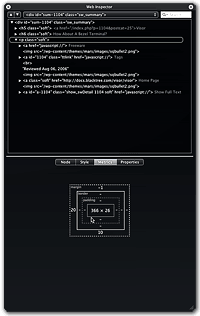 Like many of you who develop on the Mac, I was amazed and very impressed by the WebKit team’s Web Inspector tool when it was unveiled in January. However, it was clearly not yet complete… two critical tabfulls of data were missing, which kept me turning to other tools—like the excellent Firebug for Firefox—when getting into a serious debugging session.
Well, tonight I was delighted to discover that the wait is over! On downloading a new build of WebKit today, I found that Web Inspector finally can provide those critical Metrics and Properties of each DOM element on my web pages. And boy, have they done a great job in the implementation! Every bit as cool and functional as the original bits, so I can now get all the details on any element of the page with a right-click of my mouse (control-click for some folks) and a simple selection of “Inspect Element.” Now come on Firebug fans, don’t you wish you could inspect an element that easily? Not that it’s hard with Firebug, but I always say, “Save a millisecond here and a millisecond there, and pretty soon you’ve saved a whole second!” (Just kidding… I never said that before.)
Time Machine Is Leopard’s New Killer App
Macworld News: VMware Announces Beta Virtual Machine for Mac OS X
PackRat: Mac OS X client for Backpack
Container: A New File-Drawer App Debuts
Want To See An Amazing Use of QuickTime VR?
Visor: How About A Bezel Terminal?
Todos: Icon Navigation A Mixed Bag
Photoshop Automator Actions: An Amazing Set Keeps Growing
Switchblade: New “Learning” Menubar Launcher
Xblaze: Finally, Xfire for Mac OS X!
img2icns: Handy Freeware Tool for Making Icon Files
Lingon: Make Launchd Your Own Startup Manager
Apple Releases New “Resizer” Sample Widget
Cracked MacBook: Gleeful PC Zealots Once Again Try To Put Mac OS X Down
BlogAssist: Menubar Help in Formatting HTML
Daylite Productivity Suite: A Mac OS X Alternative to Entourage?
DiggUpdate: Put Digg Right … There!
Vista Upgrade Matrix: Pretty Dots, Pretty Confusing
Troubling Customer Service Lapses at Apple’s Support Forums
Apple MacBook Continues Getting Praise from PC Reviewers
Protecting Windows: How PC Malware Became A Way of Life

Ah, computer security training. Don’t you just love it? Doesn’t it make you feel secure to know that your alert IT department is on patrol against the evil malware that slinks in and takes the network down every now and then, giving you a free afternoon off? Look at all the resources those wise caretakers have activated to keep you safe!
- Virulent antivirus software, which wakes up and takes over your PC several times a day (always, it seems, just at the moment when you actually needed to type something important).
- Very expensive, enterprise-class desktop-management software that happily recommends to management when you need more RAM, when you’ve downloaded peer-to-peer software contrary to company rules, and when you replaced the antivirus software the company provides with a brand that’s a little easier on your CPU.
- Silent, deadly, expensive, and nosy mail server software that reads your mail and removes files with suspicious-looking extensions, or with suspicious-looking subject lines like “I Love You“, while letting creepy-looking email with subject lines like “You didnt answer deniable antecedent” or “in beef gunk” get through.
- Expensive new security personnel, who get to hire even more expensive security contractors, who go on intrusion-detection rampages once or twice a year, spend lots of money, gum up the network, and make recommendations for the company to spend even more money on security the next year.
- Field trips to Redmond, Washington, to hear what Microsoft has to say for itself, returning with expensive new licenses for Groove and SharePoint Portal Server (why both? why either?), and other security-related software.
- New daily meetings that let everyone involved in protecting the network sit and wring their hands while listening to news about the latest computing vulnerabilities that have been discovered.
- And let’s not forget security training! My favorite! By all means, we need to educate the staff on the proper “code of conduct” for handling company information technology gear. Later in the article, I’ll tell you all about the interesting things I learned this year, which earned me an anonymous certificate for passing a new security test. Yay!
In fact, this article started out as a simple expose on the somewhat insulting online training I just took. But one thought led to another, and soon I was ruminating on the Information Technology organization as a whole, and about the effectiveness and rationality of its response to the troublesome invasion of micro-cyberorganisms of the last 6 or 7 years.
Protecting the network
Who makes decisions about computer security for your organization? Chances are, it’s the same guys who set up your network and desktop computer to begin with. When the plague of computer viruses, worms, and other malware began in earnest, the first instinct of these security Tzars was understandable: Protect!
Protect the investment…
Protect the users…
Protect the network!
And the plague itself, which still ravages our computer systems… was this an event that our wise IT leaders had foreseen? Had they been warning employees about the danger of email, the sanctity of passwords, and the evil of internet downloads prior to the first big virus that struck? If your company’s IT staff is anything like mine, I seriously doubt it. Like everyone else, the IT folks in charge of our computing systems at the office only started paying attention after a high-profile disaster or two. Prior to that, it was business as usual for the IT operations types: “Ignore it until you can’t do so anymore.” A vulgar translation of this “code of conduct” is often used instead: “If it ain’t broke, don’t fix it.”
Unfortunately, the IT Powers-That-Be never moved beyond their initial defensive response. They never actually tried to investigate and treat the underlying cause of the plague. No, after they had finished setting up a shield around the perimeter, investing in enterprise antivirus and spam software, and other easy measures, it’s doubtful that your IT department ever stepped back to ask one simple question: How much of the plague has to do with our reliance on Microsoft Windows? Would we be better off by switching to another platform?
It’s doubtful that the question ever crossed their minds, but even if someone did raise it, someone else was ready with an easy put-down or three:
- It’s only because Windows is on 95% of the world’s desktops.
- It’s only because there are so many more hackers now.
- And all the hackers attack Windows because it’s the biggest target.
At about this time in the Computer Virus Wars, the rallying cry of the typical IT shop transitioned from “Protect the network… users… etc.” to simply:
Protect Windows!
Shiira 2.0 - A Visual Preview
ABI Research: iTunes Is Key To Apple’s Market Growth
AppButton: A Powerful Launcher in Widget Form
myNotes: Organizer for Notes and Clippings
CenterStage: Everyone Wants To Be Your Mac Media Center!
Sloth: What Application Is Connected To Your Open Files?
Aptana: A New Open-Source IDE for Web Development
AjaxWp: Turning WordPress Blogs Into Ajax Blogs
Image Caption Makes Captioning Web Graphics Easy
High-definition Video on Your iPod
Memorex To Release Terrific Video Viewer for iPod
Another Microsoft Demo Goes Awry (Video from YouTube)
PC World Offers Advice on Improving Microsoft
Microsoft: Taking Idea-Copying To A Whole New Level
CSS Tweak: Optimize Your CSS Online or With Dashboard Widget!
OmniPlan: Omni Group Beta-Releases New Project Management App
No More Mr. Nasty? Microsoft Says Good Things
In Alpha, YouOS Is the Most Mature Web-Based OS Yet
Intel Macs: The First Universal Computer
NuLOOQ Tooldial: Radial Menus Go Commercial
curvyCorners - Another Cool Script for Making Corners Round
Microsoft About To Go Down Like IBM?
Wired News: It’s the Attention To Detail, Stupid!
Getting Ready for Screencasting: A Review of Video Screen Capture Software for Mac OS X
 I’ve been hooked on the idea of screencasting ever since Jon Udell started pushing it a couple of years ago. He pointed out some very effective screencasts that others had made and posted several excellent screencasts himself, interspersed with articles on best practices, tools, and tips. As Udell pointed out in “Movies of Software,” Apple has done a less-than-stellar job at making screencasting on the Mac as super-simple as other creative and educational tasks are. He was also dismayed–well, at least, I was dismayed–to report that he was doing his screencasting on a Windows machine mainly because Microsoft had provided superior, free tools for doing so. *Groan* Let’s see… that was a year and a half ago! I thought surely someone from Apple would have read his blog post and rushed an update to QuickTime Pro to make amends. Not that it’s completely equivalent, because QuickTime Pro isn’t free, but at least Mac OS X users wouldn’t have to go hunting and pecking for a tool to do a basic job like screen-capturing. The problem is, you see, that the world has moved on from Grab, and when I think “screen-capture” today, I don’t just think still pictures. Heck, no. I want to capture motion… I want to capture sound. I want to capture software.
The sound part is easy, thanks to the truly superior tools Apple provides in iLife… in this case, GarageBand. But the video… Like I said, *Groan*! On a Mac, you can capture yourself making funny faces in both stills and videos… You can create little video miracles of your family at play… You can turn yourself into a budding American Idol with GarageBand and iMovie. But you can’t do a simple thing like capturing the beautiful animations and user-interface delights that Mac users enjoy while working with their software. In other words, you can’t capture videos of Mac OS X in action.
So, one of the categories of software I’ve been keeping an eye on–and cataloguing possible purchases in–has been video screen capture products. I don’t think I’d ever have the time–or talent–to prepare true screencasts in the Jon Udell mold, but I have found myself wanting to capture small videos of Mac OS X software in action on many occasions. In fact, little videos have been creeping into my software reviews and other blog posts for the last 6 months or so.
iShowU: Screen-Capture/Video Capture Movie Utility
Painter’s Picker: The Easiest Way To Find The Right Color
iPiece: Even Young Eyes Can Benefit!
Isosurface: Fun with Shapes and Surfaces!
Googol: Freeware Calculator Uses Google Web Services
EyeControl: Freeware Remote-Control for EyeTV
Ajax- and Flash-Powered Javascript Sound Kit
Better Approach for Browser-Specific CSS?
Ning: Social Bookmarking Gets Democratic!
Will iPods Become eBooks, Too?
Microsoft Confirms “iPod Killer” Plans
Apple Market Share Myths Exposed!
The Apple Market Share Myth
WebKit Implements CSS3 Resize Property
Web Echo: How Intelligent Is It?
Interesting Argument Against the Microformats Craze
Apple Chooses NVIDIA for Next-Gen iPod Graphics
TextMate Bundle Eases Prototype & Scriptaculous Coding
Yahoo! Widget Engine: Konfabulator’s Legacy A Worthy Sidekick for Dashboard
 I admit I was skeptical when Yahoo took over Konfabulator last year. Apple had released Dashboard for Mac OS X 10.4 (”Tiger”), which had some clear advantages over the old Konfabulator widget model. The first time or two I tried the Yahoo widgets, I was singularly unimpressed not only with the performance of the widgets but also
  with their quality. They reminded me of why I had never been impressed with Konfabulator, although I’m sure Konfabulator’s wanting money for their product had something to do with that, too.
Also there was Yahoo! itself… a company that until the last 12 months or so had been growing more conservative, more commercial, more corporate, and less fun than the Yahoo I started loving 10 years ago. Not only that, but Yahoo appeared to be less and less friendly toward the world’s Mac-minded minority. I had grown so disenchanted with Yahoo mail that I finally gave up last summer and packed my bags for the terrific IMAP mail service called Fastmail.  So it was a bit of a surprise when Yahoo wandered into territory that originally had been 100% populated by Mac-type aliens. Clearly, the visionaries had regained some influence at the company, as other recent smart moves testify (see all the cutting edge Yahoo goodies at the Yahoo Developer Network).
So, when I downloaded the Yahoo Widget Engine (YWE) 3.0 in December, I was pleasantly surprised to notice that things had changed quite a bit. Setting it aside until last month, YWE 3.1, the latest release as of this writing, confirmed my first impressions. YWE widgets are now very well behaved, for the most part, and take no more system resources than Dashboard widgets do. Plus there are actually some widgets that don’t have good Dashboard counterparts.
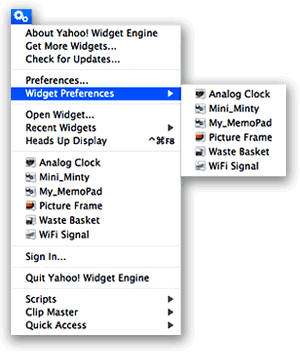
But finding more great widgets isn’t the only thing that’s made YWE a standard part of my desktop. What I really admire is the YWE implementation of widgets, which has firmed up my longstanding view that Apple needs to modify the Dashboard concept to make it more flexible, if they want Mac users to truly embrace widget-dom. The particular traits I admire are nothing new… they were standard in Konfabulator, and there’s one application for Mac OS X called Amnesty that will emulate the concept. I have stubbornly refused to pay the $20 that Mesa Dynamics wants for Amnesty, especially now that I use YWE, which does most of Amnesty’s tricks for free. So what exactly are those tricks?
- Run widgets like normal applications outside of Dashboard
- Easily change a widget’s “window level”–meaning, where it resides starting from the desktop itself up to a window that floats persistently above all regular windows, with several layers in between.
- Ability to lock a widget in place
- Ability to set transparency for a widget.
- Ability to access widgets–and their preferences–from a handy menubar item.
- Ability to stop and start the widget layer as the need arises.
Personal Backup: Flexible Backup System from Intego
Xfolders: A Freeware PathFinder?
PC Mag Mac-Switcher Writes of Five Frustrations
A Guide to OS X Software for Switchers
Quick Lessons in How To Optimize AirPort Reception
VoodooPad: The Ultimate Personal Wiki?
EU’s Antitrust Effort: Playing hardball with Microsoft ‘gets results’ - ZDNet UK News
Are Microsoft’s Employees Techno-Duds?
VisualHub: Video Conversion Powerhouse for Mac OS X
Sophos Expert Thinks Vista Won’t Be More Secure, Advises Switch to Mac
Web Style Guide: Basic Reference on Web Design Principles
New YUI Widget: Carousel
Backbase on Web Accessibility in Ajax Pages
An Interesting Approach for Implementing Global Ajax Activity Indicators
Customers Complain About Dell’s Pricing Practices
WinShortcutter: Have Your Mac Shortcuts and Windows Ones Too!
Media Central: An Alternative to Front Row
Automator Virtual Input: Extend Automator To Control Mouse and Keyboard
MODx: Ajax-Enabled PHP-Powered CMS
Packer: Dean Edwards Name’s JavaScript Cruncher
domReady Ready to Unseat Window.onLoad?!
Learning Advanced Prototype: Writing Custom Iterators
BitMemo: Elaborate, Full-Featured Notes Widget
Yojimbo: A Creative Take at Managing Personal Information
Lifeboat: Yet Another Mac OS X Backup Utility!?
PHP Class To Convert MySQL to JSON
OSFlash: Portal for Open Source Flash Projects
Flash TextArea: Cross-Browser WYSIWYG Editor for HTML Pages
FlashAid Brings Flash’s ScreenReader “Sniffer” to JavaScript
Comparing Ubuntu with Mac OS X
Use Your Own Groupings for System Preference Panes
Screen Mimic: Screen Recording in Flash or QuickTime
Alarm Clock: Much More Than a Menubar Timer
Best Tips for Working with Text in Cocoa Apps
Survey Shows Jump in PC Users Interested in Buying Macs
Terrific Tutorial for moo.fx
Bullseye: A Radial Menu Launcher
uniAjax Aims for 100% Browser Support
Sophos Advises Computer Users To Switch to Mac OS X
Liquifile: New Visual Paradigm for the Finder
Hack To Speed up Prototype’s Selectors
Quicksilver User Manual Being Drafted
Pixen: Innovative Graphics Editor for the Mac
Simon Willison Finds GWT Underwhelming
Finally! WebKit Adds JavaScript Debugger App to Nightly Build
Apple’s Complete Reference on Core Image Filters
How’re We Doing Now? An Update on DHTML/Ajax Browser Compatibility
 Since my original report on the browser and platform compatibility of some 50 Ajax JavaScript libraries in March, the market has continued to produce new toolkits at a rapid pace. I recently finished grading all (but one) of the 8 libraries added since March, and I’ve revisited the scores of another 8. With that, the time seemed right for a report on how Ajax library developers are doing at achieving cross-browser, cross-platform compatibility in the tools they’re giving us–tools which programmers around the world are using to hammer out their unique vision of Web 2.0.
I’m very pleased to report that the trend is moving strongly toward full compatibility. Of the eight new libraries, a full five of them achieve top grades of “A”. That’s a much higher percentage of the total than in March, and of the three non-A libraries, only one was a D (D+ actually). One was graded C+ and the other B. Of the revisited libraries, I was able to raise grades for three–Backbase, ICEfaces, and MochiKit. Only one library had a lower grade (Rico, down from A- to B), and the rest were unchanged.
Only two of the 8 new libraries have commercial licenses you’d have to pay for, and in one case you are really only paying for the IDE. Three of the new libraries require a java server architecture in order to be happy, one would prefer Cold Fusion, and the others are pure client libraries that are agnostic with respect to the application server. One library was added just a couple of days ago (Jitsu), and I haven’t had time to review it yet–but you’ll find it summarized here with the rest. Only one of these 16 libraries is DHTML with no Ajax controls–Uize. Even without Ajax, however, I think you’ll find Uize to be one of the most interesting here–especially in terms of visual richness.
MuseStorm Desktop A Flop in Safari
New Tutorial Examines Using F-Script To Examine Cocoa Objects
What’s Been Yanked From Vista, And When - Yahoo! News
iVideo: iTunes for Your Movies
Wallet: Storage for the Sensitive Stuff
Microsoft Fails In Another Try To Be Innovative
Anyone Who Thinks Microsoft Has “Changed” Should Read This FUD
Apple & Open Source… Strange Buffaloes?
Mail Watch: POP/IMAP Mail Monitor with Extras
ImageViewer CM: More Than Just Quick Previews!
Apple Documentation on Mac OS X Memory Management
jTemplate: Make Your Own iWeb Themes
Jitsu: New Ajax Framework Joins the Crowd
Fjax Arrives: Marrying Ajax, JavaScript, and Flash
Mint: Web Usage Stats Get Pretty and Tasty
It’s About Time! An Actual Analysis of IT Support in Windows Shops That’s Long Overdue
iTWire - Apple set to lead a PC renaissance
On Open Formats and Closed Minds: A Love Story
 With growing interest and amazement, I read the back-and-forth argument between two long-time, highly respected Mac nerds yesterday on the subject of Mark Pilgrim’s decision to abandon Mac OS X for Ubuntu Linux. John Gruber is simply one of the best Mac writers there is, and regardless of what he has to say on a particular subject, you have to admire the elegance, precision, and logic of his writing. So when Gruber raised questions about the wisdom of Pilgrim’s move in a recent blog post, his large readership weighed in, and Pilgrim responded, you can be sure that a great many Mac users like me paid attention.
As usual, I agreed with nearly everything Gruber had to say, and the couple of niggles I have are not worth mentioning here since they would distract from the purpose of this article. And what is that purpose, you are wondering? Before I get to that, let me briefly summarize (if I dare) the exchange so far between Gruber and Pilgrim.
- Pilgrim has become fed up with Apple’s “closed”-edness. After 22 years as a sophisticated, high-end user, he’s decided Apple’s “closed” ecosystem of software and hardware is too closed for him. His primary concern is that the integrity of the data he stores in that ecosystem is at risk, because Apple doesn’t always document its data formats and doesn’t respect for long the proprietary formats it develops for storage. Pilgrim feels jerked around from one closed format to another and is tired of the data conversions and consequent data loss they inevitably entail.
- Gruber is surprised and a bit incredulous that Pilgrim would have suddenly been bitten by this bug. He agrees that closed formats aren’t good for long-term archival purposes, but questions whether losing his iTunes metadata and other format problems is worth chucking his expertise with the Mac operating system for something completely different. He points out that a good backup strategy is part of the solution to preserving precious content. He also devotes a large part of his response to criticizing the Mac blog writers who had knee-jerk reactions against Pilgrim’s decision, and who cited old “Mac is better than Windows because…” arguments without realizing the advances Windows has made since Windows XP (or 95, or whatever). Gruber argues against black-and-white thinking in general and for the very reasonable position of respecting other people’s choices even if you don’t agree with them.
- Pilgrim replies that Gruber missed his point and reemphasizes that his feeling “closed in” by proprietary formats has been coming on for a long time. Apple’s decision to abandon the widely used and understood mbox format for Mail was just the last straw. He feels betrayed that Apple switched formats in Tiger without informing its users, without providing them a way to back out, and without documenting the new format.
So why do I want to wander into this disagreement between two Macintosh heavyweights I don’t know, but greatly admire and respect? As I read their separate articles, I saw something with my Martian eyes that may not be clear to them. What I saw wasn’t an OS switch story, but rather a love story.
Good Discussion of innerHTML vs. DOM methods
djay: Be The Best DJ On Your Network!
JSMIN Shrinks Your JavaScript Files
TurboGears Builds Web Apps on Mochikit and Python
Shortcuts: Finally! Assign Shortcuts to Contextual Menu Items
Tagging Service: HTML Shorthand for Mac Users
Beautiful CSS Experiment in Equal Text Columns
JavaScript Guru Dan Webb Sizes Up Four Ajax Libraries
Apple Uniquely Positioned To Lead Web 2.0 Charge
The ‘Mac OS X Closed by Pirates’ Myth
Testers Report Windows Vista “Super Buggy”
Still Solving Windows.Onload Problem: This Is It! (?)
MacDailyNews Doesn’t Mourn Bill Gates (Neither Do I)
ScribbleScreen: Freeware Screen Drawing
Scriboard: Desktop-Drawing Tool from France
TinkerTool System: Why It’s The Best, Well Worth $8
SpyMe: Not in My House, You Won’t!
PhotoTunnel: Totally Wild Slideshows
Astralite: Another Spotlight-for-the-LAN Toolset
Google SketchUp: Now for Mac OS X
Apple Posts Three New TV Ads… Work vs. Home Is A Classic!
ZDNet: Microsoft Presses the Stupid Button (Again… and Again… )
Apple Takes the Microsoft Pain Away
SafariCookieCutter: Take Control of Your Cookies!
Tell Me One Thing You Can Do With a Mac that I Can’t Do With Windows! (Part 3)
3. Use Real Productivity Applications To Get Work Done Faster, Easier
 As inventors of new tools have done throughout human history, the visionaries who designed and built the first personal computers saw them as tools that would provide an immense boost to human productivity. And they weren’t just thinking about business productivity, folks. They were also thinking of personal productivity: Getting more things done faster so we’d have more leisure time.
Today, in our Microsoft-Windows dominated world, we use the term “productivity application” to refer to Microsoft Office, and we think of the personal computer as a business tool. (Quick: Do a Google search for that term–”productivity application”–and see what you get.) But has Microsoft Office provided us with more leisure time? Of course not. Microsoft Office is a business tool that replaced prior, non-electronic tools like the typewriter and pencil. If it has enhanced productivity at all (and that is arguable), the productivity gain has come in the form of more output per worker… not more leisure time for the individual. In any case, whatever productivity impact Microsoft Office and its ilk had on the business world was completed many years ago. Yet even for businesses, productivity didn’t stop with improving our ability to prepare reports and memos, or compile numbers in spreadsheets, or do overlays for a presentation in PowerPoint.
Productivity goes up whenever you can suddenly do a task in less time than before, either at home or at work. Since its beginnings with the original Apple computer, Apple has appeared to be pursuing a vision that steadily expands the personal computer’s potential to save you time… to do complicated things simpler. Apple’s operating system recognizes that this kind of productivity gain begins with the simplest interface to the computer: Finding things, opening applications, printing, opening documents, organizing information, and the like. As a result of this vision, Mac OS X has two built-in features that are simply lacking in Windows, and they enable “productivity” applications that are truly the envy of the Windows world:
Applescript and Application Services.
ShowIEL: A Whole Evening of Dazzling Particles
Bastion Essay Unravels Myth of Windows Development
File Juicer: Extract Files Buried in Other Files
Filegazer: Unique File System Viewer and Navigator
jQuery Script to Ajaxically Display Source Code
Desktop Wrap: Arrange Your Desktop Icons Precisely
DOMTab Creates Navigation Tabs with CSS and the DOM
Wired Magazine Likes iMac Best As Media Center PC
CuePhase: Automated DJ Mixes
WhatSize: Browse Your File System by File Size
Macworld Publishes Catalog of Their “Mac Gems”
Building an Ajax “Back Button” in PHP
protoGrowl Provides Growl-Type Notices for Ajax Sites
Want To Test Older Versions of Safari on One Mac? Now You Can!
Video Shows John Dvorak Explaining How He Lies To Get Hits
ViddyUp!: VIdeo Conversion for Your iPod
OnMyCommand: Absolutely Essential Contextual Menu Wizard
1Passwd Brings Safari Goodness to Firefox
Microsoft Does Indeed Spy on Its Customers
Time Says MacBook’s Price Point a Threat to Dell, HP
OmniDazzle: Dazzle is Too Weak A Word To Describe This! Try “Awestruck”
Meta: Another “Spotlight Improved” Search Tool Wannabe
iSticky: A Most Innovative Sticky Note
History Keeper - Yet Another Back-Button History Solution?
A Back-Button Fix for Ajax?
Zoodo: Freeware To-Do Utility for iCal
DeskDoodle: Draw Freehand on Your Screen
Cool, Colorful DHTML Navigation Menu
Helma: Server-Side Javascript Web Application Framework
TextSoap: New Edition Improves Cleaning Power
EasyEclipse Packages Eclipse for Painless Installation
Analysts Predict Apple Market Share Gains To Resume
Hawk Wings - Enhancements for Apple Mail
MailPictures: Show Who You Really Are!
Letterbox: A Simple, Free Plugin Gives Mail 3 Columns
SiteOrbiter: Free, Visual Site Mapping/Link-Checking Tool
Shopify Opens for Business!
SitePoint Tests Ajax Accessibility for Screenreaders
AppleBerry? Apple in Talks with BlackBerry Maker
GeekTool: Mac OS X Geeks Just Like To Have Fun
ImageWell: Simple, Easy, Free Image Editor for Mac OS X
Trans Lucy: Transparent Video While U Work?
ControllerMate: Automator for Your Input Devices
Dojo ShrinkSafe — Dojo Compressor in a Friendly Web GUI
Tango Desktop Project - Open Source Gets Look/Feel
PC World’s Best 100 An “Apple Lovefest”
Wufoo: Ajax-Enabled HTML Form Builder
Applying Rails Database Strategy to PHP
Suggestions for Designing a Backup Strategy
TextExpander: Looking for a Great Shorthand Typing Tool?
Reference List of Mac OS X Background Processes and Daemons
GameSpot News: Apple Planning iPod Gaming?
Trying To Debunk The “Mac Is More Expensive” Myth
Does Mac OS X Need a Linux-Like Kernel? A Resounding “No”
Ubikuo Notes: Ajax/DHTML sticky notes
DeskShade: Your Desktop’s New Best Friend?
Videator: New Video Editor Leverages Core Image
Wridea: New Web 2.0 “Idea Management” App
Best Demo of DHTMLized Canvas I’ve Seen
Jot Introduces Next-Generation WYSIWYG Dojo-Based Editor
jQuery Fan Posts “15 Days” of Tutorials
All The Lovely Browsers!
 Lately, I’ve been on a bit of a rampage on the subject of cross-browser compatibility, becoming especially incensed by prominent websites and web 2.0 applications that don’t work in Apple’s Safari browser. I know some of you are sympathetic, but think I should just be pleased that these sites work in Mozilla Firefox, which runs on all platforms known to man (or woman (or Martian)).
Yes, it’s definitely worth celebrating that Firefox has broken through the stranglehold with which Microsoft’s Internet Explorer had gripped the industry for so long, providing not just a viable alternative, but a demonstrably superior web browsing experience. Firefox is the descendent of Netscape Navigator that’s finally returned to beat off the IE interloper, and it has a huge following among developers as well as users.
But there are a number of other excellent web browsers that get shortchanged when a company is testing its site or application in only IE and Firefox. For as good as Firefox is, it’s not the best in all aspects of web browsing, either on Windows or the Mac. This article highlights a few facts about the browser market and points to some really useful features found in non-IE, non-Mozilla browsers that explain why users remain devoted to them and, like me, continue to raise a stink when they are ignored. The other two browsers I use pretty much every day, in addition to Firefox, are Opera and Safari.
DivX Finally Releases Mac Version of DivX Player
Thorough Analysis of Five Mac Myths Related to Security
Using Ajax.Responders To Debug Ajax Requests in Prototype
Excellent Developer Notes for Prototype
iuPro: Investment Property Analysis for Mac OS X
Summary: A Different Kind of Web Log Analyzer
iDive: Manage Digital Video and Quartz Animations
Ajaxians Share Their Experience Using Dojo
Speeding Up JavaScript
Microsoft Propaganda for Atlas Begins
No Kidding! Nike+iPod Become Buddies
Good Grief: The iPod Nano “Scratch” Case Was Indeed A Fraud
TVMax - Watch and Record TV on Your Mac
Two Very Interesting Ajax Development Projects from Sun
Dojo Releases Intro Tutorial
TIBCO Now Integrates with Dojo and Yahoo! UI
Google Web Toolkit - Build AJAX apps in Java
Hack Stickies To Add Scrollbar and Ruler
Useful Automator Actions for Video Projects
Subtraction: How Much Is That Browser in the Windows OS?
Blogger Reveals “Why I Will Probably Continue To Buy Macs”
More on Microsoft’s “Big Lies”: A Tale of Two Press Releases
Yahoo’s Ajax/DHTML User Interface Library Apparently Fails Its Own Test

I have been among the developers and observers who have praised Yahoo for the technical strength of their recently launched User Interface Library. In my tests for the Ajax/DHTML Scorecard project in March, Yahoo’s library was a clear “A” in its cross-browser credentials, and I was very impressed with Yahoo’s development team, which published clear and exacting browser standards for their library.
According to Yahoo’s own Graded Browser Support table, Safari is an A-graded browser, meaning it achieves the highest level of support possible with the Yahoo interface library. Clearly, the thought that went into this table is impressive, and the authors conclude the explanation that precedes the table itself with an appropriate quote from Tim Berners-Lee on the importance of cross-browser support:
“Anyone who slaps a ‘this page is best viewed with Browser X’ label on a Web page appears to be yearning for the bad old days, before the Web, when you had very little chance of reading a document written on another computer, another word processor, or another network.â€
It is therefore highly disappointing and disillusioning to discover tonight that Yahoo has released a preview of its new, Ajax-enabled home page with support only for Internet Explorer 6.0 and Firefox 1.5. The only logic one can use to justify such a move is based on a totally PC-centric viewpoint, which argues that only Windows users are worth troubling with, since they comprise the vast majority of potential viewers. But this is precisely the viewpoint that must cease if Web 2.0 is to become the fertile melting ground for truly cross-platform interdependence that it wants to be. It’s simply not the viewpoint of any company that really cares about Berners-Lee’s vision or about the millions of users on platforms other than the virus- and malware-riddled mess that is Microsoft Windows today.
Piper Jaffray says Macs cost only slightly more than PCs
Tuner: Plug In To iTunes Playlists
Even More AJAX Activity Indicators!
Ajaxload - Build Custom Progress Indicator Animations
CSS Drive: CSS galleries, examples, references, and tools
Mossberg Sees Apple’s “Device Model” Gaining Respect
More Evidence That Microsoft Is Rotten
Sony Gives In To AAC
Minuteur: Simple, Beautiful, Freeware Timer
PHP-Aquarium: Learn and Test PHP Functions
Mozilla’s Brendan Eich Points To JavaScript 2
Is It Possible This Reuters Writer Can’t Read? Nah!
While reading MacDailyNews this evening, I happened on a remarkable story entitled, “Another iPod+iTunes FUD article keeps the disinformation flowing.” With a sigh, I took a look to see what idiot could possibly not understand the iPod and/or iTunes after so many years and so many articles.
As it turned out, the depth of this writer’s ignorance is absolutely shocking. There’s no way he could honestly think this stuff is true. If he does, he has no business covering complicated technology topics like the iPod and iTunes, because clearly the product’s available options are far too difficult for him to grasp. Concluding instead that he’s probably a bright guy, I’m tempted to conclude, as MacDailyNews did, that his piece in Reuters is a deliberate attempt to mislead consumers and smear Apple’s innovative and highly successful music service. The article appears as part of Yahoo’s Finance site with the innocuous-sounding title “Do you own songs bought online? Well, sort of“.
Dojo Releases Version 0.3
An In-depth Look At Javascript Debugging With Firebug
Leopard Will Not Run Windows Apps
Mac OS X Solves 5 Architectural Flaws in Windows
Custom Buttons to Drag’n'Drop into Opera
MkConsole: Pipe Log Files to Your Desktop
Adobe Releases Spry Framework for Ajax
Yahoo! Ajax/DHTML UI Library Updated
WebScripter: Mac OS X IDE for PHP, Perl and HTML
Cross-Browser Ajax: It Don’t Come Easy
In a case demonstrating that you can’t be sure your Ajax/DHTML website will truly be cross-browser just by including one of the toolkits that are known themselves to be fully so. From my own experience, even if you use Prototype, you’re likely to pick up a few odd JavaScripts along the way to include in your site. Or, you might take a stab at writing a function out of the blue. Either of the latter two steps can get you in trouble if you’re not careful.
Today’s case is an Ajax/DHTML “tutorial” which has been advertised on a couple of websites that a lot of folks in the Ajax community rely on for good tips and pointers. Unfortunately, the only thing the script is a good example of is cross-browser carelessness, or perhaps simply cross-browser “couldn’t care less”-ness on the part of the developer.
Five Next-Gen PHP Frameworks
Fabtabulous! A Tabset Widget Using Prototype
MorphX: Freeware Image/Video Morpher
Puzzling Out Why Apple Hasn’t Failed
QCDesktop: Ultimate Desktop Screensaver for Quartz Files
Escaping Special Characters in PHP and JavaScript
Complete, Compact CSS 2.1 Reference
Voice Candy: PhotoBooth for Your Voice!
iStrip: Comic Strip Viewer
Grep: A GUI for the Venerable Unix Search Tool
LightZone: New Alternative To Photoshop? Sadly, No
Tricks With ‘This’ in JavaScript
MacDailyNews: A Banner Day for Anti-Apple FUD
At PC Magazine, Writing About the Mac With PC Blinders On
PC Mag’s Michael Miller has written what I’m sure he believes is a reasonable comparison of the state of things with Mac OS X versus Windows. What he doesn’t realize is that he’s full of B***hit, ensnared in a system he thinks he understands but is really merely apologizing for. In doing so, he adheres to old Mac myths that he’ll probably believe till he steps over that final cliff.
Miller tries once again to make the case that Macs are more expensive than PC’s and that they don’t have enough software. If I weren’t so irritated by this, I’d simply yawn. In one case, he writes of visiting the Dell store and buying an E1505 notebook for only about $1,300, while the entry-level MacBook Pro with roughly the same specs is $1,999.
Backpedaling on the “Mac Virus Outbreak” Non-Story
Tim Berners-Lee Makes Appeal for Platform-Neutral Web
Interesting Proposal for Speeding up AJAX Apps
ATLAS: Microsoft Live Shopping Supports Only IE
Rob Enderle Revs Up the FUD
Apple (Finally) Launches Insanely Great Commercials
Pandora: Social Music Bookmark System Evolving Nicely
Hot Plan: Yet Another Take on To-Do List Management
ToyViewer: Freeware Image Editor/Viewer
Backbase Trying To Widen Browser Support
Apple To Use Sun’s Spiffy New File System, ZFS?
Another Positive Review of the “Butt-Kicking” Boot Camp
A Seattle Tech Writer Exposes Mac Ignorance
Excellent Explanation of Why Apple’s Product Approach Is Best
More Evidence That Steve Ballmer’s Really [ - bleep - ]
Deep Freeze: Save & Restore Your Mac System Configurations
Web Tool Kit: Record Information About Your Browse Session
Tooltips for script.aculo.us
Review of Aperture 1.1: Software Has Received A Bad Rap
New $600 Mini Shootouts Prove Mac Offers Much More For Less
Brief Comparison of Dojo and Prototype
Desktastic: Draw Directly on your Mac OS X Desktop!
WeatherDock: This Ultimate Weather App Is Amazing Freeware!Â
haXe: A New Open-Source Programming Language for the Web
Create Booklet: A PDF Service for Automator
iPodDisk: Freeware Utility Makes iPod Music Accessible in Finder
Complete Web Server Kit for Mac OS X
Image Tricks: Lightweight Image Editor Uses Core Image
Brad Neuberg and Dojo Release Dojo.Storage and Demo Editor Moxie
OpenLaszlo Selects Dojo Toolkit
JavaScript speed test: Test Your Browser!
Thickbox: Lightweight, Jquery Alternative to Lightboxrule them all.
MacDailyNews Shreds Columnist Who Perpetuates Myth That Apples Are Pricier Than Dells
xCuts Dashboard Widget: Tripping the Light Script.aculo.us
 I’ve been writing for some time now about the kinship between Apple’s Dashboard Widgets and web pages. I’ve recently written a time or two about Ajax and the various wonderful dynamic HTML (DHTML) JavaScript libraries that are now available to web developers. And when I first starting compiling the lists of available Ajax/DHTML JavaScript libraries, I was planning to grade Apple’s Widgets library along with all the rest. In explaining why I didn’t, here’s what I wrote last month about Widgets and DHTML pages:
It’s interesting that 2 months after an Adaptive Path essay coined the term “Ajax,” Apple released Mac OS X 10.4 “Tiger”, with its amazing and powerful dashboard widgets system. Within a couple of months, there were over 1,000 widgets available on the web, and these little babies were capable of completely replacing (almost all for free!) a number of system utilities, menubar items, and whole applications on the Mac. I’m tempted to think that awareness of Apple’s widgets helped promote awareness of, and interest in, what could be accomplished with rich Ajax/DHTML toolkits. After all, widgets are simply little Ajax/DHTML programs running in a special layer of Mac OS X called the Dashboard… They use exactly the same technologies as all of the Ajax/DHTML libraries, and in fact you can run them inside of Safari outside of the Dashboard.*
And so, it was fitting that when I finally found time to work on a widget I’d been planning to build since last summer, I decided to use one of the leading Ajax/DHTML toolkits rather than Apple’s own, for most of the widget’s functionality. Having done most of my recent DHTML web work with Prototype and its light-hearted, freewheeling sidekick, Script.aculo.us, I naturally turned to those libraries to help me out.
Dressing Up Safari’s Search Fields
Why Ruby on Rails won’t become mainstream
Keynote Is Changing the Way People Present.. For the Better!
Amazon S3 Web Storagey
Bloginfluence Shows You How Unimportant You Really Are
Apple May Be Low-Hanging Fruit for IT
Sam Kass: Quartz Composer Composer
SnapWeb: Unique Web-Page Archiving Utility
Peek-a-Boo: System Monitor and App Prioritizer
MailSteward Stores Your Email in a Database
Tutorial on Building Autocomplete Forms with Scriptaculous
Scriptaculous Cheat Sheet #1
Testing Web Sites on Various Browsers
Tutorial on Building Rich Ajax Slideshow with “Ken Burns” Effect
Kawa.net: Unbelievable JavaScript Raster and Cube Effects
Pinki: The Easiest Way Yet To Make Image File Icons
iWeb Resource Links
iWeb Hacks
WebKit Team Illuminates the Website Pixel Problem
iLocalize: It’s A Small World… Let’s Communicate!
GraphClick: Turn Graphs into Data
ProVoc: Build Vocabulary in Any Language… with your iPod
fseventer: Observe Mac OS X System Events Graphically
Macworld Reviews Parallels Workstation
CED Releases Major Report Calling for Open Standards, Open-Source Software for U.S.
Windows Security Problems Illuminated in Art
Fluxiom: New Web 2.0 App from the Script.aculo.us Wizard
Even Better Ajax Windows Using Prototype!
How To Build Custom Ajax Effects with Script.aculo.us
DOM Builder: Making DOM Suck Less
Poor Mr. Thurrott Is Getting Disillusioned with Microsoft Over Vista
Business Week Sees 2006 Home Runs for Apple
Quadrium: Feeling Creative? Help Yourself to Happiness!
Command+Q, Command+W, Alt+Tab and Other Keyboard Stories
Mac 101: Great Overview of Mac OS X
TUAW Isolates Another Bizarrely Dim Windows Cretin
Safari use up 76 percent
AppZapper: An Ultimate Uninstaller for Mac OS X
Display Eater: Screencasting Assistant
Apple Bug Reporter
Writer: Cool But Out of Date
OS X Tiger 10.4 process limits solution
CamiScript: Add Script Menu to Camino
Nothing To Cheer Here: Microsoft’s Ajax Toolkit Is a “D”
 Back in early March when I first released the Ajax/DHTML Scorecard, rating all of the existing Ajax/DHTML toolkits against an ideal cross-browser scale, I rated Atlas an “E.†So, the good news for Microsoft fans is that Atlas is actually better than that. But not by much.
On April 4, I rescinded the original score after some readers correctly pointed out that I was treating Atlas differently from the other toolkits in the shootout. That’s because Atlas was simply vaporware in early March, and there was nothing to test. As I explained in an update to the article, the “E†was based on Microsoft’s past conduct in the cross-browser-support department. Here, they had been very bad big boys. Microsoft is the reason that we have to worry so much about cross-browser support today, so it stood to reason that their entry in the Ajax field would continue their past strategy of steering all users to Microsoft products and away from alternatives.
Though I was skeptical Microsoft had changed its stripes, one writer assured me that
In general Microsoft’s strategy with .NET is to require Windows on the server, but to be 100% browser compatible on the client. .NET components configure themselves automatically for the available browser features ( i.e. CSS levels, javascript dialects, or css/js disabling). While I’m still in the early phases of researching Atlas, it seems that this style of browser support has continued.
And so, I began testing with an open mind, especially after an Ajax blogger raved about Atlas in an article that was picked up by the No Fluff, Just Stuff RSS feed that I follow. (I’ll have to remember to ignore future articles by Brad Abrams, whose blog after all is hosted by msdn.com…)
Since Abrams was celebrating the release last week of the Atlas Control Toolkit, which includes 9 online demos of different Atlas controls, I decided to start my testing there. Unfortunately, Atlas failed on the very first control, the “Cascading Drop Down.†Though it worked in Firefox on Mac OS X, it failed in both Safari 2 and Opera 9. After going through three or four of these, Atlas was batting a very low score, and I decided to keep track of results more scientifically.
The end result? Of the 9 Atlas controls very publicly celebrated by Microsoft this week, here’s how Atlas rates:
- Firefox, 8 of 9 controls worked
- Safari, 4 1/2 of 9 controls worked
- Opera, 3 1/2 of 9 controls worked
I don’t think you can count this as cross-browser support, folks.
How NOT To Build a Shelf in WordPress
BoxOver: A New Great-Looking Tooltip Script
HoudahSpot: Another “Spotlight Enhancer” Search Tool
MacDailyNews: USA Today’s Kantor Embarrasses Himself Yet Again
DOMinclude: An innovative alternative to popups/tooltips
Ajax e-Commerce at HiDefDVD.com
Proxi: New Innovative Mac OS X System Utility in Beta
Web-Based Collaborative Editing: Twiki, Tiddly, or TikiWiki?
 I spent a few weeks in December 2005 investigating the universe of wiki software, and confirmed what I already suspected: It’s a very big universe with many wikis! It would be impossible to explore them all, so I first tried to come up with a short list of wiki engines to focus on. Fortunately, there are a number of excellent sites that attempt to provide matrices of wiki software functions and abilities. Here are a few I used and recommend:
- Good reviews of wiki software at onLamp.com, a site devoted to open-source LAMP products.
- This is a very thorough “choice tree†for wikis.
- Splitbrain, which makes Dokuwiki, has a good comparison page on wikis.
- Best of all, don’t miss the new Wiki Matrix website, which evolved from a static HTML table matrix last fall.
After studying these various resources, I was able to narrow the list of wikis down to the following:
MediaWiki was the default choice, since I assumed it was probably the best of the lot, given its starring role in powering Wikipedia and just about every other high-profile wiki you encounter on the web. After a painless default installation of MediaWiki, I had the usual MediaWiki shell and did a few quick walk-throughs of the structure just to make sure all the plumbing was in place. It seemed to be, so I proceeded to install a few of the others from my short list.
qTip: Small footprint, unobtrusive tooltips
overLIB: Granddaddy of DHTML Tooltips
Tooltip.js: Tooltip script leverages script.aculo.us
DOM Tooltip: Oldie But Goodie DHTML tooltips
MooSB: Not Much To Look At, But Great To Listen To!
Arguments Over Cringely’s Prediction of OS X for PCs
Mambo: Best Open Source CMS?
BetterSound: An Improved Sound Preference Pane
PodUtil: More Than Just Copying
Color Tool: Ajax Colors!
Apple Releases Resource Guide for Developers Delivering Content with RSS on Mac OS X
Computerworld Posts Excellent Set of FAQ’s on Apple’s Boot Camp
Apple - Boot Camp: Now Macs Do Windows, Too
Hallon: Bookmarks Aren’t Just For Browsers Anymore
Ocean Waves: Everybody Needs A Nap Nowadays
F-Script: Cocoa Scripting Made Easy
Japanese Bank Switching Desktops to Mac OS X
Surfin’ Safari: Text Fields Getting Wild!
Is Vista Failing Because of Apple Competition?
MovieLink: How Stupid Can You Get?
MacDailyNews: Rob Enderle Has A Stupid Daydream
Cringely: On Paul Allen and Microsoft’s Skeletons
Blog Article Explores How OS X Executes Applications
LXer: A Brief History of Microsoft FUD
LXer Reports on Active Microsoft Lobbying to Undermine Working Systems at Homeland Security
Macworld: 30 Pivotal Moments in Apple History
IT-Enquirer Summarizes a New Pfeiffer Research Report on Cost and Productivity, Mac versus Windows
Gearlog : Mac Os X 10.5 May Have Native Windows Support
Philippines Writer Touts the Mac Alternative
Macworld Hints: How To Make Branded Docked URLs
More Fun With MonkeyMan Steve Ballmer
Brightness Control: Dim Your Mac’s Display All The Way!
Alahup!, the Agile, Ajax-Powered Web Development CMS
Doodim: Lightbox for your Desktop!
Terminal Pal: Run .term files from the Dock
Xilin.us: Rich Interface Public Bookmarks Manager
New Apple ADC Video Series: Building a Sample Core Data Application
Microsoft Employees Calling for M$ Heads To Roll!
Apple Computer Tops Business Weeks’ 50 Best for 2006
I-Search: Plugin to TextExtras Provides Incremental Search
SelfService: Access Mac OS X Services by Drag’n'Drop
Memogram: Freeware for Detailed Virtual Memory Info
Creating a Compressor Droplet
CNET prizefight: Apple 30-inch LCD Bests Dell’s
ShelfMenu: Menubar Item for Storing Images, URL’s, Text, Lists, etc.
appleMods: Repository for Universal AppleScript Libraries
Appscript: Applescript Rewritten in Python?
San Francisco Chronicle Writer Proves Himself An Idiot Technology Analyst
MacDailyNews: Another Day, Another (Wrong-Headed) Mac Market Overview
John Gruber: He Told Us So… 2004 Wasn’t Anything Like 1984
Stereophile Editor Raves About the iPod Hi-Fi
Windows Users Just Don’t Understand Apple’s Appeal
Vanity Fair Ponders Steve Jobs
Advanced Mac OS X Programming Topics and Tools
Observation Post: Growl-Powered Watcher System for Mac OS X
YouTube - Microsoft History (Hysterical!)
Ars Technica Reviews Mac OS X’s Timeline
Microsoft Employees in Vista Revolt
Kiko: Free Web 2.0 Calendar Syncs With iCal
Ajax Usability Guidelines
ajaxWrite: Another Free Ajax-Based Word Processor
Beware Lock-Ins in Open-Source and Ajax Clothing!
Associated Press Lights A Birthday Candle for Apple
Adobe Engineer Explains Why Photoshop Isn’t Ready Yet
DOM (Document Object Model) Reference
Windows Blogger Gets Excited About A New, Innovative Windows Tool That… Is A 5-Year-Old Mac OS X Feature
What’s the Difference Between Mac OS X and Vista?
Windows XP on Macs: Tested, Benchmarked
CocoaSuite: Customize Your Cocoa Apps
Vista and the Quest for More Memory
LXer: Ubuntu, Macintosh and Windows XP
PHP Function Reference Widget
Web Experiments: Animation, DHTML, CSS, and More
Developing Dashboard Widgets
Apple Releases QuickTime Broadcaster
Southwest Adds Mac OS X Version of DING
CSS Optimizer for Mac OS X
Explaining and Customizing the Cocoa Text System
ShortStat Widget: For Your Stat-Checkin’ Addiction)
Animated Ajax Search
Feed2JS: Feed to Javascript
JSON for the masses
A (Re)-Introduction to JavaScript
Microsoft Pretends To Like Open Source
Downloadable Web 2.0 and AJAX Widgets
DOM Scripting: Slip-sliding away
Yahoo!’s new twist on mapping APIs
Building a Custom Mac OS X Theme Installer
Ajax Activity Indicators
Windows XP on Intel iMac: Confirmed
JSEclipse: Edit JavaScript with ease.
OpenLaszlo Shows Off New DHTML Chops
BoxOver: A mighty fine DHTML tooltip
Ensemble: Freeware RSS Reader Missing Features
High Priority: iCal To-Do List Menu Extra
RCWebColorPicker: Freeware Web Color Panel from Rubicode
Collection of 30 AJAX Tutorials
Why Apple Has Not Advertised Mac OS X
PC Magazine on G5 Quad Pricing: Fact, Fiction, or FUD?
 This can’t really be called “newsâ€, since I clipped this PC Magazine review in late December, 2005. But a Martian never forgets! Besides, PC Magazine still brazenly displays this information on its website as if it were fact, not fiction. After reading through the info I’ve gathered in the last half hour, you be the judge of the facts in this case.
The serious error here is that PC Magazine lists the Apple Power Mac G5 Quad as costing… guess! You’ll never guess how much they say it costs. Honestly.
OK, I gotta spill the beans at some point. PC Magazine says a Quad costs $7,023 to $9,522!
That struck me as very odd, since I had just bought a new Quad for myself in December, and I didn’t pay anywhere near $7,000-$9,500 for it. The unit I bought was hardly the base model, either: I had upgraded to the $350 Nvidia GeForce 7800 graphics card when it became available and also added Bluetooth and Airport wireless cards for $99. And I got all this for only $3,448! How is this possible, you ask? Read on.
The Plaxo Toolbar for Mac: As Lame As It Sounds?
TextMate: A Popular Programming Editor for Mac OS X
Ajax Mistakes - What To Avoid in Implementing Ajax
The Open Software Wiki - SWiK
Automator World: Food To Make Otto Grow
Two Top-Notch Event Systems, but Which Is Tops? Dojo or Yahoo?
InfoWorld: Apple Products Go Wild
A WordPress Plugin to Enable Lightbox
Link Indicator: Enhanced in-Page Links
From Apple: Cocoa Fundamentals Guide
Particletree: Useful Web Programmer Tips ‘n’ Tutorials
Opera 9 Passes Acid 2 Test
Firefox Whips Internet Explorer In Vulnerability Tally
arRsync: Cocoa GUI for rsync anyone?
Mac Mini vs. Microsoft Media Center: Round 1
Prototype Gets Some Serious Syntactic Sugar
Rico rounded corners with Script.aculo.us
What hurt Apple in the desktop wars gives iTunes an edge
Blacktree Upgrades Quicksilver Docs: Another Thing of Beauty
Ajax Lessons Offers Ajax Workshops and Tutorials
DOM Scripting Task Force : Promoting Better Javascript
LXer: What if the Microsoft trial was rigged?
Creating A Live Ajax Datagrid
Endo: RSS Reader from the Developer of Ecto
NotLight: Free Spotlight Search Utility
12 Perfect Cases for Ajax
A First? PC Gamer Switches To Macintosh!
Univ. of Wisconsin Issues Mac OS X Security Challenge
It’s True! Macs Really Cost Half As Much As PC’s
j2k: Free JPEG 2000 Photoshop Plugin
Ajax/DHTML Library Scorecard: How Cross Platform Are They?
 As I mentioned in an earlier post, the whole Ajax/Web 2.0 thing that’s happened this last year reminds me vividly of the mid-1990’s. Back then, the web was brand new, it was exciting, everyone was learning how to build web applications, developers were totally turned on and creative, everybody was pointing out cool new apps and sites, and the potential of this new computing platform seemed unlimited. Leading the charge was a young company that built software for every operating system under the sun, and they clearly had a solid vision of where they were headed. During 1994-96, Netscape introduced one astonishing new client-side technology after another to what a web browser could do–tables, animated graphics, client-side imagemaps, frames, cookies (yes, these really were a vital improvement to the web client), and something they called Javascript.
Each of these technologies offered dramatic new ways of presenting information in a web browser, and developers who loved new gadgets glommed on to every advance, racing each other to see who could do the coolest things with these first. A lot of mistakes were made–a lot of really ugly eggs were hatched–but excitement and optimism were the buzz feelings. With Netscape in charge, you felt like you do when working as a protege with a master hacker: Does this guy ever stop pulling amazing tricks out of his sleeve?
One of the promises of Netscape’s vision was that the web–and, in particular, the web browser–could make one’s choice of operating system irrelevant. The web could level the computing playing field, since applications built for the web were applications for all, regardless of what OS you happened to prefer. What worked for NeXT, OS/2, Irix, Solaris, and Windows would also work just fine on Linux, Mac OS, Be OS, HP-UX, and BSD. The web browser could be the OS, and the only limiting factor in what you could do would be your hardware and connection speed. Microsoft’s lock on the computer desktop could be broken, and new competitors in operating systems and computers could unleash the full potential of the personal computer to improve our lives–both at work and at leisure.
Only, it didn’t quite turn out that way.
This article inventories the Ajax/DHTML toolkits now available and grades each from A to E on the degree to which they adhere to a cross-browser ideal. The good news is that if you want to build astonishing Web 2.0 applications in 2006, you’ve got a lot of fine Javascript libraries to choose from! And nearly all of the Grade A libraries are open-source, so you can build without shelling out a license fee for the privilege. The bad news is that some of the most prominent players in the field fall far short of that mark.
SunriseBrowser: Webkit for Web Developers
JS-Sorcerer: Cross-Platform Javascript Testing
JavaScript Tabifier: Automatically HTML tabs
CSS: Writings and Test Pages
On Having Layout: The concept of hasLayout in IE/Win
Why Windows Vista will suck
Microsoft Still Trying To Scare Google
Ultimate Pen: Another Draw-on-Screen Tool
The no-framework PHP MVC Framework for Building a Web 2.0 App
A Windows User Looks Longingly at the Mac
FileMerge: Free XCode Utility Lets You Compare or Merge Two Folders’ Contents
Musing on the Mac Mini’s Integrated Graphics
Interview With The Hacker Who Tried To Make Mac OS X Malware
BrainJar.com: Intro to the DOM
Ruby on Rails: Big Day for Mac OS X Developers
Browser Speed Comparisons
Quick Guide to (Somewhat Advanced) JavaScript
PreFab UI Browser/Actions: Essential Tools for AppleScripting
Unobtrusive Javascript: Intro to “DOM Walking”
Profile Manager Premium: State of the Art Web Application
JotForm: Oh Wow! Absolute scrump.tio.us!
Painless JavaScript Using Prototype
Google Lets Apple Safari Users Down Again
Google Labs today released another shiny new toy for geeks to play with… this one, a web page creation tool. My colleague says it uses Ajax and a rich dhtml Javascript interface to make page creation fun and simple. I wouldn’t know, since so far it doesn’t work in Safari.
DomAPI - DHTML Application Platform
New Intel iMac: Power Efficiency King
TestXSLT: Cocoa app for Experimenting with XSLT on Mac OS X
DHTML Kitchen: DragLib and Other Hits
Youngpup.net - DHTML Code
ToolMan DHTML Library
Color Scheme Generator 2
Web Developer’s Handbook
PlaysForSure - On Windows-only!
SharePoints: Make Full Use of Your Apple File Server (for Free!)
OSAF’s Survey of Ajax/JavaScript Libraries
Viou: Freeware for Making Custom Icons
I’ve Removed QuickImage Contextual Menu Plugin
Droffett: Free OS X Utility “Flattens” Folders
MenuMeters: Freeware System Monitors for Your Menubar
wikiCalc: Web Spreadsheet in Testing
Macworld: Learning AppleScript
Desksaver Plus: Dashboard Widget Runs Screensavers on the Desktop
Backlight: Screensaver in your Menubar
AOL’s I Am Alpha: A Wide Slap At Mac Users on Safari
This is another horrible example of a company with blinders on. Google has been doing this lately, too. What am I talking about? Why, thinking it’s OK to release a new product without support for Safari or other KHTML-based browsers.
The Exporter: Freeware for QuickTime Conversion
Google Analytics - Now Safari Friendly
Path Finder: Top-Notch Finder Replacement Not Compelling Enough To Switch
Apple: Working with Quartz Composer
Macworld: MacBook Pro Beats Dell on Laptop Prices
Top 10 Things All Windows Switchers Should Know at Plastic Bugs
Wash. Post: Federal Grants System Excludes Mac Users
Lightbox JS: Cool Technique for Web Images
Flex CSS with JavaScript for better reading
Progressive Layout
Presentational JavaScript
One In Two PCs Won’t Run Vista’s 3D Interface
Spyware Barely Touches Firefox
Microsoft Vista: Another Reason to Switch to Apple
A Microsoft iPod rival? Gates Hasn’t Given Up
Noodleboard: Web-Based Collaboration with a Dashboard Widget
WebArchive Folderizer: Great Way To “Unpack” WebArchived Pages
Nifty Corners: Rounded Corners Without Images (Original Article)
More Nifty Corners
Bill Shein’s Not Switching To A Mac… Or Is He?
Apple’s Remote Desktop Software Gets Overdue Respect
NetVibes: Ajax Home Page
CSS Quick Start Article & Tutorial Guide.
Finding a Javascript Tool Tip Script
jQuery: New Wave Javascript
OttoMate: Automator Web Tester!
Cocoa Cookies: A Real Cookie Manager for Safari/WebKit
GUIdebook: Graphical User Interface gallery
Ajax: Home Was Never Like This!
 When I first read about Ajax last summer, it sounded too good to be true. After all, I was a web geek who was raised on Netscape Navigator, and for whom Javascript had always been the holy grail of great web applications. I had delighted with each new release of Navigator, excitedly diving into the new objects, methods, and properties as they were unveiled by Netscape. Indeed, Javascript was one of the major reasons to use Netscape in the mid-1990’s, since no other browser could touch it for providing rich client-side interactivity to web pages and applications.
Then, around the time that Communicator (Netscape 4) was released in June 1997, the storm clouds that had been forming from Microsoft’s threatening posture against Netscape began to be really troubling. When IE 4 was released that fall, it finally caught up to Netscape in Javascript support. Indeed, until then Microsoft had simply been copying Javascript in order to provide Netscape compatibility, as part of their strategy to win the market. But IE 4 was different. Microsoft took Javascript in a different, and incompatible direction. Thus began the great cross-browser incompatibility nightmare for Javascript lovers like me–a dark, stormy decade that lasted until the clouds began to part in 2005 with the emergence of Ajax.