




Articles In Category
Mars Themes and OS X Mavericks


Trying To Tame Mountain Lion Without A Hat
 Remember my angst about whether I should migrate my computing life to Mountain Lion? Well, that story's now over, and Mountain Lion has won.
Introducing Smooth Black: A New Button Theme for CrystalClear Interface
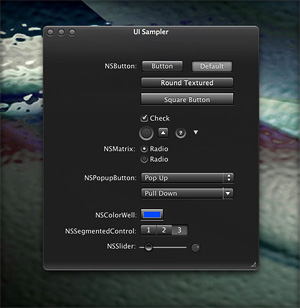 In my previous article I spoke of a desire to get back to theming, and specifically mentioned a desire to do that "black matte" theme I've been thinking about. I guess the article helped spur me on, because after several weeks of work I'm now ready to release Smooth Black, a new button theme for CrystalClear Interface (CCI).
On Theming Mac OS X: How Long Can I Hold On?
CrystalClear Interface and Crystal Black are marvelous, foolhardy, and frivolous experiments in theming the Mac OS X user interface. As they were in the beginning, so they remain today: Elegantly imperfect software products, which will always be buggy. It's just the nature of the experiment. Why? Because they try to do something Apple works hard to prevent, and therefore are outlaw apps: Only able to pop up here and there with a sparkling, think-different approach that just isn't meant to be.
I am the foremost user of these two themes, and I continue to develop them because (1) it's still possible and (2) I really like them. As the author, I'm tolerant of their occasional misbehavior, but I understand that not all observers are so patient. Nobody likes a screaming 3-year-old while enjoying a quiet evening at one's favorite restaurant. I'm no different in that, but I do try to make sure my children learn how to behave as new situations arise that cause them to flare up.
Still, there are always new situations, and, well, children will be children. My children are still quite young, but the day may come when either they are banned from new restaurants for their behavior, or I become too exhausted from apologizing for them to take them out in public any more.
With each release of its operating system, Apple drives me one step closer to that edge. It's not intentional, I'm sure... In the interest of providing a safe OS environment, Apple continues to tighten the knot around inter-application interactions — especially those that allow third-party software, like CrystalClear Interface (CCI), to load itself into other applications, such as the Finder or TextEdit. And yet, without that kind of interaction, CCI and Crystal Black (CB) could not function.
For now, it appears that CCI will survive the transition to Mountain Lion (Mac OS X 10.8), but as with every release of Mac OS X since Tiger (Mac OS X 10.4), the amount of effort to do so is greater. And I fear that as the technologies introduced by Apple for increased security in Lion and Mountain Lion are more widely adopted by software developers, the number of applications that won't run CCI properly will increase.
In some future update, Apple could introduce a change that will turn off the lights for CCI and CB for good, as well as those for AppMenu Magic and my freeware Text Tools. Such a change would mean I could no longer develop the software, let alone support it.
AppMenu Magic Conjures A Simpler, More Elegant Menubar
Dress Up Your Mac’s Authentication Panel With Crystal NIBs!
 This little application provides two alterna-tive styles for the “Authenticate” panel that appears when-ever you’re required to enter a password on your Mac. It works by substituting differ-ent “NIB” files — the files that define the window’s interface — for the default system versions. (Jargon Alert: NIB stands for “NeXT InterfaceBuilder,” which was the original IB app developed on the NeXT operating system — the predecessor of Mac OS X.)
Text Tools for Mac OS X: Free At Last!
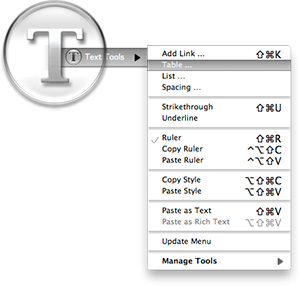
Some variation of these text tools have been included in CrystalClear Interface, as well as Crystal Black, since those applications were first released. However, the tools have nothing to do with the theming of buttons and windows, or with the general appearance of Mac OS X. I added them because they address a real need of mine, which no other software could do.
As a writer, I need ready access to a range of text functions, and I need them in whatever application in which I happen to be writing. In most of the rich text editors I use, those functions are available somewhere in the app’s menus, but typically they're in different places within each app. Some apps don’t include one or two key functions at all.
Mac OS X has a rich text framework that provides just the set of editing tools I require, and it would be extremely handy to be able to access those tools consistently across apps. This is precisely what the MarsThemes Text Tools do: Grant easy access to the key Cocoa text tools that writers and editors need but can’t find.
In The Works On Mars: CrystalClear Interface 2.6
Work on programming and graphics is now far enough along that it's safe to say that CrystalClear Interface 2.6 will be ready for release soon. How soon? Don't ask, because my answer is always wrong.
CCI 2.6 will be a major upgrade, with some features customers have wanted for quite awhile now. The upgrade will be free for current CrystalClear Interface license-holders, but after release the software's price will increase to $18. The price increase reflects the major amount of work required to push CCI's functionality to the new level, and a lot of that work has to do with making it work — and look right — on Lion (Mac OS X 10.7).
Briefly, the main new features in CCI 2.6 will be:
- Incorporates the Crystal Black button theme for users on both Snow Leopard and Lion.
- Adds eight menubar themes users can mix and match with their chosen button theme.
- Seamlessly swaps custom application graphics for a given theme with the chosen new one.
- Fleshes out the custom system graphics for Lion, so that both the Gradient and the new Black Gloss button themes are almost in parity with Snow Leopard.
- Adds two new window frame styles — "Black Gloss" and "Black Gradient."
- Incorporates two new preset themes — "Black Gloss" and "Smooth Black" — to take advantage the new window styles.
- Adds numerous new Crystal Docs icons, and improves the icons tab to show previews of the various icons.
- Automates the installation of third-party Crystal Docs icons, so the user isn't interrupted and prompted to install for each app as they open it.
- Provides a new set of Crystal Desktop pictures, mainly for users who want a dark desktop. This set of "Deco Bubbles" desktops has six dark variations and four light ones.
- Adds code to enable readable statusbar text for the clock and username "menu extras." (Note: This feature currently doesn't work consistently on Lion.)
Theming Snow Leopard:
How Hard Could It Be To Paint A Leopard Black?
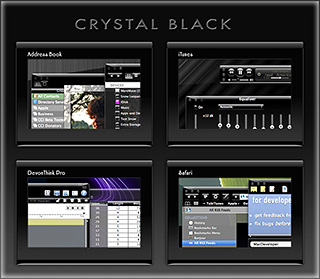
Dark interface themes are extremely popular with a small, but very passionate, group of Mac users. Sadly, since Apple introduced Leopard (Mac OS X 10.5), the old, relatively simple method of creating such themes on the Mac can't be used, and it took the theming community a good year and a half to figure out the current, relatively hobbled tools to theme the few bits of the interface that can be themed.
Given the weakened state of theming on the Mac, it's not surprising that the number of themes available has dwindled to a mere handful. And even those only go part of the way compared with what we used to be able to achieve with ShapeShifter. Still, the yearning for Mac themes remains strong among this community, and black themes are virtually nonexistent now.
Black themes have always been a challenge, because the frameworks used to build applications were designed to assume that text would always be black and the color of windows and buttons always light. Apple introduced a dark-theme paradigm a few years ago with its Heads-Up Display window style, which, with its translucent black background actually assumes that text will be white.
So, why would anyone undertake an effort to introduce a fully black theme for Snow Leopard?
I suppose it's because we Martians just can't step back from a challenge. Not to mention the fact that we, too, are afflicted with the passion for dark themes that many Earthlings suffer from. I also have a good starting point, having developed some useful techniques for the challenge through building CrystalClear Interface.
To acknowledge the theme's heritage, I've dubbed the theme Crystal Black.
Theming A Web Page With Crystal Black:
A CSS Design for Web Inspector
For awhile, I've wanted to theme Safari's Web Inspector—the incredibly useful built-in website viewer/debugger/designer assistant—with the Crystal Black look and feel, but it wasn't immediately obvious how to do this. I assumed that the tool was just a part of Safari, and therefore built with classes and widgets from the Cocoa AppKit (which is the framework all Cocoa apps are built with). However, when I began to inspect the Inspector, I discovered that everything contained within its borders was simply web content: HTML, CSS, JavaScript, and images.
In other words, the Web Inspector tool is nothing but an intricate, sophisticated, and extremely well designed web page!
Having built a Crystal Black CSS file for web pages in general, and with my past expertise in CSS, I attacked this challenge with relish! It reminded me of the time I realized that Dashboard widgets are, at their core, nothing but little web pages (as are simply apps for the iPhone). In tackling this one, the main question was, How should the various elements look? And the hardest part was inspecting the various parts in of the Inspector in great detail to determine which CSS rules governed their default appearance and behavior.
As I discovered, the WebKit has a a sub-framework called "WebCore," which in turn has a folder of resources specifically for the Web Inspector. In the Inspector folder, among other things, is a suite of CSS files that handle different aspects of the Inspector's design and behavior. Of these, the primary one I needed to tweak was called simply "inspector.css."
A Black Gloss Theme for CoverSutra
I recently posted another member of the coming Crystal Black theme for Snow Leopard on my deviantART site. This new component is a glossy black theme for the popular iTunes controller CoverSutra.
Crystal Black is a theme for Mac OS X "Snow Leopard" that I'm still refining and plan to release eventually. I published a preview of the theme last fall, and a few weeks ago released a Crystal Black theme for iTunes. The skins for both iTunes and CoverSutra will, of course, be included in the full theme once it's out.
Crystal Black Preview: A New Attempt To Put a Dark Skin on Snow Leopard
Like many themers for Mac OS X 10.3 ("Panther"), I was awed by the beta releases of a theme called "Cathode" back in 2004. An artist named Dragun took the theme through a few iterations and then abruptly halted development.
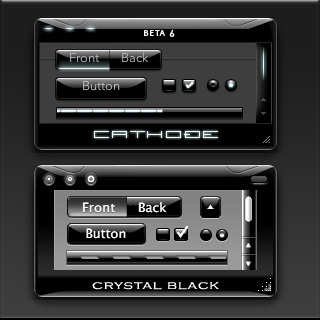 Those of us who used ShapeShifter to run Cathode on our Macs understood why. Although Cathode was beautiful, in practice it was impractical. There were too many elements of too many applications that resisted a dark theme for buttons and window backgrounds.
For me, however—and I'm sure for many theming fans—the dream of using a beautiful black theme like Cathode was a siren call impossible to forget. Over the years, the dream receded further from our grasp because of roadblocks Apple erected—intentionally or not—to the existing mechanisms of theming Mac OS X.
Starting with Mac OS X 10.5 ("Leopard") in 2007, the main tool for applying Mac themes, ShapeShifter, went bye-bye and has never returned. This is one of the main reasons I continued development of CrystalClear Interface, because it was the only way for me to apply a fully realized theme to Mac OS X.
Since Leopard, themers have been able to finesse the problem by changing the system graphics files that apply buttons, menubar background, basic window shape and color, and a few other items to your window appearance. Despite best efforts to unravel the secrets of the Mac's new ways of drawing itself, this mechanism isn't able to consistently change text color in the many contexts in which it appears in a window, thus making design and use of dark theme impractical.
As I'll describe in a future article, tackling the design of Crystal Black, a new theme inspired by Cathode, has been far from easy. And there remain user interface elements that totally resist its charms. But for me, those elements are few enough to make Crystal Black practical.
At this point, I'm confident that I'll be able to complete Crystal Black and release it at some point for all Mac users of Snow Leopard (Mac OS X 10.6). The theme is an offshoot of CrystalClear Interface (CCI) and uses much of the same code. However, Crystal Black is much simpler, has a smaller impact on the operating system, and is compatible with many more applications than CCI. Also unlike CCI, Crystal Black provides a complete theme for iTunes 10.
CrystalClear Interface 2.5:
Taming a Leopard in Winter
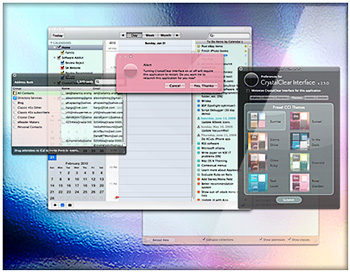
I recently released a major new version of CrystalClear Interface (CCI). Among the most significant enhancements in version 2.5 are its full compatibility with Mac OS X 10.6 ("Snow Leopard") and its ability to finally theme the Finder. Because of new limitations to system add-ons imposed by Apple, taming Snow Leopard has been a daunting challenge, but the final outcome is a version of CCI that's the most stable, robust, and compatible yet. The extended struggle with Snow Leopard over the winter is one of the primary reasons I've decided to require a license fee for CCI 2.5 ($12.00).
Eight New Themes Coming in CrystalClear Interface 2.5
Besides the set of Crystal Document icons previewed recently, another feature of the forthcoming CrystalClear Interface 2.5 is a new set of eight beautiful preset themes, shown below. (Click the images for a closer look.) The themes are designed to complement the eight Frosted Crystals desktop pictures released with CCI 2.2. Of course, you can still set colors, frames, and transparency settings for Mac OS X windows to your own taste, as always. The preset themes are ones I've enjoyed and find a convenient shortcut to designing custom themes.
Introducing Crystal Documents:
A Set of Document Icons for CrystalClear Interface
This is a set of 74 document icons intended to complement CrystalClear Interface and the set of Crystal Albook system and application icons I released a couple of years ago. The set covers most of the document types used by Apple's applications as well as a limited set of document types for third-party applications. The icon set for third-party apps will be augmented substantially as time permits.
These icons are available for download now, and they will be included in the forthcoming release of CrystalClear Interface 2.5 (more on that in another article). In CCI 2.5, you will be able to automatically install and uninstall the various icon sets displayed below, including any of the Crystal Docs icons for any of the third-party applications you use. The new icon install feature will be included in the new CCI Preferences window.
Enjoy!
CrystalClear Interface 2.2

I posted the new version of CrystalClear Interface a few days ago, and then proceeded to hunt down and squash a couple of last-minute bugs. Yesterday, I was also moved to make one of the hard-wired features a configurable option. While not as dramatic an upgrade as version 2.1, CCI 2.2 nevertheless has a large number of new features, enhanced features, and bug fixes, as well a great deal of code optimizing. This article summarizes the more significant changes since version 2.1 was released in June.
Introducing Frosted Crystals for CrystalClear Interface
These are snippets of the 9 "Frosted Crystal" desktop pictures that'll be distributed with CrystalClear Interface 2.2. The look of frosted glass looks terrific when viewed through CrystalClear windows! I hope you enjoy using them as much as I have.
CrystalClear Interface 2.1

The Many Faces of CrystalClear Interface 2.0
The beta release of CrystalClear Interface 2.0 is now available on its new website. Also on the site is a documentation page describing all the features of this new version. Be sure to peruse that information—especially the tips and troubleshooting sections—before you try it out.
It’s Coming . . . CrystalClear Interface 2.0
The Transparent Experiment Lives!
CrystalClear Interface 2.0 will soon enter a public beta release. This is a major step from the previous version, released in March 2008 and described in the Mars article:
CrystalClear Interface 1.9:
Going Where No Theme Has Gone Before
Those of you who found CCI 1.9 outlandish no doubt find that version 2.0 sets a new standard for outlandishness.
CoreUI Finder Utility Now Available For CrystalClear Interface 1.9
CrystalClear Interface Update: Version 1.9.1
 This release fixes a problem with the uninstaller, and is otherwise the same as 1.9.0. (Note: Today’s update fixes the error in yesterday’s release, which inadvertently still had the 1.9.0 installer. Sorry about that!) The uninstaller now runs a new utility, GraphicsToggle, after running the installer/uninstaller, and this takes care of making sure the Leopard graphics are fully restored. See the documentation included with the download for more information about GraphicsToggle.
Announcing CrystalClear Interface v. 1.8.12
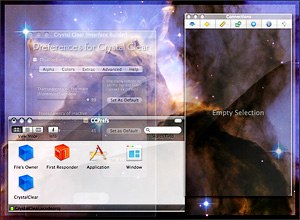 This unexpected journey into the realm of transparent user interfaces has taken me much further than I ever imagined. It's been almost a year now since the first inkling of the idea rattled my brain, which led to the first release of Crystal Clear for ShapeShifter in mid-February.
Thanks to the Cocoa InputManager SetAlphaValue, I was led, Pied-Piper-like, into the enormous and strange world of Objective-C and Cocoa during the summer. I'm finally surfacing from that expedition and have brought a souvenir of my travels into the strange, terrifying, and glorious realm of Cocoa.
Each computer user will have to decide for themselves just how much transparency they can stand while working at their Mac. I was surprised at the amount of loathing that was expressed towards Leopard's newly translucent menubar last month. But I don't think it's indicative of any permanent flaw in the concept. Quite the contrary, in fact: If anything, Leopard's toying with translucency is too much of a baby step, on the one hand, and smacks of me-tooism with Vista, on the other.
Very briefly, the premise I'm proposing is that our computer monitors are essentially glorious light sources, much like the ones that shine through windows in our houses and automobiles. Just as we do with those windows, there are times when we want to bask in the beauty shining through, and other times that we prefer to close the blinds to avoid glare. On the computer, we already know how to close the blinds. I'm suggesting that there's a world of beauty awaiting computer users who can enjoy the light as well.
Update On That Crystal I’ve Been Growing
I can’t believe it’s been 2 months since I published the preview article for Crystal Clear 1.5! What was going to be a 2-3 week project after that turned into a monster of a project that’s taken me on several journeys into the bowels of Mac OS X and Cocoa, the primary framework for building Mac OS X software in the programming language Objective-C. But the story of those journeys–if I ever have time to write them down–is an article unto itself.
Today, I just want to briefly report what’s going on with Crystal Clear. Besides the features noted in August, the screen movie above shows a variety of noteworthy advances, some obvious and some not so obvious. Here are the ones I want to point out in particular:
Apple: Optimizing Web Applications and Content for iPhone
Apple Mail Slowing Down? VacuumMail Can Probably Help
VacuumMail now comes with a full installer package, which puts VacuumMail in your Utilities folder, the Launch Agent in your Library (makes the LaunchAgents folder if you don’t have one yet), and also optionally includes Peter Borg’s handy Lingon software for customizing your Launch Agent. No other changes are made to VacuumMail itself at this time. I’ve updated the link, though, to point to the new installer download.

A lively discussion and exchange of information occurred recently on Hawk Wings, the blog site mostly devoted to news and resources for users of Apple’s terrific Mail program. A colleague at work sent me a message on Tuesday, excited when word on Hawk Wings started circulating about a “vacuum” process available for SQLite databases that appeared to dramatically speed up Apple Mail. He had tried the recommended vacuuming and definitely noticed peppier Mail performance. One thing led to another, and before I knew it, I’d become engrossed in developing and polishing up an AppleScript utility to automate a periodic vacuuming of my Mail, which I’m of course dubbing VacuumMail.
As the Hawk Wings discussion unfolded, we learned that Mail maintains an SQLite database called “Envelope Index” in your ~/Library/Mail folder, which gradually grows as the number of emails in your mailbox does. Natively, Mail performs no optimizations on this critical database, which contains pointers to all of your mail that become fragmented and somewhat disorganized over time. At the office, my Envelope Index file was over 100mb, and at home it’s about 30mb. SQLite offers a “vacuum”  command that rewrites the Envelope Index, optimizing and reorganizing it for faster access. It sounds a bit like what happens when Mac OS X defragments your hard drive periodically.
 At first, news of this function took the form of a shell command you can run in Terminal. It was quite interesting and exciting to see how the Mac users reading of this learned more about it as information was shared, and the command itself became more concise and precise as the day went on. Other users discovered that SQLite offers an “autovacuum” process that can do vacuuming without prompting, and I’m sure that’s a great thing as well. However, we also learned that vacuuming is a more robust and thorough optimizing of the file, since it actually analyzes and rewrites the whole thing, whereas autovacuuming acts only on a certain recent portion of mail pointers. The basic Terminal command turns out to be:
sqlite3 ~/Library/Mail/Envelope Index vacuum;
Automator Development Tip
Firebug Lite: Simulate Firebug Calls in Opera and Safari
Weather Channel Widget: It’s A Must To Avoid
Widgets 1.0: W3C Drafts A Widget Spec
Fidelity Market Monitor Widget: The Best Stock Market Widget Bar None
Amnesty Singles: Convert Dashboard Widgets for Desktop Use
Desktop Picture Imperium: A Widget for Controlling Your Desktop Pics
Does Anybody Really Know What Their IP Address Is?
In our modern, interconnected, always-on age, knowing one’s IP address comes in real handy at times. Knowing your IP address isn’t quite as important as knowing what time it is, but it helps to have an IP clock handy when you need it.
I’ve dabbled with quite a few solutions to this problem over the last few years, and there are a large number of decent IP clocks available… most of them for free. In my IP ramblings, I’ve ruled out solutions that work only in the Dock and ones that put an IP address right in your menubar. I don’t use the Dock that much anymore (between Quicksilver, ClawMenu, Dashboard, and menubar widgets, I don’t need it), except in its application switcher form. And IP addresses printed directly in the menubar take up too much valuable space and are invariably ugly.