




Articles In Category
Apple v. Samsung: The True Story


The Future for Home Computing
ComputerWorld Pits Snow Leopard Against Windows 7 (Again)
WebKit Introduces Styleable Scrollbars
Compass: A New Concept for Managing CSS Styles
Without Even Trying, Apple’s iPhone Takes the eBook Reader Sweepstakes
I recently decided it was time to look again at the state-of-the-art in eBook reader hardware. It seems like I've waited forever for a company to design one I could really use in place of the traditional paper-filled parallelepiped. I first got excited by the possibility while implementing the PDF format for a magazine on CD-ROM back in 1995. "Wow!," I thought, "Whoever wrestles PDF onto a small electronic device is going to make a mint!"
Of course, PDF turned out to be not particularly well suited to small viewing screens, since publishers would have to make a special layout for the PDF version. And so, years went by, with talk of E-Ink, electrowetting, electronic paper, and other exotic technologies appearing to be on the verge of practicality.
What most of the would-be designers of eBook readers have seemingly failed to grasp, however, is that to replace paper books, eBooks must be nearly as light and portable as a paperback. They must work without cords, and be compatible companions to one's daily trip to the little boy's room. (I've honestly never met a woman who reads in the john, but it seems nearly all men do.) They must be able to accompany you to the beach, the pool, or the mountains. I'd really like something I could read while holding it in one hand, like I do a paperback. I don't want a reader that will break the bank, either. And most of all, an eBook reader needs to be comfortable to use in bed or in your favorite armchair.
Even today, with devices shrinking towards the ideal size and weight, nearly all fail to meet my needs for one reason or another. Quite surprisingly, one device has in fact replaced books for me, and it's not one I ever thought would or could. Because I had bought the device for another purpose entirely, this eBook reader has actually cost me nothing whatsoever.
This article covers five eBook reader devices, including two that are full-fledged personal computers serving as an eBook reader by way of third-party software, and another that is a multifunction "smart phone" with eBook reader capabilities. All five devices have strongly positive characteristics, and two of of them possess the full range that would allow them to serve as portable eBook readers for organizations that need access to technical and policy documentation. Even though I personally need a reader that's useful for novels and such, I'm evaluating these based on their utility as devices for storing and reading technical and other documentation rather than literature, each of which have quite different requirements for eBook reading.
WebKit/Safari Keep Blazing the Trail to CSS 3.0
Looking back, This is an update to the article I wrote last summer, when Safari 3.0 was first released. In the 9 months since then, a lot has happened, and I wanted to try to keep this info up to date. Opera, iCab, Konqueror, and Firefox have all made progress in adopting CSS 3.0 specifications, the next generation of the W3C's Cascading Style Sheets standard.
However, the WebKit team continues to lead the pack, as they have since I first contemplated this article over a year ago. In the last 6 months, that team has not only adopted more of the CSS 3.0 specs ahead of the others, but they have proposed several exciting new specs of their own, which the W3C is taking up as draft recommendations.
In addition to updating the state of CSS 3.0 in WebKit/Safari, I've also added some new demos for the Backgrounds section.
Here are the CSS 3.0 features I wrote about in July 2007:
- Box-shadow: Yes! Add drop shadows through CSS!
- Multi-column layout: Can we really do this now? With HTML?
- Resize: Give JavaScript hacks a rest and let users relax when typing input on web pages.
- Rounded corners: Any can be made round.
- Colors with transparency: There goes another ugly hack from way back!
- Background image controls: Remember how great it was when you could add images as well as colors to an element's background CSS style? Well, it's about to get a whole lot better!
And since then, WebKit and Safari 3.1 have adopted the following new ones:
- Adopted last October, WebKit introduced its first take at CSS Transforms, which it has submitted to the W3C for consideration. With CSS Transforms,
<DIV>s can be scaled, rotated, skewed and translated... all without using JavaScript! - Announced at the same time is the equally exciting implementation of CSS Animations. At the moment, the only type of animation that's documented and demonstrated on the WebKit blog is based on CSS Transitions, which let you define how an object or attribute changes over time from one state to another.
- Also in October, WebKit added the CSS Web Fonts feature, which lets designers beam fonts to users through CSS and HTML, approximating the capabilities of PDF in a much lighter-weight form.
- Then, after a lull, things started to heat up again last month, when Apple released Safari 3.1. Safari 3.1 incorporated all of the CSS 3.0 features WebKit had pioneered earlier, plus it added a bunch of things the WebKit team hadn't blogged about. Chief among these was support for CSS Attribute Selectors. This is something of a holy grail to advanced web developers, since it opens up a whole world of possibilities for using the Document Object Model (DOM) to build better web interfaces. When released, WebKit was the first and only browser to support this geeky, but highly practical feature.
- And then, just today, WebKit added support for CSS Gradients to its portfolio. Gradients are not yet a CSS 3.0 specification, but they are part of the HTML 5.0 spec. No doubt Apple's implementation will be referred to the W3C for consideration.
Leopard’s “Quick Look” Raises the Bar for File Previewing
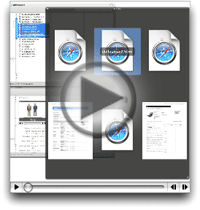 With Leopard's forthcoming "Quick Look" feature in the Finder, Apple is leaping ahead of the file-previewing game by providing a separate, translucent preview window of amazing flexibility and beauty. Quick Look can preview movies at full size or even full screen. It can preview text, HTML, and PDF documents and even let you navigate them. If you select multiple files, Leopard provides an "expose"-like view that lets you navigate among them. Or, if the files are images, you can quickly go into slideshow mode. There's much more... but ain't that enough for now?
Parallax Web Page Background Using Javascript and CSS
inkBook: Time To Get A Writing Tablet?
iPhone: OK, I’m Impressed… Now Gimme The Goods!
Zirrus: An Online To-Do List App With Clear Clouds
Mogopop: New Web 2.0 Publishing Tool for iPod
WebKit Team Adds New CSS Methods for Text-Stroke
Onlife: Automatically Stores and Indexes Your Daily Activities and Content
Edgies: Super-Stickies on the Edge of Your Screen
Contrepoint: A Unique, Rails-Like Way To Build Static Websites
Zune’s Debut Spoiled by a Brief Shuffle on CNN
How Many Firefox Extensions Does It Take To Make One SafariStand?
The title of this 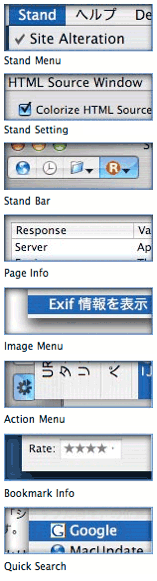 article is deliberately provocative: I don't know the answer to the question, and I don't really care. But having been there with Firefox many times, all I can say is that Safari plugins like SafariStand make me grateful that I don't have to find out. I've found it much easier to utilize and keep track of one plugin rather than keeping, say, six or more in sync and up-to-date.
Our culture is generally dominated by a "more is More" attitude, so that the browser with the most plugins is believed by definition to be the best horse to bet on. This is the same argument some Windows users have made for years with respect to their choice of operating system: I want to use the computer that has the most software to choose from. This argument is proven empty when you actually sit down and compare the quality of Mac software in a given functional category versus that of Windows software (don't take my word for it: Actually do it yourself sometime), and that emptiness carries over to the issue of browser plugins. Certainly, there are some software categories that you legitimately need access to a Windows PC for. But if you notice, nearly all such categories cover business, rather than personal, requirements, and they're for very narrow fields of interest indeed. The only personal software category where the Mac actually lags Windows is gaming, and I predict that the gap in gaming titles won't be nearly so large a year or two from now as it is today.
As far as the supposed dearth of plugins for Safari in comparison with Firefox, SafariStand is an excellent case-in-point. There are other excellent multifunction Safari plugins (Saft, PithHelmet, Safari Extender, for example), but I'm highlighting SafariStand because it's not only great, but also free. After all, if a Safari user finds they are starting to buy plugins, they really should consider paying for a browser that has dozens of plugins already built in, like OmniWeb. Being the cheapskate I am, I like free things, and SafariStand is one of my favorite freebies for Safari. Besides, most Firefox plugins are free, so it seems only fair to restrict this plugins conversation to those that Safari users can add without paying extra.
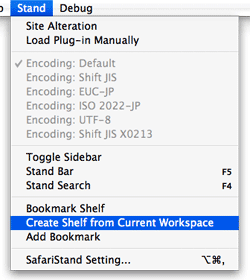 In this article, I'm going to focus on just a couple of the best bits from the latest SafariStand beta, which are just too wonderful to remain obscure from the Safari-loving hordes. But very briefly, here is a list of the main functions that SafariStand adds to Safari. To gather these functions into Firefox would require the gathering of a half-dozen or more separate plugins, each of which would have to be authorized and kept up to date, etc.
- Option to restore your last workspace, or any of the pages you had open, on launch.
- Add sidebar with thumbnail tabs.
- Customize search engines available in the standard Google search form.
- Automate "find" function without having to type Cmd-F.
- Add color labels to your bookmarks.
- Enable site alteration, customizing allowable plugins, images, JavaScript, style sheets, and more for any website.
- Colorize the HTML source window, and make it editable.
- Reorder tabs in a window (this is a native feature of Firefox and will be one in Safari 3.0).
- Use the "Stand Bar", a floating palette with searchable bookmarks and history, as well as customizable SafariStand folders and RSS feeds.
- Configure your "Bookmark Shelf," a floating palette that lets you build and access saved "workspaces," which are lists of sites you open up in a browser session and want to save for later use.
- Access one of the best "Page Info" stores now available for any browser.
- For any site you're visiting, easily see a list of all the cookies the site has set, examine their contents, and/or delete one or more of them.
Desktop Picture Imperium: A Widget for Controlling Your Desktop Pics
Google Chief Praises Apple’s “Most Remarkable” Resurgence
Three New Safari 3.0 Tricks Are Producing Leopard Lust
You’ve heard about one or two of them, and you may even have seen a YouTube video of Safari 3.0’s tab tricks. But let me tell you, as part of my Building Leopard project, discovering Safari 3.0 has left me with an insatiable desire to work in Leopard full-time. There are three standout features that I really miss when I “degrade gracefully” to other modern web browsers on my Mac—and that includes Firefox 2.0x, Opera 9.x, and Safari 2.x as my regular web companions.
Even though Firefox has enough cool extensions to keep a software addict fed from now until next year, none of them match the upcoming features Apple has cooked up for Safari 3.0 in Mac OS X 10.5 (”Leopard”). Likewise, Opera and its talented development team is going to be left behind the curve for awhile, as are better-than-Safari wannabes like Shiira and OmniWeb on the Mac. (It took Microsoft 5 years to add tabs to its browser, and from the way they’ve implemented them, I still don’t think they quite get it. So, no, I’m not expecting any innovative new ideas in web browsing from Redmond any time soon.)
Ok, with a buildup like that, I can hear you Safari naysayers out there beginning to clear your throats in preparation for throwing out some canned dissults about Safari. Save ‘em.
I’m not sharing these in order to put down anybody else’s browser of choice (well, IE is so far down it’s hard to do anything else!), and I’m not suggesting they are going to revolutionize web browsing, even remotely. The ideas Apple has implemented are not so unique that the company should have taken out patents or anything. Rather, these are incremental innovations of the sort that keep the art of web browsing moving forward. It’s ideas like these that could potentially jog the minds of other creative programmers, who will then go off and imagine some other cool new enhancements for Firefox or Opera or Shiira or OmniWeb.
In the end, it’s all good for web surfers like you and me. (Hey! Are humans and martians who browse the web “web browsers”? If so, when do we get new features?)
Tom Yager in MacWorld: An Apple for the enterprise?
And Another Thing The Mac Can Do That Windows Can’t: Remember Your !*?\&^!*% PaS$w0rdZ!

I didn’t intend to write this article today… In fact, I’m right in the middle of three others that I want to finish. However, it just leaped at me from the front page of today’s Washington Post Business page, and I couldn’t resist. In an article called Access Denied, the writer bemoans the many passwords and PINs and such that the modern, web-connected human must juggle in daily life. People today have so many passwords to remember, they simply can’t, and this undermines the very security the passwords are set up to ensure, since companies will typically allow a shortcut to someone who claims to have forgotten a password—for a bank account, for example.
When I forget a password, I launch Keychain Access, which is a surprisingly sophisticated application that I use in a very simple way. Namely, I enter a search term in the search field, which invokes a live search on the Keychain database and displays matching results below. Each result shows the username associated with the website or application, so it’s easy to find which Key I’m looking for. Double-clicking on the Key brings up a dialog panel that gives me some management capability on the particular key. I’m sure this is cool and significant, but I go straight for the “Show password” checkbox.
NeXTSTEP in 1992: If Only We Had Known . . .
Thanks to an article on the Rixstep blog (”The Object Oriented Cake“), I took the time to listen to Steve Jobs introducing NeXTSTEP 3.0 back in 1992. As Rixstep points out, in 1992 Microsoft was just introducing Windows 3.1 and was still trying to build Windows NT. The hardware it ran on was unbelievably weak. As an example, consider that it wasn’t until early 1993 that Intel introduced the Pentium, which ran at an astonishing 66mHz!
Meanwhile, in 1992 Apple had just introduced System 7 the year before, which turned out to be the last truly significant upgrade the company was to make until OS X was released in 2001. Even so, among the “innovations” in System 7 was color computing. (Can you say, “take me for granted”?) Apple had also just introduced the first Macs powered by the new RISC-based PowerPC chip based on their collaboration with Motorola and IBM.
In the Unix world, Solaris 2.0 was just a baby that year, FreeBSD was gestating for a 1993 birth, and Linux was still reaching for a 1.0 release.
Ponder these few moments from computing history as you watch a very youthful Steve Jobs dazzle us with the remarkable achievements of his company’s operating system, NeXT, and its new application development tool, NeXTSTEP 3.0. Truth is, NeXT was so far out there in 1992, a lot of the folks in his audience probably couldn’t believe it was real. After all, these marvels were running on hardware that was only somewhat less puny than the day’s most powerful PC’s, and some of the features he demonstrates are ones we’re still waiting for today!
It should really make you wonder what went wrong after 1992. Why don’t we have PC’s, applications, and development platforms today that fully match the power of NeXT and NeXTSTEP? Mac OS X comes close, but it’s still hobbled with remnants of the Classic MacOS. Besides, the Mac hardly represents “mainstream computing” in 2006.
I know I’m gonna get it from the “never say die!” Microsoft fans out there, but it’s clear to me that the major villain in this story is none other than the company formerly led by Bill Gates. If you want an example of why monopolies are bad for the economy and bad for consumers, just watch this 14-year-old demo of an operating system that you can’t buy anymore. When brilliant technology like this can die stillborn–and no one notices–something is definitely wrong with the marketplace for new technology.
For my own convenience, and therefore yours, I’ve split the video (previously disseminated through YouTube and Google Video) into six parts, each corresponding to one of the major themes in Jobs’ talk.
Quicksilver Dresses Up Its Cube
If you’ve been hoping Blacktree would enable the planned customization feature for Quicksilver’s Cube interface, I’m happy to report that the wait is over!
Tofu: Improves Onscreen Text Readability and Navigation
3D-Space VFS: File Viewer/Launcher in Fly-By 3D!
Time Machine Is Leopard’s New Killer App
Visor: How About A Bezel Terminal?
Will iPods Become eBooks, Too?
Yahoo! Widget Engine: Konfabulator’s Legacy A Worthy Sidekick for Dashboard
 I admit I was skeptical when Yahoo took over Konfabulator last year. Apple had released Dashboard for Mac OS X 10.4 (”Tiger”), which had some clear advantages over the old Konfabulator widget model. The first time or two I tried the Yahoo widgets, I was singularly unimpressed not only with the performance of the widgets but also
  with their quality. They reminded me of why I had never been impressed with Konfabulator, although I’m sure Konfabulator’s wanting money for their product had something to do with that, too.
Also there was Yahoo! itself… a company that until the last 12 months or so had been growing more conservative, more commercial, more corporate, and less fun than the Yahoo I started loving 10 years ago. Not only that, but Yahoo appeared to be less and less friendly toward the world’s Mac-minded minority. I had grown so disenchanted with Yahoo mail that I finally gave up last summer and packed my bags for the terrific IMAP mail service called Fastmail.  So it was a bit of a surprise when Yahoo wandered into territory that originally had been 100% populated by Mac-type aliens. Clearly, the visionaries had regained some influence at the company, as other recent smart moves testify (see all the cutting edge Yahoo goodies at the Yahoo Developer Network).
So, when I downloaded the Yahoo Widget Engine (YWE) 3.0 in December, I was pleasantly surprised to notice that things had changed quite a bit. Setting it aside until last month, YWE 3.1, the latest release as of this writing, confirmed my first impressions. YWE widgets are now very well behaved, for the most part, and take no more system resources than Dashboard widgets do. Plus there are actually some widgets that don’t have good Dashboard counterparts.
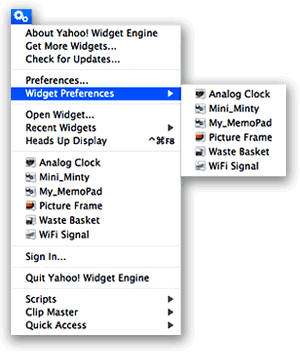
But finding more great widgets isn’t the only thing that’s made YWE a standard part of my desktop. What I really admire is the YWE implementation of widgets, which has firmed up my longstanding view that Apple needs to modify the Dashboard concept to make it more flexible, if they want Mac users to truly embrace widget-dom. The particular traits I admire are nothing new… they were standard in Konfabulator, and there’s one application for Mac OS X called Amnesty that will emulate the concept. I have stubbornly refused to pay the $20 that Mesa Dynamics wants for Amnesty, especially now that I use YWE, which does most of Amnesty’s tricks for free. So what exactly are those tricks?
- Run widgets like normal applications outside of Dashboard
- Easily change a widget’s “window level”–meaning, where it resides starting from the desktop itself up to a window that floats persistently above all regular windows, with several layers in between.
- Ability to lock a widget in place
- Ability to set transparency for a widget.
- Ability to access widgets–and their preferences–from a handy menubar item.
- Ability to stop and start the widget layer as the need arises.
Automator Virtual Input: Extend Automator To Control Mouse and Keyboard
Bullseye: A Radial Menu Launcher
Liquifile: New Visual Paradigm for the Finder
Apple Uniquely Positioned To Lead Web 2.0 Charge
Tell Me One Thing You Can Do With a Mac that I Can’t Do With Windows! (Part 3)
3. Use Real Productivity Applications To Get Work Done Faster, Easier
 As inventors of new tools have done throughout human history, the visionaries who designed and built the first personal computers saw them as tools that would provide an immense boost to human productivity. And they weren’t just thinking about business productivity, folks. They were also thinking of personal productivity: Getting more things done faster so we’d have more leisure time.
Today, in our Microsoft-Windows dominated world, we use the term “productivity application” to refer to Microsoft Office, and we think of the personal computer as a business tool. (Quick: Do a Google search for that term–”productivity application”–and see what you get.) But has Microsoft Office provided us with more leisure time? Of course not. Microsoft Office is a business tool that replaced prior, non-electronic tools like the typewriter and pencil. If it has enhanced productivity at all (and that is arguable), the productivity gain has come in the form of more output per worker… not more leisure time for the individual. In any case, whatever productivity impact Microsoft Office and its ilk had on the business world was completed many years ago. Yet even for businesses, productivity didn’t stop with improving our ability to prepare reports and memos, or compile numbers in spreadsheets, or do overlays for a presentation in PowerPoint.
Productivity goes up whenever you can suddenly do a task in less time than before, either at home or at work. Since its beginnings with the original Apple computer, Apple has appeared to be pursuing a vision that steadily expands the personal computer’s potential to save you time… to do complicated things simpler. Apple’s operating system recognizes that this kind of productivity gain begins with the simplest interface to the computer: Finding things, opening applications, printing, opening documents, organizing information, and the like. As a result of this vision, Mac OS X has two built-in features that are simply lacking in Windows, and they enable “productivity” applications that are truly the envy of the Windows world:
Applescript and Application Services.