



News Posts With Tag Flash
Ars Technica Predicts Microsoft’s Silverlight Will Kill Flash
Microsoft’s Flash-killer Silverlight steals the show at MIX07
Ars Technica had better can some of these guys who have become blatant cheerleaders for Microsoft, or they’re going to start losing readers. In response to this biased piece on Microsoft’s new Silverlight technology, which is specifically designed to compete with Flex, Apollo, and Flash, I left this little message as a comment:
Regardless of how good or bad Microsoft’s version of Flash (or Ajax, or JPEG, or MPEG, or PDF, or you name it) may be, the fact is that Microsoft has a monopoly on corporate desktops, one that it won illegally by the way but has never been brought to task for. Its technologies should be avoided entirely unless you really want to see Microsoft extend them to the entire range of computing environments eventually.
In other words, unless you really want competition and innovation in computing to grind to a halt, you should always look for alternatives to whatever Microsoft is selling. And please avoid playing Microsoft cheerleader in a serious technology journal like Ars Technica would like to be. The point is, new Microsoft standards aren’t necessary… we have plenty of good ones already. Every time Microsoft comes along with another of its proprietary versions of existing standards, it only serves to confuse the market and slow the adoption and use of web technologies. Look at what happened when they crushed Netscape in the late 1990’s… it’s taken 10 years to recover from that, so that we’re finally seeing the kinds of web interfaces I, for one, was ready to deliver in 1998.
Not only that, but each Microsoft technology takes up mindshare that squeezes out genuinely innovative ideas from much smaller, potential competitors. And small companies, as everybody who’s taken Econ 101 knows, is where innovation occurs in this economy. Every time Microsoft buys up a small company with a good idea (think: Vermeer and FrontPage), it ruins a tool that could be really useful (it didn’t take long for FrontPage to turn the web into a bunch of pages that didn’t work in non-IE browsers, or non-Windows platforms, for example, by injecting Active/X controls and proprietary IE tags into the pages it created… the same is true of every MS development tool, for that matter).
If you’re really in favor of open competition in our economy, you’d never select a Microsoft product as the basis for anything. If they didn’t already own the desktop, it would be different. Since they do, they need to be simply ignored in technologies they don’t already own. Remember, regardless of what their sometimes sympathetic spokespoeple may say, Microsoft’s entire product line is designed to extend the Windows platform as far as possible. That’s it.
I think a lot of people believe it’s extended far enough already, thanks. If you agree, just say no to Microsoft’s latest candy. That includes you, Microsoft apologists who write for Ars Technica.
iScreensaver Designer: A Tool for Making Cross-Platform Screensavers
 Originally downloaded March 24, 2007. I simply have to try this one, given what a sucker I am for cool screensavers. Lately, I've been happy just filling up my screensaver folder with Quartz Compositions, but there are still an enormous number of OpenGL savers and others that are worth having. The fact that you can make screensavers for Windows too isn't a selling point to me... it's the tool's supposed ability to convert savers to QuickTime and Flash that's of interest. iScreensaver Designer has a price scale depending on who you are, including a personal license for only $29.
Version as tested: 3.5.
OpenLaszlo Goes 4.0 and DHTML/Ajax, Too!
Adobe Chooses WebKit for Its Apollo Project
Seriously Twisted ZDNet Writer Wants Ajax To Stay Out of Flash’s Way
Guys like Ryan Stewart don't understand that the web is built on open standards, and that the web browser is a client that understands how to interpret and display those standards. The standards themselves have matured greatly since the early-to-mid 1990's, and more standards have been added to the web browser's repertoire. But the fact is that Flash is not a native content type that the web browser understands... it does so only through plugins. Folks who argue that the rich-interface web should be built with native standards like JavaScript, HTML, and CSS are making the case for continued reliance on open standards in web application development. Why? I know the reason it matters to me is that I don't want to see the web fractured along proprietary-standard lines.
ÂAlthough Flash is widely deployed, well respected, and powerful, it's not an open standard. It's a legitimate foundation for application development, but it's not web-based development... web as in World Wide Web... as in Tim Berners-Lee and his NextStep HTML browser. Â
At least Flash is cross-platform, however. To talk about Windows Presentation Foundation in the same breath with talk of web application development is simply a commercial argument for Microsoft Windows. Folks who think this way don't care about non-Windows platforms, and in fact would likely prefer that they just go away. Â
Apollo and Flex are more likely to work cross-platform, but they are still commercial products from one company--Adobe. To allow any one company to usurp the power of open standards on which the web is built is simply to argue against the web browser itself. Ever since Microsoft engaged Netscape in battle 10 years ago, companies have tried to lay claim on the "standards" for web development, and I sincerely hope that web developers continue to resist those efforts. Â
It may be that SVG and Canvas are too young to build fancy graphical apps with. But they won't be young for long! In the meantime, I have no objection to pulling in a flash object now and then as the need arises, just as I think it's fine to use java or QuickTime or other plugin objects. But let's remember they are plugins. HTML does not plug in to Flash, folks... it's the other way around, or it's no longer a web application.
Gucci Ditches Flash, Goes Script.aculo.us!
Getting Ready for Screencasting: A Review of Video Screen Capture Software for Mac OS X
I’ve been hooked on the idea of screencasting ever since Jon Udell started pushing it a couple of years ago. He pointed out some very effective screencasts that others had made and posted several excellent screencasts himself, interspersed with articles on best practices, tools, and tips. As Udell pointed out in “Movies of Software,” Apple has done a less-than-stellar job at making screencasting on the Mac as super-simple as other creative and educational tasks are. He was also dismayed–well, at least, I was dismayed–to report that he was doing his screencasting on a Windows machine mainly because Microsoft had provided superior, free tools for doing so.
 *Groan* Let’s see… that was a year and a half ago! I thought surely someone from Apple would have read his blog post and rushed an update to QuickTime Pro to make amends. Not that it’s completely equivalent, because QuickTime Pro isn’t free, but at least Mac OS X users wouldn’t have to go hunting and pecking for a tool to do a basic job like screen-capturing. The problem is, you see, that the world has moved on from Grab, and when I think “screen-capture” today, I don’t just think still pictures. Heck, no. I want to capture motion… I want to capture sound. I want to capture software.
The sound part is easy, thanks to the truly superior tools Apple provides in iLife… in this case, GarageBand. But the video… Like I said, *Groan*! On a Mac, you can capture yourself making funny faces in both stills and videos… You can create little video miracles of your family at play… You can turn yourself into a budding American Idol with GarageBand and iMovie. But you can’t do a simple thing like capturing the beautiful animations and user-interface delights that Mac users enjoy while working with their software. In other words, you can’t capture videos of Mac OS X in action.
So, one of the categories of software I’ve been keeping an eye on–and cataloguing possible purchases in–has been video screen capture products. I don’t think I’d ever have the time–or talent–to prepare true screencasts in the Jon Udell mold, but I have found myself wanting to capture small videos of Mac OS X software in action on many occasions. In fact, little videos have been creeping into my software reviews and other blog posts for the last 6 months or so.
What I’ve lacked, though, is a standard process for doing these. You can’t really do a thing optimally until you settle on how it should be done. Imagine heading out for your daily commute never knowing the best route, never knowing how long the commute will take, and with no clear idea how much money you should budget for this activity. What? This is your standard state of affairs, you say?
Perhaps that was a bad example.  But actually, it’s pretty close. Because as a result of those kinds of unknowns, you can’t get to work on time, you dread the daily battle… the unplanned shortcuts… the unplanned long cuts. Your commute simply takes too much time, and it isn’t any fun.
Doing screencasts for me has been kind of like that. I would prepare myself to do one, head off to capture my screen and its cool activity, and find what should be a 15 or 20 minute exercise turning into 45 minutes to an hour. I don’t know about you, but I simply don’t have that kind of time to throw around these days.
Hence, I took a great deal of time to do as much testing as I needed in order to settle on a video screen capture product and work out a standard operating procedure for turning a captured screen video into a little screencast for a Musings from Mars article. Since I’m not a magazine with a full testing staff, you are more than welcome to take my product ratings with a heaping helping of salt. That’ll be especially true the farther away you get from July 2006, since who knows the trajectories these particular products will take in the coming months and years. I’m sharing this review for two reasons:
- My memory for certain kinds of details is horrible, and this way I’ll be able to look back and remember what problems I had, or delights I discovered, with each of these products. In other words: What did I test back in 2006, and why did I pick “X”. One of the truisms about software is that versions more than 5 years old are worthless. It’s because the technology advances so fast that any good software is bound to get much better, and any bad software is not going to be around. That leaves middlin’ software, such as that from a particular powerhouse in Redmond, Washington, which often muddles through from one upgrade to the next with enough musclepower and usability to stay in business, but not enough brainpower and beauty to attract attention from … but I digress.
- The second reason is that I thought, Hey! Maybe one or two people out there are in the same boat I am and will find this review useful. I’m happy to share my thoughts if it’ll help reduce the shopping time for other software hunters.
After gathering up all the known–and in several cases, unknown–software products that capture videos of software in action, I ended up trying out 7 different products:
Without further ado, and with a minimum of space and fuss, here’s the result of my quest, beginning with a few summary bullet points:
- I ended up buying a license for iShowU, even though I already have one for SnapzPro. iShowU isn’t perfect, but its developer is actively enhancing the product, and it left a trail of inventiveness and fun as it launched its way across my desktop. It’s fast, intuitive, and has excellent built-in support for audio capture. Sure, I have a gripe or two, but in the end iShowU was the clear standout for my needs.
- ScreenMimic and Screenography can record in both Flash format and QuickTime formats. I liked them both, but
- ScreenMimic had some usability problems, and not enough flexibility for me, and
- Screenography has some really nice features and is the spittin’ image of SnapzPro but better for video (including Flash), but it suffers from some fool factors that made me sick of it after a few days of testing.
- ScreenAction Studio and ScreenTool aren’t really Mac OS X products… they’re half-backed software projects that nevertheless someone is charging good money for.
- DisplayEater is potentially a good product, but it was totally unreliable in operation and took too much CPU power and time to be a standard Martian tool.
- SnapzPro is overrated, outdated, boring, and often downright irritating as a screen capture tool for static graphics, and it has only basic video screen capture chops. Which is why I went shopping in the first place.
| Name | Version | Price | Formats | Fun | Cool | Looks | Idiots | Power | Yes? | Notes | |
| DisplayEater | 1.8 | $17.00 | QuickTime |  |
No | Notes | |||||
| iShowU | 1.13 | $20.00 | QuickTime | |
|
|
|
|
Yes | Notes | |
| ScreenAction Studio |
1.0.1 | $30.00 | QuickTime | No | Notes | ||||||
| ScreenMimic | 1.5.1 | $25.00 | QuickTime Flash |
|
|
No | Notes | ||||
| Screenography | 1.0.1 | 39.95 | QuickTime Flash |
|
|
|
No | Notes | |||
| ScreenTool | 2.0.3 | $11.95 | QuickTime | No | Notes | ||||||
| SnapzPro | 2.0.2 | $69.00 | QuickTime | |
|
|
Yes | Notes |
Even with a copy of the $500 Flash MX software, I couldn’t figure out how to compress a Flash file to a size similar to a QuickTime file. In the end, Flash seemed like more trouble than it is worth for this exercise. That may change in the future, of course, but that’s my story at the moment.
I’ll still need QuickTime Pro in order to compress the videos to an optimum size for web publishing, since none of these tools performed better at this task. The best among them simply embed the QuickTime export functions into their products
As part of my Flash experiments, I tested Video2SWF, which is another product from the company that makes Screenography. Video2SWF has some very interesting and potentially useful features for both Flash and QuickTime publishing. But though it does a passable job at compressing QuickTime videos for the web–in either Flash or QuickTime formats–it can’t do the same with Flash files.
Besides Video2SWF and QuickTime Pro, I also tested a few other video conversion tools as part of this study: VisualHub, iSquint, swfShrink, and Flash Optimizer. Of these, VisualHub is worth buying, but not for screencasting tasks. iSquint is VisualHub’s free, one-trick-pony sibling. swfShrink is freeware that may be of interest if you have the patience, and Flash Optimizer (in both its Heavy and Lite forms) is a joke.
In the course of testing, I managed to create a slew of little videos, and I thought it might be a good idea to include a few of them here. As it turns out, though, I’m only going to include one, and it’s the same one I used in my previous Mars article on Dashboard and Yahoo widgets. In this case, it’s not a video of a Dashboard or Yahoo widget–natch!–but rather it’s an Opera widget. That’s because it was the coolest one for video purposes and also because it happened to be the one I practiced my planned standard procedure on the most.
First, the video… then, the procedure.
This little widget was made with iShowU, which was first captured and saved at full size in .MOV (QuickTime) format. One of the coolest things about iShowU is that–unlike any of the others–you get an instant QuickTime movie the second your capture is finished. After fooling around with many permutations of quality and compression settings, I settled on the following as a preset for iShowU:
- 30 frames/second, normal rate
- 7 frames/second, “slow” rate
- “High” quality, with the slider just above average
- “Apple Animation” compression, which is a fairly new option that the folks who make iShowU recommend for the kind of software videos I’m doing. I also got excellent results using .h264 and MPEG-4 compression with iShowU.
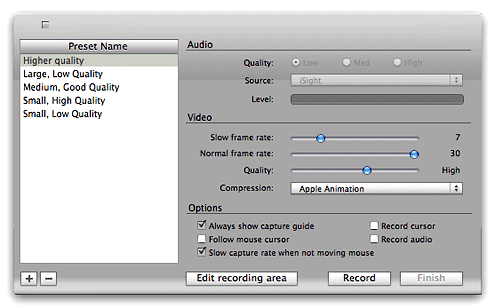
Once captured, iShowU drops me off in QuickTime Pro with a 25-second video that’s about 25mb big. I found that reducing the dimensions and further compressing the file worked just as well, if not better, in QuickTime Pro than in any of the other tools. As I mentioned previously, in fact, the other good ones simply use a QuickTime plugin for this. So ending up in QuickTime Pro with the video open just saves me a few seconds.
In QuickTime Pro, I shave a few seconds here and a few seconds there off the video, to eliminate any “dead air” or “shaky pointer” moments. The goal is simply to eliminate any frames that don’t contribute to the demo, so the video file can be as small as possible while still of reasonable picture quality. Shaving in QuickTime Pro could hardly be simpler, so this takes just a minute or two.
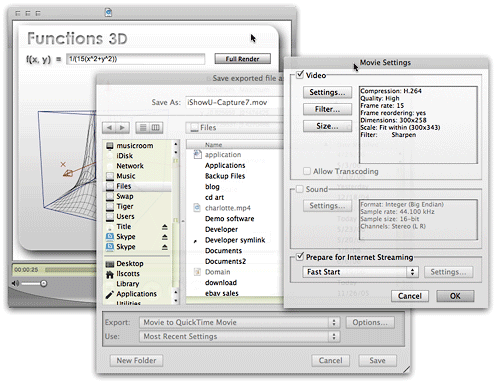
I then export the file from QuickTime to a QuickTime movie file with the following settings:
- H.264 compression at “High” quality
- 15 frames/sec frame rate, with frame reordering on
- Scale to a custom width, in this case, 300 pixels, with QuickTime set to preserve the aspect ratio and fit within the specified size
- Filtered the video with a minimum Sharpen setting.
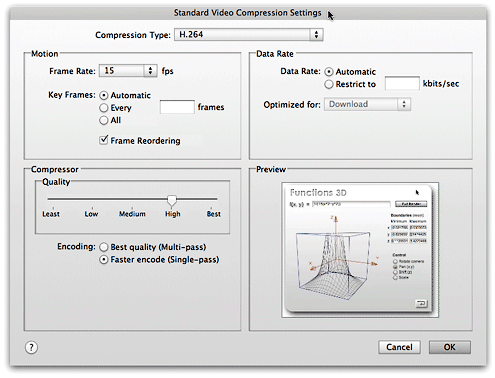
With a 25-second file, this export process is over in only 5 seconds or so… remarkably fast, compared with the slow save/export times of the other tools in this review. The 25mb file is now shrunk down to 250kb, and from 500 pixels wide to 300 pixels. I found the quality at these settings to be quite acceptable, given the huge video compression that’s occurred. How huge? It’s only a 99% reduction, but it’ll do.
With my 1% of video in hand, I then open it in my blogging tool of choice, Ecto, and let it write the code for displaying QuickTime in my article. This isn’t optimum, because of some change or other in Internet Explorer which… blah, blah, blah. I suppose I really should care, so I’ll follow Apple’s advice and start using the technique they now recommend for embedding QuickTime in HTML.
Now all I need to do is find the time to write more articles, so I can start making little movies! Gee, I wonder if there will ever be a Webby award for screencasting? *sigh*
Hey! A Martian can dream, can’t he?
Ajax- and Flash-Powered Javascript Sound Kit
OSFlash: Portal for Open Source Flash Projects
 Who knew there were so many cool open source Flash projects? This could consume a lot of my time, since I know virtually nothing about these. The Flash version of phpmyadmin is really quite cool, as is the Flash HTML editor, etc.
Flash TextArea: Cross-Browser WYSIWYG Editor for HTML Pages
FlashAid Brings Flash’s ScreenReader “Sniffer” to JavaScript
Screen Mimic: Screen Recording in Flash or QuickTime
Screen Mimic: Flash-based screen recording for Mac OS X
 Originally downloaded 7/8/06.In the category of apps that let you record screen movies (movies of your desktop in action), there are only one or two that record directly to Flash. Screen Mimic is one, and it also records to QuickTime. Requires Mac OS X 10.4 (”Tiger”). I’m testing these and will figure out which will work best for me.
Update 7/26/06 For now I’ve decided to record in QuickTime, and Screen Mimic’s QuickTime chops aren’t as good as some others. See my July 2006 article “Getting Ready for Screencasting: A Review of Video Screen Capture Software for Mac OS X” for more info.
Fjax Arrives: Marrying Ajax, JavaScript, and Flash
Pandora: Social Music Bookmark System Evolving Nicely
haXe: A New Open-Source Programming Language for the Web
YouTube - Microsoft History (Hysterical!)
Yahoo!’s new twist on mapping APIs
OpenLaszlo Shows Off New DHTML Chops
Screenography: Capture Screen Movies to QuickTime or Flash
Screenography - capture your screen to various image, movie and Flash formats.
 Originally downloaded 12/9/05.The flash part sounds interesting.
Update 7/25/06 It only took me half a year to get around to completing my planned wrapup of video screen capture products, but I did use the most recent version of Screenography for the testing. I really wanted to like this software, since it’s very much like SnapzPro, only better in some ways. Yet I just ran into too many problems, and the QuickTime recording was too unreliable. See my July 2006 article “Getting Ready for Screencasting: A Review of Video Screen Capture Software for Mac OS X” for more info.
OpenLaszlo 3.0 for Flashy Ajax
After reading up on this in December, I realized that this is the “other†approach to rich web interfaces, using Flash by default. I plan to stick with dhtml, thanks.


