



News Posts With Tag Wireless & Bonjour
Analyst Says Apple TV Could Overtake both TiVo and Netflix
Maestro: Music File Sharing Is Back!
 Originally downloaded February 20, 2007. If I'm reading the Maestro website correctly, this software provides a way for any users who are running Maestro to share song files across a network. Apple disabled this ability in iTunes fairly quickly after the iTunes store opened, and now all we can do is listen to others' files. Maestro runs its own client and can only communicate with other Maestro clients. It supports scheduling and playlist subscriptions, which is pretty cool. For a family, the price is definitely right: $8.95 gets you three licenses, which is probably enough for most. It uses Bonjour to discover other Maestro clients, even outside the local network. I'll give it a try and see how well it works and if anyone actually uses it.
Version as tested: 1.0.
Update 9/11/12. This software is no longer in development or supported.
Sticky Notes: A Terrific Sticky Notes App Returns
 Originally downloaded February 16, 2007. A couple of years ago, I had looked over the Mac market for sticky notes applications (Stickies replacements) and ultimately settled on Sticky Notes. Unfortunately, the developer then promptly went into hibernation and only just woke up today! I'm sure he wasn't really sleeping, but his mind sure wasn't on Sticky Notes. I assumed it was an abandoned app, and I myself abandoned using it some time last year. The problem was that Sticky Notes lacked some features I was hoping would be added and one of its killer features started failing after Tiger came along. Now Sticky Notes is back with an update and full Tiger compatibility, so I've decided to see how it fares against the likes of Edgies (which is my current default Stickies app) and QueueMemo (which makes use of that killer app I spoke of...) I think I paid $20 for Sticky Notes, but the current price is $12.95. (Yes, my license is still good, fortunately!)
Version as tested: 1.5 b2.
iXiu: Glass Pasteboards for Your Bonjour Network
iXiu: New, easy eye-candy for your clipboard history
 Originally downloaded 6/8/06. Now here’s something totally new… iXiu is just barely in beta at this point, so I don’t expect a whole lot. But I immediately figured out how to use it. Any time you copy/paste, your paste can go onto a Xiu pasteboard. Nothing too unique there. But the pasteboards themselves can be transparent and any color you like… you can even use an image fill, so gradiant fans, watch out! The font, brightness, and graphic characteristics (for pasted images) are also customizable. Furthermore, you can have multiple pasteboards, each a different style. The pasteboards sit as tabs on any edge of the screen, kind of like DragThing or StickyWindows. There isn’t even a website for it yet, but MacUpdate has a download. Heck, I don’t even know if it’s shareware or what! But I do know it’s pretty darn cool.
Update 1/9/07. Well, a few days ago iXiu was finally released at version 1.0, and it’s got a new icon and everything! I’ve tried it out pretty much with each release since June, but only now do I understand what the developer sees as its primary purpose: iXiu is a clipboard-sharing utility, a very elaborate one at that. In some ways, it’s simply another Bonjour-enabled networking tool, but goes way beyond what DropCopy and others can do by way of clipboard and file sharing. iXiu lets you draw on a pasteboard, for example, and other iXiu clients on the network can presumably both see your drawing and “chime in.” Now that it’s out, and I understand what it’s up to, I’ll try it again. Hopefully the missing functionalities that have been mere mysteries in the past will now be filled in, too. iXiu is $14 for 1-5 licenses.
Version as tested: 1.0.
Desktop Transporter: Remote Desktop Client Now A Devon Product
 Originally downloaded 11/9/06. It was only 2 months ago that I downloaded Desktop Transporter version 1.4 from Yellow Lemon Software (the developer of Folder Glance), and it was $15 then and didn't work at all on my systems. When I reported the problem, the developer thought it was because I was using an Intel Mac, but I wasn't. And now I see today that Devon Technologies has purchased the product and is selling version 2.0 of it for $30! I guess I'll download it again to see if it's working now, but it kind of galls me to think of paying twice as much as a in September!
Version as tested: 2.0.
Does Anybody Really Know What Their IP Address Is?
Further Update 10/24/06: BwanaDik has been updated to eliminate the unnecessary CPU cycling when you’ve turned auto-update off, so I once again highly recommend this app for your menubar.
Update 10/12/06: A couple of readers wrote with excellent suggestions which I’ve incorporated into the article. One noted that DynDNS and similar services should be mentioned and another pointed out that BwanaDik uses more system resources than necessary. Those changes jogged my memory and I’ve also added information about two other menubar IP utilities: IPMenu and IP Broadcaster.
In our modern, interconnected, always-on age, knowing one’s IP address comes in real handy at times. Knowing your IP address isn’t quite as important as knowing what time it is, but it helps to have an IP clock handy when you need it.
I’ve dabbled with quite a few solutions to this problem over the last few years, and there are a large number of decent IP clocks available… most of them for free. In my IP ramblings, I’ve ruled out solutions that work only in the Dock and ones that put an IP address right in your menubar. I don’t use the Dock that much anymore (between Quicksilver, ClawMenu, Dashboard, and menubar widgets, I don’t need it), except in its application switcher form. And IP addresses printed directly in the menubar take up too much valuable space and are invariably ugly. Note that for your primary external (WAN) IP address, many users are taking advantage of free services like DynDNS to maintain a static hostname even if their IP address changes. This doesn’t keep your IP address constant, but the DynDNS client (there’s even a Dashboard widget now) can let you know what your current address is.
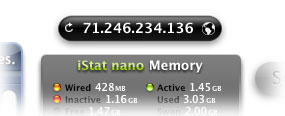 Since Dashboard and widgets became available in Mac OS X 10.4 (”Tiger”), I’ve been using a very handy free widget simply called IP Widget. This slim little fellow sits right on my desktop, always displaying my external (WAN) IP address. Since it’s a widget, I could run more than one of them if knowing multiple IP’s instantly were important to me (it’s not). Instead, with IP Widget, I can flip it over and select a different network port to display (e.g., one of my ethernet or wireless ports). On the front, there’s a refresh button that will reload the address, and if I click on the IP address itself, the widget will copy it to the clipboard for pasting in another app. The widget automatically refreshes the IP address when you open Dashboard. Of course, since I keep it on my desktop rather than in Dashboard, it never refreshes unless I logout or click on the refresh button.
As much as I love keeping widgets on my desktop, there are times when I turn Dashboard off to save system resources. When I do, IP Widget is of no use to me at all. The time it would take to turn Dashboard on and wait for all the widgets to reload is greater than I can stand. (Sorry, I’m an impatient guy!)

So, non-widget solutions came back on my radar screen. One that’s ever-present and fairly simple is Quicksilver. Yep, it can do IP address lookups, too. If you have enabled the QS Extras AppleScripts module, one of the extra scripts is “Get External IP.” So, just invoke Quicksilver and start typing “Get Ext…” and then hit Return. Up will pop your external IP address in Quicksilver’s “Large Type” display. To copy it, just hit Cmd-C. You could set up a shortcut Trigger in Quicksilver to save keystrokes here… for example, I have one (Option-Shift-X) that then just instantly loads the Large Type display for my IP address. This is great, except when I’m having a Senior Moment and can’t remember the shortcut.  Or when I need more than just my external IP.
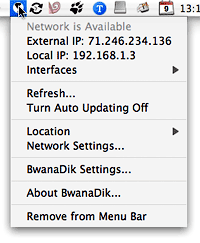 That’s where the other four solutions I’ve tried come in. All of these are simple menubar extras that put an icon in the menubar, which display a menu full of IP info:
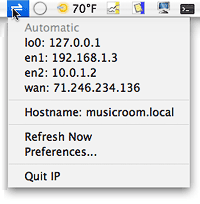 None of these developers will be winning any app-naming contests, and the only one that might be considered for an icon design award is IP Broadcaster. But these are all very handy little menubar applications, and three of the four offer many more options than either the IP widget or Quicksilver. The primary extras they offer are:
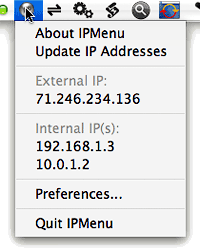
- Multiple IP-address displays. By clicking on their icons, you can instantly see the IP addresses for all your network ports at once. Well, unlike the others, BwanaDik shows only your WAN and active Ethernet addresses in the main menu, but not your Bonjour address. IP even shows your localhost address.
- Automatic Updates. All of the tools can be set to periodically refresh the IP address information, at a user-specified interval.
- Notification of IP address changes. A recent update to IP added Growl support for onscreen notifications, which can be configured to display whenever an IP address changes, or a network comes back online. BwanaDik has the same basic notification options, but uses a regular Cocoa window for the notifications rather than Growl. IPMenu doesn’t offer a local notification option, and IP Broadcaster none at all.
- Email notification. All these tools except IP Broadcaster let you configure them to email you a notice when IP information changes. IP also lets you FTP the information somewhere.

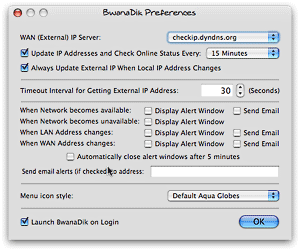 Each tool has a couple of extra bells and whistles that the other doesn’t. Probably the most convenient one for mobile users is that BwanaDik lets you easily change network sets (”Locations”) from within its menu. Another thing about BwanaDik that I like is that it offers several different icons to choose from. In addition, BwanaDik’s menubar icon changes color (or shape) as the status of your network connections change. Finally, the BwanaDik developer has managed to cram all of the tool’s settings into one preference pane, while still making them very easy to understand and change.
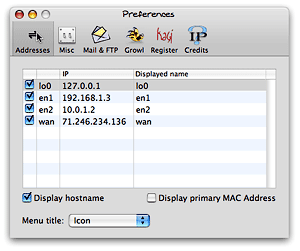 One of the reasons that IP’s preferences are split into multiple panes is so the developer could add one that lets users buy and register the application through Kagi. Which brings me to the main difference between the two: BwanaDik is totally free (and always has been), whereas IP is free only up to a certain point, after which you need to cough up $6 to enable the additional features. And what features don’t work without a license? You can’t use the email or FTP notification options without registering, and you can’t customize the “Displayed name” of your network ports (e.g., you can’t display “FIOS” instead of “wan” or “Vicky” instead of en1).
 IPmenu is a favorite of mine in this category going back a couple of years… When I first prepared this article, I had frankly forgotten about it, since the software hasn’t been updated in awhile. IPmenu gets the basics down perfectly, making quickly seeing and copying one of your IP addresses from its menu child’s play. It doesn’t have as many bells and whistles as IP or BwanaDik, but it does a basic email notification if you want that, and you can set the refresh time easily. Plus, one thing it does that the others don’t is let you easily customize the menubar icon. Where BwanaDik gives you a choice of a few, IPmenu lets you paste or drag whatever image you want to its image well if you don’t like its default “globe.”
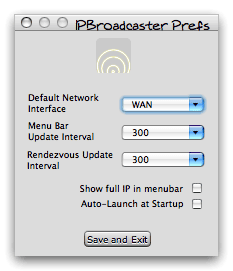 IP Broadcaster is a free tool from 10base-t, the group of developers that gave us the wonderful DropCopy bonjour utility. Compared with the other three here, it’s pretty bare bones. It has a much nicer icon to start out with, but beyond that it’s not as easy to use. For one thing, copying an IP address is a two- or three-step process, depending on which IP address you want. You can set up a default, but if you happen to want a different one, you have to “toggle” the setting and then select “Copy to clipboard.” The IP addresses themselves are grayed out and can’t be selected or copied without doing this. Further, there’s nothing in the display that indicates which IP address is active for copying, so it can be trial and error. This pretty much rules it out for me.
Among IP, IPmenu, and BwanaDik, it’s a very close call, frankly. Each application is quite worthy of a place in my toolbox. But in the end, I may be going back to IPmenu, my old favorite. In the first version of this review, I had chosen BwanaDik–the Software Whose Name I Blush To Speak Aloud. After I noticed BwanaDik’s wayward CPU usage, I leaned back to IPmenu, my old favorite. Now, I have both of them in my menubar (temporarily)! But after noticing how much time it spends in the top 10 of my Activity Monitor CPU hogs, I’ve had second thoughts. Now that BwanaDik has its CPU usage under control, here’s an updated QuickTime movie showing how well it behaves. I’ve left the original version here for comparison purposes, as well as the movie showing the IP widget, IPmenu, and IP, each recorded for 10 random seconds:
Good BwanaDik (version 3.0.4):
Bad BwanaDik:
The Other Three:
Now, calling BwanaDik a CPU hog is a bit of an exaggeration… nevertheless, it’s troubling that it uses any cycles at all when I’ve set its preference to not “auto-refresh” anymore. With this little piece of data to distinguish among them, I’ll be putting IPmenu back in my menubar, and taking BwanaDik down. (Whew! I really was embarrassed to have a BwanaDik in my menubar!)
No matter which one of these great freeware packages I end up with (or maybe I’ll just rotate them), one thing’s for sure… Between BwanaDik, IPmenu, Quicksilver, and the IP widget, I’ll never be without my IP address again!
John Gruber on Apple’s New AirPort Security Update
Cracked MacBook: Gleeful PC Zealots Once Again Try To Put Mac OS X Down
Quick Lessons in How To Optimize AirPort Reception
AirPort Monitor Utility: Perhaps Some Useful Tweaking Parameters?
 This might be totally worthless, in which case I'll save myself $10 by trying it first. On the other hand, the world could use a tool that would actually measure the variable strength of the airport emitter, especially in a household like mine where we also have two remote airport express units. Up to now, managing it has been kind of like reading tea leaves.
iSticky: A Most Innovative Sticky Note
iSticky is your full-featured assistant at home or around the world
 Originally downloaded 6/8/06. I tried out iSticky several times last year when I was looking for a better Sticky Notes app than Apple’s Stickies. iSticky was interesting, but I ultimately bought Sticky Notes, which did nearly everything iSticky does, plus some it didn’t. One of my favorite features of Sticky Notes was that you could attach notes to Applications, so that all your Safari-relevant notes would show up when Safari was active, Mail notes when Mail was active, etc. Sticky Notes is also bonjour-enabled, so you can put sticky notes on the desktops of other folks in your network, and you can link to the filesystem, import iCal To-Do items, and easy organize the tiny window-shaded notes using their built-in “magnetic” personalities. So why look at iSticky again? Well, one or two of the Sticky Notes features needed to be improved, but the developer hasn’t updated it since late 2004. iSticky, on the other hand, has been continually improved, slowly adding many of the features I liked about Sticky Notes. So, we’ll see…
Version as tested: 3.0 beta.


