



News Posts With Tag Video
TVShows: New Freeware Gathers Torrents for Your Favorite Shows
 Originally downloaded May 3, 2007. Now, I'm not going to recommend TVShows, because it's illegal to torrent actual TV shows, isn't it? But wait! TVShows doesn't actually download the illegal content, folks. It just searches for the available torrents and keeps you updated with them as they come up. So, say you want to subscribe to American Idol---I know! Just say you do, OK?--you select it from TVShows friendly interface, tell it what quality you want and how often it should check for torrents, and it'll make sure your torrent client gets the messages.
  I'm testing it now, and we'll see. Unfortunately, I don't have time to watch TV, so the networks definitely aren't going to lose money on me.
Version as tested: 0.3.4.
Updated 8/14/12:
Leopard’s “Quick Look” Raises the Bar for File Previewing
 Each new operating system that's come out in recent years has tried to make previewing content from your file system easier and easier. Both Mac OS X and Windows have been able to preview images and some other types of documents within their relative file browsers (Finder and Explorer) for several years, and with both Leopard and Vista, the two are once again trying to outdo each other.
Mac OS X has had the upper hand in handling digital media, though, since you can browse and play live audio and video within the Finder as well. As far as I can tell, this functionality, which has never been part of Windows XP, is still left out in the forthcoming Windows Vista.
 Vista has a document preview pane that lets you scroll through Office documents (and possibly text files), but as far as I can determine it doesn't help you with PDF files. Microsoft has added a number of other features like "smart" folders and live search, which of course come straight from Mac OS X.
But despite Microsoft's attempts to improve Explorer's looks and functions, it mostly seems to keep making Explorer more complicated than anyone really wants or needs. Of course, this is the Windows Way, isn't it? Never miss an opportunity to add an "Advanced" button whenever possible in order to cram in more useless but impressive-looking functions that only a Help Desk person could love.
 This has left the field free for Apple to continue raising the bar on usability, making the Finder more and more indispensable. Although many of us keep hoping they'll rewrite Finder in Cocoa and add useful features like tabs, I have to say I'm pretty delighted with a new feature they've slipped in to the latest build of Leopard.
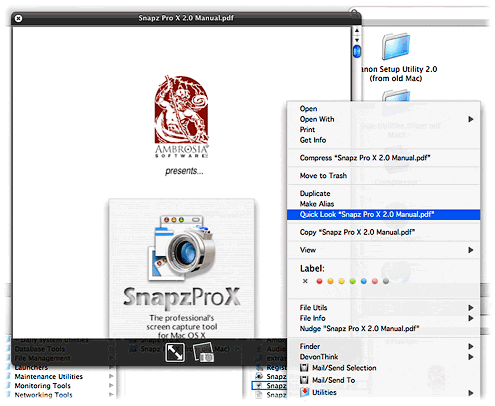
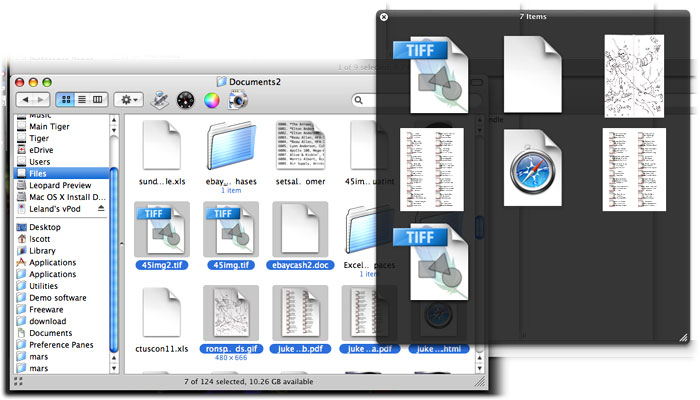
With "Quick Look," Apple is leaping ahead of the file-previewing game by providing a separate, translucent preview window of amazing flexibility and beauty. It can preview movies at full size or even full screen. It can preview text, HTML, and PDF documents and even let you navigate them. If you select multiple files, Leopard provides an "expose"-like view that lets you navigate among them. Or, if the files are images, you can quickly go into slideshow mode. There's much more... but ain't that enough for now?
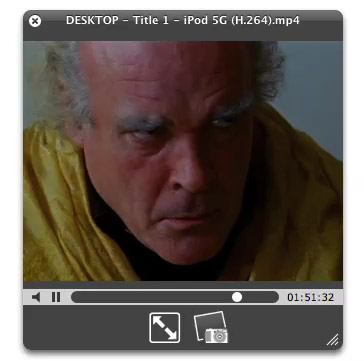
Last night I made three movies of "Quick Look" in action. The first shows simple file browsing with multiple file types--HTML, PDF, and images (including a Photoshop file).
The second one I made while quickly browsing some Apple "Mac vs. PC" ads that I'd downloaded in QuickTime format. In recording the movie, I was simply moving my cursor in the Finder from one video to the next, and somehow Quick Look picked each movie up at the same point in the timeline rather than starting at the beginning each time.
The final movie is a quick snippet of one of my favorite scenes from Stanley Kubrick's A Clockwork Orange. To me, this is the most amazing innovation of Quick Look. Although in Tiger, you can preview movies right in the Finder... it's not much fun, since you can't make them more than about 128 pixels square. In Leopard, you'll be able to resize the Quick Look bezel to full size or even full screen, just as easily!
And of course, Apple has endowed Quick Look with some eye-catching animation techniques, so that it's almost as much fun to invoke as it is to actually employ for previewing your files.
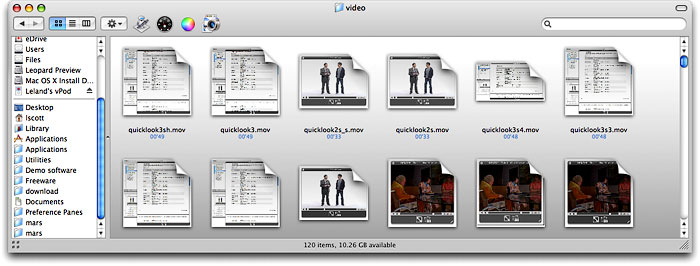
Besides Quick Look, Apple has enhanced file previewing in Leopard in a few other ways. First, you can now set a view preference to see file previews, which makes thumbnails for movies, images, PDF files, text documents, and other types. Of course, Quick Look can be invoked in any Finder view, even icon view. Also, if you're in column mode, you can now resize videos to their full size, whereas in Tiger there is some arbitrary size limit to video resizing, just as there is for images.
LightWindow: Awesome Prototype-Script.aculo.us Add-On for Adding Media, Forms, PDFs, and More to Lightboxes
If not, check out the LightWindow demos! As some readers have noticed, I had earlier hacked Lightbox to enable running videos, but this does so much more. And it's more than a hack as well! Thanks, Kevin! Analyst Says Apple TV Could Overtake both TiVo and Netflix
MPEG2 Works: Video Conversion and DVD Tools Get New Swiss Army Knife
 Originally downloaded March 14, 2007. MPEG2 Works version 4 was just released in late January, and apparently it adds a slew of useful features to an already popular conversion product. It also more than doubles the product's price, but you can still get version 3 for only $10. All the attention and accolades among professional Mac writers these days seems to go to VisualHub, which is a truly great product. I'm curious to see what overlap there is between MPEG2 Works 4 and VisualHub, which is about the same price ($25). Certainly, Mac users aren't having any trouble finding terrific, inexpensive, and easy to use video conversion products these days... making the market leader Toast look very expensive indeed.
Version as tested: 4.1.3.
iTheater: An Open Source Media Center App for Mac OS X
 Originally downloaded February 3, 2007. This is, I believe, the second such project that's started up in the last year or so. Giving Apple's Front Row some for-free competition, iTheater is setting its sights pretty high, with a vision of an interface and framework for more than just music and video playback. Already the app incorporates a weather service, but it also handles widgets and would clearly like to move toward web services of various kinds. Even if it's rough around the edges, it's great to see a project like this taking shape. I'm anxious to download this new version to see what they've come up with.
Version as tested: 0.1.3.
Update 9/11/12. This software is no longer in development.
Postino: RSS Reader That Also Handles Audio/Video Podcasts
 Originally downloaded January 23, 2007. The hype was a little much when Postino was released last year, and most people took a look at the price tag and at their own favorite, free RSS readers, and went, "Huh?" Still, Postino is still being developed and does have some unique features... if you want to have one news reader that incorporates support for web, video, and audio, it might be worth the $18 for Postino.
Version as tested: 1.6.
OnAirRecorder: Record Audio or Video with Free Timer
 Originally downloaded January 22, 2007. As is the case with all JS8 Media software, OnAirRecorder is freeware up to a certain point... the manual only says that you need to register to be able to use it for "full length... sessions," but I'm not sure what that means yet. In any case, this looks like a very simple, handy tool for accessing the recording features in QuickTime Pro, while also enabling use of a timer for doing so. Even at full price, its $12 is a lot less than QT Pro, so it might be worth it for some users.
Version as tested: 1.5.
ReelBean: Freeware Plays and Converts Many Video Formats
 Originally downloaded January 22, 2007. ReelBean has been out for over a year now, but somehow I've never bothered to download it. However, JS8 Media, which makes the software, impressed me a lot this morning with their update to MiNews, so I'm looking over their wares. This appears to be an excellent substitute for QuickTime Pro, though "most of ReelBean's features are available for free". I can't tell from the web page what features require a $15 registration fee, but I'm definitely going to check it out.
Version as tested: 2.6.
iPhone: OK, I’m Impressed… Now Gimme The Goods!
 In these jaded times, it's hard to impress people. But I sincerely doubt that even the most ardent Apple-haters will be able to look at these demos of the new iPhone by Apple, Inc. (yes, they just dropped "computer" from their name!) without giving in to awe... pure, marvelous awe. If the delivered product is half as good as it looks, I'll be standing in line for one, because it so far exceeds my expectations that I'm really, really... impressed! The iPhone is a misnomer, because this is the "convergent" product the market has been anticipating for years. The iPhone is:
- A widescreen iPod for video and audio, synked through iTunes
- A mobile phone (yawn) with integrated camera, voicemail and photo sharing
- A web browser (Safari), including email, Google maps, search, and widgets
- A technological marvel, featuring a new "multitouch" touchscreen system (no buttons), an embedded copy of Mac OS X, wireless computing (bluetooth, 802.11b/g, and Cingular's Edge network, and sophisticated new sensors that do a heckuva lotta cool things just by moving the device around.
Did I mention it comes with a Bluetooth headset?
Help! I can't wait until June!
Kinemac: What Apple’s Motion Should Have Been?
 Originally downloaded 1/9/07. Kinemac released a new version of their animation software today, and after looking through the gallery of movies they've got posted I decided it simply had to be tried. Even though $250 is a lot of change for any piece of software, it's not as outrageous as some other 3D tools I've seen. If Kinemac has actually mastered ease-of-use for this category, I'll gladly pay that price. I earlier purchased Apple's Motion software, but frankly never found it that easy to use.
Version as tested: 1.5.
Mogopop: New Web 2.0 Publishing Tool for iPod
 This looks like a really cool Web 2.0-style application, designed specifically for the iPod. Mogopop provides a small application for Mac OS X and Windows users, which manages the installation of Mogopop content (and removal), which you can browse and download from the Mogopop website. Content appears to run the gamut of simple text to complex multimedia presentations with linked images, movies, and sound. In some ways, Mogopop is like some iPod notes creation tools, except that the content builder is part of the Mogopop website. Using the “Publish” part of the site, you can sign up for a 50MB space to create your multimedia masterpiece, which any user can then find and download to their iPod. To understand what’s really going on with Mogopop, I recommend checking out the excellent, short screencast. I’m looking forward to making some Mogopop content myself here soon!
Songbird: Cool New Web-Savvy Media Player Taking Flight
 Originally downloaded 1/2/07. I just finished watching the excellent screencast for Songbird, and I have to admit, I'm excited about this little birdie. Songbird goes beyond iTunes by basically building the media player on top of its built-in web browser (which uses the Gecko engine from Mozilla). You can see playlists built on web pages you browse, if they have media files linked to them, and Songbird plays the files as if they were already on your hard drive. On top of that, Songbird has a search engine optimized for music searches, and you can of course easily subscribe to podcasts you encounter while browsing. Songbird also does video files similar to the way Democracy handles them. To top it off, Songbird has a plug-in architecture that supports skins (Songbird calls them "feathers"), as well as extensions a la Firefox. Oh, and when I first ran Songbird, it found my iTunes library and offered to import it! I don't think I'm ready to start using it as a replacement for iTunes yet, though... one of the big questions about such a move, of course, would be how well (if at all) it can sync with my iPod. In any case, this open source project, still in its infancy, looks very promising indeed!
Version as tested: 0.2.1.
Windows Vista Set To Poison HD Video?
The "executive executive summary" of the study is "The Vista Content Protection specification could very well constitute the longest suicide note in history." My only question is, who will be killed in the end? I don't get the impression that the author thinks it will be Microsoft. Nor does he think this future is avoidable if Microsoft's desktop monopoly were reduced, either as a whole, or for just the Vista portion if Windows users refuse to upgrade.
It's also a shame that he thinks there's a parallel between Apple's success with iTunes/iPod and Microsoft's desktop monopoly. I totally reject any such comparison, since Apple's success was achieved against all odds and on the merit of its products and services, whereas Microsoft's monopoly was achieved largely by the fortunate accident of riding on IBM's coattails, as IBM's mainframe and typewriter monopoly was essentially transferred to Microsoft on corporate desktops. The merits of Microsoft's products had virtually nothing to do with it... nor were consumers ever really given a choice, since their employers ended up dictating their choice of a home computer.
Democracy: Podcast Client Opens Up Internet TV
Democracy - Open Source Internet TV Platform
 Originally downloaded 2/23/06. This looks extremely cool… you can try out their reader, which works on Mac, Linux, and Windows, and they also provide a “Broadcast Machine”–a php/mysql web application for use in setting up your own internet TV station! This is the kind of thing that keeps the web so revolutionary… and exciting!
Update 12/24/06. I don’t intend to let myself get sucked into Internet TV, mind you. But if I did, I’d probably use Democracy player. This terrific open source project has grown by leaps and bounds since it first debuted earlier this year, and the latest client is well worth checking out. It comes with a guide to existing podcast resources as well as a search engine that displays results from the biggest web video sites such as Yahoo, Google, and YouTube. Subscribing to “channels” is very easy, and Democracy takes care of deleting old videos you download but don’t specifically mark to save. You’ll find smart folders, regular folders, playlists, and lots of options for customizing the way Democracy works.
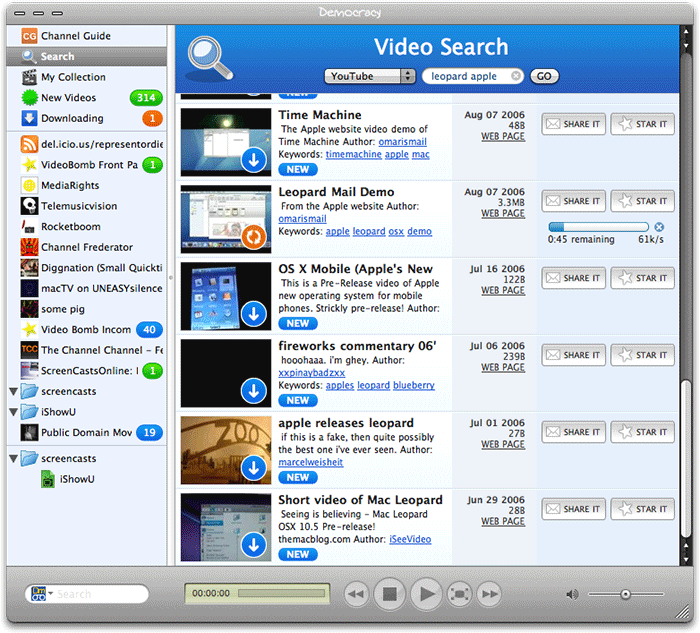
I did have a few user interface complaints, but I suspect these developers will smooth out the rough spots as time goes on (including replacing that horrible, scary icon). Here are my notes on pros and cons:
|
Pros |
Cons |
|---|---|
|
|
Version as tested: 0.9.2.2
Cycling ‘74: An Amazing Non-Company And Its Amazing Creative Toolsets
I've downloaded a range of these tools but a not going to attempt to "review" them. Each can be used freely for 30 days and comes with demos and documentation. Max was originally developed for the Mac, and Cycling '74's entire product line now runs on Mac and Windows. Besides Max/MSP and Jitter, I also downloaded the full Pluggo software as well as Hipno, another set of audio effects plugins.
One of the things that intrigues me most about these products is the company itself. When asked in their FAQ's what their mission statement is, here's what they say:
Our mission is never to have, or need, a mission statement. "The software is the mission statement," is the mission statement we might have, but since we don't have a mission statement, it isn't our mission statement.Now, that's a company that's going to make great products... you just know it!
A Solution To Washed-Out h264 Video Exports
Perian: Free Plugin Expands QuickTime’s Range
Perian - A swiss-army knife for QuickTime
 Originally downloaded 9/30/06. Perian is an open source project that extends the range of QuickTime to cover more video formats. You’ll still need Flip4Mac to play Windows Media files, but Perian has you covered on most other types that QuickTime doesn’t handle natively. I haven’t tried it yet, but will definitely recommend if it works.
Update 11/27/06. Yup! It works just fine alright. My son just ran into an AVI movie that wouldn’t play. I upgraded Flip4Mac on his Intel iMac, but of course Flip4Mac doesn’t really help with AVI files. Then I remembered Perian… downloaded and installed it on his machine, and the AVI movie actually played, audio and video both! I don’t have occasion to use AVI movies much, but I’m taking this as testimony that Perian works as advertised. Next, I’m going to take the Perian developers’ advice and remove older QuickTime components that Perian effectively replaces, to ensure there are no conflicts in loading certain video types.
Version as tested: 0.5.
SimpleMovieX: Alternative to QuickTime Pro for Movie Editing
 Originally downloaded 11/16/06. After reading the site's description, I have to say I'm intrigued. As a happy user of QuickTime Pro, I'm not looking for a replacement, but that's what SimpleMovieX wants to be. It claims to have features QT Pro doesn't (such as editing native mpeg and avi files, easy chapter marking, etc.) and is actually free to use without ever registering. However, apparently it's encoding tasks are much slower for non-registered users. All in all, it looks like an application I need to try out!
Version as tested: 3.0 b3.
Flip4Mac WMV Player: Bend Windows Media To Your Will!
Flip4Mac WMV Products: Windows Media on Your Mac
 Originally downloaded 1/20/06. Back in January, Flip4Mac made their Windows Media Player freeware and introduced a series of value-added products that users could upgrade to. I’ve been using WMV Player ever since, blissfully unaware that certain videos I encounter on the Web are Windows Media, since they look and play just like QuickTime… right in my browser!
It was only when I was working in the latest Leopard build that I realized how much I’d come to depend on Flip4Mac’s free player. The hilarious CNN video introducing the Zune, which I blogged yesterday, was Windows Media, but I couldn’t play it in Leopard because I hadn’t yet installed Flip4Mac. I rectified that oversight earlier today and then decided to upgrade to the WMV Player Pro, since that lets you actually edit WMV files in QuickTime Pro, just as you’d do for regular QuickTime files. Definitely worth the $29, given my proclivities.
This is a great product, and clearly one I can no longer do without.
Version as tested: 2.1.0.33.


