



News Posts In Category
iBlog: Major Update to Blogging Tool in the Works
 Originally downloaded April 14, 2007. I had tried the first version of iBlog and wasn't terribly impressed... it just wasn't flexible enough to interest me. Unlike tools like Ecto and MarsEdit, iBlog is a blog publishing platform you would use instead of Blogger, WordPress, TypePad, etc. The new version appears to have added a very flexible template builder, which also incorporates a tabbed editing environment for managing your template and style files. It also supports any iLife data types and can publish to any FTP or .Mac site. In this way, it's similar to Apple's iWeb, but is much more flexible. In addition, it apparently incorporates an HTML code editor in addition to the WYSIWYG editing tools you'd expect from a tool like this. All in all, it sounds like a worthy upgrade... but just how much it's worth isn't yet known, since there's no pricing listed (yet). At this point, I've downloaded release candidate 2 for iBlog 2.0.
Version as tested: 2.0 RC2.
Update 8/17/12.


In search for civility online, is the Golden Rule the answer?
MarsEdit: Blogging Software Gets An Update
 Originally downloaded March 3, 2007. I had tried MarsEdit in 2005 and put it in my "reject" bin, but I don't know why anymore. I noticed today it's got a new version out, and appears to have favorable user feedback and the requisite functionality. Since I'm a little frustrated while waiting for the developer of Ecto to update that great tool (which really needs some updating), I thought I'd give MarsEdit another look. Besides, how appropriate it would be to use a tool called "MarsEdit" to Edit Mars? (Sorry, couldn't resist!)
Version as tested: 1.1.3.
myBlog: Blogging Software Worth Passing By
myBlog manages, publishes and uploads blog to your web space
 Originally downloaded 10/14/06. myBlog is a new Mac OS X app that lets you write, format, and publish articles to a blog. Unfortunately, the application description pages are presented in blog format, so I couldn’t find a succinct or complete description of its capabilities. Guess I’ll have to download to find out…
Update 1/26/07. I had tried myBlog last October when it first came out, but I couldn’t believe it was really as lame as it seemed. Figured I must have been tired and decided to revisit it later… Well, later came today, and I’m puzzled to report that myBlog is definitely lame. The developer updated it to 1.1.2, but that’s as far as it went in October and hasn’t been enhanced since then. I kept thinking he might, um, spend a little more time polishing a piece of software he expects someone to pay $12.95 for, but it ain’t happened yet.
One very huge problem is that myBlog gives no indication what type of blog system it supports. I entered the data for my WordPress blog, and after adding a short test post and publishing it, myBlog acted like it had done something, even inviting me to view the entry in my browser! Then, it opened TextEdit, which promptly crashed. I visited my test blog site, and as I suspected, there’s no sign of my test post from myBlog. Apparently, myBlog simply wrote out an HTML file or two on my hard drive in the directory it asked me to set up… but then, why does it ask for the information on my blog, including my username/password, if it can’t really connect and upload to it? As for TextEdit, I can only assume that there’s an error in the way myBlog is writing the header information for the HTML file… surely it wouldn’t add TextEdit as the file creator?
In addition to that fundamental flaw, myBlog has an inscrutible interface that is frustrating as all get out. It appears to be patterned loosely on Pages and iWeb, with a little inspector on the side. But in fact you can’t do anything except type in one of the three windows that shows up. You can use the menubar (no toolbar) to do things like add images, links, and movies (huh?), but this is totally lame. You can also use the inspector to add links (I think). The inspector is also where you define text style and color for your blog, but not while you’re inspecting anything. Also, there’s a field in the inspector for adding a post image, which is cool… but the interface puts that image in one of the text fields you can’t type in, and doesn’t even attempt to display it fully. Meanwhile, a large arrow remains in one of the other text fields with no apparent purpose. I dragged an image to that field just to get rid of it, but later the arrow came back somehow.

To top everything off, the user interface shows no understanding of what parameters to set in putting together a Cocoa interface. The window itself can be dragged into oblivion (see screenshot), and the developer isn’t using the tools Apple provides to make sure page elements rearrange themselves sensibly as the user resizes the window. The choice of elements themselves is highly questionable, as is their placement on the window palette. But enough!
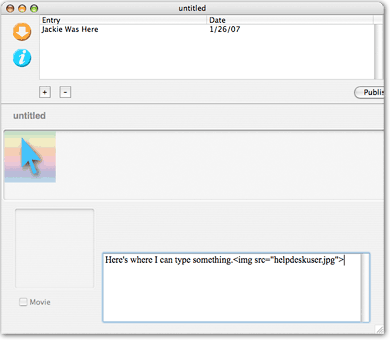
At this point, I’ve really had all I can stand of myBlog, and it gives me a really bad taste for trying out the developer’s other software, all of which sounds interesting. He’s got an HTML editor, an accounting tool, and a folder synching utility. Maybe in another few months I’ll feel up to trying one of those…
Version as tested: 1.1.2
Snippet Mind: Organize and Layout Your Diary
 Originally downloaded 11/28/06. Snippet Mind is the first product from a promising new Mac OS X developer, zykloid.com. The software comes at personal information management from the diary side of things, but with web logs in mind. It appears to support categories, as well as Spotlight and other Mac OS X technologies. I’m adding it to the list of apps to check out in the PIM category.
Version as tested: 1.0.1.
Journler: Highly Rated Freeware Notebook Supports Multimedia Too Â
Journler is a place for your thoughts and everything they touch
 Originally downloaded 7/4/06. In the crowded Mac OS X market for personal information management tools, including “notebook” applications, here’s a full-featured entry that’s also free! Available for Mac OS X 10.4 only, Journler can double as a word processor or blogging tool, and it can export content to your iPod or email. Unique among such tools, Journler has a built-in audio recorder, and can also capture video from an attached videocamera such as iSight. Journler can include any media from the iLife suite and even integrates with iWeb. The website’s description makes so many claims for Journler that I’d be highly skeptical except for the high ratings this software receives from users. Definitely one to try out.
Update 11/5/06. I’ve written up my notes on Journler, as well as 5 other PIM software apps, in a November 2006 article, “An Ongoing Review of Personal Information Management Tools for Mac OS X: No Perfect Solution (Yet)“. I’m putting Journler in the “reject” pile for now, but it’s one that I’ll be keeping an eye on. I don’t consider the case closed on my choice of DevonThink Pro in this product category.
Version as tested: 2.0.2.
Mephisto: New Blog Software Makes A Splash
Unobtrusive AJAX Star Rating Bar
PulpFiction: Advanced News Reader/Aggregator for Mac OS X
PulpFiction - Advanced News Reader/Aggregator for Mac OS X
 Originally downloaded 12/10/06. OK… after fleeing from Bloglines in search of something better, I downloaded and installed about a dozen Mac OS X RSS readers, and I set up profiles on about the same number of other web-based news aggregating sites. Pulp Fiction is the only tool that had a combination of all the features I wanted, and I’ve been very pleased with my (rather unconventional) choice.
Update 9/24/06. One of these days, I’ll get around to posting the spreadsheet I prepared showing the criteria and how each tool fared… back in December 2005. Nothing stays the same, and I’m sure the RSS reader market is different today. Unfortunately, the software company that made PulpFiction—FreshlySqueezed—has been inactive in 2006, and PulpFiction has seen no updates at all. Not that it’s suffered from that, but it’s a little bit worrisome.
Version as tested: 1.2.2.
BlogAssist: Menubar Help in Formatting HTML
Dejal BlogAssist: System menu item to format text on the clipboard to help blog entry
 Originally downloaded 12/9/05 (version 1.1.2). Could be another useful way of grabbing content for blogging purposes.
Update 12/10/05 No… It’s actually for HTML-coding various entities (text, url’s, images, email, etc… not for interacting with your blog per se). Not what I am looking for at the moment. Besides, I’d want an HTML formatter to respond to keyboard shortcuts rather than having to use a pull-down menu.
Update 8/1/06 Downloaded new version of BlogAssist released 7/17/06 (version 2.0). Definite improvements… better icon, for one thing. Also, you now have a window to drag or paste text into, and it provides a preview of both the source and display HTML. But you know what? It doesn’t help me, for two reasons:
- First, I still can’t set up keyboard shortcuts for common tasks. The TagText service I started using recently is nice because it lets me quickly type a shorthand code and then use one shortcut to translate any HTML shorthand code into full markup. Even if I were to use MenuMaster or some other menu-shortcut utility, I’d have to define separate shortcuts for each HTML action. Probably not worth it.
- Second, the menubar actions don’t even work inside this HTML
<textarea>tag I’m working in. It’s quite common for me to be trying to format HTML right in WordPress’s post forms, so whatever I use has to work there. The only way to use BlogAssist here is to drag the text over to the floating window, apply the HTML formatting with the pull-down menu, and the drag the coded text back here. No thanks, folks, I can simply type HTML faster than that!
FYI, BlogAssist is shareware at $9.95 per license.
AjaxWp: Turning WordPress Blogs Into Ajax Blogs
MODx: Ajax-Enabled PHP-Powered CMS
 MODx is an open source PHP application framework for managing websites and website content. The site project site has a useful demo of both the end product and the admin tool, both of which are very impressive. Downloads are, of course, available.
Bloginfluence Shows You How Unimportant You Really Are
Just as interesting, of course (if not more so) is that you can look up your neighbor blogger and see who has the better numbers. Oh Goody! Keeping up with the Joneses in 2006 now favors the nerds.
Mambo: Best Open Source CMS?
&Mambo: A LAMP/MAMP Open-Source CMS All Grown Up
 I remember looking at Mambo a couple of years ago, but man has it changed a lot since then! Still free, still open source, it now has hundreds of plugins and related projects in its ecosystem. I wonder if I can get my hosting service to let me use it? I really like WordPress, but often feel hampered by its tight blog-structure focus. Mambo runs on Apache, MySQL, and PHP, so it’ll be familiar territory if I ever have the time to try it out! Great website and documentation, too, as well as an online front-end and back-end demo.
ShortStat Widget: For Your Stat-Checkin’ Addiction)
 Now this is a cool use of widget technology... First, you install the ShortStat software that plugs site-usage data into your Mysql database. Then, you install a file that "glues" the widget to the database. Then launch the widget, and you've got immediate info on referrers, hits, visits, etc. Not a full-blown stats solution, you understand, but at least as good as the refer plugin to WordPress I'm using now.
Feed2JS: Feed to Javascript
Ajaxian: All Things Ajax Blog
Mooflex Beta: Ajax/Web 2.0 Content Management System
Practical Help with WordPress Loops
Using prototype.js: Unofficial Reference
mir.aculo.us: Father of Script.aculo.us
llor.nu: Wouldja believe a web 2.0 boardgame?
Nucleus CMS: Pure Publishing
Another powerful-looking blog/publishing tool built on mysql & php… for free, of course! Has a good store of skins and plugins, as well as import tools
My Delicious NetNewsWire
Well, That Took Longer Than I Thought!
This is a tale of two blogs: Blogger, and WordPress. When I looked around for blogging tools and software last March, I settled on Blogger (now owned by Google) because it looked like I could get up and running very quickly. And I did! I don’t think it took me more than a week to customize an existing template and choose the few options available to get something I was pleased with.
Blogger is kind of like Apple’s .mac HomePage tool… mostly, you just point and click and make the best of the few options you have. Still, with very little effort you can end up with something that looks very professional. In my review of tools, I noted wistfully the powerful features of tools like WordPress and Movable Type. As a guy who likes to design and program web sites, those two blogging systems loomed on the net like two giant chocolate ocean liners. But I knew I had to be strong and ignore them, in order to get the blog up with a minimum of effort.

At the time, I also looked at desktop blogging tools and settled on Ecto, which I’ve been very pleased with. My only complaint is that Ecto’s developer updates the software so often I’m always having to download a new version! But it’s not much of a complaint, really, since each update just makes Ecto better.
So, with Blogger and Ecto in hand, I happily began writing down many things, delighting in my newfound ability to express my rants in a more disciplined form. As my “catalog” of articles grew, however, I started bumping up against the one feature of Blogger that bothered me in the beginning: No categories. As of this writing, Blogger offers no way to organize posts into categories or to tag them with keywords. This is a pretty serious deficiency, but it only has an impact after you’ve written more than a dozen posts or so, or if you’ve started writing about more than one subject.
That “bump” point came for me over the summer, but I knew I would need time to convert the site to WordPress or Movable Type. Various competing priorities in my life forced that project into late October, and it was on November 1 that I finally downloaded and installed WordPress on my G5 at home. Why WordPress and not Movable Type? They both looked great to me, but a few factors edged me toward WordPress:
- I’m more familiar with PHP than Perl, and WordPress is written in PHP; Movable Type, in Perl.
- Although Movable Type is free for personal use, it’s still a privately owned product that uses a proprietary tagging system. WordPress is open source with tags written in PHP, and I like to use open source tools whenever possible.
- WordPress has an extremely quick and easy installation routine.
- WordPress supports subcategories as well as categories
- WordPress seemed to have better support for “skinning” (letting users select alternative templates).
- I got the feeling from browsing the Movable Type website that some plugins cost money, and in fact that I might find myself tempted to spend money in general with that platform. With WordPress, virtually everything is free.
Clearly, both blogging systems have a large following, but I was satisfied that WordPress had the documentation and community support I would need to make the most of it.
“Why did you look at only WordPress and Movable Type?” you ask. Well… That would be because I didn’t have time to thoroughly investigate everything out there. I looked at feature tables like this one, and the sheer number of possible blogging platforms boggled (or is it “bloggled”?) my mind. As much as I would have enjoyed downloading, installing, and trying out each one, I would still be doing that today if I had tried. Somewhere along the way, it became clear to me that WordPress and Movable Type were the “market leaders” here, so I limited my choice to them. (Sorry, b2Evolution, bBlog, Blojsam, Bloxsam, and the rest of you fine blog makers!)
So I jumped into WordPress in early November and didn’t look up until the site was converted last Tuesday, November 22. I was also transitioning to a new hosting service, so late last Tuesday night I switched my DNS servers to the new company–Server Logistics–and made my bright, shiny new WordPress-powered blog available to the public.
Now, when I step back from it, I have to admit that 3 weeks isn’t an unreasonable amount of time to launch a new blog with the rich capabilities of a complex tool like WordPress. On the other hand, that’s 3 weeks when I wasn’t working on any number of other projects, which have now all backed up and threaten to overwhelm my stress threshhold.
Could it have been done in less than 3 weeks? Certainly! There are literally hundreds of terrific templates for WordPress, and I downloaded, installed, and evaluated several dozen of them (available theme lists are here and here). But being the perfectionist tinkerer I am, I simply couldn’t find one that did everything I wanted–the way I wanted. It took me quite awhile to find the template pieces I needed, and the result you see here is a conglomeration of several different themes.
One of the first things you realize with WordPress is that you’re not gonna get anywhere in theme work without knowing Cascading Style Sheets (CSS) thoroughly. Now, I wasn’t a novice at CSS when I started my WordPress theme a month ago, and even after this I can’t say that I know CSS “thoroughly.” CSS is much more complicated than HTML, and its syntax is nothing like any programming language. Like a complex work of art, admirers come to appreciate CSS only after a long apprenticeship, during which they gaze at CSS from many different angles. It’s also important afterwards to share what you’ve learned about CSS with the world, which is why the web now has so many CSS wise men (and women) sitting on their mountaintop blogs and dispensing pearls of wisdom to those who approach them.
I picked up quite a few new CSS pearls myself over the last few weeks. One of the cool attributes I discovered was fixed, which you can apply to page elements to make them stick to certain positions on the page. I first noticed this used with the body tag in some WordPress themes. In these, the designer used background-attachment: fixed to make a background graphic stay, for example, at the top of the screen rather than scrolling with the content.
Then I realized that the themes I had seen which appeared to use the old-fashioned (and much scorned) <frame> tag were in fact an implementation of the fixed attribute. By using position: fixed in a style, you can keep a given page element from scrolling with the content. Since I’ve always been a fan of designing websites with persistent navigation–the main reason I was an early advocate of frames–I took a quick detour in CSS to implement this in my page header. To make the content slide under the fixed element, you simply add appropriate z-index values to the CSS page elements. This is way better than frames!
The next step was to migrate all of my Blogger posts–including all the comments (and their dates, etc.)–to WordPress. Although WordPress has a tool for this, the chatter I read in the WordPress forums indicated that it wasn’t very reliable or easy to use. Fortunately, I was able to locate a useful hack that I can testify really worked well for me. There’s even an illustrated guide to using this “Blogger Import” script. After running the script, I had all my Blogger posts, accurately migrated along with all of their comments, to my new WordPress installation. It was at this point that I realized everything was going to be fine. The rest was just fine-tuning, and I probably could have shaved a week off the project by being satisfied with rough-tuning instead.
But I wasn’t. No, once I had the design settled, and the content migrated, it was time for the fun part to begin: To see what all those WordPress plugins (see here and here, for example) could do for me.
Once you start investigating WordPress plugins, there’s no turning back. I mentioned earlier that WordPress had looked like a chocolate ship to me from the distance of Blogger. Well, wandering through the plugins lists was like walking the decks of that ship, only now it was obvious that the delights were available in many flavors besides chocolate! Here again, it was necessary to restrain myself and stay focused on the goal at hand. I did only a fair-to-middlin’ job at enforcing restraint, and ended up installing several plugins that were simply “nice to have” rather than “must have” functionality. Still, I look forward to taking more time, a few months from now perhaps, to wander back into that particular candy ship and sample some more goodies.
Just for the record… and for those who may be interested… here are the WordPress plugins I’ve used in the initial launch of the new Musings from Mars (in alphabetical order):
- Extended Live Archives.
- This one was a godsend in providing really useful, browsable archives… both by category and by date
- Bloglines Reader
- Bloglines is one of the many web services that have sprung up in recent years that are so wonderful you almost feel guilty not paying for them. I use Bloglines for all my RSS newsfeeds and have used their “clipping” service for many months now to organize and store articles of interest. This plugin made it easy to mirror that info on my blog.
- Browser Sniff
- I thought it would be fun to record the browser and operating system of the folks who leave comments here.
- CG-Referrer
- This plugin stores information in the database about where visitors link to the site from. It’s one of many plugins for the WordPress administration tool that are available out there.
- CG-Samecat
- I wanted to show related articles in the sidebar, in case visitors wanted to read more of my rantings on a particular topic.
- Custom Query String
- This mysteriously generic-sounding plugin actually does something quite useful… It allows you to alter the number of posts displayed on a given page, rather than using the systemwide default. This way, for example, I can show only one post (the latest) on the home page, but many summaries on the category listings.
- del.icio.us cached
- Remember what I said about Bloglines? The del.icio.us service does for bookmarks what Bloglines does for RSS feeds.
- Dunstan’s Time Since
- I just like this one. Rather than always time-stamping the posts with a boring “Posted on September 7, 2005,” it converts the time-stamp to the more elegant “This article was posted 2 months, 3 weeks ago on Wednesday, September 7th, 2005 at 3:28 pm.” Very cool.
- Enhanced Post List
- This is another administrative plugin… it makes editing your posts in the WordPress admin tool easier.
- Fold_category_list and Fold_page_list
- These plugins just save space on the page by collapsing subcategories and subpages. The subcategories and subpages “fold out” when you select the parent category or page from the navigation menu.
- Get Custom Field Values
- WordPress lets you define custom fields for pages and posts, but doesn’t give you an easy way to reference them in your templates. This plugin makes it easy to do that. I added some custom fields on the Apple Myths and “Dell versus Apple” pages and found this plugin to help make use of them.
- Bread Crumb Trail Generator
- I tried out several breadcrumb plugins, but this came closest to what I wanted, and it supports the “permalinks” I’m using as well. Some people interpret “breadcrumb” as being a log of every step you’ve taken on a website, and its Hansel-and-Gretel origin no doubt inspires that belief in the more literal-minded among us. What it really means, however, is “showing the way” out or back to some logical (safe) destination. I’m sure most users don’t really want to return to an important page via the circuitous route they may have taken to get there. Show me the way, but make it the most direct way, please!
- Live Comment Preview
- OK, I admit it. This one is just some very cool javascript-powered eye-candy, which I’m something of a sucker for.
- Official comments
- This plugin provides ways to distinguish the author’s (my) comments from those of visitors in a conversation thread.
- RC Custom Comment Text
- With this plugin, you get a new field in the database that lets you customize the heading for the comments section of each post. Instead of the default “Comments (0)” you can have “Say What??” instead, if you want.
- Tiger Style Administration
- The default WordPress administration tool is very plain-jane… boring and only minimally functional from a usability standpoint. This gift to WordPress’ers turns the tool into a Macintosh-quality interface.
- Search Excerpt
- To quote from the plugin author, “Search Excerpt plugin displays text snippets around found keywords, with matches highlighted, in a WordPress search.” Much nicer than the default behavior.
So, have I employed enough plugins, do you think?
Well, as I said, this rather lengthy list is the result of a good deal of self-restraint on my part… believe it or not. There are so many more ways to enhance the site with WordPress plugins, I really don’t even want to think about it for a few months. I’ve already had to go back and fiddle with the CSS style sheets to make the site look reasonably OK in Internet Explorer, which of course doesn’t support standard CSS the way the Mozilla and Webkit-based browsers do. The site still has some lame parts in IE, but hey, it’s too cool for IE anyway.
Now that I’m done with the programming and design part, I really want to spend some time writing again!
So stay tuned. I’ve got a list of planned articles that’ll easily carry me through 2006. And now I’ve got a blogging platform that I can waste a lot of time tinkering with can grow with me.


