This second part of my report on the iPhone application marketplace covers the class of software that, while still falling squarely in the overall eReader category, is designed primarily for storing and managing documents. The primary distinctions between this class and the one covered in Part 1 are that the eReader apps discussed here:
- Handle a wide variety of common file formats found in the workplace, rather than just text and proprietary eBook formats,
- Don't include controls for customizing fonts,
- Don't let users do full-text search on documents,
- Have good embedded browsers and follow web links,
- More easily let users move files to and from their iPhones, and
- Typically let users organize and rename files and folders within their interface.
It still surprises me how rapidly this market is evolving, and that evolution makes keeping tabs on the capabilities of each application--and even on the entire set of applications--quite challenging. As I was finalizing this report, a new application in this class came to market that, it turns out, I've found to have among the very best features of any that came before. I have no doubt that many of the applications reviewed here will continue to be refined, rendering this snapshot fairly obsolete fairly quickly. But the observations here accurately reflect the current state of iPhone eReaders.
]]>The iPhone application marketplace now offers a tantalizing variety of tools that can be used as eBook readers and file managers. As I concluded in the September 2008 report, "Without Even Trying, Apple's iPhone Takes the eBook Reader Sweepstakes," the iPhone and iPod Touch hardware finally enables truly practical eBooks, and the software now available for the iPhone platform just clinches the deal.
Having worked with the growing number of these applications since the first started appearing in June, I've concluded that the market is clearly divided into two major objectives:
- Applications designed primarily for reading text (books), and
- Applications designed primarily for storing and managing documents.
As I compiled notes and usability data on this group of applications, it became clear that trying to cover all 19 different applications for the iPhone that can server as e-document readers in one article (a 20th was released just as I was finalizing this report) would be a bit much--for me as well as for readers. As a result, this will be the first of two installments of the overall report. (Note: All of these applications, with one exception, work equally well on both the iPhone and iPod Touch. For simplicity and brevity, I'll use "iPhone" to refer to both devices going forward.)
This first part covers the following iPhone applications, which are primarily aimed at reading text and HTML documents:
- Bookshelf
- Bookz
- Reader
- Evernote
- Instapaper
- iSilo
- ReaddleDocs
- Stanza
The second installment will cover applications that specialize in enabling document repositories on the iPhone: Air Sharing, Annotater, Caravan, DataCase, File Magnet, Files, Folders, iStorage, Mobile Finder, TextGuru, and TouchFS.
]]>Of course, PDF turned out to be not particularly well suited to small viewing screens, since publishers would have to make a special layout for the PDF version. And so, years went by, with talk of E-Ink, electrowetting, electronic paper, and other exotic technologies appearing to be on the verge of practicality.
What most of the would-be designers of eBook readers have seemingly failed to grasp, however, is that to replace paper books, eBooks must be nearly as light and portable as a paperback. They must work without cords, and be compatible companions to one's daily trip to the little boy's room. (I've honestly never met a woman who reads in the john, but it seems nearly all men do.) They must be able to accompany you to the beach, the pool, or the mountains. I'd really like something I could read while holding it in one hand, like I do a paperback. I don't want a reader that will break the bank, either. And most of all, an eBook reader needs to be comfortable to use in bed or in your favorite armchair.
Even today, with devices shrinking towards the ideal size and weight, nearly all fail to meet my needs for one reason or another. Quite surprisingly, one device has in fact replaced books for me, and it's not one I ever thought would or could. Because I had bought the device for another purpose entirely, this eBook reader has actually cost me nothing whatsoever.
This article covers five eBook reader devices, including two that are full-fledged personal computers serving as an eBook reader by way of third-party software, and another that is a multifunction "smart phone" with eBook reader capabilities. All five devices have strongly positive characteristics, and two of of them possess the full range that would allow them to serve as portable eBook readers for organizations that need access to technical and policy documentation. Even though I personally need a reader that's useful for novels and such, I'm evaluating these based on their utility as devices for storing and reading technical and other documentation rather than literature, each of which have quite different requirements for eBook reading.
]]> technique with the letter-soup name "XMLHttpRequest," became known as "Ajax." Ajax spawned an avalanche of cool, useful, and powerful new web applications that are today beginning to successfully challenge traditional computer-desktop software like Microsoft Word and Excel. As good as vanguard products like Goodle's Maps, Gmail, Documents, and Calendar apps are, one only has to peek at what Apple has accomplished with its new MobileMe web apps to see how much like desktop applications web software can be in 2008.
That this overwhelming trend toward advanced, desktop-like applications has happened at all is the result of the efforts of determined developers from the Mozilla project, which rose from the ashes of Netscape's demise to create the small, light, powerful and popular Firefox browser. The activity of the Mozilla group spurred innovation from other browser makers and eventually forced a trend towards open standards that made the emergence of Ajax possible.
This article starts with a brief history of web browsers and then jumps into a look at the feature set of the four primary "modern" web browsers in 2008. The comparison of browser features begins by listing the core features that all these browsers have in common. The bulk of the article lists in detail "special features" of each browser and each browser's good and bad points, as they relate to the core browser characteristics. Following that, I present some recent data on the comparative performance of these browsers. The article concludes with recommendations I would make to organizations interested in making the switch from IE6 in 2008.
]]> pop into your head when you contemplate the fact that there are at least two dozen different software applications for Mac OS X that want to be your iTunes controller is, "So, why not just use iTunes to control iTunes?" If you've never used iTunes before, you might also be wondering, "What's wrong with iTunes that makes so many people avoid using it directly?"
This is indeed a curious paradox at first blush. iTunes is the world's most popular digital music jukebox software. It has a screaming wonderful interface that just gets better with each iteration. Its innovative design practically defines "ease of use" in this category. So, why have so many developers expended so much energy and creative imagination on redefining how we interact with it?
There isn't just one answer to that question, but here are a few possible ones:
pop into your head when you contemplate the fact that there are at least two dozen different software applications for Mac OS X that want to be your iTunes controller is, "So, why not just use iTunes to control iTunes?" If you've never used iTunes before, you might also be wondering, "What's wrong with iTunes that makes so many people avoid using it directly?"
This is indeed a curious paradox at first blush. iTunes is the world's most popular digital music jukebox software. It has a screaming wonderful interface that just gets better with each iteration. Its innovative design practically defines "ease of use" in this category. So, why have so many developers expended so much energy and creative imagination on redefining how we interact with it?
There isn't just one answer to that question, but here are a few possible ones:
- Mac users are too impatient to switch applications in order to change songs. They want an application that can overlay whatever they're currently doing, providing immediate access. Call this a variation of the "Instant gratification" impulse.
- Because the iTunes API makes building external interfaces to it so easy. You often get the impression that some iTunes controllers are their developers' first foray into xCode and/or Cocoa programming. Call this a variation of the "Because we can" impulse.
- Because a programmer had a new idea that was too cool to pass on. Either the idea was really new, or it was building on someone else's idea. Some of the iTunes controllers are clearly attempts to improve other ones that already exist. Call this simply the "Urge to create."
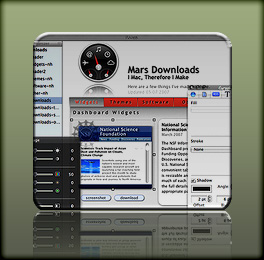 Since releasing of Crystal Clear and VacuumMail earlier this year, my download traffic has overridden my .Mac account ... and twice (so far) I've had to upgrade my account to accommodate the bandwidth. I don't mind that, nor do I mind the additional traffic on the Mars Downloads pages. What I do mind is the time it takes me to keep those pages updated! In fact, it takes so long I haven't been able to keep them in sync with the new stuff I was making.
I've been a pro webmaster for, well, a long time... since 1994, in fact. So keeping a couple of simple pages updated shouldn't make me break a sweat, right? Damn right! Problem is, the Download pages started as an experiment with Apple's iWeb software last year, and iWeb and WordPress don't mix well. To help them get along, I devised a simple checklist so all I'd have to do was:
- Generate the raw HTML from iWeb
- Massage the HTML by
- Tweaking a few CSS styles,
- Doing a few search/replaces,
- Doing a bit of reformatting, and
- Plopping the iWeb HTML in the WordPress template, and
- Moving the iWeb graphics and other files to the server.
At least, that's how I thought it was going to go. As it turns out, the convoluted HTML and CSS code that iWeb generates invariably causes problems when running inside Mars. This means each update can turn into a 2-3 hour scavenger hunt, with each contestant (Me, Me, and Me) trying to find a lost px in a huge block of unreadable code.
So last week I vowed to find another way, and I think I have. The end solution means more work up front in generating the site to begin with, but should make it very easy to rearrange, add, or rewrite content or images on those pages.
]]> completed a review of all the currently available tools that add a class of functionality that I'm calling "window tricks" to your Mac. Such tools have existed for years, but last year saw some new tools in this category, as well as more visibility thanks to an increase in the number of new Mac users who've migrated from Microsoft Windows.
What these users are looking for typically is some freedom from the Mac OS X user interface constraints on how you can move and resize your application windows. As new Windows users discover, Apple's user interface guidelines prescribe very specific parts of the window that can be used to move it (usually, just the toolbar and titlebar) or to resize it (just the lower right-hand corner of resizable windows).
Longtime Mac users (me included) generally agree that these guidelines are sensible and work well. Unlike MS Windows windows, Mac OS X windows typically don't have "chrome" on their sides that can be used for grabbing, and that's precisely where Windows users are accustomed to resizing and moving theirs about. Apps that do have "sides," like the Finder, can indeed be dragged about from there. But they can only be resized from the lower right.
Even so, all Mac users have likely experienced an occasion where they've managed to drag a window to a location from which it can neither be resized nor moved. Don't ask me how at the moment, but believe me, I've been there. There are also occasions when it would be more convenient to resize a window by its lower left corner rather than the lower right. It's not hard to imagine what kind of configuration I'm talking about there. And in these circumstances, it's no doubt crossed your mind that it would be sure nice to have some way to grab that freakin' window and move it without having to do a major dance, reshuffling other components of your desktop in order to make that one simple change.
]]> some life decisions that you should think twice before revisiting. I'm talking things like your marriage, your decision to have kids, your choice of college, your upcoming vacation plans... maybe your car and house. But honestly, don't politicians make too much of clinging to decisions they made that turn out to be wrong? And don't some of them place way too high a value on consistency over a long period of time in one's personal values and beliefs? Is that "fortitude" or "stupidity"? Heck, as Joni Mitchell once pointed out, "Life is for learning." If you acknowledge that learning changes you by adding new ideas and insights, then individuals who never change their mind about things aren't particularly good role models for an advanced society... are they? Â
 Astute readers of this page are probably starting to wonder where the hell I'm going with this topic. "Is this an article about PIM software, or not?" Well, it's actually highly relevant, because one type of decision we make quite often nowadays should be easily reversed. If it isn't, we've made the wrong choice and should change our minds immediately. I'm talking about one's choice of software applications.
It's ironic that so many "technology experts" think of Apple as the company that locks users in with proprietary hooks, when Apple has never been the source of such danger at all. Yes, Apple's hardware is proprietary, but think about it: If you want to extract your data from a computer, what form does the data take? Hardware? Of course not... it's the software, stupid!
The danger of lock-in isn't from hardware, it's from software. Since Mac OS X hit the scene 5 1/2 years ago, Apple has been delivering a platform built on open source, standards-based software. Even when they come up with a proprietary file format, they will shortly reveal easy ways of getting your data into and out of that format. I'm not saying Apple has never been stupid about this, but their stupidity about formats is the exception rather than the rule. As a pure software company, Microsoft's business model is built on secret, proprietary formats that hook in to secret code in Windows, closing the Windows environment and locking users into an apparently velvet prison.
I didn't mean to digress onto Microsoft (yet again), but my point is that one of the main reasons I use Mac OS X drives a lot of my software decisions: I don't want to get stuck. I want to be able to migrate freely to a new software application if the features and benefits are compelling enough, and I don't want worries about how I'll migrate my data to be a show-stopper.
With this in mind, I've been eyeing the market for personal information management (PIM) software on Mac OS X for a couple of years now. I've felt a little like a honey bee, alighting briefly on this software package, then moving on to another, and another, all the while sampling a dozen more. The tool I'm currently using has been my "flower" for the longest period so far: DevonThink Pro.
Though far from perfect, it's the best tool I've yet found, with the most flexibility for getting data into and out of its data store. DevonThink Pro covers the widest range of data types, and encompasses a large universe of possible uses and usage scenarios. However, it took me quite awhile to get comfortable with DevonThink, and even now I continue to discover better ways of working with it. And because of a few glaring limitations, as well as my general Software Addict's mindset, I continue to sample the competition.
This article is not about DevonThink Pro, although I'll share a few thoughts along the way. Rather, it's intended to be an ongoing repository of my observations about software products that overlap with DevonThink as I try them out. Given time constraints, these are not complete reviews of the various products, but rather they simply document my quickly written notes on pros and cons during the course of my evaluations. Because new versions of software often overcome limitations in earlier versions (but, as self-evident as this may be, it's not always true), it wouldn't be fair to set these notes in stone forever. For any products that have enough "pros" to make me want to return and sample new releases down the road, I intend to revise the entries as the products evolve.
ÂOne of these days, I'll hopefully find the "perfect" product and can close the door on this category of software for awhile. But in the meantime, I'm keeping the door wide open and welcome any newcomers that look interesting and aren't outrageously expensive.
]]>- personal information management
- personal organizers
- graphic design tools
- 3D design and animation tools
- image management tools
- project management
- word processing tools
- programmers text editors
- Music mixing and editing tools
- News aggregators (RSS/podcast readers), and
- many others.
 been using Quicken on my Mac for over 10 years now. Quicken came free with the very first Mac I bought back in 1996, and having nothing else to compare it against, it seemed like a pretty good thing. Sure, it was buggy, and as time went by I realized it was just a pale shadow of the version Intuit was providing to its Windows customers. But it definitely was saving my wife and I time at the end of the month in paying bills and reconciling the checkbook.
By now, I've grown accustomed to Quicken's face, but unlike Henry Higgins' statement in My Fair Lady, that's not a compliment. I hate Quicken's face, in fact, and I detest the continued second-citizen status Quicken consigns me to in the world of personal finance. That's not totally Intuit's fault, but they haven't done a good job of improving Mac users' lot much over time. I guess I should feel lucky that I can connect online and automatically download transactions from my bank. Too bad I can't do the same with the mutual fund company where I have my IRA money.
The worst thing about Quicken's face is the total absence of control over all the windows that get spawned. You think the Finder is bad? Then you haven't spent much time in Quicken! Fortunately, I use WindowShade to keep my account windows from taking over, but do you know what? Quicken can't remember from session to session where I've left my windows, or in what state I left them. This means I have to spend a minute or so each time I open the damn software to rearrange all those windows. What fun! :-{
The next worst thing is the incomprehensible set of menus and toolbar items. Quicken's interface appears to have grown like the suburbs of most U.S. cities in the last few decades---that is, totally without order, logic, or aesthetics of any sort. This is probably why I never venture far when I enter QuickenLand... Just do my checkbook, pay a few bills, update a few stock prices, and get the hell out of there.
Naturally, Quicken has no concept of the Mac OS X Cocoa framework, so all the neat little user interface utilities I use in my other Mac apps don't work here... or they work with a jerk. Application services? Ha! Automator actions or Spotlight support? Ha Ha! Intuit has made no attempt whatsoever to keep Quicken up to date with the latest and greatest Mac OS X technologies, and if I'm a typical customer, I can understand why.
I'm so locked into Quicken that it's almost painful contemplating my escape. Not only do I have the last 10 years of financial data locked in there, but I also spent a lot of time early on entering all my data back to the early 1980's. Some of my investment account data go back even further than that. I know that some Mac customers have gotten free, but I also know they probably had to spend a lot of time digging themselves out. And once they were out, did they feel like Neo waking up outside the Matrix? Lord, I hope not!
So I've been keeping a close eye on the various personal finance packages that are available for the Mac. In the last 2 years, there have finally been a few apps that looked interesting enough to do more than just open them, take a quick look around, and leave. I've now tried four of them and have at least four more to go. As I finish the trials, I'll keep this article updated on my prospects for a Quicken escape.]]>
been using Quicken on my Mac for over 10 years now. Quicken came free with the very first Mac I bought back in 1996, and having nothing else to compare it against, it seemed like a pretty good thing. Sure, it was buggy, and as time went by I realized it was just a pale shadow of the version Intuit was providing to its Windows customers. But it definitely was saving my wife and I time at the end of the month in paying bills and reconciling the checkbook.
By now, I've grown accustomed to Quicken's face, but unlike Henry Higgins' statement in My Fair Lady, that's not a compliment. I hate Quicken's face, in fact, and I detest the continued second-citizen status Quicken consigns me to in the world of personal finance. That's not totally Intuit's fault, but they haven't done a good job of improving Mac users' lot much over time. I guess I should feel lucky that I can connect online and automatically download transactions from my bank. Too bad I can't do the same with the mutual fund company where I have my IRA money.
The worst thing about Quicken's face is the total absence of control over all the windows that get spawned. You think the Finder is bad? Then you haven't spent much time in Quicken! Fortunately, I use WindowShade to keep my account windows from taking over, but do you know what? Quicken can't remember from session to session where I've left my windows, or in what state I left them. This means I have to spend a minute or so each time I open the damn software to rearrange all those windows. What fun! :-{
The next worst thing is the incomprehensible set of menus and toolbar items. Quicken's interface appears to have grown like the suburbs of most U.S. cities in the last few decades---that is, totally without order, logic, or aesthetics of any sort. This is probably why I never venture far when I enter QuickenLand... Just do my checkbook, pay a few bills, update a few stock prices, and get the hell out of there.
Naturally, Quicken has no concept of the Mac OS X Cocoa framework, so all the neat little user interface utilities I use in my other Mac apps don't work here... or they work with a jerk. Application services? Ha! Automator actions or Spotlight support? Ha Ha! Intuit has made no attempt whatsoever to keep Quicken up to date with the latest and greatest Mac OS X technologies, and if I'm a typical customer, I can understand why.
I'm so locked into Quicken that it's almost painful contemplating my escape. Not only do I have the last 10 years of financial data locked in there, but I also spent a lot of time early on entering all my data back to the early 1980's. Some of my investment account data go back even further than that. I know that some Mac customers have gotten free, but I also know they probably had to spend a lot of time digging themselves out. And once they were out, did they feel like Neo waking up outside the Matrix? Lord, I hope not!
So I've been keeping a close eye on the various personal finance packages that are available for the Mac. In the last 2 years, there have finally been a few apps that looked interesting enough to do more than just open them, take a quick look around, and leave. I've now tried four of them and have at least four more to go. As I finish the trials, I'll keep this article updated on my prospects for a Quicken escape.]]>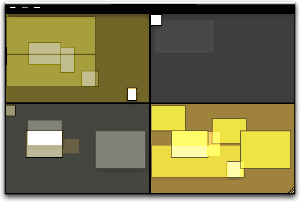 by the concept of virtual desktops since encountering them in a Unix system many years ago (I think it was an SGI Irix system), and then later when I set up Linux about 5 years ago to play around with that OS firsthand. Then, a couple of years ago I saw an early build of Virtue Desktops and thought it was pretty cool. I really loved the nifty transition effects and all the desktop customization you can do with Virtue.
However, Virtue seemed pretty flaky at the time, so I looked around to see what other virtual desktop environments there were for Mac OS X. To my surprise, there were several in addition to Virtue... including some commercial implementations. After trying all the free ones (I wasn't interested in paying for this feature, since I didn't even know if I'd like it), I decided Virtue was the best of the bunch.
But I also decided that Virtue's flakiness was simply adding more time to my routine rather than helping me organize my work, and I finally broke down and decided to try You Control Desktops. Now, it may be a total coincidence, but just after I installed Desktops and restarted my system, the whole OS began to flake out, and I ended up having to trash my hard drive.
Needless to say, whether that was You Desktops' fault or just a bad hard drive kicking in, it soured me on the whole idea of virtual desktops for awhile.
Then, when Apple announced in August that one of the premier features of its forthcoming Leopard OS would be a virtual desktop system called Spaces, I thought that maybe someone would finally get this thing done right on Mac OS X. Maybe the problem has been that the implementations I'd tried just weren't intuitive enough, or right-featured enough, to be useful to me. I even said this out loud in an article of video snippets from the WWDC keynote that I published in mid-August.
by the concept of virtual desktops since encountering them in a Unix system many years ago (I think it was an SGI Irix system), and then later when I set up Linux about 5 years ago to play around with that OS firsthand. Then, a couple of years ago I saw an early build of Virtue Desktops and thought it was pretty cool. I really loved the nifty transition effects and all the desktop customization you can do with Virtue.
However, Virtue seemed pretty flaky at the time, so I looked around to see what other virtual desktop environments there were for Mac OS X. To my surprise, there were several in addition to Virtue... including some commercial implementations. After trying all the free ones (I wasn't interested in paying for this feature, since I didn't even know if I'd like it), I decided Virtue was the best of the bunch.
But I also decided that Virtue's flakiness was simply adding more time to my routine rather than helping me organize my work, and I finally broke down and decided to try You Control Desktops. Now, it may be a total coincidence, but just after I installed Desktops and restarted my system, the whole OS began to flake out, and I ended up having to trash my hard drive.
Needless to say, whether that was You Desktops' fault or just a bad hard drive kicking in, it soured me on the whole idea of virtual desktops for awhile.
Then, when Apple announced in August that one of the premier features of its forthcoming Leopard OS would be a virtual desktop system called Spaces, I thought that maybe someone would finally get this thing done right on Mac OS X. Maybe the problem has been that the implementations I'd tried just weren't intuitive enough, or right-featured enough, to be useful to me. I even said this out loud in an article of video snippets from the WWDC keynote that I published in mid-August.
 Apple's initiative with Spaces also made me question my previous conclusion that virtual desktops were not worth the effort. If Apple is investing the energy to bring virtual desktops to "the rest of us" someone at Apple must believe that they are a user interface enhancement that will really benefit "us."
So, I opened my mind once again to the idea of virtual desktops. As a member of the select Apple developer group, I've been getting the Leopard "seeds" as they're released, and I've taken the opportunity to try out Spaces along with other new features of Leopard. Given my nondisclosure agreement with Apple, I'm not going to say anything about Spaces that isn't revealed in Apple's own presentation of it on the Leopard website. Instead, I'm going to spend a few minutes sharing my impressions of virtual desktops in general and of four other specific VD applications that are already available for Mac OS X:
At the outset, I'll confess that my note-taking for this exercise wasn't as rigorous as usual... I didn't test for the same set of features in each application. Unfortunately, I can't go back now and refresh my memory for the commercial products, because their demo licenses have expired. The reason for my relatively sloppy approach probably reflects my renewed conviction, after thoroughly testing Spaces, that for most computer users, virtual desktops are a waste of time and effort. Simply put, they're an idea whose time has passed.
That's a pretty harsh judgment, I realize, and one likely to make a good number of fellow geeks stop reading right here. After all, some users of virtual desktops feel strongly that they are highly valuable and necessary---for them. And I suspect that's true. Given the probability for misunderstanding when expressing an opinion on a topic like this, I want to begin by exploring why virtual desktops arose in the first place and what benefits users get (or believe they get) from them. I also want to explore the expectations users have of virtual desktops like Spaces, in the very likely event that they've never actually used such a system themselves.]]>
Apple's initiative with Spaces also made me question my previous conclusion that virtual desktops were not worth the effort. If Apple is investing the energy to bring virtual desktops to "the rest of us" someone at Apple must believe that they are a user interface enhancement that will really benefit "us."
So, I opened my mind once again to the idea of virtual desktops. As a member of the select Apple developer group, I've been getting the Leopard "seeds" as they're released, and I've taken the opportunity to try out Spaces along with other new features of Leopard. Given my nondisclosure agreement with Apple, I'm not going to say anything about Spaces that isn't revealed in Apple's own presentation of it on the Leopard website. Instead, I'm going to spend a few minutes sharing my impressions of virtual desktops in general and of four other specific VD applications that are already available for Mac OS X:
At the outset, I'll confess that my note-taking for this exercise wasn't as rigorous as usual... I didn't test for the same set of features in each application. Unfortunately, I can't go back now and refresh my memory for the commercial products, because their demo licenses have expired. The reason for my relatively sloppy approach probably reflects my renewed conviction, after thoroughly testing Spaces, that for most computer users, virtual desktops are a waste of time and effort. Simply put, they're an idea whose time has passed.
That's a pretty harsh judgment, I realize, and one likely to make a good number of fellow geeks stop reading right here. After all, some users of virtual desktops feel strongly that they are highly valuable and necessary---for them. And I suspect that's true. Given the probability for misunderstanding when expressing an opinion on a topic like this, I want to begin by exploring why virtual desktops arose in the first place and what benefits users get (or believe they get) from them. I also want to explore the expectations users have of virtual desktops like Spaces, in the very likely event that they've never actually used such a system themselves.]]>The podcast tool market was still in its infancy a year ago, but already there were quite a few choices. There were fewer choices for doing enhanced podcasts, but I had no trouble finding a good piece of freeware for my experiment: ChapterToolMe was awkwardly named but easy to use, and in no time I had a podcast to submit to the iTunes music store.
The aim of my podcast experiment was to publish the latest mp3 snippets added to the Classic 45's "Jukebox," and I planned to include a brief, spoken narrative about each 45 rpm record. I used Soundtrack Pro to assemble the audio file, and that was the time-consuming part. Stringing the mp3 bits together didn't take too long, but getting the narrative just right did. After doing one, I decided I simply wouldn't have time to make a series out of this, and my life moved on to other creative endeavors. (To my surprise, I see that my original podcast is still in the iTunes inventory... you can find it by searching for "Classic 45s Jukebox" or perhaps trying this URL.)
A few months ago, I finally sat down and adapted my PHP script that updates the regular RSS feed for Classic 45's to create a new feed just for jukebox items, including an enclosure tag for the mp3 files. Then the project lay dormant until last week, when a possible method of automating the podcast process suddenly hit me.
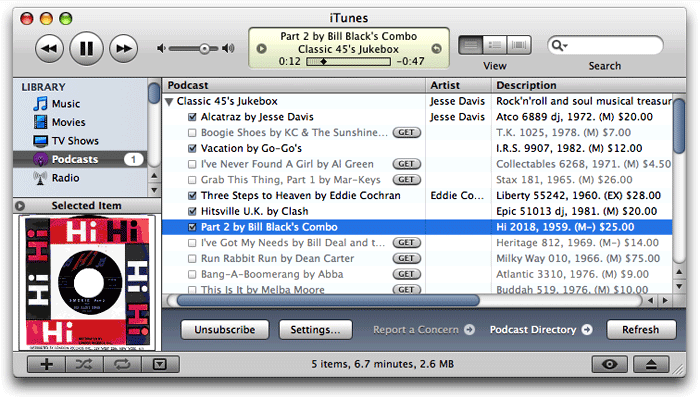 Rather than putting together one big audio file, with recorded narration, and then dividing it into chapters using an enhanced podcast tool, I could just release each mp3 file as a separate episode. Each episode could include the text narration and facts about the record, plus the label or sleeve scan I normally include on the site. I wasn't totally sure this would work, but it seemed worth testing. If it worked, I could release a podcast without eating away up any more of my precious spare time. When I pointed Safari to the mp3 feed I'd made earlier, it loaded the "podcast" right up, displaying the HTML and image content along with a link to the enclosed mp3 file for the last 36 jukebox items. I then went to iTunes and entered the feed URL as a new Podcast subscription, and lo and behold, iTunes also loaded the feed, even providing little
  buttons for subscribers to download each episode they want.
So, the concept seemed sound, and the next step seemed to be a tools review. Was there some cool new application that would help me with the project? Perhaps there were new capabilities of the podcast specification that I could leverage. Thus, the usual sequence of my life played out again: One project led to another! :-)
]]> article is deliberately provocative: I don't know the answer to the question, and I don't really care. But having been there with Firefox many times, all I can say is that Safari plugins like SafariStand make me grateful that I don't have to find out. I've found it much easier to utilize and keep track of one plugin rather than keeping, say, six or more in sync and up-to-date.
Our culture is generally dominated by a "more is More" attitude, so that the browser with the most plugins is believed by definition to be the best horse to bet on. This is the same argument some Windows users have made for years with respect to their choice of operating system: I want to use the computer that has the most software to choose from. This argument is proven empty when you actually sit down and compare the quality of Mac software in a given functional category versus that of Windows software (don't take my word for it: Actually do it yourself sometime), and that emptiness carries over to the issue of browser plugins. Certainly, there are some software categories that you legitimately need access to a Windows PC for. But if you notice, nearly all such categories cover business, rather than personal, requirements, and they're for very narrow fields of interest indeed. The only personal software category where the Mac actually lags Windows is gaming, and I predict that the gap in gaming titles won't be nearly so large a year or two from now as it is today.
As far as the supposed dearth of plugins for Safari in comparison with Firefox, SafariStand is an excellent case-in-point. There are other excellent multifunction Safari plugins (Saft, PithHelmet, Safari Extender, for example), but I'm highlighting SafariStand because it's not only great, but also free. After all, if a Safari user finds they are starting to buy plugins, they really should consider paying for a browser that has dozens of plugins already built in, like OmniWeb. Being the cheapskate I am, I like free things, and SafariStand is one of my favorite freebies for Safari. Besides, most Firefox plugins are free, so it seems only fair to restrict this plugins conversation to those that Safari users can add without paying extra.
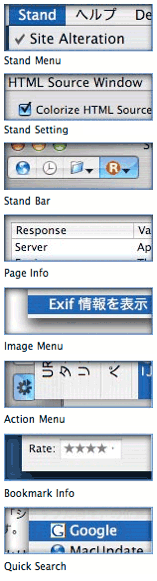
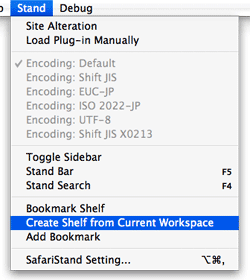 In this article, I'm going to focus on just a couple of the best bits from the latest SafariStand beta, which are just too wonderful to remain obscure from the Safari-loving hordes. But very briefly, here is a list of the main functions that SafariStand adds to Safari. To gather these functions into Firefox would require the gathering of a half-dozen or more separate plugins, each of which would have to be authorized and kept up to date, etc.
- Option to restore your last workspace, or any of the pages you had open, on launch.
- Add sidebar with thumbnail tabs.
- Customize search engines available in the standard Google search form.
- Automate "find" function without having to type Cmd-F.
- Add color labels to your bookmarks.
- Enable site alteration, customizing allowable plugins, images, JavaScript, style sheets, and more for any website.
- Colorize the HTML source window, and make it editable.
- Reorder tabs in a window (this is a native feature of Firefox and will be one in Safari 3.0).
- Use the "Stand Bar", a floating palette with searchable bookmarks and history, as well as customizable SafariStand folders and RSS feeds.
- Configure your "Bookmark Shelf," a floating palette that lets you build and access saved "workspaces," which are lists of sites you open up in a browser session and want to save for later use.
- Access one of the best "Page Info" stores now available for any browser.
- For any site you're visiting, easily see a list of all the cookies the site has set, examine their contents, and/or delete one or more of them.
 developing websites with MySQL for over 7 years now, until recently I had almost always used phpMyAdmin to manage my databases. phpMyAdmin is such an excellent web application and makes managing MySQL so easy that the only time I strayed was when it wasn't available on the host server (which was very rare). When I needed a desktop MySQL client, I had turned to YourSQL, which I determined a couple of years ago was the best for me when connecting to MySQL from Mac OS X.
For various reasons that I won't bore readers with here, I found myself needing a Mac desktop client for MySQL again recently, so I took the opportunity to review the market once again. What surprised me most, I suppose, is how many options there are for Mac OS X users who do a little light database work. (Caveat: I am by no means a database administrator, and my knowledge of SQL and MySQL is merely sufficient to develop web applications---meaning, I can build tables, relate tables, and build queries for those tables. The tools reviewed here are from this use case alone.) In the course of testing, I tried out nine different database apps:
]]>
developing websites with MySQL for over 7 years now, until recently I had almost always used phpMyAdmin to manage my databases. phpMyAdmin is such an excellent web application and makes managing MySQL so easy that the only time I strayed was when it wasn't available on the host server (which was very rare). When I needed a desktop MySQL client, I had turned to YourSQL, which I determined a couple of years ago was the best for me when connecting to MySQL from Mac OS X.
For various reasons that I won't bore readers with here, I found myself needing a Mac desktop client for MySQL again recently, so I took the opportunity to review the market once again. What surprised me most, I suppose, is how many options there are for Mac OS X users who do a little light database work. (Caveat: I am by no means a database administrator, and my knowledge of SQL and MySQL is merely sufficient to develop web applications---meaning, I can build tables, relate tables, and build queries for those tables. The tools reviewed here are from this use case alone.) In the course of testing, I tried out nine different database apps:
]]>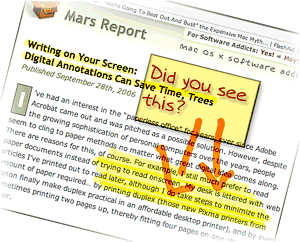 the "paperless office" for years, ever since Adobe Acrobat came out and was pitched as a possible solution. However, despite the growing sophistication of personal computers over the years, people seem to cling to paper methods no matter what great digital idea comes along. There are reasons for this, of course. For example, I still much prefer to read paper documents instead of trying to read onscreen. My desk is littered with web articles I've printed out to read later, although I do take steps to minimize the amount of paper required... by printing duplex (those new Pixma printers from Canon finally make duplex practical in an affordable desktop printer), and by even sometimes printing two pages up, thereby fitting four pages on one sheet of paper.
My preference for reading paper has more to do with portability than readability nowadays. I simply prefer to read in a more relaxed position than one can muster at a desktop PC, and I also like reading in places where even laptops are uncomfortable to use. (I didn't say the toilet, mind you.)
One small area where little progress seems to have been made in eliminating paper involves marking up comments and other notes on paper documents. If I see a web article or some other electronic document and want to pass it along to a colleague with a few comments, my digital options aren't great. I can forward the URL in an email, but then it's hard to focus attention on the particular passage I want to comment on. I can take a screenshot and somehow include that in an email or word processing document and send it along. Or I can print it out and mark it up, then stick it in interoffice mail... or simply walk it over to my colleague.
But what if I could simply mark up a few comments right on my computer screen and then transmit a snapshot of that? Wouldn't that be easier all around, and save paper as well?
]]>