<div id='error'>
		<p class='wpdberror'><strong>WordPress database error:</strong> [Table &#039;llscotts_mars.wp2_categories&#039; doesn&#039;t exist]<br />
		<code>SELECT cat_ID FROM wp2_categories WHERE category_nicename = &#039;innovation&#039;</code></p>
		</div><?xml version="1.0" encoding="UTF-8"?>
<rss version="2.0"
	xmlns:content="http://purl.org/rss/1.0/modules/content/"
	xmlns:wfw="http://wellformedweb.org/CommentAPI/"
	xmlns:dc="http://purl.org/dc/elements/1.1/"
	xmlns:atom="http://www.w3.org/2005/Atom"
	xmlns:sy="http://purl.org/rss/1.0/modules/syndication/"
	>

<channel>
	<title>Musings from Mars &#187; Innovation</title>
	<atom:link href="http://www.musingsfrommars.org/topic/innovation/feed" rel="self" type="application/rss+xml" />
	<link>http://www.musingsfrommars.org</link>
	<description>I've been observing personal computing behavior for a long time, and now I have some things to say. Here are my two cents about computing, music, software, and related topics.</description>
	<pubDate>Tue, 25 Jun 2024 16:28:46 +0000</pubDate>
	<generator>http://wordpress.org/?v=2.7.1</generator>
	<language>en</language>
	<sy:updatePeriod>hourly</sy:updatePeriod>
	<sy:updateFrequency>1</sy:updateFrequency>
			<item>
		<title>Apple v. Samsung: The True Story</title>
		<link>http://www.musingsfrommars.org/2012/09/apple-v-samsung-the-true-story.html</link>
		<comments>http://www.musingsfrommars.org/2012/09/apple-v-samsung-the-true-story.html#comments</comments>
		<pubDate>Sat, 01 Sep 2012 17:47:59 +0000</pubDate>
		<dc:creator>admin</dc:creator>
		
		<category><![CDATA[Apple]]></category>

		<category><![CDATA[Apple Myths]]></category>

		<category><![CDATA[FUD Propaganda]]></category>

		<category><![CDATA[Innovation]]></category>

		<category><![CDATA[Misreporting]]></category>

		<category><![CDATA[Technology]]></category>

		<category><![CDATA[iPhone/Touch]]></category>

		<category><![CDATA[News]]></category>

		<guid isPermaLink="false">http://www.musingsfrommars.org/?p=2226</guid>
		<description><![CDATA[]]></description>
		<wfw:commentRss>http://www.musingsfrommars.org/2012/09/apple-v-samsung-the-true-story.html/feed</wfw:commentRss>
		</item>
		<item>
		<title>The Future for Home Computing</title>
		<link>http://www.musingsfrommars.org/2010/04/the-future-for-home-computing.html</link>
		<comments>http://www.musingsfrommars.org/2010/04/the-future-for-home-computing.html#comments</comments>
		<pubDate>Thu, 15 Apr 2010 22:43:05 +0000</pubDate>
		<dc:creator>admin</dc:creator>
		
		<category><![CDATA[Apple]]></category>

		<category><![CDATA[Innovation]]></category>

		<category><![CDATA[Other Musings]]></category>

		<category><![CDATA[Reviews]]></category>

		<category><![CDATA[Usability]]></category>

		<category><![CDATA[eReaders]]></category>

		<category><![CDATA[Mobile Computing]]></category>

		<category><![CDATA[News]]></category>

		<guid isPermaLink="false">http://www.musingsfrommars.org/?p=2158</guid>
		<description><![CDATA[]]></description>
		<wfw:commentRss>http://www.musingsfrommars.org/2010/04/the-future-for-home-computing.html/feed</wfw:commentRss>
		</item>
		<item>
		<title>ComputerWorld Pits Snow Leopard Against Windows 7 (Again)</title>
		<link>http://www.musingsfrommars.org/2009/11/computerworld-pits-snow-leopard-against-windows-7-again.html</link>
		<comments>http://www.musingsfrommars.org/2009/11/computerworld-pits-snow-leopard-against-windows-7-again.html#comments</comments>
		<pubDate>Tue, 03 Nov 2009 21:53:49 +0000</pubDate>
		<dc:creator>admin</dc:creator>
		
		<category><![CDATA[Apple]]></category>

		<category><![CDATA[Innovation]]></category>

		<category><![CDATA[MS Windows]]></category>

		<category><![CDATA[Mac OS X]]></category>

		<category><![CDATA[Macs vs. PCs]]></category>

		<category><![CDATA[Microsoft]]></category>

		<category><![CDATA[Monopoly Ineptitude]]></category>

		<category><![CDATA[Reviews]]></category>

		<category><![CDATA[News]]></category>

		<guid isPermaLink="false">http://www.musingsfrommars.org/?p=2144</guid>
		<description><![CDATA[]]></description>
		<wfw:commentRss>http://www.musingsfrommars.org/2009/11/computerworld-pits-snow-leopard-against-windows-7-again.html/feed</wfw:commentRss>
		</item>
		<item>
		<title>WebKit Introduces Styleable Scrollbars</title>
		<link>http://www.musingsfrommars.org/2009/06/webkit-introduces-styleable-scrollbars.html</link>
		<comments>http://www.musingsfrommars.org/2009/06/webkit-introduces-styleable-scrollbars.html#comments</comments>
		<pubDate>Wed, 24 Jun 2009 03:04:19 +0000</pubDate>
		<dc:creator>admin</dc:creator>
		
		<category><![CDATA[CSS]]></category>

		<category><![CDATA[Innovation]]></category>

		<category><![CDATA[Programming]]></category>

		<category><![CDATA[Safari & WebKit]]></category>

		<category><![CDATA[Web Browsers]]></category>

		<category><![CDATA[Resources]]></category>

		<guid isPermaLink="false">http://www.musingsfrommars.org/?p=2138</guid>
		<description><![CDATA[]]></description>
		<wfw:commentRss>http://www.musingsfrommars.org/2009/06/webkit-introduces-styleable-scrollbars.html/feed</wfw:commentRss>
		</item>
		<item>
		<title>Compass: A New Concept for Managing CSS Styles</title>
		<link>http://www.musingsfrommars.org/2009/05/compass-a-new-concept-for-managing-css-styles.html</link>
		<comments>http://www.musingsfrommars.org/2009/05/compass-a-new-concept-for-managing-css-styles.html#comments</comments>
		<pubDate>Sun, 24 May 2009 04:06:48 +0000</pubDate>
		<dc:creator>admin</dc:creator>
		
		<category><![CDATA[CSS]]></category>

		<category><![CDATA[Innovation]]></category>

		<category><![CDATA[Programming]]></category>

		<category><![CDATA[Semantic Web]]></category>

		<category><![CDATA[Web Development]]></category>

		<category><![CDATA[Code Download]]></category>

		<category><![CDATA[Developer Tools]]></category>

		<category><![CDATA[Resources]]></category>

		<guid isPermaLink="false">http://www.musingsfrommars.org/?p=2132</guid>
		<description><![CDATA[]]></description>
		<wfw:commentRss>http://www.musingsfrommars.org/2009/05/compass-a-new-concept-for-managing-css-styles.html/feed</wfw:commentRss>
		</item>
		<item>
		<title>Without Even Trying, Apple&#8217;s iPhone Takes the eBook Reader Sweepstakes</title>
		<link>http://www.musingsfrommars.org/2008/09/without-even-trying-apples-iphone-takes-the-ebook-reader-sweepstakes.html</link>
		<comments>http://www.musingsfrommars.org/2008/09/without-even-trying-apples-iphone-takes-the-ebook-reader-sweepstakes.html#comments</comments>
		<pubDate>Tue, 09 Sep 2008 03:40:38 +0000</pubDate>
		<dc:creator>admin</dc:creator>
		
		<category><![CDATA[Innovation]]></category>

		<category><![CDATA[Reviews]]></category>

		<category><![CDATA[Technology]]></category>

		<category><![CDATA[eReaders]]></category>

		<category><![CDATA[iPhone/Touch]]></category>

		<category><![CDATA[Articles]]></category>

		<guid isPermaLink="false">http://www.musingsfrommars.org/2008/09/without-even-trying-apples-iphone-takes-the-ebook-reader-sweepstakes.html</guid>
		<description><![CDATA[<p>I recently decided it was time to look again at the state-of-the-art in eBook reader hardware. It seems like I've waited forever for a company to design one I could really use in place of the traditional paper-filled parallelepiped. I first got excited by the possibility while implementing the PDF format for a magazine on CD-ROM back in 1995. "Wow!," I thought, "Whoever wrestles PDF onto a small electronic device is going to make a mint!"</p><p>Of course, PDF turned out to be not particularly well suited to small viewing screens, since publishers would have to make a special layout for the PDF version. And so, years went by, with talk of <a href="http://eink.com/">E-Ink</a>, <a href="http://www.liquavista.com/technology/default.asp">electrowetting</a>, <a href="http://thefutureofthings.com/articles/1000/the-future-of-electronic-paper.html">electronic paper</a>, and other exotic technologies appearing to be on the verge of practicality.</p><p>What most of the would-be designers of eBook readers have seemingly failed to grasp, however, is that to replace paper books, eBooks must be nearly as light and portable as a paperback. They must work without cords, and be compatible companions to one's daily trip to the little boy's room. (I've honestly never met a woman who reads in the john, but it seems nearly all men do.) They must be able to accompany you to the beach, the pool, or the mountains. I'd really like something I could read while holding it in one hand, like I do a paperback. I don't want a reader that will break the bank, either. And most of all, an eBook reader needs to be comfortable to use in bed or in your favorite armchair.</p><p>Even today, with devices shrinking towards the ideal size and weight, nearly all fail to meet my needs for one reason or another. Quite surprisingly, one device has in fact replaced books for me, and it's not one I ever thought would or could. Because I had bought the device for another purpose entirely, this eBook reader has actually cost me nothing whatsoever.</p><p>This article covers five eBook reader devices, including two that are full-fledged personal computers serving as an eBook reader by way of third-party software, and another that is a multifunction "smart phone" with eBook reader capabilities. All five devices have strongly positive characteristics, and two of of them possess the full range that would allow them to serve as portable eBook readers for organizations that need access to technical and policy documentation. Even though I personally need a reader that's useful for novels and such, I'm evaluating these based on their utility as devices for storing and reading technical and other documentation rather than literature, each of which have quite different requirements for eBook reading. </p>]]></description>
		<wfw:commentRss>http://www.musingsfrommars.org/2008/09/without-even-trying-apples-iphone-takes-the-ebook-reader-sweepstakes.html/feed</wfw:commentRss>
		</item>
		<item>
		<title>WebKit/Safari Keep Blazing the Trail to CSS 3.0</title>
		<link>http://www.musingsfrommars.org/2008/04/webkitsafari-keep-blazing-the-trail-to-css-30.html</link>
		<comments>http://www.musingsfrommars.org/2008/04/webkitsafari-keep-blazing-the-trail-to-css-30.html#comments</comments>
		<pubDate>Tue, 15 Apr 2008 02:07:26 +0000</pubDate>
		<dc:creator>admin</dc:creator>
		
		<category><![CDATA[CSS]]></category>

		<category><![CDATA[Innovation]]></category>

		<category><![CDATA[Internet]]></category>

		<category><![CDATA[Open Standards]]></category>

		<category><![CDATA[Safari & WebKit]]></category>

		<category><![CDATA[Web Browsers]]></category>

		<category><![CDATA[Articles]]></category>

		<category><![CDATA[Web Design]]></category>

		<guid isPermaLink="false">http://www.musingsfrommars.org/2007/06/safari-30-blazes-trail-for-css-30.html</guid>
		<description><![CDATA[<p class="BigFirst">Looking back,<img src="http://www.musingsfrommars.org/images/csslogo.jpg" height="226" width="250" border="0" alt="Cascading Style Sheets!" title="Cascading Style Sheets!" leader style="float:right;display:block;margin-left:8px;" />This is an update to the article I wrote last summer, when Safari 3.0 was first released. In the 9 months since then, a lot has happened, and I wanted to try to keep this info up to date. Opera, iCab, Konqueror, and Firefox have all made progress in adopting CSS 3.0 specifications, the next generation of the <a href="http://www.w3.org/TR/css3-roadmap/">W3C's Cascading Style Sheets standard</a>.</p><p>However, the <a href="http://webkit.org/blog/">WebKit team</a> continues to lead the pack, as they have since I first contemplated this article over a year ago. In the last 6 months, that team has not only adopted more of the CSS 3.0 specs ahead of the others, but they have proposed several exciting new specs of their own, which the W3C is taking up as draft recommendations.
</p><p>In addition to updating the state of CSS 3.0 in WebKit/Safari, I've also added some new demos for the Backgrounds section. </p>
<p>Here are the CSS 3.0 features I wrote about in July 2007:
</p><ol> <li><strong>Box-shadow</strong>: Yes! Add drop shadows through CSS!</li> <li><strong>Multi-column layout</strong>: Can we really do this now? With HTML?</li> <li><strong>Resize</strong>: Give JavaScript hacks a rest and let users relax when typing input on web pages.</li> <li><strong>Rounded corners</strong>: Any <div> can be made round.</div></li> <li>C<strong>olors with transparency</strong>: There goes another ugly hack from way back!</li> <li><strong>Background image controls</strong>: Remember how great it was when you could add images as well as colors to an element's background CSS style? Well, it's about to get a whole lot better!</li> </ol>
<p>And since then, WebKit and Safari 3.1 have adopted the following new ones:</p>
<ol><li>Adopted last October, WebKit introduced its first take at <strong>CSS Transforms</strong>, which it has submitted to the W3C for consideration. With CSS Transforms, <code>&#60;DIV&#62;</code>s can be scaled, rotated, skewed and translated... all without using JavaScript!</li>
<li>Announced at the same time is the equally exciting implementation of <strong>CSS Animations</strong>. At the moment, the only type of animation that's documented and demonstrated on the WebKit blog is based on <strong>CSS Transitions</strong>, which let you define how an object or attribute changes over time from one state to another.</li>
<li>Also in October, WebKit added the CSS <strong>Web Fonts</strong> feature, which lets designers beam fonts to users through CSS and HTML, approximating the capabilities of PDF in a much lighter-weight form.</li>
<li>Then, after a lull, things started to heat up again last month, when Apple released Safari 3.1. Safari 3.1 incorporated all of the CSS 3.0 features WebKit had pioneered earlier, plus it added a bunch of things the WebKit team hadn't blogged about. Chief among these was support for <strong>CSS Attribute Selectors</strong>. This is something of a holy grail to advanced web developers, since it opens up a whole world of possibilities for using the Document Object Model (DOM) to build better web interfaces. When released, WebKit was the first and only browser to support this geeky, but highly practical feature.</li>
<li>And then, just today, WebKit added support for CSS Gradients to its portfolio. Gradients are not yet a CSS 3.0 specification, but they are part of the HTML 5.0 spec. No doubt Apple's implementation will be referred to the W3C for consideration.</li>
</ol>]]></description>
		<wfw:commentRss>http://www.musingsfrommars.org/2008/04/webkitsafari-keep-blazing-the-trail-to-css-30.html/feed</wfw:commentRss>
		</item>
		<item>
		<title>MacFUSE and MacFusion: Very interesting development in information management</title>
		<link>http://www.musingsfrommars.org/2007/06/macfuse-and-macfusion-very-interesting-development-in-information-management.html</link>
		<comments>http://www.musingsfrommars.org/2007/06/macfuse-and-macfusion-very-interesting-development-in-information-management.html#comments</comments>
		<pubDate>Tue, 12 Jun 2007 16:10:48 +0000</pubDate>
		<dc:creator>admin</dc:creator>
		
		<category><![CDATA[Innovation]]></category>

		<category><![CDATA[Freeware]]></category>

		<category><![CDATA[Google]]></category>

		<category><![CDATA[Resources]]></category>

		<guid isPermaLink="false">http://www.musingsfrommars.org/2007/06/macfuse-and-macfusion-very-interesting-development-in-information-management.html</guid>
		<description><![CDATA[]]></description>
		<wfw:commentRss>http://www.musingsfrommars.org/2007/06/macfuse-and-macfusion-very-interesting-development-in-information-management.html/feed</wfw:commentRss>
		</item>
		<item>
		<title>Leopard&#8217;s &#8220;Quick Look&#8221; Raises the Bar for File Previewing</title>
		<link>http://www.musingsfrommars.org/2007/06/leopard-quick-look-raises-bar-file-previews.html</link>
		<comments>http://www.musingsfrommars.org/2007/06/leopard-quick-look-raises-bar-file-previews.html#comments</comments>
		<pubDate>Mon, 11 Jun 2007 21:30:51 +0000</pubDate>
		<dc:creator>admin</dc:creator>
		
		<category><![CDATA[Apple]]></category>

		<category><![CDATA[Innovation]]></category>

		<category><![CDATA[Mac OS X]]></category>

		<category><![CDATA[Articles]]></category>

		<category><![CDATA[Video]]></category>

		<guid isPermaLink="false">http://www.musingsfrommars.org/2006/10/leopard-quick-look-raises-bar-file-previews.html</guid>
		<description><![CDATA[<img src="http://www.musingsfrommars.org/images/movie1_s.png" height="210" width="200" border="0" align="right" alt="Leopard's Quick Look Adds Pizzazz To File Previews" title="Leopard's Quick Look Adds Pizzazz To File Previews" />With Leopard's forthcoming "Quick Look" feature in the Finder, Apple is leaping ahead of the file-previewing game by providing a separate, translucent preview window of amazing flexibility and beauty. Quick Look can preview movies at full size or even full screen. It can preview text, HTML, and PDF documents and even let you navigate them. If you select multiple files, Leopard provides an "expose"-like view that lets you navigate among them. Or, if the files are images, you can quickly go into slideshow mode. There's much more... but ain't that enough for now?]]></description>
		<wfw:commentRss>http://www.musingsfrommars.org/2007/06/leopard-quick-look-raises-bar-file-previews.html/feed</wfw:commentRss>
		</item>
		<item>
		<title>Parallax Web Page Background Using Javascript and CSS</title>
		<link>http://www.musingsfrommars.org/2007/03/parallax-web-page-background-using-javascript-and-css.html</link>
		<comments>http://www.musingsfrommars.org/2007/03/parallax-web-page-background-using-javascript-and-css.html#comments</comments>
		<pubDate>Fri, 23 Mar 2007 02:15:50 +0000</pubDate>
		<dc:creator>admin</dc:creator>
		
		<category><![CDATA[CSS]]></category>

		<category><![CDATA[Innovation]]></category>

		<category><![CDATA[JavaScript]]></category>

		<category><![CDATA[Tips & Tricks]]></category>

		<category><![CDATA[Code Download]]></category>

		<category><![CDATA[Resources]]></category>

		<guid isPermaLink="false">http://www.musingsfrommars.org/2007/03/parallax-web-page-background-using-javascript-and-css.html</guid>
		<description><![CDATA[]]></description>
		<wfw:commentRss>http://www.musingsfrommars.org/2007/03/parallax-web-page-background-using-javascript-and-css.html/feed</wfw:commentRss>
		</item>
		<item>
		<title>inkBook: Time To Get A Writing Tablet?</title>
		<link>http://www.musingsfrommars.org/2007/01/inkbook-time-to-get-a-writing-tablet.html</link>
		<comments>http://www.musingsfrommars.org/2007/01/inkbook-time-to-get-a-writing-tablet.html#comments</comments>
		<pubDate>Sat, 27 Jan 2007 19:04:29 +0000</pubDate>
		<dc:creator>admin</dc:creator>
		
		<category><![CDATA[Innovation]]></category>

		<category><![CDATA[Software Addict]]></category>

		<category><![CDATA[Commercial]]></category>

		<category><![CDATA[Evaluate]]></category>

		<category><![CDATA[Input Devices]]></category>

		<category><![CDATA[Notes & Reminders]]></category>

		<guid isPermaLink="false">http://www.musingsfrommars.org/2007/01/inkbook-time-to-get-a-writing-tablet.html</guid>
		<description><![CDATA[]]></description>
		<wfw:commentRss>http://www.musingsfrommars.org/2007/01/inkbook-time-to-get-a-writing-tablet.html/feed</wfw:commentRss>
		</item>
		<item>
		<title>iPhone: OK, I&#8217;m Impressed&#8230; Now Gimme The Goods!</title>
		<link>http://www.musingsfrommars.org/2007/01/iphone-ok-im-impressed-now-gimme-the-goods.html</link>
		<comments>http://www.musingsfrommars.org/2007/01/iphone-ok-im-impressed-now-gimme-the-goods.html#comments</comments>
		<pubDate>Tue, 09 Jan 2007 20:42:23 +0000</pubDate>
		<dc:creator>admin</dc:creator>
		
		<category><![CDATA[Apple]]></category>

		<category><![CDATA[Innovation]]></category>

		<category><![CDATA[Mac OS X]]></category>

		<category><![CDATA[Web Browsers]]></category>

		<category><![CDATA[iPhone/Touch]]></category>

		<category><![CDATA[iPod & iTunes]]></category>

		<category><![CDATA[Email Clients]]></category>

		<category><![CDATA[News]]></category>

		<category><![CDATA[Video]]></category>

		<guid isPermaLink="false">http://www.musingsfrommars.org/2007/01/iphone-ok-im-impressed-now-gimme-the-goods.html</guid>
		<description><![CDATA[]]></description>
		<wfw:commentRss>http://www.musingsfrommars.org/2007/01/iphone-ok-im-impressed-now-gimme-the-goods.html/feed</wfw:commentRss>
		</item>
		<item>
		<title>Zirrus: An Online To-Do List App With Clear Clouds</title>
		<link>http://www.musingsfrommars.org/2007/01/zirrus-an-online-to-do-list-app-with-clear-clouds.html</link>
		<comments>http://www.musingsfrommars.org/2007/01/zirrus-an-online-to-do-list-app-with-clear-clouds.html#comments</comments>
		<pubDate>Mon, 08 Jan 2007 22:18:48 +0000</pubDate>
		<dc:creator>admin</dc:creator>
		
		<category><![CDATA[Ajax]]></category>

		<category><![CDATA[Innovation]]></category>

		<category><![CDATA[Web Development]]></category>

		<category><![CDATA[Bookmarking & Tagging]]></category>

		<category><![CDATA[Resources]]></category>

		<category><![CDATA[To-Do Lists]]></category>

		<guid isPermaLink="false">http://www.musingsfrommars.org/2007/01/zirrus-an-online-to-do-list-app-with-clear-clouds.html</guid>
		<description><![CDATA[]]></description>
		<wfw:commentRss>http://www.musingsfrommars.org/2007/01/zirrus-an-online-to-do-list-app-with-clear-clouds.html/feed</wfw:commentRss>
		</item>
		<item>
		<title>Mogopop: New Web 2.0 Publishing Tool for iPod</title>
		<link>http://www.musingsfrommars.org/2007/01/mogopop-new-web-20-publishing-tool-for-ipod.html</link>
		<comments>http://www.musingsfrommars.org/2007/01/mogopop-new-web-20-publishing-tool-for-ipod.html#comments</comments>
		<pubDate>Thu, 04 Jan 2007 04:49:29 +0000</pubDate>
		<dc:creator>admin</dc:creator>
		
		<category><![CDATA[Ajax]]></category>

		<category><![CDATA[Innovation]]></category>

		<category><![CDATA[Web Development]]></category>

		<category><![CDATA[iPod & iTunes]]></category>

		<category><![CDATA[Freeware]]></category>

		<category><![CDATA[Launchers]]></category>

		<category><![CDATA[Resources]]></category>

		<category><![CDATA[Video]]></category>

		<guid isPermaLink="false">http://www.musingsfrommars.org/2007/01/mogopop-new-web-20-publishing-tool-for-ipod.html</guid>
		<description><![CDATA[]]></description>
		<wfw:commentRss>http://www.musingsfrommars.org/2007/01/mogopop-new-web-20-publishing-tool-for-ipod.html/feed</wfw:commentRss>
<enclosure url="http://resources.mogopop.com/help/what_is.mov" length="5854093" type="video/quick" />
		</item>
		<item>
		<title>WebKit Team Adds New CSS Methods for Text-Stroke</title>
		<link>http://www.musingsfrommars.org/2006/12/webkit-team-adds-new-css-methods-for-text-stroke.html</link>
		<comments>http://www.musingsfrommars.org/2006/12/webkit-team-adds-new-css-methods-for-text-stroke.html#comments</comments>
		<pubDate>Tue, 26 Dec 2006 22:34:24 +0000</pubDate>
		<dc:creator>admin</dc:creator>
		
		<category><![CDATA[CSS]]></category>

		<category><![CDATA[Innovation]]></category>

		<category><![CDATA[Safari & WebKit]]></category>

		<category><![CDATA[Web Browsers]]></category>

		<category><![CDATA[News]]></category>

		<guid isPermaLink="false">http://www.musingsfrommars.org/2006/12/webkit-team-adds-new-css-methods-for-text-stroke.html</guid>
		<description><![CDATA[]]></description>
		<wfw:commentRss>http://www.musingsfrommars.org/2006/12/webkit-team-adds-new-css-methods-for-text-stroke.html/feed</wfw:commentRss>
		</item>
		<item>
		<title>Onlife: Automatically Stores and Indexes Your Daily Activities and Content</title>
		<link>http://www.musingsfrommars.org/2006/12/onlife-automatically-stores-and-indexes-your-apps-content.html</link>
		<comments>http://www.musingsfrommars.org/2006/12/onlife-automatically-stores-and-indexes-your-apps-content.html#comments</comments>
		<pubDate>Wed, 20 Dec 2006 00:40:10 +0000</pubDate>
		<dc:creator>Leland Scott</dc:creator>
		
		<category><![CDATA[Innovation]]></category>

		<category><![CDATA[Software Addict]]></category>

		<category><![CDATA[Freeware]]></category>

		<category><![CDATA[Rejected]]></category>

		<guid isPermaLink="false">http://www.musingsfrommars.org/2006/03/onlife-automatically-stores-and-indexes-your-apps-content.html</guid>
		<description><![CDATA[]]></description>
		<wfw:commentRss>http://www.musingsfrommars.org/2006/12/onlife-automatically-stores-and-indexes-your-apps-content.html/feed</wfw:commentRss>
		</item>
		<item>
		<title>Edgies: Super-Stickies on the Edge of Your Screen</title>
		<link>http://www.musingsfrommars.org/2006/12/edgies-stickies-on-the-edge-of-your-screen.html</link>
		<comments>http://www.musingsfrommars.org/2006/12/edgies-stickies-on-the-edge-of-your-screen.html#comments</comments>
		<pubDate>Sat, 09 Dec 2006 15:14:12 +0000</pubDate>
		<dc:creator>Leland Scott</dc:creator>
		
		<category><![CDATA[Innovation]]></category>

		<category><![CDATA[Software Addict]]></category>

		<category><![CDATA[Commercial]]></category>

		<category><![CDATA[Custom Desktops]]></category>

		<category><![CDATA[Notes & Reminders]]></category>

		<category><![CDATA[Recommended]]></category>

		<category><![CDATA[To-Do Lists]]></category>

		<guid isPermaLink="false">http://www.musingsfrommars.org/2006/07/edgies-stickies-on-the-edge-of-your-screen.html</guid>
		<description><![CDATA[]]></description>
		<wfw:commentRss>http://www.musingsfrommars.org/2006/12/edgies-stickies-on-the-edge-of-your-screen.html/feed</wfw:commentRss>
		</item>
		<item>
		<title>Contrepoint: A Unique, Rails-Like Way To Build Static Websites</title>
		<link>http://www.musingsfrommars.org/2006/12/contrepoint-website-creation-software.html</link>
		<comments>http://www.musingsfrommars.org/2006/12/contrepoint-website-creation-software.html#comments</comments>
		<pubDate>Tue, 05 Dec 2006 21:52:54 +0000</pubDate>
		<dc:creator>Leland Scott</dc:creator>
		
		<category><![CDATA[Innovation]]></category>

		<category><![CDATA[Code Download]]></category>

		<category><![CDATA[Developer Tools]]></category>

		<category><![CDATA[Resources]]></category>

		<category><![CDATA[Web Design]]></category>

		<guid isPermaLink="false">http://www.musingsfrommars.org/2006/02/contrepoint-website-creation-software.html</guid>
		<description><![CDATA[]]></description>
		<wfw:commentRss>http://www.musingsfrommars.org/2006/12/contrepoint-website-creation-software.html/feed</wfw:commentRss>
		</item>
		<item>
		<title>Zune&#8217;s Debut Spoiled by a Brief Shuffle on CNN</title>
		<link>http://www.musingsfrommars.org/2006/11/zunes-debut-spoiled-by-a-brief-shuffle-on-cnn.html</link>
		<comments>http://www.musingsfrommars.org/2006/11/zunes-debut-spoiled-by-a-brief-shuffle-on-cnn.html#comments</comments>
		<pubDate>Wed, 15 Nov 2006 03:55:00 +0000</pubDate>
		<dc:creator>admin</dc:creator>
		
		<category><![CDATA[Apple]]></category>

		<category><![CDATA[Innovation]]></category>

		<category><![CDATA[Microsoft]]></category>

		<category><![CDATA[Monopoly Damage]]></category>

		<category><![CDATA[Monopoly Ineptitude]]></category>

		<category><![CDATA[iPod & iTunes]]></category>

		<category><![CDATA[News]]></category>

		<guid isPermaLink="false">http://www.musingsfrommars.org/2006/11/zunes-debut-spoiled-by-a-brief-shuffle-on-cnn.html</guid>
		<description><![CDATA[]]></description>
		<wfw:commentRss>http://www.musingsfrommars.org/2006/11/zunes-debut-spoiled-by-a-brief-shuffle-on-cnn.html/feed</wfw:commentRss>
		</item>
		<item>
		<title>How Many Firefox Extensions Does It Take To Make One SafariStand?</title>
		<link>http://www.musingsfrommars.org/2006/10/how-many-firefox-extensions-does-it-take-to-make-one-safaristand.html</link>
		<comments>http://www.musingsfrommars.org/2006/10/how-many-firefox-extensions-does-it-take-to-make-one-safaristand.html#comments</comments>
		<pubDate>Sun, 29 Oct 2006 17:28:08 +0000</pubDate>
		<dc:creator>admin</dc:creator>
		
		<category><![CDATA[Innovation]]></category>

		<category><![CDATA[Reviews]]></category>

		<category><![CDATA[Safari & WebKit]]></category>

		<category><![CDATA[Software Musings]]></category>

		<category><![CDATA[Web Browsers]]></category>

		<category><![CDATA[Articles]]></category>

		<category><![CDATA[Software Plugins]]></category>

		<guid isPermaLink="false">http://www.musingsfrommars.org/2006/10/how-many-firefox-extensions-does-it-take-to-make-one-safaristand.html</guid>
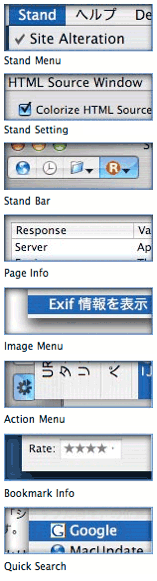
		<description><![CDATA[<p class="BigFirst">The title of this <img src="http://www.musingsfrommars.org/images/safaristand1.png" alt="Many plugins built into SafariStand" title="Many plugins built into SafariStand" width="157" height="581" style="margin-bottom:10px;margin-left:10px;float:right;"/>article is deliberately provocative: I don't know the answer to the question, and I don't really care.  But having been there with Firefox many times, all I can say is that Safari plugins like <a href="http://hetima.com/safari/stand-e.html">SafariStand</a> make me grateful that I don't have to find out.  I've found it much easier to utilize and keep track of one plugin rather than keeping, say, six or more in sync and up-to-date.</p>
<p>Our culture is generally dominated by a "more is More" attitude, so that the browser with the most plugins is believed <strong>by definition</strong> to be the best horse to bet on.  This is the same argument some Windows users have made for years with respect to their choice of operating system: I want to use the computer that has the most software to choose from.  This argument is proven empty when you actually sit down and compare the quality of Mac software in a given functional category versus that of Windows software (don't take my word for it: Actually do it yourself sometime), and that emptiness carries over to the issue of browser plugins.  Certainly, there are some software categories that you legitimately need access to a Windows PC for.  But if you notice, nearly all such categories cover business, rather than personal, requirements, and they're for very narrow fields of interest indeed.  The only personal software category where the Mac actually lags Windows is gaming, and I predict that the gap in gaming titles won't be nearly so large a year or two from now as it is today.</p>

<p>As far as the supposed dearth of plugins for Safari in comparison with Firefox, SafariStand is an excellent case-in-point.  There are other excellent multifunction Safari plugins (<a href="http://haoli.dnsalias.com/Saft/index.html">Saft</a>, <a href="http://culater.net/software/PithHelmet/PithHelmet.php">PithHelmet</a>, <a href="http://batista.org/extender.html">Safari Extender</a>, for example), but I'm highlighting SafariStand because it's not only great, but also <em>free</em>.  After all, if a Safari user finds they are starting to <em>buy</em> plugins, they really should consider paying for a browser that has dozens of plugins already built in, like <a href="http://www.omnigroup.com/applications/omniweb/">OmniWeb</a>.  Being the cheapskate I am, I like free things, and SafariStand is one of my favorite freebies for Safari.  Besides, most Firefox plugins are free, so it seems only fair to restrict this plugins conversation to those that Safari users can add without paying extra.</p>

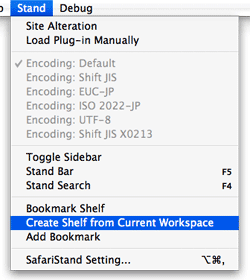
<p><img src="/images/safaristandmenu.png" height="280" width="250" border="0"  alt="SafariStand Main Menu" title="SafariStand Main Menu" style="float:right;margin-left:10px" class="reflect rheight25" />In this article, I'm going to focus on just a couple of the best bits from the latest SafariStand beta, which are just too wonderful to remain obscure from the Safari-loving hordes.  But very briefly, here is a list of the main functions that SafariStand adds to Safari.  To gather these functions into Firefox would require the gathering of a half-dozen or more separate plugins, each of which would have to be authorized and kept up to date, etc.</p>
<ol><li>Option to restore your last workspace, or any of the pages you had open, on launch.</li><li>Add sidebar with thumbnail tabs.</li><li>Customize search engines available in the standard Google search form.</li><li>Automate "find" function without having to type Cmd-F.</li><li>Add color labels to your bookmarks.</li><li>Enable site alteration, customizing allowable plugins, images, JavaScript, style sheets, and more for any website.</li><li>Colorize the HTML source window, and make it editable.</li><li>Reorder tabs in a window (this is a native feature of Firefox and will be one in Safari 3.0).</li><li>Use the "Stand Bar", a floating palette with searchable bookmarks and history, as well as customizable SafariStand folders and RSS feeds.</li><li>Configure your "Bookmark Shelf," a floating palette that lets you build and access saved "workspaces," which are lists of sites you open up in a browser session and want to save for later use.</li><li>Access one of the best "Page Info" stores now available for any browser.</li><li>For any site you're visiting, easily see a list of all the cookies the site has set, examine their contents, and/or delete one or more of them.</li></ol>]]></description>
		<wfw:commentRss>http://www.musingsfrommars.org/2006/10/how-many-firefox-extensions-does-it-take-to-make-one-safaristand.html/feed</wfw:commentRss>
		</item>
		<item>
		<title>Desktop Picture Imperium: A Widget for Controlling Your Desktop Pics</title>
		<link>http://www.musingsfrommars.org/2006/10/desktop-picture-imperium-a-widget-for-controlling-your-desktop-pics.html</link>
		<comments>http://www.musingsfrommars.org/2006/10/desktop-picture-imperium-a-widget-for-controlling-your-desktop-pics.html#comments</comments>
		<pubDate>Mon, 23 Oct 2006 03:05:38 +0000</pubDate>
		<dc:creator>admin</dc:creator>
		
		<category><![CDATA[Innovation]]></category>

		<category><![CDATA[Software Addict]]></category>

		<category><![CDATA[Widgets]]></category>

		<category><![CDATA[Freeware]]></category>

		<category><![CDATA[Recommended]]></category>

		<guid isPermaLink="false">http://www.musingsfrommars.org/2006/10/desktop-picture-imperium-a-widget-for-controlling-your-desktop-pics.html</guid>
		<description><![CDATA[]]></description>
		<wfw:commentRss>http://www.musingsfrommars.org/2006/10/desktop-picture-imperium-a-widget-for-controlling-your-desktop-pics.html/feed</wfw:commentRss>
		</item>
		<item>
		<title>Google Chief Praises Apple&#8217;s &#8220;Most Remarkable&#8221; Resurgence</title>
		<link>http://www.musingsfrommars.org/2006/10/google-chief-praises-apples-most-remarkable-resurgence.html</link>
		<comments>http://www.musingsfrommars.org/2006/10/google-chief-praises-apples-most-remarkable-resurgence.html#comments</comments>
		<pubDate>Thu, 05 Oct 2006 00:15:34 +0000</pubDate>
		<dc:creator>admin</dc:creator>
		
		<category><![CDATA[Apple]]></category>

		<category><![CDATA[Innovation]]></category>

		<category><![CDATA[Google]]></category>

		<category><![CDATA[News]]></category>

		<guid isPermaLink="false">http://www.musingsfrommars.org/2006/10/google-chief-praises-apples-most-remarkable-resurgence.html</guid>
		<description><![CDATA[]]></description>
		<wfw:commentRss>http://www.musingsfrommars.org/2006/10/google-chief-praises-apples-most-remarkable-resurgence.html/feed</wfw:commentRss>
		</item>
		<item>
		<title>Three New Safari 3.0 Tricks Are Producing Leopard Lust</title>
		<link>http://www.musingsfrommars.org/2006/10/three-new-safari-30-tricks-are-producing-leopard-lust.html</link>
		<comments>http://www.musingsfrommars.org/2006/10/three-new-safari-30-tricks-are-producing-leopard-lust.html#comments</comments>
		<pubDate>Wed, 04 Oct 2006 03:32:29 +0000</pubDate>
		<dc:creator>admin</dc:creator>
		
		<category><![CDATA[Apple]]></category>

		<category><![CDATA[Innovation]]></category>

		<category><![CDATA[Mac OS X]]></category>

		<category><![CDATA[Safari & WebKit]]></category>

		<category><![CDATA[Usability]]></category>

		<category><![CDATA[Web Browsers]]></category>

		<category><![CDATA[Articles]]></category>

		<guid isPermaLink="false">http://www.musingsfrommars.org/2006/10/three-new-safari-30-tricks-are-producing-leopard-lust.html</guid>
		<description><![CDATA[<p class="BigFirst">You've heard about one or two of them, and you may even have seen a YouTube video of Safari 3.0's tab tricks.  But let me tell you, as part of my <a href="http://www.musingsfrommars.org/building-leopard/">Building Leopard</a> project, discovering Safari 3.0 has left me with an insatiable desire to work in Leopard full-time.  There are three standout features that I really miss when I "degrade gracefully" to other modern web browsers on my Mac---and that includes Firefox 2.0x, Opera 9.x, and Safari 2.x as my regular web companions.  
</p><p>Even though Firefox has enough cool extensions to keep a software addict fed from now until next year, none of them match the upcoming features Apple has cooked up for Safari 3.0 in Mac OS X 10.5 ("Leopard").  Likewise, Opera and its talented development team is going to be left behind the curve for awhile, as are better-than-Safari wannabes like Shiira and OmniWeb on the Mac.  (It took Microsoft 5 years to add tabs to its browser, and from the way they've implemented them, I still don't think they quite get it.  So, no, I'm not expecting any innovative new ideas in web  browsing from Redmond any time soon.)
</p><p>Ok, with a buildup like that, I can hear you Safari naysayers out there beginning to clear your throats in preparation for throwing out some canned  dissults about Safari.  Save 'em.  
</p><p>I'm not sharing these in order to put down anybody else's browser of choice (well, IE is so far down it's hard to do anything else!), and I'm not suggesting they are going to revolutionize web browsing, even remotely.  The ideas Apple has implemented are not so unique that the company should have taken out patents or anything.  Rather, these are incremental innovations of the sort that keep the art of web browsing moving forward.  It's ideas like these that could potentially jog the minds of other creative programmers, who will then go off and imagine some other cool new enhancements for Firefox or Opera or Shiira or OmniWeb.
</p><p>In the end, it's all good for web surfers like you and me.  (Hey! Are humans and martians who browse the web "web browsers"?  If so, when do we get new features?)
</p>]]></description>
		<wfw:commentRss>http://www.musingsfrommars.org/2006/10/three-new-safari-30-tricks-are-producing-leopard-lust.html/feed</wfw:commentRss>
		</item>
		<item>
		<title>Tom Yager in MacWorld: An Apple for the enterprise?</title>
		<link>http://www.musingsfrommars.org/2006/09/tom-yager-in-macworld-an-apple-for-the-enterprise.html</link>
		<comments>http://www.musingsfrommars.org/2006/09/tom-yager-in-macworld-an-apple-for-the-enterprise.html#comments</comments>
		<pubDate>Sun, 24 Sep 2006 18:44:07 +0000</pubDate>
		<dc:creator>admin</dc:creator>
		
		<category><![CDATA[Apple]]></category>

		<category><![CDATA[FUD Propaganda]]></category>

		<category><![CDATA[Innovation]]></category>

		<category><![CDATA[Mac OS X]]></category>

		<category><![CDATA[PC Prejudice]]></category>

		<category><![CDATA[Analysis & Opinion]]></category>

		<category><![CDATA[News]]></category>

		<guid isPermaLink="false">http://www.musingsfrommars.org/2006/09/tom-yager-in-macworld-an-apple-for-the-enterprise.html</guid>
		<description><![CDATA[]]></description>
		<wfw:commentRss>http://www.musingsfrommars.org/2006/09/tom-yager-in-macworld-an-apple-for-the-enterprise.html/feed</wfw:commentRss>
		</item>
		<item>
		<title>And Another Thing The Mac Can Do That Windows Can&#8217;t: Remember Your  !*?\&amp;^!*%   PaS$w0rdZ!</title>
		<link>http://www.musingsfrommars.org/2006/09/and-another-thing-the-mac-can-do-that-windows-cant-remember-your-pasw0rdz.html</link>
		<comments>http://www.musingsfrommars.org/2006/09/and-another-thing-the-mac-can-do-that-windows-cant-remember-your-pasw0rdz.html#comments</comments>
		<pubDate>Sat, 23 Sep 2006 20:34:12 +0000</pubDate>
		<dc:creator>admin</dc:creator>
		
		<category><![CDATA[Apple]]></category>

		<category><![CDATA[Innovation]]></category>

		<category><![CDATA[MS Windows]]></category>

		<category><![CDATA[Mac OS X]]></category>

		<category><![CDATA[Macs vs. PCs]]></category>

		<category><![CDATA[Usability]]></category>

		<category><![CDATA[Articles]]></category>

		<category><![CDATA[Securing Content]]></category>

		<guid isPermaLink="false">http://www.musingsfrommars.org/2006/09/and-another-thing-the-mac-can-do-that-windows-cant-remember-your-pasw0rdz.html</guid>
		<description><![CDATA[<img src="http://www.musingsfrommars.org/images/keychainicon.png" height="128" width="128" border="0" alt="Keychain Icon" title="Keychain Icon" style="float:right; border-left:10px;"/><p>
I didn't intend to write this article today... In fact, I'm right in the middle of three others that I want to finish.  However, it just leaped at me from the front page of today's <em>Washington Post</em> Business page, and I couldn't resist. In an article called <a href="http://www.washingtonpost.com/wp-dyn/content/article/2006/09/22/AR2006092201612.html">Access Denied</a>, the writer bemoans the many passwords and PINs and such that the modern, web-connected human must juggle in daily life.  People today have so many passwords to remember, they simply can't, and this undermines the very security the passwords are set up to ensure, since companies will typically allow a shortcut to someone who claims to have forgotten a password---for a bank account, for example.
</p>
<p>
When I forget a password, I launch Keychain Access, which is a surprisingly sophisticated application that I use in a very simple way.  Namely, I enter a search term in the search field, which invokes a live search on the Keychain database and displays matching results below.  Each result shows the username associated with the website or application, so it's easy to find which Key I'm looking for.  Double-clicking on the Key brings up a dialog panel that gives me some management capability on the particular key.  I'm sure this is cool and significant, but I go straight for the "Show password" checkbox.  
</p>]]></description>
		<wfw:commentRss>http://www.musingsfrommars.org/2006/09/and-another-thing-the-mac-can-do-that-windows-cant-remember-your-pasw0rdz.html/feed</wfw:commentRss>
		</item>
	</channel>
</rss>