



News Posts In Category
An Audiophile Listening Room with Apple’s HomePod
Apple's HomePod has been the underdog in the "smart speakers" category since its introduction last year. It's more expensive than the offerings from Google and Amazon, and Siri doesn't seem to be as powerful. I haven't used Alexa or the Google AI assistant, so I can't say what the difference may be. But let me just say that HomePod is a revelation in audio quality, and its "smart" features are more than adequate for my needs. The most surprising aspect of HomePod is that it has finally let me put together an audiophile listening room without taking out a second mortgage!
At its most basic, HomePod is a smart speaker with Siri built in and truly gifted sound quality. It's a breeze to set up... you just use your iPhone to pair and copy settings, which takes about a minute. My first use was to add some smart light bulbs to the house, and with Apple's HomeKit app on the iPhone that's a simple matter too. To activate a new device, you just scan an icon on the packaging and then assign it to a "room" in your house. (In HomeKit, you can set up rooms and "scenes" for your devices.) Once set up, it's a simple matter to say "Hey Siri" and then turn on or off a given bulb. HomeKit also makes automation simple, so you can easily have lights come on and off at different times of the day. With scenes, you can automate multiple devices with a single command. For example, when I go to bed, I say, "Hey Siri, Goodnight," and Siri turns off the basement family room light and the foyer light.
I also subscribed to Apple Music as part of my movement to the HomePod, and I've thoroughly enjoyed being able to listen to any given album by voice command. Of course, HomePods are also AirPlay speakers, so you can easily play music to them from your iPhone, iTunes, or other devices. It's simple to play to multiple HomePods at once, and Siri can move the music from room to room by voice command if you so choose.
But the most surprising aspect of HomePod has been its audiophile sound quality. Even bass response is great, which is amazing given the small size of these speakers.
I got a new HomePod for Christmas (I already had two) and decided to put it in the living room. It sounded so wonderful I decided to buy another one and set them up as a stereo pair. That's when the true value of these little speakers became clear.
With two HomePods now in my living room, I finally have achieved an audiophile listening environment at a truly reasonable price. The two little speakers pump out amazing sound, and they only cost me about $700. To replicate a listening environment with traditional high-fidelity speakers would cost at least $2,000, because you need not only the speakers (minimum: $1,000), but also you would need a receiver/amplifier and some components to get music into the system: A CD player or turntable, for example. On top of that, you would need some place in the living room to house the speakers (much larger than HomePods) as well as the stereo components... and that means another piece of furniture as well as considerably more space than my current setup requires.
With my paired HomePods, I just need to plug them into the wall and put them on a shelf. And voila! Instant audiophile listening without all the other setup headaches and at a much lower cost.
And I love the fact that the speakers have Siri built in, which means I can raise or lower the volume by voice, get information on what's playing, skip a song, or repeat... all by simply asking Siri.
The HomePod's audio quality is more than just a differentiating factor when you compare it to Google and Amazon speakers. It truly is great enough to compete with high-end speakers costing much more, and you can easily set up a listening environment that will tickle the ears of even the pickiest audiophile. A surprising punch for such a tiny device.


Crystal Black for iTunes
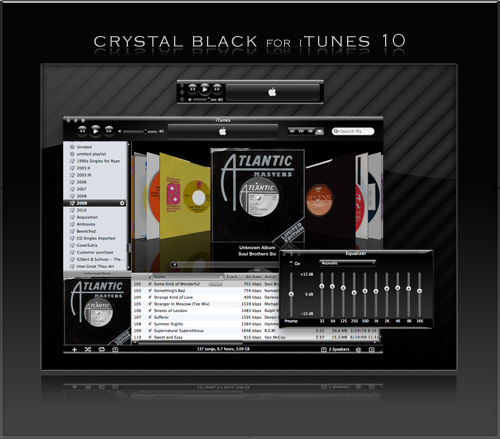
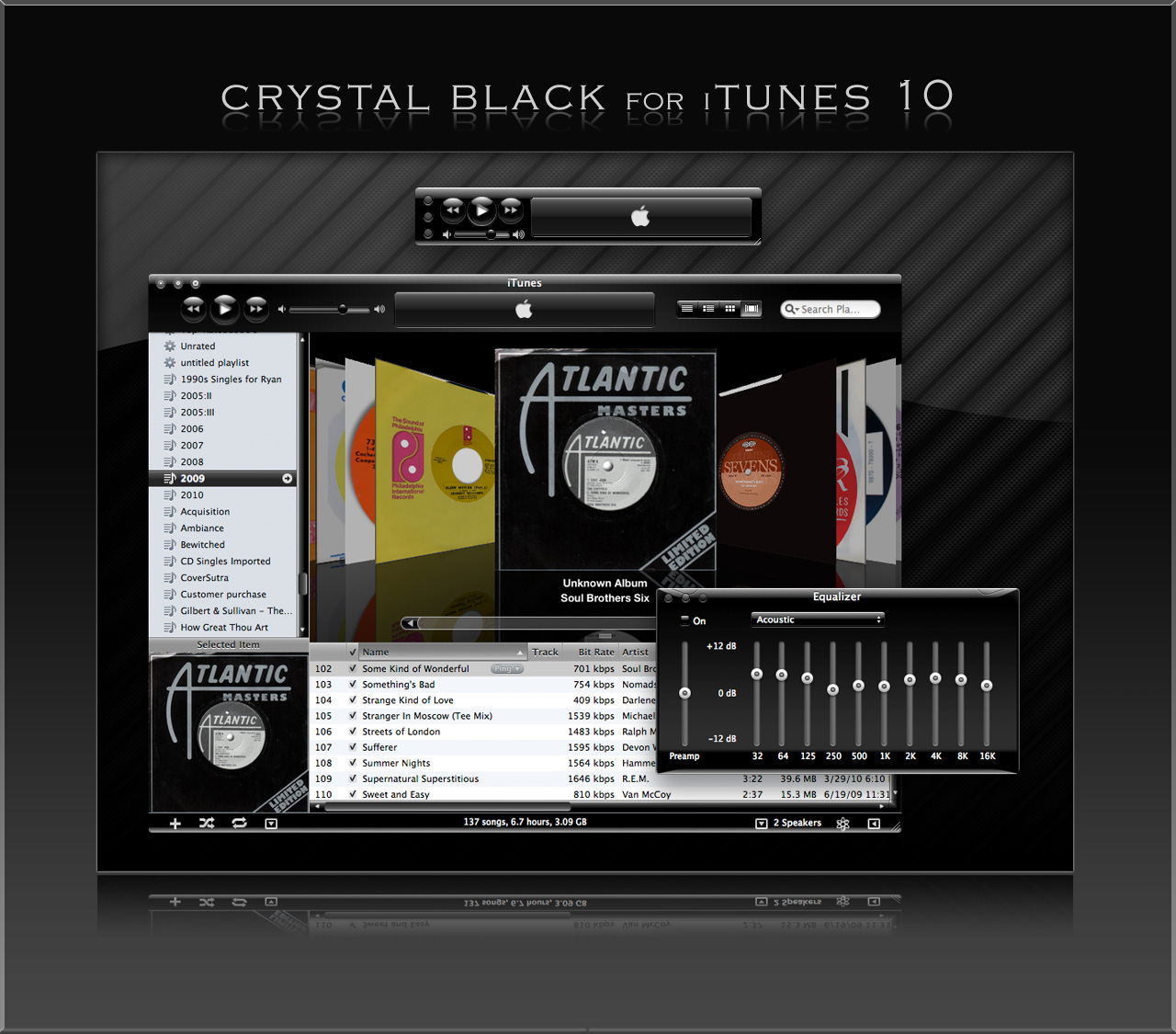
Last fall, I released an early version of Crystal Black for iTunes 10.1 on my deviantART site and have updated it once or twice since then. This post announces an update of the theme for iTunes 10.1.2 and adds a couple of minor enhancements for 10.1.1.
Crystal Black is a theme for Mac OS X "Snow Leopard" that I'm still refining and plan to release eventually. I published a preview of the theme last fall, and also migrated the theme to iTunes 10 when it came out. Since theming iTunes is 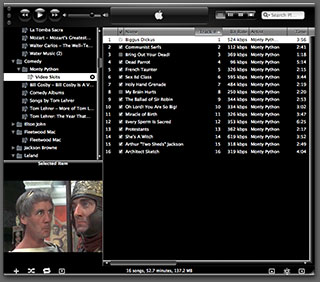 quite a bit easier than theming the entire operating system, I decided to release Crystal Black for iTunes first.
This version of Crystal Black for iTunes continues to improve its usability when iTunes is set with the hidden "High Contrast Mode" option. High Contrast Mode effectively inverts white and black in the iTunes sidebar and playlist contents (see screenshot at right), and looks great with Crystal Black. The high-contrast option is accessible through various utilities you can download to customize "hidden" features of Mac OS X. I use and recommend the free, open-source Secrets for such customizing. Secrets installs an easy-to-use and auto-updated Preference Pane and includes hidden options for a wide variety of third-party apps, in addition to Mac OS X.
One more application-specific Crystal Black theme I plan to release soon will be of interest primarily to web developers: It's a theme for Safari's Web Inspector module. Stay posted for more on that, and for more about Crystal Black as a whole.
Update 4/18/11: The full Crystal Black 1.0 theme is now available from the Crystal Black website.
Installing Crystal Black for iTunes
The download contains a little application that installs the Crystal Black theme for iTunes. To install, simply double-click the application and select "Install." You can also use the app to restore the default iTunes theme. To restore, double-click the app and select “Uninstall.” You will need to authenticate as the admin user to make these changes
After installing or uninstalling the theme, you'll need to quit and restart iTunes for the theme to take effect.
Crystal Black for iTunes (Download file is 24.2MB)
New Zunes Killing Themselves In Droves
Even for those of us who have long maintained that Microsoft products are second-rate (or, in some cases, third), this is surprising news. Still, as a rational Martian I can't imagine why anyone except, perhaps, Microsoft's desperate shareholders, would think Microsoft--a maker of buggy software--could build a reliable music player. Maybe it's their success with the XBox... ?
An Intimate Evening With Two Dozen iTunes Controllers
In other iTunes controller news, I’ve now evaluated CoverSutra and am pleased to recommend it as well (see information in the table below). I still haven’t revisited iTunes Volume, which gave me trouble every time I tried it earlier in the year, but I will eventually.
One question that might pop into your head when you contemplate the fact that there are at least two dozen different software applications for Mac OS X that want to be your iTunes controller is, “So, why not just use iTunes to control iTunes?” If you’ve never used iTunes before, you might also be wondering, “What’s wrong with iTunes that makes so many people avoid using it directly?”
This is indeed a curious paradox at first blush. iTunes is the world’s most popular digital music jukebox software. It has a screaming wonderful interface that just gets better with each iteration. Its innovative design practically defines “ease of use” in this category. So, why have so many developers expended so much energy and creative imagination on redefining how we interact with it?
There isn’t just one answer to that question, but here are a few possible ones:
- Mac users are too impatient to switch applications in order to change songs. They want an application that can overlay whatever they’re currently doing, providing immediate access. Call this a variation of the “Instant gratification” impulse.
- Because the iTunes API makes building external interfaces to it so easy. You often get the impression that some iTunes controllers are their developers’ first foray into xCode and/or Cocoa programming. Call this a variation of the “Because we can” impulse.
- Because a programmer had a new idea that was too cool to pass on. Either the idea was really new, or it was building on someone else’s idea. Some of the iTunes controllers are clearly attempts to improve other ones that already exist. Call this simply the “Urge to create.”
Notice that none of these possible motives is an attempt to remedy a shortcoming in iTunes, or even to add significant functionality to the application. The only thing that comes close is the addition of tools to fetch album art from the web, or to integrate with a social music networking system like Audioscrobbler. Instead, they’re simply tools that extend the iTunes interface into every aspect of a Mac user’s workflow… making it practically ubiquitous as we work.
A couple of weeks ago, I set out to survey the market to identify all of the iTunes controllers that are currently supported. (There are still old links to some phantom controllers on MacUpdate, but I won’t tell you which.) Having found 24 of them, I clearly don’t have the time to prepare a full snapshot of each as I’ve done for other software categories recently. In order to keep this workload sane for me, I have to skinny it down to the basics–my notes, a link, price info, a version number, and a recommendation.
Of the total options, 15 are freeware. This puts a pretty high standard on any app that wants you to actually pay for its services, and 9 of them attempt to go there. Two of the shareware options are choices from the “Launcher” category… these are tools that include an iTunes controller among their many other features, so they aren’t selling themselves simply on their iTunes chops. That leaves seven that do want your money, and I was curious to see how tempted they would make me.
Of the freeware options, one is iTunes itself, which provides a fully functional mini-controller that you can keep nearby at all times. The rest run the gamut from the launcher category to minimalist menubar controller, many of which are very much alike, but a few of which show incredible breadth and ingenuity.
With so many to choose from, I still had little difficulty identifying the ones I would pick for myself, and my notes on pros and cons probably explains the choices. In everyday use right now, I use a combination of an option that isn’t even on the list and Quicksilver. The missing option is simply AppleScript. You can use AppleScript scripts to do just about anything you want to in iTunes. Many moons ago, I got a set of scripts (from Apple, I think, or from Doug’s Scripts for iTunes) and assigned keyboard shortcuts to them in iKey. Now, my fingers automatically go to:
- Cmd-Ctrl-Space to Play/Pause
- Cmd-Ctrl-Right Arrow to Play Next
- Cmd-Ctrl-Left Arrow to Play Previous
- Cmd-Ctrl-5 to Rate 5 Stars (etc.)
And that pretty much sums up the extent of what I need to do with iTunes from other apps. These are great, because they don’t launch any other app, yet magically exert my will over my music. Aside from those shortcuts, I use Quicksilver to search my iTunes library. This is quick and easy, as others have documented well in the past… Here’s Blacktree’s page describing the iTunes plugin for Quicksilver.
Outside of this, I was very impressed with a few of the shareware and freeware products and am considering incorporating them into my desktop. Here’s my short list of the creme de la creme:
 Menuet. (
$12.95now free) Part of the appeal here is Specere’s bundling of its splendid Art Collector app for the price of the equally delightful Menuet. It’s simply the best tool for collecting and managing your album art collection I’ve yet seen. You Control Tunes. (Free) Many people overlook this one because it seems like merely an invitation to buy the company’s other products. I’m no fan of You Control in general, but their free iTunes controller is simply the best all-around tool available, and it’s free. The only thing it lacks, in my opinion, is an API for developing your own skins, and a search function (a common deficiency in most of these tools). But it still has plenty of nice skins, if none that quite match the best of Synergy’s or Menuet’s.
 ClawMenu. ($19.95) ClawMenu is a frequently overlooked star performer in the Launcher category, but its joys are many and deep. As an iTunes controller, I find ClawMenu beats most of the competition… certainly, it’s far better than the functions in the similarly priced Launchbar and the free Butler. I might not buy ClawMenu just for its iTunes abilities, but they’re definitely worth writing home about.
 Quicksilver. (Free) Nuff said already. It’s free, so just get it and get to know it. You won’t be sorry.
 CoverSutra. ($14.95) A beautiful, unobtrusive controller with some nice extras like Apple Remote support. It doesn’t have great iTunes integration like the others, but what really snagged me (a die-hard 45 rpm vinyl collector) was its cool Laurent Baumann-designed 45 record sleeve, an option to the default CD jewel case, for displaying song artwork.
There were two tools that I categorized as a “Maybe,” meaning I still haven’t decided whether I’d actually use them, partly because they have a fairly narrow scope in the iTunes controller world. But I think they’re both pretty cool at what they do.
 Barquee. ($10) Barquee is the only menubar controller I’ve seen whose in-bar scroller is visually bearable. In fact, the more I live with Barquee, the more I like it. Plus, Barquee has a simple API for developing your own skins, which lets you incorporate them seamlessly into any Mac OS X theme you may be using. Plus it comes with a beginning inventory of some really nice ones. Still, it’s not something I really need.
 Krix. (Free) Krix is less an iTunes controller than an alternative iTunes interface. Still, this open-source project is coming up with some really cool ideas, and it does one thing iTunes doesn’t: Let you browse your music files outside of the rigid structure of iTunes. Yet, it does this while still leverage meta data about the files that you’ve stored in iTunes. Pretty cool! It’s a maybe at this point, because I’ve found Krix a little too unstable for regular use.
.
Then, there are a couple of tools that are in development or in planning but aren’t really in a state that even lends itself to review at this point. But they’re worth keeping an eye on for the future:
- Synergy Advance. ($12.95) From the developer of the classic Synergy iTunes controller, this “next generation” Synergy still has too much “planned” functionality missing to fully evaluate it.
- Radion. (Free for now) In limbo for a long time, Radion had a lot of good ideas. The current version (1.2), if you can find it, clearly shows the lack of attention to details, but the developer recently launched a new website with a promise for a new version of Radion by the end of 2006.
 Finally, it would hardly be a complete review of iTunes controllers without mentioning the many Dashboard widgets that can help you out with iTunes. There are way too many to list here—especially since I haven’t reviewed most of them lately—but my all-time favorite is Symphonic, which uses a simple search field to do more than you’d suspect. If you try Symphonic, be sure to check out the Help page, which explains all
  the commands you can use to fine-tune your iTunes control. The same developer has a companion widget called Harmonic that downloads song lyrics and adds them to iTunes as you play them. If you’d like a controller that can help you find and add album art to your collection, my favorite is Album Art Widget.
  It not only does album art, but includes controls for rating your tunes and for basic play/pause/previous/forward commands (even with keyboard shortcuts). But that’s just scratching the surface… Apple’s widget repository lists 118 widgets in the “Music” category, and most of those interact with iTunes in one way or another.
Now, without further ado, here’s the list:
| Name | Pros | Cons |
| Barquee (Version 1.2, $10) |
|
|
| Butler (Version 4.1.2, Free) |
|
|
| ByteController (Version 0.8.5, Free) |
|
|
 ClawMenu ClawMenu(Version 2.6.3, $20) |
|
|
| CoverSutra (Version 1.1.6, $15) |
|
|
| GimmeSomeTune (Version 2.6, Free) |
|
|
| iController (Version 0.5b, Free) |
|
|
| iMote (Version 2.2.1, Free) |
|
|
| iTunes Manager (Version 2, Free) |
|
|
| Ivy (Illis) (Version 1.0 rc2, Free) |
|
|
| Krix (Version v16, Free) |
|
|
| Launchbar (Version 4.2 b1, $20) |
|
|
| Maestro (Version 1.2.3, Free) |
|
|
| Menuet (with Art Collector) (Version 1.1 b2, |
|
|
| Play MiniTunes(Version 1.2, Free) |
|
|
| Quicksilver (Version b51, Free) |
|
|
| QuickTunes (Version 2, Free) |
|
|
| Radion (Version 1.2, Free) |
|
|
| SizzlingKeys (Version 3.0.7, $5) |
|
|
| Synergy Classic (Version 3.1 b2, $7) |
|
|
| Synergy/Advance (Version 0.4, $13) |
|
|
| TuneHound (Version 1.1, $10) |
|
|
| TuneX (Version 2.5, $12) |
|
|
| YouControl Tunes (Version 1.4.1, Free) |
|
|
Analyst Says Apple TV Could Overtake both TiVo and Netflix
DasBoot: Freeware Utility To Turn An Old iPod Into Bootable Mac First-Aid Tool
 Originally downloaded March 3, 2007. The design of this website is so, um, PC-like that I hesitate to even download one of their products. However, the concept behind DasBoot is one that's intrigued me lately. Micromat, the makers of TechTool Pro and other hits, have come out with a similar piece of software called Protogo , which is a software-only version of a hardware product they'd already started selling. But if DasBoot can do the important half of what Protogo does em:for free, I'm sold! I figure I definitely want to try DasBoot before shelling out $135 for Protogo...
  With DasBoot, you basically turn an old iPod into a bootable Mac, on which you can then install whatever diagnostic utilities you already own... like TechTool Pro, DiskWarrior, Drive Genius, and the like.
Version as tested: 1.0.2.
CoverSutra: A New, Elegant iTunes Controller Debuts
CoverSutra: Learn To Love Your Music
 Originally downloaded March 3, 2007. As my recent article on the subject clearly demonstrated, the Mac market doesn’t lack for useful iTunes controller tools. Yet here’s a new one that’s striving to reinvent the genre. CoverSutra includes the basic functionality, but tries to do it with uncommon style. It also has built-in support for Last.fm, and can be controlled with an Apple Remote. You know I’ve gotta try this one!
Version as tested: 1.1.
Maestro: Music File Sharing Is Back!
 Originally downloaded February 20, 2007. If I'm reading the Maestro website correctly, this software provides a way for any users who are running Maestro to share song files across a network. Apple disabled this ability in iTunes fairly quickly after the iTunes store opened, and now all we can do is listen to others' files. Maestro runs its own client and can only communicate with other Maestro clients. It supports scheduling and playlist subscriptions, which is pretty cool. For a family, the price is definitely right: $8.95 gets you three licenses, which is probably enough for most. It uses Bonjour to discover other Maestro clients, even outside the local network. I'll give it a try and see how well it works and if anyone actually uses it.
Version as tested: 1.0.
Update 9/11/12. This software is no longer in development or supported.
Tangerine!: Smart Playlist Maker Can Set The Right Mood
 Originally downloaded February 4, 2007. From the creative Mac developers who brought us Voice Candy and Podcast Maker comes this recent addition, which apparently gets your music from iTunes, analyzes it, and creates playlist that match certain criteria you specify. For example, it can do dance tapes like nobody's business, since it can analyze beats-per-minute and get the timing just right. As the site says, perfect for workouts! Presumably it can also do candlelight dinner moods with your new date... This I've gotta try! Of course, at $25, it's an expensive course for dessert...
Version as tested: 1.1.
youPod: Make Your iPod Your Home Folder
 Originally downloaded January 23, 2007. youPod has been out for quite awhile now, and unfortunately hasn't been updated lately. Still, the idea is sound, and the implementation appears to be easy and intuitive. With youPod, you can take your addresses, keychain, bookmarks, calendar, music, and (I think) mail with you. When you plug your iPod into another computer, you can switch your stuff in and out of the stuff on the other computer using the youPod menubar tools. Yes, if you have .Mac you can get most of this anyway (though not the music part), but on someone else's computer getting to your .Mac stuff can take some setup (as well as your own account). At $12.95, youPod seems like it's worth a try.
Version as tested: 1.2.2.
The Ultimate iPhone FAQ’s from David Pogue
iPhone: OK, I’m Impressed… Now Gimme The Goods!
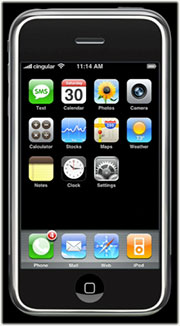 In these jaded times, it's hard to impress people. But I sincerely doubt that even the most ardent Apple-haters will be able to look at these demos of the new iPhone by Apple, Inc. (yes, they just dropped "computer" from their name!) without giving in to awe... pure, marvelous awe. If the delivered product is half as good as it looks, I'll be standing in line for one, because it so far exceeds my expectations that I'm really, really... impressed! The iPhone is a misnomer, because this is the "convergent" product the market has been anticipating for years. The iPhone is:
- A widescreen iPod for video and audio, synked through iTunes
- A mobile phone (yawn) with integrated camera, voicemail and photo sharing
- A web browser (Safari), including email, Google maps, search, and widgets
- A technological marvel, featuring a new "multitouch" touchscreen system (no buttons), an embedded copy of Mac OS X, wireless computing (bluetooth, 802.11b/g, and Cingular's Edge network, and sophisticated new sensors that do a heckuva lotta cool things just by moving the device around.
Did I mention it comes with a Bluetooth headset?
Help! I can't wait until June!
Mogopop: New Web 2.0 Publishing Tool for iPod
 This looks like a really cool Web 2.0-style application, designed specifically for the iPod. Mogopop provides a small application for Mac OS X and Windows users, which manages the installation of Mogopop content (and removal), which you can browse and download from the Mogopop website. Content appears to run the gamut of simple text to complex multimedia presentations with linked images, movies, and sound. In some ways, Mogopop is like some iPod notes creation tools, except that the content builder is part of the Mogopop website. Using the “Publish” part of the site, you can sign up for a 50MB space to create your multimedia masterpiece, which any user can then find and download to their iPod. To understand what’s really going on with Mogopop, I recommend checking out the excellent, short screencast. I’m looking forward to making some Mogopop content myself here soon!
Songbird: Cool New Web-Savvy Media Player Taking Flight
 Originally downloaded 1/2/07. I just finished watching the excellent screencast for Songbird, and I have to admit, I'm excited about this little birdie. Songbird goes beyond iTunes by basically building the media player on top of its built-in web browser (which uses the Gecko engine from Mozilla). You can see playlists built on web pages you browse, if they have media files linked to them, and Songbird plays the files as if they were already on your hard drive. On top of that, Songbird has a search engine optimized for music searches, and you can of course easily subscribe to podcasts you encounter while browsing. Songbird also does video files similar to the way Democracy handles them. To top it off, Songbird has a plug-in architecture that supports skins (Songbird calls them "feathers"), as well as extensions a la Firefox. Oh, and when I first ran Songbird, it found my iTunes library and offered to import it! I don't think I'm ready to start using it as a replacement for iTunes yet, though... one of the big questions about such a move, of course, would be how well (if at all) it can sync with my iPod. In any case, this open source project, still in its infancy, looks very promising indeed!
Version as tested: 0.2.1.
iTunes Volume: An iTunes Controller That’s Louder Than It Appears
 Originally downloaded 12/31/06. Like many other potential users, I admit that I was deceived by the name of this software into thinking it wouldn't be worth a download. Having just played with it for 5 minutes, however, I can assure it that it's worth a look if you're interested in seeing the latest ideas developers are coming up with for iTunes controllers. iTunes Volume has a myriad of cool visual and functional preferences for the volume slider, which also has a rating button, and for the separate iTunes art and info windows. A contextual menu also gives access to a sleep timer control, and you can set the software to speak song info when the song changes. On top of all this, it turns out that the controller art can be customized. iTunes Volume comes with 5 different "skins" for the slider, as well as sixth you can download that has instructions on building your own! I'm definitely going to play with this freeware for awhile to see if it becomes an irresistable item on my desktop.
Version as tested: 8.4.5.
PodStat: MenuBar Item for Your iPod
 Originally downloaded 2/20/06. There are a slew of apps for getting content off your iPod and into iTunes, but this is the first I’ve seen that puts the iPod in your menubar. You can not only copy files to your computer with it, but you can navigate your iPod and play the music on it from here. Worth a try for $10.
Update 12/17/06. Well, I couldn’t run the trial of Podstat because it kept crashing shortly after launch. The Podstat icon would show up briefly in my menubar and then promptly disappear with a crash report error message. I tried the software first in my usual account and then in a “clean” test account, to make sure it wasn’t a software conflict problem. However, I got the same error in the “clean” account. It looks like the software hasn’t been updated since 2003, which is probably why it’s broken in Tiger. I wrote to the developer, letting them know of this problem. I also pointed out that they don’t have anything on the Podstat page about compatibility and suggested they should add a notice. In case they want to try to fix the problem, I sent a copy of the crash report.
Podstat still looks like a very cool utility to me, and I’m not aware of any other app that does quite what it does. Podstat would give you access to your iTunes playlists and music without even having iTunes running, and you could also use it to copy files from the iPod to folders on your hard drive. Maybe someday it’ll be fixed, but in the meantime, it’s going in the reject bin.
Version as tested: 1.0.
MPFreaker: More Control of Your MP3 Tags, Lyrics, and Artwork
 Originally downloaded 12/12/06. Recent switchers to the Mac seem to bemoan the lack of a really good MP3 tag editor... at least, it's a comment I see a lot in software commentary lately. I honestly think iTunes is about as good as I need... it's a great tag manager, as I've come to realize. However, I'm willing to try others out (and I have), and MPFreaker is a new entrant on the scene, emphasizing your ability to add artwork and lyrics and to edit those in place. For $20, it certainly needs to add some value to iTunes to be worthwhile...
Version as tested: 1.6.
krix: A visual music browser for Mac OS X
krix: An open-source, visual music browser
 Originally downloaded 9/16/06. What a great home page! SourceForge was way too busy the other day when I tried to download krix, but it popped right up today. If the software is half as good as the homepage design, I’m clearly in for a treat. Of course, how this compares with CoverFlow, which Apple recently integrated into iTunes 7, remains to be seen. Krix uses information from iTunes, but generates its own icons for faster browsing. It’s still in pre-alpha stage, so it’s too early to tell if krix is here for the long-haul or not.
Update 12/5/06. Over the last few months, Krix has gotten steadily better, and the developer releases new versions several times a month. It’s still pretty buggy, and I sent the developer an email tonight with a question about why Krix can’t seem to load my iTunes library. (I speculated it has something to do with the symbolic links I use, but that may be way off base.) However, Krix does a fine job loading music folders from my hard drive, and I guess it’s able to read the ID3 tags I’m adding to the music files in iTunes since it knows artist names, finds song art, etc.
Even though Krix still has a ways to go, I’m adding it to my recommended list because it’s so screamin’ cool! The screenshot below shows Krix in its “window” mode, but it’s also great running full screen. If you have an Apple remote, you can opt to control Krix using that. (I haven’t tested that yet.) Once I’m able to load my iTunes library, I’ll have a better idea of whether I’ll be using Krix regularly as an iTunes/music controller.

For a full review of all current iTunes controllers, see my December 2006 article, “An Intimate Evening With Two Dozen iTunes Controllers“.
Version as tested: 16
GimmeSomeTune: Highly Rated iTunes Freeware Fails To Impress
GimmeSomeTune: You will never want to use iTunes without it again
 Originally downloaded 8/1/06. Man, there are so many iTunes assistants out there it boggles the mind! And I’m just talking about the Mac OS X variety… there must be oodles for Windows, too. This one is on version 2.0 and has a slew of preference panes that let you control display of a floating window of info, configure hot keys for controlling iTunes, support iChat, fetch and display cover art, and display lyrics saved in iTunes.
Update 12/4/06. I honestly couldn’t find much that distinguishes GimmeSomeTune over some of the better freeware iTunes controllers, and it had a number of usability problems as well. For a full review of all current iTunes controllers, see my December 2006 article, “An Intimate Evening With Two Dozen iTunes Controllers“.
Version as tested: 2.6.
Ivy: Yet Another iTunes Controller, With Search
 Originally downloaded 11/11/06. No, we don’t really need another iTunes controller (at least, I don’t… heck, you probably don’t, either). But since Ivy is free, I can’t resist trying it out. Ivy supports Growl and has a quick search field similar to the Symphony widget (I gather) so you can play any song from your iTunes library really quickly.
Update 12/4/06. Ivy’s search feature is definitely its best offering… though ultimately it’s not interesting or useful enough to join my software collection. For a full review of all current iTunes controllers, see my December 2006 article, “An Intimate Evening With Two Dozen iTunes Controllers“.
Version as tested: 1.0.
QuickTunes: Another Cool Freeware iTunes Assistant
QuickTunes: Customize… Listen… Enjoy…
 Originally downloaded 8/1/06. QuickTunes puts your current iTune in the Mac OS X menubar, with all the usual controls one needs for iTunes hiding therein. Recent versions have added a floating window with info about the playing tune, and options for an iTunes announcer a la RadioDays. Hope it doesn’t take up too much room in the menubar, but other than that, looks like some cool ideas here.
Update 12/4/06. QuickTunes has quite a lot to offer, but ultimately isn’t on a par with the best freeware in this “market.” For a full review of all current iTunes controllers, see my December 2006 article, “An Intimate Evening With Two Dozen iTunes Controllers“.
Version as tested: 2.0.
MediaRage: Swiss Army Knife for Your Digital Libraries
 Originally downloaded 11/21/06. I'm not sure why I've never tried this before now... maybe I was put off by the developer's cheesy artwork. Having just gone through a bit of the "intro" tutorial that pops up when you first load MediaRage, I think I may have underestimated the power here. The only question I have now is, how well does it work, and how confusing are all the multilayered tools to work with? Also, how much of a mess can they get your media collection into?
Version as tested: 2.6.1.
iTunes Statistician: Get Data on Your Music Collection
 Originally downloaded 2/12/06. I love statistics! I already use a dashboard widget that does some of this, but for free I’ll give it a spin!
Update 11/20/06. This statistician offers some tantalizing glimpses at your listening habits, but it feels like a half-finished program at this point and hasn’t been updated since February 2006. The main window has only four basic stats: Most played artist, genre, title, and album. For each, you get the top 100, and the only real configuration option you have is whether to weight artist and genre listings by the playcount of the songs in each. The menubar shortcut is nice, but not nearly dynamic enough to justify having around all the time. By this, I mean it measures data for all time, rather than offering a more interesting selection of data by latest day, week or month. On top of this, the software has a really bad icon. :-} I think I’ll stick with the widget.
Version as tested: 1.3.4.
Cast Life: A Stylish “Easy Podcast” Maker
Cast Life Makes Cast Publishing Easy
 Originally downloaded 6/25/06. This looks like the sort of thing Apple would make if they were making a standalone podcast maker. At $10 it’s pretty cheap, but then again, a lot of Mac users already have a good free podcast tool in the latest GarageBand’s “podcast studio.” It’s also clear that the developer is using iWeb to make the Cast Life website! (Aren’t reflections great?)
Update 11/17/06. CastLife is the least expensive option (after freeware) for preparing podcasts on Mac OS X, and it’s a beautiful little $10 app. Despite its rough edges, CastLife is easy and fun to use. For the full scoop on podcasting tools for Mac OS X as of November 2006, check out my latest article, “Ten Ways To Make a Podcast, Plus One.”
Version as tested: 1.4.
Podcaster: Easy Tool for Making Podcasts
Podcaster helps create enhanced podcasts
 Originally downloaded 10/9/06. Podcaster was among the first Podcast creation tools to arrive on the scene in 2005 after podcast support was added to iTunes, but somehow I don’t think it was one I tried out. I never have sorted out all the different podcast tools, and there are several still waiting to be settled on. Might as well have one more.
Update 11/17/06. Podcaster is a decent, well-rounded application for making iTunes-ready podcasts, including “enhanced” ones. However, it didn’t rank among the best in a recent survey of podcasting tools we conducted here on Mars. For the full scoop on podcasting tools as of November 2006, check out “Ten Ways To Make a Podcast, Plus One.”
Version as tested: 1.1.9.
Ten Ways To Make a Podcast, Plus One
In August 2005, I was all pumped up to make my first podcast, and the webosphere was full of great advice, new tools, and lots of encouragement from Mac zines and blogs. I was particularly excited to put together an "enhanced" podcast using the new iTunes extensions Apple had released earlier that summer. With enhanced podcasts, you can embed "chapters" into a single audio file, and mark each chapter with text and images. That way, when the podcast plays in your iPod or in iTunes, the text forms a set of hyperlinks so the user can hop from one part of the podcast to another, while your chapter pictures help set the mood. This was a great new publishing medium, and obviously publishers all around the world were excited to adapt their ideas to it.
The podcast tool market was still in its infancy a year ago, but already there were quite a few choices. There were fewer choices for doing enhanced podcasts, but I had no trouble finding a good piece of freeware for my experiment: ChapterToolMe was awkwardly named but easy to use, and in no time I had a podcast to submit to the iTunes music store.
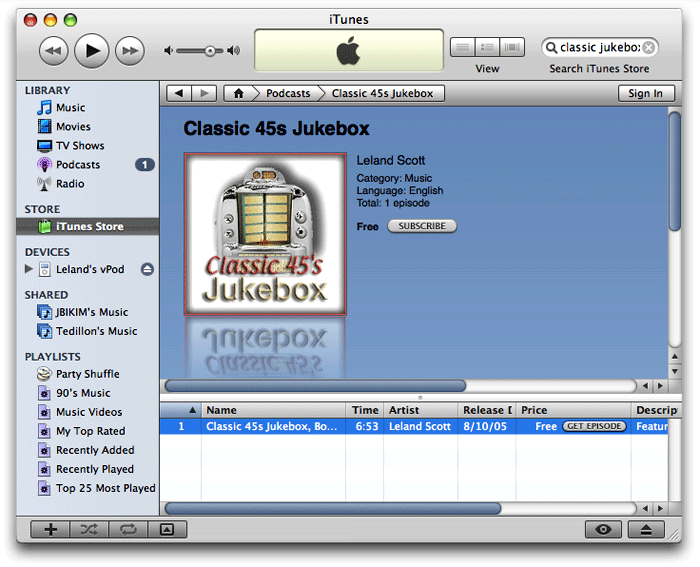
The aim of my podcast experiment was to publish the latest mp3 snippets added to the Classic 45's "Jukebox," and I planned to include a brief, spoken narrative about each 45 rpm record. I used Soundtrack Pro to assemble the audio file, and that was the time-consuming part. Stringing the mp3 bits together didn't take too long, but getting the narrative just right did. After doing one, I decided I simply wouldn't have time to make a series out of this, and my life moved on to other creative endeavors. (To my surprise, I see that my original podcast is still in the iTunes inventory... you can find it by searching for "Classic 45s Jukebox" or perhaps trying this URL.)
In the last year, podcasting has become mainstream, and every organization that was publishing RSS feeds the year before is now getting podcasts out. I haven't honestly subscribed to enough podcasts to know how many publishers are preparing "enhanced" 'casts, but given the continued popularity of iTunes, I assume that format is still quite popular. All the while, the back of my mind has kept returning to the question of doing a podcast with the rich storehouse of music in the Classic 45's Jukebox. After all, I make the mp3's and write the descriptions up already. Since the snippets are only about a minute each, have very low-quality audio, and are typically from recordings that are no longer available commercially, I didn't think copyright issues would be... well, an issue.
A few months ago, I finally sat down and adapted my PHP script that updates the regular RSS feed for Classic 45's to create a new feed just for jukebox items, including an enclosure tag for the mp3 files. Then the project lay dormant until last week, when a possible method of automating the podcast process suddenly hit me.
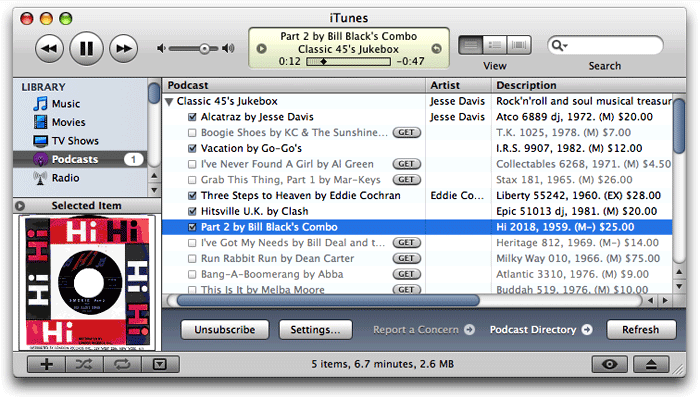 Rather than putting together one big audio file, with recorded narration, and then dividing it into chapters using an enhanced podcast tool, I could just release each mp3 file as a separate episode. Each episode could include the text narration and facts about the record, plus the label or sleeve scan I normally include on the site. I wasn't totally sure this would work, but it seemed worth testing. If it worked, I could release a podcast without eating away up any more of my precious spare time. When I pointed Safari to the mp3 feed I'd made earlier, it loaded the "podcast" right up, displaying the HTML and image content along with a link to the enclosed mp3 file for the last 36 jukebox items. I then went to iTunes and entered the feed URL as a new Podcast subscription, and lo and behold, iTunes also loaded the feed, even providing little
  buttons for subscribers to download each episode they want.
So, the concept seemed sound, and the next step seemed to be a tools review. Was there some cool new application that would help me with the project? Perhaps there were new capabilities of the podcast specification that I could leverage. Thus, the usual sequence of my life played out again: One project led to another!
Somehow, I thought I'd still need the capabilities of Apple's Chapter Tool to embed images or text into the media, so my review would include "enhanced" podcast software as well as "regular" podcast makers. For those who aren't hip to the different kinds of podcasts, it boils down to these three basic kinds:
- Podcasts adhering to the RSS 2.0 specification.
- Podcasts adhering to RSS 2.0 spec plus Apple's iTunes extensions, and
- iTunes podcasts enhanced with Apple's Chapter Tool software.
The first two kinds refer solely to the XML code and content within the RSS file itself. (The main difference between podcasts, vidcasts, etc. and regular RSS feeds is that the 'casts have a media-file "enclosure" that becomes linked content for the feed.) Enhanced podcasts actually have a different kind of enclosure: An MPEG4 AAC file that has embedded meta data, which can include text and/or images. Apple introduced the free Chapter Tool software and this new kind of podcast with the release of iTunes 4.9 in June 2005. (How time flies!)
OK, lesson over...
Besides the ability to create enhanced podcasts and my usual exacting standards for the software's user interface, my ideal Podcast-making tool would have the following virtues:
- Import existing podcast feeds.
- Support for the iTunes RSS extensions.
- Support for the full RSS 2.0 spec.
- A built-in RSS validator.
- Built-in publishing of feeds to FTP/SFTP, Webdav (including .Mac), and local folders.
- Preview for HTML content in episode descriptions.
- Support for editing HTML content
- Ability to play the episode's audio content within the interface.
- Ability to easily add images for the feed and episodes.
- Built-in search for podcast and feed content.
So, what did I find from my podcast tools survey in November 2006? A heckuva lot of great podcasting software---that's what!
Honestly, I don't think I could actually pan any of these tools. There are clearly some shining stars here, but no black holes this time out. I did testing and took notes on the following 10 applications for developing and publishing podcasts on Mac OS X (the "shining stars" are labeled with a checkmark:  ):
):
Once again, I know there are a few knowledgeable readers who are wondering why GarageBand---Apple's own Podcast-making tool---isn't on this list. There are several reasons:
- First, GarageBand isn't primarily intended for making Podcasts---that's just a new feature Apple tacked on to the 2006 version.
- Second, GarageBand was very flaky in the podcast department when I first tried it, starting with the fact that I couldn't get its podcast template to work. Every time I selected "Podcast" from the list of possible projects and enter a name for the project, GarageBand would return me to the "Starting Points" screen to select a project. That got old really fast.
- Third, about the time I figured out I could make an ad-hoc podcast by choosing that track type in any old GarageBand file, I realized that using GarageBand was going to be like Soundtrack Pro all over again. Its idea of a podcast is someone manually piecing together some tracks of music or some narratives and then lovingly massaging it with chapters, text, and images. But I'd decided I didn't have time for that.
- And finally, I realized that GarageBand was missing a key functionality: It couldn't import my remote podcast from its XML feed.
So, although GarageBand clearly doesn't suck for its main intended use, it definitely wouldn't be useful to me in my new podcasting enterprise. GarageBand was the first software I tried, and it just never made it onto my DevonThink spreadsheet. However, as you might notice when looking over the applications I did review, GarageBand would be perfect for someone who does want to make an enhanced podcast and doesn't care about automation and remote XML files. Plus, if you have a new-model Mac or have purchased iLife '06, you already have GarageBand on your hard drive!
For a wrapup and a few notes on lessons learned, see the Addendum.

Cast Life
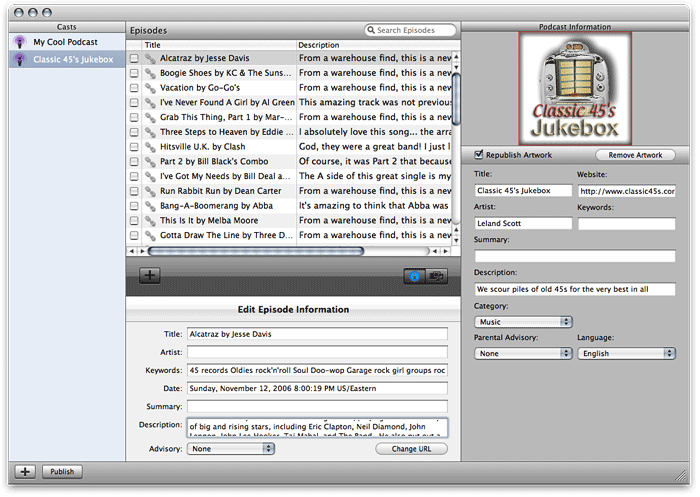

Cast Life is a beautiful little Mac OS X Cocoa application that is marvelously easy to use, but somewhat limited in its abilities. At $10, it's the least expensive shareware product here, but you get quite a bit for that price. Cast Life has great range, handling regular text (news) feeds as well as photo, video, and music feeds (otherwise known as podcasts). The first time you start it up, Cast Life gets you going in grand visual style, with a Quartz ripple effect to transition the user from the starting points sheet to the feed data entry interface. Also noteworthy is Cast Life's excellent search tool and flexibility in publishing options.
As much as I like Cast Life, however, the "whaddaya expect for ten bucks" question popped up several times during testing. Most significant are the tool's tendency to crash, the absence of preview functions, and the limited support for RSS extensions and options in developing your feed. Although Cast Life has a nice iLife media browser, it gives you no way to browse your hard drive outside of the iLife content to import artwork and sound files. Still, I think it's a great starter podcasting tool, given its low price, ease of use, and good coverage of the basics.
| Cast Life (Version 1.4, $10) | |
| Pros | Cons |
|
|

ChapterToolMe
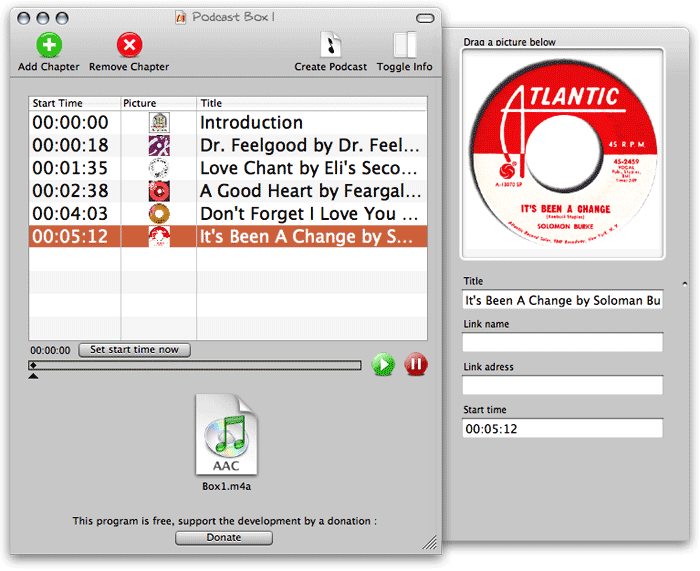
ChapterToolMe is pretty much the same application I used in August 2005, having had only one or two minor updates since then. As a free tool for developing enhanced podcasts, it still can't be beat and is definitely a step above working with Apple's free Chapter Tool software on your own. However, it doesn't have most of the basic functionality I'm looking for this year, so it wasn't hard to pass on it this time. If you have GarageBand, you're probably better off using that, since ChapterToolMe can only do the enhancement to your audio file. You then need a separate tool to prepare your RSS feed. With GarageBand, you just send the podcast file off to iWeb, and it will make a nice HTML page and the RSS feed to boot! It even lets you submit the feed to the iTunes music store (something a few of the other tools here do as well). What I'm saying is that time seems to have passed ChapterToolMe by... any Mac user today can get the same (and better-looking!) tools in the iLife suite, plus the rest of the podcasting "life cycle."
| ChapterToolMe (Version 1.4.3, Free) | |
| Pros | Cons |
|
|

Feedati
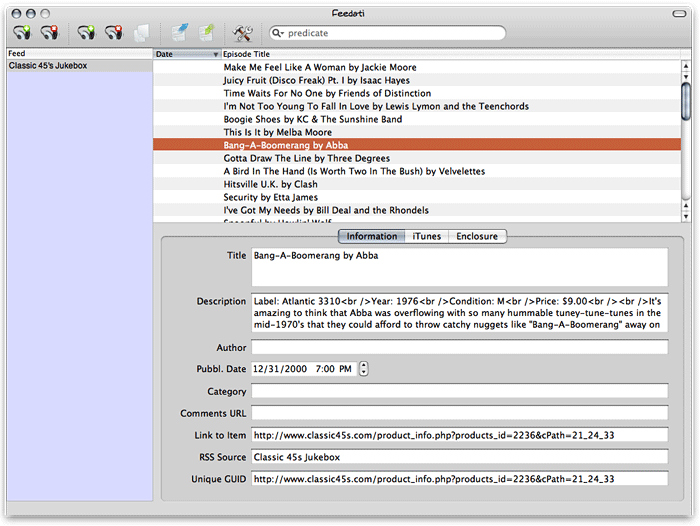
Feedati is so new it's only at version 0.1 today. According to the writeup on Feedati's website, it's incorporated the very cool Sparkle autoupdate framework, but thus far users haven't had a chance to make use of it. Clearly, Feedati is just at the beginning stage of the developer's vision, and only time will tell if that vision gets fleshed out further or Feedati fades into the very large background of fellow apps that time (and their developers) forgot. Not that there's anything seriously wrong with Feedati... it just has fairly limited functionality at this point, plus one or two very annoying bugs (for which I finally found a workaround). Two big drawbacks from my personal standpoint are that Feedati is iTunes-tag-specific (meaning it doesn't support the standard RSS 2.0 elements or options), and its XML export function is broken. Still, it's free, and might be worth a look for that reason alone if you have a very tiny (or zero) budget.
| Feedati (Version 0.1, Free) | |
| Pros | Cons |
|
|
Feeder
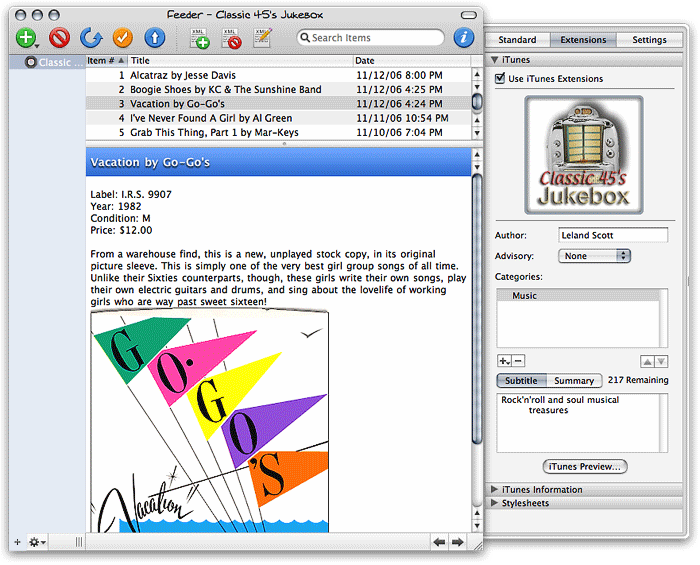
I distinctly remember Feeder from my look at tools in the summer of 2005, since it has the same distinctive icon. Then, as now, it doesn't support enhanced podcasts, and at $30 it's not cheap... both reasons why I didn't use it for my first podcast experiment. However, clearly the Feeder developers have been very busy in the last year, because their podcast software today is among the most polished and well-rounded of the bunch here.
The thing that struck me most when I tried Feeder last week was what a terrific job it does at previewing your feed. It defaults to a view that looks just like the standard Safari RSS template, faithfully displaying your HTML formatting and images. Feeder's user interface is very well designed, making it simple to find everything you need... while hiding the complexity of all the potential things you don't yet know you want. Feeder has full support for the iTunes extensions as well as the standard RSS 2.0 spec, and it's the only app here that provides a working preview of how your feed is going to look in the iTunes interface. On top of that, Feeder is one of only two apps here that provide a good HTML editing environment for designing your feed's description field, which---as the screenshot shows in one of my sample episodes---can also include images, hyperlinks, and all the rest.
Aside from one or two small bugs, the two deficiencies I noted in Feeder were its lack of support for enhanced podcasts, and its inability to attach a separate image to each episode (outside of the description field).
| Feeder (Version 1.4, $30) | |
| Pros | Cons |
|
|

FeedForAll
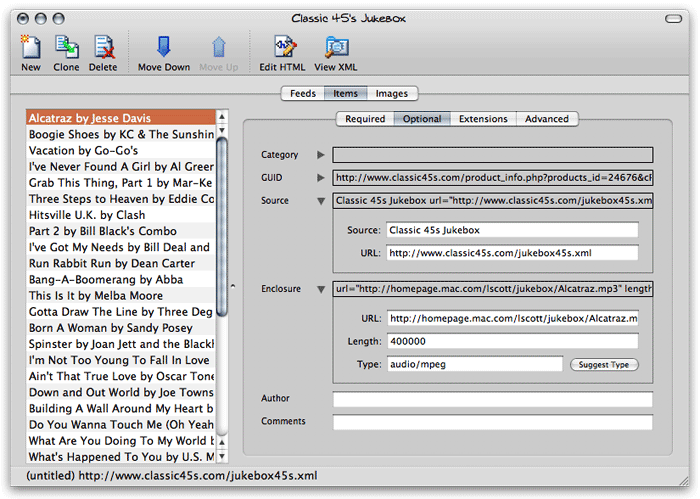 (Note: Updated 11/20 with information for version 2.0.0.5. Changes from the original writeup are noted with cross-outs.) My initial impression of FeedForAll was "Yuck!" However, that was simply an irrational, visceral reaction to the software's obvious Windows XP roots. Not only does it have those awful, childish-looking icons, but when I first ran FeedForAll, it was so much slower than all the other Mac tools here I was certain it had simply crashed. Turns out I was wrong about that... it's just extremely slow. Eventually FeedForAll will finish loading itself, and when you ask it to import a remote feed, it will eventually finish loading the feed. You just have to be patient. Of course, the developer could help out here by following Apple's user interface guidelines, which suggest use of a progress indicator when a process is going to take awhile. All you get in FeedForAll is the spinning beach ball, which most of us have come to associate with a hung application rather than one that's just working hard.
Once I was ready to give FeedForAll a serious workout, I was impressed by the depth and breadth of its abilities. FeedForAll is a serious tool that has all the power most publishers will want from a podcasting experience. The first thing that impressed me was FeedForAll's built-in RSS validator: It helped me knock out a few syntax errors that might have caused trouble down the line. FeedForAll won't even import your feed until you correct the errors, by the way---this could be annoying or pleasing depending on your personality. Also impressive is the application's useful HTML editor and its ability to preview your HTML content. Another notable virtue in FeedForAll's favor is the wealth of PHP scripts the developer makes available to its registered users for manipulating RSS feeds in various ways.
On the downside, FeedForAll is the most expensive tool available for the Mac. At $40, that's only $10 more than its competition, but it's hard to justify given the quality of the $30 tools here. More seriously, FeedForAll fails iTunes users by not providing support for Apple's iTunes extensions, which really help in displaying your feed in the iTunes store. Although FeedForAll has a useful HTML preview, it doesn't let you preview your audio or video content, and it has no support for enhanced podcasts. , and your only publishing option is FTP... you can't publish to .Mac or even to a local folder. Continuing in the "fails to take full advantage of iTunes" vein, FeedForAll is also unable to associate an image with an episode, providing a feed-level image only.
Finally, as a non-Cocoa application, FeedForAll misses out on a lot of user interface tricks and functionality that Mac users are coming to expect---like sheets, panels, resizable drawers, and the like. Contrary to what I've heard from some naysayers, these Cocoa user-interface widgets make it possible to design much more functional and attractive software than is possible with Java, XUL, or COM interface objects. More than mere eye-candy, the Cocoa framework widgets simply make for better software design. (Or so it seems to me.) Given all of these "cons," I find it hard to fully recommend FeedForAll, but it's definitely a good Podcasting tool and might be worth a look if the features that are negatives for me don't mean that much to you.
| FeedForAll (Version 2.0.0.5, $40) | |
| Pros | Cons |
|
|
Podcast AV
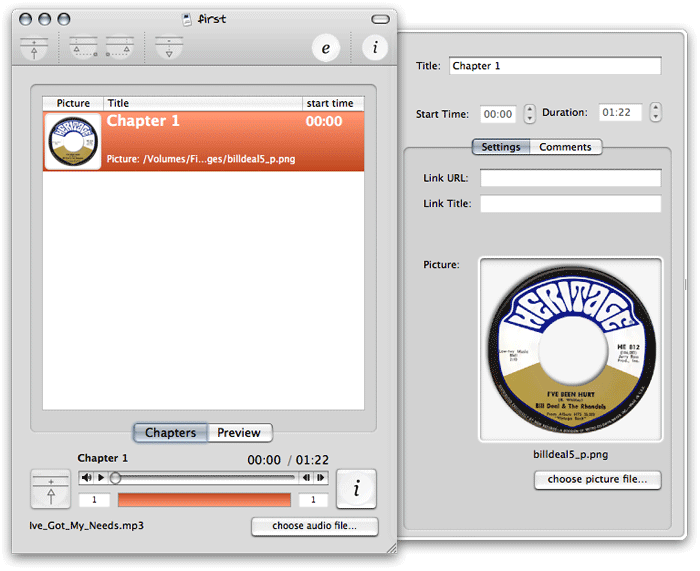
Podcast AV is kind of like a professional-grade ChapterToolMe. Its basic functionality is pretty much the same as ChapterToolMe and GarageBand, but it has a much better user interface than the former and bests the latter by virtue of its simplicity and focus. I love software like Podcast AV that offers to start you out with a little interactive tutorial, and this tool's tutorial is both longer and more interactive than most. For my purposes, however, Podcast AV won't cut it, since it doesn't import existing feeds, can't actually prepare a podcast feed itself, and in fact can only help you prepare the audio file for one episode at a time. If you're planning on taking advantage of the enhanced podcast features, this app is definitely worth a look. For now, it's free, though the developer's site indicates they plan to charge for it whenever it gets out of the pre-1.0 beta stage.
| Podcast AV (Version 0.8.7, TBD) | |
| Pros | Cons |
|
|

Podcast Maker
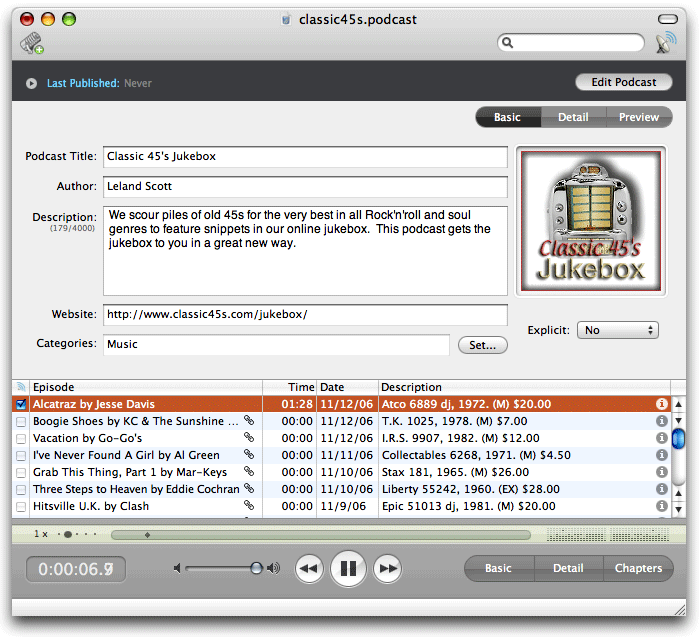

In terms of sheer interface ingenuity, Podcast Maker gets my vote for the brightest star on stage today. Fortunately, its good looks and interface smarts are matched pretty well by its well rounded functionality. Podcast Maker does have a few missing features, but by and large it would probably be my top choice if I were buying one of these apps today.
Besides its stunningly cool user interface, which is so nice I had to capture it in a brief movie, Podcast Maker shines through its sheer speed in importing external RSS feeds, its top-notch support for iTunes extensions, its built-in support for enhanced podcasts through use of chapters, and its ability to add an image to each separate episode of a feed. Great publishing options, search, and audio preview capability add luster to its other virtues.
However, Podcast Maker is not my ideal "podcast maker." The main things missing for me are its surprising inability to preview content stored remotely, its willingness to ignore the standard RSS 2.0 enhancements in deference to Apple's iTunes extensions, its lack of built-in previews for HTML content (there's a Preview function that I could never get to work), and its lack of support for editing HTML. Still, Podcast Maker is a pretty young tool, and it wouldn't take much to take it to the must-have level for podcast publishers.
| Podcast Maker (Version 1.2.8a, $30) | |
| Pros | Cons |
|
|

Podcaster
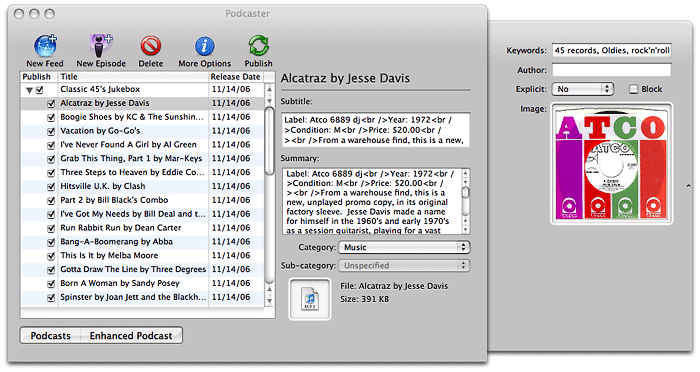
Podcaster is one of the oldest tools here, having been released soon after the enhanced podcast spec came out last year. It and Podcast Maker are the only tools in the bunch that give users the tools to build both enhanced podcasts and regular ones, and similarly they alone can accomplish the trick of associating a unique image with each episode of a podcast. Naturally, it follows that both of these tools lean heavily toward the iTunes version of RSS and virtually ignore the RSS 2.0 standard. In fact, the basic functionality of Podcaster and Podcast Maker are virtually identical.
So, why have I put a checkmark by Podcast Maker but not Podcaster. This is where attention to detail really makes a difference, folks. Though Podcaster can do nearly everything Podcast Maker can, it does so with little if any finesse and with a number of annoyances. For example, to start with, Podcaster makes you download and install (by finding the right file and dropping it on Podcaster) Apple's Chapter Tool software in order to make enhanced podcasts. Until you do this, it displays an ugly "Install Chapter Tool" button prominently on its face. Another example: When you import an existing feed, Podcaster insists on taking the time to download every attachment it contains... which can take quite a long time in a case like mine with 36 episodes. (Occasionally, Podcaster will hang after such an import, forcing you to re-do it.) This might be worth the time if Podcaster could then let you play the attachments within its interface... but it can't!
Podcaster has the same limitations as Podcast Maker, and then some. Besides those already mentioned, the application provides no help file whatsoever for end users. That's just wrong! And although it has a compact interface, it's compact in a rather clunky way, thanks to its Carbon user-interface foundation. Podcaster comes in a $15 basic version, and apparently you have to pay another $15 to enable publishing to FTP sites and local folders; otherwise, it publishes only to your iDisk.
| Podcaster (Version 1.1.9, $15/$30) | |
| Pros | Cons |
|
|
ProfCast

ProfCast is clearly designed and marketed for educators, and as such it has some features I don't need, while lacking some I do. Prominent selling points that don't sell the app on me is ProfCast's built-in voice recording function and its ability to handle attached presentation files. I'm sure these are of keen interest to teachers and professors who want to publish podcasts of their lectures and presentations, and in general ProfCast seems like an excellent tool for that use case. Along those lines, ProfCast comes with plugins for Keynote versions 2 and 3, so clearly lecturers who use Keynote will find ProfCast particularly worthy of a tryout.
Other nice aspects of ProfCast are its ability to import existing podcasts and its easy-to-use interface for managing the podcast and adding new episodes. It also has all the bases covered for publishing. The ProfCast site says it has support for enhancing files with chapters, but I didn't see that capability when testing it. Instead, I noticed that ProfCast has a plugin for GarageBand, which lets you shunt your episode audio over to it "for further editing"---which I took to mean adding chapters and such.
Aspects of ProfCast I didn't like were its import behavior (similar to Podcaster), which included a tendency to crash repeatedly when trying to import my test feed. Its ability preview the audio files it spent so much downloading is also quite flaky, and its "Import to iTunes" feature was grayed out most of the time. Finally, ProfCast provides no HTML preview of your episode and no tools for editing your episode description. At $30, ProfCast is priced at what seems to be the norm for podcasting tools, and it's probably worth that if you value its lecture-focus functionalities.
| Profcast (Version 2.0b3, $30) | |
| Pros | Cons |
|
|

Vodcaster
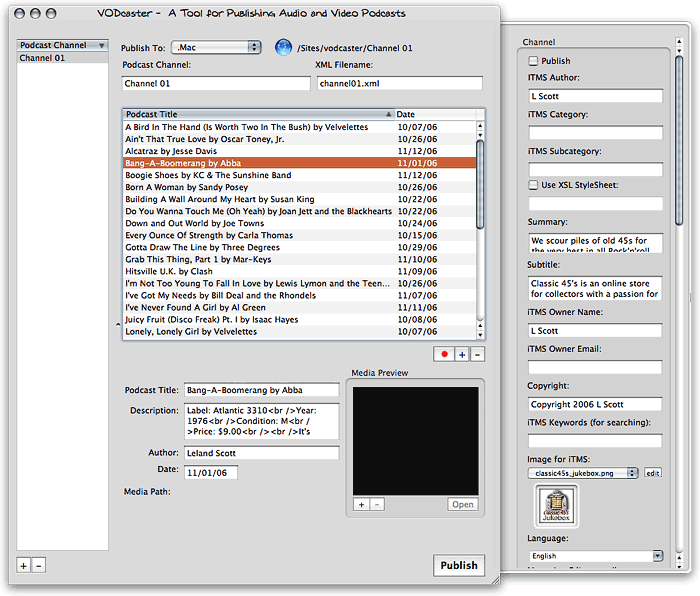
Vodcaster is the best overall freeware product in this review. It easily imports existing feeds, either from remote URL's or from local XML files, and has an advanced options drawer that you can have Vodcaster pack with (nearly) every RSS extension in both the RSS 2.0 and iTunes repertoire. If you don't want that many options, just uncheck that selection in Vodcaster's preferences. Vodcaster also ably writes your RSS feed for you and lets you add new media files---either video or audio---with its built-in chooser. If you have an attached camera such as an iSight, Vodcaster can also record video (with audio) right there on the spot (but it has no video editing tools and can't enhance your media with chapter markers and images).
In general, Vodcaster has a nice interface, but there are some quirks, as noted in the table below. Perhaps befitting its nature as freeware, Vodcaster can't preview any HTML content you have prepared for the description, and it provides such a tiny rectangle for this field that you couldn't possibly enter or edit anything much there. And though Vodcaster can publish to .Mac or a local folder, it can't publish through FTP. Despite these drawbacks, Vodcaster is stable, has most of the required basics, and even has a few advanced touches. Well worth a try at $0, I'd say.
| Vodcaster (Version 2.5, Free) | |
| Pros | Cons |
|
|
Addendum
Unlike previous forays into the software market here on Mars, this time I'm not certain I'll be buying any of these tools. Obviously, given my enthusiasm for some of them, that's not because I didn't find anything worth buying. Rather, it goes back to my need to keep my time commitment for this project to a minimum. Since I'm capable of writing a little PHP script to generate an RSS feed from the Classic 45s MySQL database, I don't really need a tool to do that for me.
One thing I didn't know prior to this project was how to attach an image file to each episode. I had already added an image to the feed item's HTML description field, but how would I get that image to show up in iTunes, which doesn't support HTML in its feed descriptions?
As it turns out, the information for a given feed or episode that you see in iTunes is a combination of the podcast's RSS content and the mp3 file's ID3 tags. In particular, the ability to add a separate image for each episode is only possible through ID3 tags, because it's not something the RSS specification supports. The only image you can add in RSS is at the feed level, and RSS supports only one image per feed. (Not counting "photocasts," in which the episode's enclosure tag consists of a photo.)
But how do you add an ID3 tag with an image to your mp3 files? Two of these applications can handle that task---Podcast Maker, and Podcaster. Since these tools also do enhanced podcasts, they're already quite agile at adding metadata to your media files, and that's what the ID3 image tag is.
And yet... once I figured this out, I realized I can just use iTunes for this. In fact, that's what happens when you add an image to a song in your iTunes collection: It becomes part of the mp3 file's ID3 tagset. What I didn't know is that when you post such an mp3 on a server and someone else downloads it, the image goes along with the file and all of its other ID3 tags, and it shows up in the user's iTunes listing. Pretty cool. So, since that's precisely what I want in this case, I don't really need a podcast-making tool that can similarly add an image to my epidodes via ID3 (although it's a nice touch).
So the main value-added features these tools offer a geek like me are feed validation, ping-service submissions, and a few other esoterically advanced features. And I suspect those are things I can get for free off the web somewhere.
Of course, if you have some content you'd like to podcast and you're not a coder, a good podcast-maker will definitely come in handy. The good news is that there are a lot of great choices at reasonable prices. The bad news is that I can't help you out by recommending just one. But then, if you're a software addict like me, you'll want to download and try out a bunch of these anyway, and I hope this review will help get you started doing just that.
Oh yeah, and in case you're interested, here's a link to my new Classic 45s Jukebox podcast. I'm currently working on a Dashboard widget for the podcast, which will let you see the text and images and play the music from within the widget. What fun!
Universal Music Group CEO Calls Non-Zune Owners “Thieves”
Zune’s Debut Spoiled by a Brief Shuffle on CNN
CNN.com Video: Microsoft’s New Zune
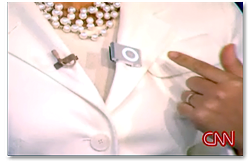 I saw this on TUAW, and had to share it here as well. This is a hilarious video that all Apple/iPod lovers will get a kick out of. While looking sheepishly like a Microsoft-paid spokesman, the New York Times fellow shows off the new Zune to a somewhat skeptical pair of CNN anchors. Then, at the end, one of the anchors whips out her new iPod shuffle and pins it to her lapel. Everyone agrees it’s much sexier than the Zune, and the other anchor wonders why Microsoft “can’t get some good designers in there” because the Zune is so “clunky” looking. Priceless!
Apple’s Technical Specifications for iTunes Podcasts (RSS)
All About LAME - History, Recommended Settings, Versions, and More
LAME - Hydrogenaudio Knowledgebase
 Here’a a great page from the Hydrogenaudio website wiki that has essential information for users of the LAME encoder, which by all accounts is superior to the one bundled in Apple’s iTunes software. LAME is used by the freeware Max software for Mac OS X, for example, and it’s also available from Blacktree as an AppleScript for use within iTunes. (See also this guide for updating Blacktree’s script to use the latest, best version on LAME, currently 3.97.)
Life2Go: Turn Your iPod Into A PDA
Life2Go: Think your iPod was designed just for music? Think again!
 Originally downloaded 5/21/06. This utility (previously called Pod2Go) has been around quite awhile now, but I’ve never actually tried it out. The developer has been continuously improving it, and it’s now got a pretty compelling list of features. I think it’s time to see whether the iPod can really be useful to me for textual information such as weather, directions, movies, stocks, and the like.
Update 11/12/06. As much as I love my iPod, I just don’t find it useful for reading text. It’s nice that you can sync it with news feeds, weather reports, and all the other things Life2Go can do, but in the last few months when Life2Go has been faithfully syncing up that data on my iPod whenever I plug it in, I have never looked at the information except to verify it was actually happening. Until the screen gets bigger, and the iPod can support PDF formatting and images with the text, its “notes” feature will remain an interesting curiosity for me. Given that, I’m certainly not going to part with $13 for Life2Go or any of its competitors.
That said, if you do find iPod notes useful in your daily life (maybe if I commuted to work on the train, I’d feel differently), I can testify that Life2Go does what it claims, and does it reliably.
Version as tested: 1.6.4.
Did You Know Zune Does Not “Play For Sure”?
Max: Create High-Quality Audio Files from CDs or Files
Max converts audio in over 20 different formats using the highest-quality open-source tools
 Originally downloaded 3/26/06. This freeware is still in an early stage of development, but it seems to be onto something. By integrating all of these open source tools into one interface, the developer will have done audiophiles a huge favor. Definitely worth a try… so far, it gets rave reviews on VersionTracker and MacUpdate.
Update 10/30/06. It took me a few tries to understand how Max works, but once I did it’s clear that this will be very valuable when I decide to archive my AIFF lossless files and keep mp3 or aac copies for my iPod. Max attempts to provide all the pieces of the puzzle, beyond making all the various output formats available. For example, Max can find album art, can put files into iTunes with meta data from the ripped CD, and can save files to disk with custom names and even a custom directory structure based on the album’s meta data.
The only downside for me is that I’m not sure Max will be able to seamlessly replace files that iTunes now knows about as AIFF files, which will mean I have to somehow re-sync all my tracks with the new versions. Maybe there’s an iTunes script that will do that… I’ve already been through this once, and with a collection of over 7,500 tunes in my iTunes library, it’s not something I can afford to be real time-consuming. Nor do I want to lose all my existing iTunes meta data.
Still, I was very impressed with the quality of Max’s output—I tried AAC, MP3, and Apple Lossless—and with the overall design of Max. It’s very handy that the user can specify how many threads Max should devote to its processing, since with my G5 Quad I have threads to spare. Gee… maybe I should wait to until that rumored 8-processor Mac that’s coming soon.
Version as tested: 0.6.1.
Video2Go: Another iPod-Video Conversion Tool
Video2Go makes for comfortable converting of your movies
 Originally downloaded 12/24/05 (when it was named Video2Pod) There are so many of these video-2-ipod packages now, I’m not sure which I’ve tried… but I don’t think I’ve given this shareware a trial run. With so much freeware in this space, it’ll have to be noticeably better to entice money from my wallet.
Updated 10/29/06. Somewhere during 2006, Video2Pod was renamed Video2Go, and at first I thought it was a separate product. (Silly me.) Video2Go provides a nice interface for viewing your movie catalog, and it can record video from a Firewire or DV camera as well as converting movies. The software was recently updated, but it’s not clear from the website whether Video2Go supports the new higher-resolution iPod video format yet.
Version as tested: 1.6.2.
iSquint: iPod Video Made Free and Easy
iSquint - an iPod video conversion tool
 Originally downloaded 12/22/05. iSquint is one of several video-to-iPod video tools that have sprung up in the wake of the vPod. This one’s free… iSquint claims to convert to iPod video “…many times faster than QuickTime Pro.”
Update 8/03/06. The developers of iSquint now have a commercial product called VisualHub that takes video conversion to another level (one worth paying for, presumably).
Update 12/19/06. If you don’t want to pay anything but want a quick, easy, and reliable tool to convert video for your iPod, you can’t go wrong with iSquint. Sure, the developer wants you to upgrade to VisualHub (and isn’t shy about letting you know!), but the fact is that he continues to enhance iSquint and keep it up to date. For example, iSquint was last upgraded in October to version 1.5, which adds support for the new 640×480 iPod resolution for h264 video, and you can also now convert Flash 8 videos to play on your iPod! Here’s a developer who understands that goodwill generated through a great, free product like iSquint will develop into new customers for the upgraded product.
Version as tested: 1.5.
Zune Is An Actual 4-Letter Word in Hebrew?
Pod Comic Caster: Easy Podcasts From Any Image Set
Pod Comic Caster: Deliver your comics as a podcast!
 Originally downloaded 12/23/05. These guys have a libsyn site for their Twisted TV series… this is a free tool that presumably they use to make their animations podcast-ready.
Update 10/4/06. Turns out this freeware is an Automator application, for which you also get the workflow file in your download. And it does precisely what it says it will, and very efficiently, too! You don’t have to use this just with comics, either… Basically, the application prompts you to select a bunch of images from your file system. It then resizes them and pulls them together in QuickTime as a slideshow, saved in a format that works just right as a podcast for your video iPod. The action gives you some control over the slideshow settings during setup. My only gripe is that the application didn’t clean up after itself… it left all the down-sized images on my desktop. I’m not sure when or if I’ll have a need for this, but it’s a great example of what you can build with Automator, and the workflow itself will be a useful learning tool.
Version as tested: 1.0.
Senuti: One of Many Utilities for Transferring Songs from iPods
 Originally downloaded 10/1/06. I know I've tried Senuti before, but for the life of me I can't remember what I thought of it or why it didn't stay put in my Applications folder. Senuti is an open source project that's still going strong, aimed at giving you control over your iPod music. Senuti, by the way, is iTunes spelled backward.
Version as tested: 0.33.
Slashdot: Apple Accused of “Upsampling” Low-Res Videos for iTunes
Analyst Missing Secret Ingredient in iTunes/iPod Video Service: No DVD Involved
Rob Pegoraro does a great job balancing coverage of the Mac with that of Windows in his Washington Post tech column. However, I think he missed a key selling point in the iTunes video store launch when he wrote in a recent column that Apple’s new offering was “worth skipping.” Pegoraro gave two main reasons why the iTunes video store is uncompelling at the moment:
- There aren’t enough titles (though he concedes the titles that Apple’s rounded up are top-notch), and
- You can’t burn your purchased movies to DVD.
Pegoraro’s right about the iTunes store’s movie selection, although I had no trouble finding several I’d like to buy. But his second criticism about DVD’s is way off the mark. That’s because I believe the iPod will eventually make DVD’s obsolete in the same way that it’s making audio CD’s obsolete today.
Since getting my “iPod with video” late last year, I’ve thoroughly enjoy the convenience of syncing TV shows to my iPod and popping the iPod into my TV set. On our very large HDTV set, “Desperate Housewives” looks great, and so do “Office,” “Lost,” and the rest. I bought my first movie from iTunes last week—Shakespeare in Love—and my wife and I both thought the new higher-resolution picture quality was excellent. But more important, we loved the convenience of not having to deal with DVD’s.
I’m sure we aren’t the only consumers who are fed up with the DVD format. In fact, judging from the burgeoning retail market for software that converts DVDs to the iPod, I’d say the movement to chuck DVD’s is well on its way.
In the beginning, DVDs were cool. They had those nifty menus that were… nifty… and it was nice that designers got to be creative in a new way. But DVD menus have gotten way out of hand. Like a bad website designer, DVD makers seem to think it’s OK to foist a brand new user interface on consumers with each new release. They also seem to think that the more complicated the user interface is, the more impressed consumers will be.
Wrong! I’m no longer impressed by nifty navigation menus on my DVD’s… I just wanna watch the damn movie!
But wait… nifty menus weren’t enough for Hollywood. It wasn’t long before they started to use DVD technology to make captive consumers watch ads and previews they didn’t want to see. At first, you could skip through the garbage, but lately, I’ve had more than my fill of DVD’s that put the fast forward button to sleep until they’re good and ready to show you what you paid to see.
By now, the movie companies have made DVD’s so difficult and painful to use that I think consumers will rush toward a decent iPod-capable solution with open arms. Who needs a piece of plastic with obtuse, difficult-to-navigate menus and introductory content that you can’t even skip through—every time you watch the movie!—when you can get the movie itself on your iPod and plug it right in?
The big increase in resolution with the latest iPods is crucial to this, of course. I checked the resolution of a DVD copy of “Clockwork Orange” that I bought some time ago, and its native resolution is only 720×480. This means that an iTunes version at 640×480 is indeed “almost DVD quality.” I’m sure more recent DVD’s are higher resolution than that… but the point is, the $30 DVD has picture quality no better than what I can download from iTunes for $10.
The use of iPods for portable video is still pretty rare, but I think it’s a mistake to judge the iTunes service by how well it interfaces with a DVD player. That’s just not how people are going to use the service. Why burn a DVD when you can just carry the iPod to the TV and plug it in?
Now, Apple just needs to convince the movie companies to fork over more titles, and tell Walmart to stop acting like a baby. If they don’t—mark my words—the word “torrent” is going to be as familiar in the next couple of years as “napster” was in the late 1990’s. And everybody with a computer and a fast internet connection will become a criminal in very short order.


