



News Posts With Tag Security
Balanced Article on “Smart Home” in 2020 Gives Nod to Apple for Privacy/Security
Interesting article. I think it’s fair for the most part. It dings Apple justifiably for staying behind in the smart assistant race, and it’s true that the HomeKit-compatible devices market is much smaller than that for Google or Amazon. But Note that Apple wins in the privacy and security race and comes in as runner-up for 2020 overall. They also seem to think that the HomePod mini is a game changer in Apple’s favor, and they give Apple positive marks for being ahead of the game in privacy and security not only for their products but also for those that run on HomeKit. That isn’t true for the other platforms and their many, often sub-par third-party products.
Utility Lock: Freeware Menubar Utility Provides Screen Locking with a Keystroke
 Originally downloaded April 21, 2007. How ironic! Just this morning, I had followed a link in my referrer logs to a post on digg.com about Mac OS X keyboard shortcuts (the referral was someone following a posted link to my xCuts widget, which is a keyboard shortcuts reference for Dashboard). One of the complaints I was investigating was a user who bemoaned Mac OS X's lack of a keyboard shortcut equivalent to Ctrl-L on Windows (which I gather locks the screen with a login prompt). Sure enough, I couldn't find any native shortcut that did quite the same thing. I always just lock my screen with a screensaver, using a screen corner shortcut. But I can understand the yearning for a keystroke fix. So I whipped one up for myself using Quicksilver!
Apple does provide the function users would like... just not the keyboard equivalent. If you have enabled Fast User Switching, you probably have the "Users" menu extra in your system menubar. That item has a menu selection called "Login Window...", which will get you there. Now, there are several ways to get a keyboard shortcut attached to that item. One is to use Quicksilver, which is what I did.
Quicksilver comes with a built-in script called "Fast Logout," and it's basically the same as a call to the Mac OS X login screen. To get my Ctrl-L shortcut, I just created a trigger for it in Quicksilver.
Another easy way is to get rid of Apple's "Users" menu extra and install the free, open-source menu extra WinSwitch instead. Open WinSwitch's preferences and you'll discover you can set a keyboard shortcut to open the login window!
Still, there's always room for a better idea if you're a Mac user, so I was delighted to discover Utility Lock today. I haven't tried it yet, but from the looks of it, Utility Lock is a specialized tool that goes to the heart of what users want in screen locking. It sits in your menubar and provides a quick means to lock up your screen at a keystroke. It doesn't use the Fast User Switching function at all, but instead is more like DeskShade, which has a screen-locking mechanism that puts a big padlock on your screen. (But unlike Utility Lock, DeskShade ain't free.)
Version as tested: 1.0.1.
Update 8/16/12.
Google Ditching Windows?
Virtually Every Windows PC at Risk from Malware
There have been a rash of articles in recent weeks about a new Windows worm that takes several routes to PCs, including Facebook. Apparently, it is now building a huge "Botnet," a network of zombie PCs that can be commandeered to do various evil things, like sending junk mail.
In the midst of this, security firm Secunia now finds that 98% of Windows users work on PCs that already have some form of malware installed. Now, let's see... What percentage of Mac users have this problem? Oh yes, it's still 0%, but don't worry, as the "experts" have been telling us for years now, the hackers will get to the Mac platform eventually. Yeah, right.
Oops, I guess that makes me a "smug Mac user," right? How does that make me smug? Just stating the facts. Despite what they say, it's no accident... and no reflection on market share... that Mac OS X users aren't vulnerable to this kind of bull*hit. It's just good engineering and an attention to detail.
Mac Hack Makes for Good Headlines, But…
Even if you believe these things would have happened if Apple's OS held the monopoly (which is a demonstrably false opinion), the burden of computer security has fallen exclusively on Windows users over the last 7 years. Exclusively... not just 90-95% of the burden. I have never spent a dime on security software or subscriptions, nor have I spent a moment worrying about going online. I've never had my machine hijacked by malware, or had my browser go haywire because I visited the "wrong" website. I take sensible precautions about suspicious emails, and I don't download files from suspicious websites.
If someone has developed a true exploit for hacking Mac OS X, I'm sure it'll be quickly squashed by Apple. And one or two such exploits in 7 years is a far more intelligent risk than dealing with thousands of such exploits a year over that period, don't you think?
Microsoft admits it knew about, didn’t patch, bugs
Computerworld: Microsoft admits it knew about, didn’t patch, bugs
OK, Microsoft apologists, take a healthy bite of this one and see if it doesn’t taste as bad to you as it does to me. When are you guys gonna realize that Microsoft is only out for itself and cares nothing for anything but money and maintaining its illegally obtained monopoly? The fact that our government (I mean, specifically, the Bush Administration) has chosen to look the other way is just one more example of how our country has abdicated its moral leadership in economic, political, military, and environmental affairs.
Sandbox: A Free GUI for Managing Mac OS X ACLs
 Originally downloaded February 4, 2007. As the developer notes, managing access control lists (ACLs), which were introduced for enhancing secure computing in Tiger, is not for the faint of heart. If you're a sysadmin working on Mac OS X, you probably already have Mac OS X server running, in which case you have the Apple-supplied ACL GUI manager. But if not, or if you're just curious to learn more about ACLs, Sandbox proposes to help out. It comes with what looks like good documentation, as well as a link to Apple's more in-depth description of ACLs in Tiger.
Version as tested: 2.11.
Bill Gates Still Telling Hitler-Style Big Lies
 If anybody is confused about whether this guy is honest or not, or thinks he might have turned over a new leaf since his wife is giving lots of money to charity, get a load of what he told Newsweek in a Vista-promo interview:
Nowadays, security guys break the Mac every single day. Every single day, they come out with a total exploit, your machine can be taken over totally. I dare anybody to do that once a month on the Windows machine.
As John Gruber at Daring Fireball points out, "Gates’s claim about Mac OS X security is simply false. Flabbergastingly false." And that's just the latest example. This guy will say anything to win. Is that OK nowadays? Is "unscrupulous" an OK personality trait in today's world? Let's remember what "unscrupulous" means: "having or showing no moral principles; not honest or fair." In my book, that's a bad thing, which is why I continue to boycott Microsoft products and encourage others to do the same.
Just like Hit--you know who--ler, Bill Gates and his buddy Steve Ballmer are masters of telling the Big Lie to get their way. Heck, it's worked for them in the past, so now they're convinced no one will ever call them on it. Just like the Newsweek interviewer, who let the statement roll right on by without question! As Hitler discovered, people will believe Big Lies before they believe small ones. Too bad humanity has advanced so little since that experience that people are still willing to be misled like this.
1Passwd: Unify Password Support Across All Browsers
1Passwd: Password Manager + AutoFill for Mac OS X
 Originally downloaded January 31, 2007. If you switch browsers a lot or use applications that don’t natively support Apple’s Keychain, 1Passwd may be just the thing to help you out. It not only provides unified password support—while still utilizing Keychain—but goes beyond that in a number of ways. 1Passwd lets you set up multiple identities for its autofill functionality, through which it can automatically fill in forms on various websites. You can specify how much or how little of the requested information is supplied by picking the appropriate user. There’s more, but at this point I’ve done nothing more than read the website info and watch the developer’s screencast. At the developer’s request, I’ll be trying 1Passwd out myself and will post a review of it here in a couple days, so stay tuned! One other factoid of interest is that you can use 1Passwd for free within certain limits, which is a very nice way of publishing shareware. Without registering ($30 for a single user, $40 for a family license), you can have 1Passwd handle passwords for a single user identity and for up to 12 web forms.
Update 2/2/07. Unlike most reviews here at Software Addicts, this review of 1Passwd is being paid for by the application developer through ReviewMe.com. This explains why I’m getting the review done so quickly rather than waiting months (sometimes)… But I assure readers that 1Passwd is subjected to the same scrutiny that all the Mac software we evaluate is, and I’ve shown the developer no mercy in putting 1Passwd through its paces. Fortunately for me, the developer, and the Mac community at large, 1Passwd is a delightful application that will does a great job of extending the Mac OS X keychain to several web browsers that don’t natively support it.
At first, I was skeptical, mainly because most of the apps I use and care about already support Keychain. But in fact, there are several big ones that don’t. Although I don’t use Firefox, Camino, Flock, or OmniWeb, I do use the nightly WebKit browser, which, like those other apps, doesn’t use the Keychain and doesn’t leverage Safari’s saved forms functionality. So I can see right away that 1Passwd would take away my main misgivings about putting Safari aside: It would let me use WebKit while still getting Safari’s form-filling and password-remembering smarts. The application lets you import all relevant Keychain entries from Safari, thus making them available to the other browsers as well. (I believe 1Passwd also imports Safari’s saved forms, but I wasn’t able to test this.) The only caveat here is that the process requires you to approve 1Passwd’s use of each and every Keychain entry, and if you have hundreds of these (as I do), it could take awhile… longer than you may want to spend, in fact.
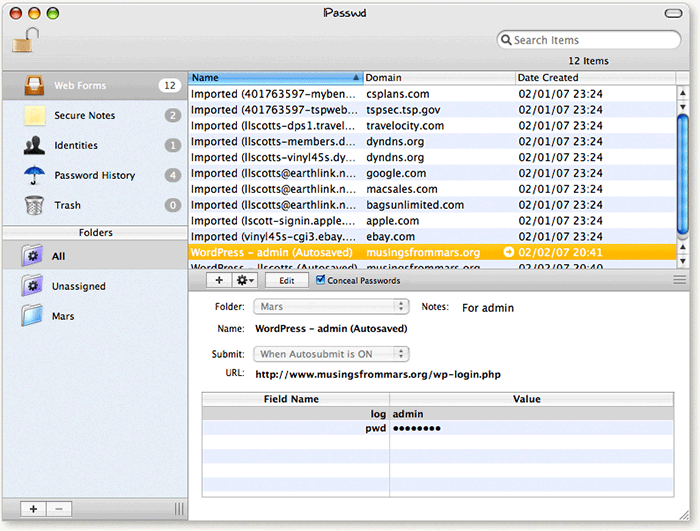
I should note that one thing I didn’t like about 1Passwd is the demo restriction you work under, which limits you to 12 passwords and one identity. This restriction limited my ability to fully test 1Passwd’s scalability, or to see how it would handle import of information from multiple browsers. On the other hand, you can freely use 1Passwd with this restriction if it’s no problem for you… there is no time limit.
Besides its use in enabling Keychain for other web browsers, 1Passwd also has a unique feature that lets you set up multiple identities for yourself. This is useful if you want to set up specific profiles for web logins, or to specify what information you want to provide about yourself to a given website. Using a toolbar icon that 1Passwd places in your browser (different, customizable icons for each browser, by the way…), you can tell the software to log you in as “Bob” on this website and as “Dick” on another. On one website, you can log in with an identity that provides your address details, while using a different one elsewhere that provides only your name and email address.
Like Keychain, 1Passwd runs in the background, and it requires you to authenticate its use of information entered into web forms. If you decide to use 1Passwd, you may want to turn off your browser’s native support for this functionality… otherwise, you’ll end up authenticating several times. Fortunately, 1Passwd appears to have robust export features, so your data won’t be locked inside in case you decide to stop using it at some point. You can export your information to Passport Wallet format, plist format, and for use on a Palm or Treo, for example.
I did run into a few problems while testing 1Passwd, but none that significantly affected usability or functionality. Mostly, the list of Cons in the table below are suggestions for improving the user experience… They’re features I like to see in all A-Class Mac OS X software, so I try to encourage developers to adopt them. Especially for the family license, which covers your household’s use of 1Passwd for $40, this software is a good value. The following is a list of the pros and cons I noted during my evaluation.
|
Pros |
Cons |
|---|---|
|
|
Version as tested: 2.3.5.
MacSlash | Why Are Macs More Secure?
Apple, Microsoft and the War Mentality
A Clear Explanation for Why Windows Is More Vulnerable To Malware Attack Than Mac OS X
John Gruber on Apple’s New AirPort Security Update
Macs Are Inherently Safer for Data Storage
Fugu: An Award-Winning, Open Source Secure FTP Client
 Originally downloaded 9/15/06. Here's another free Mac OS X client from the University of Michigan's Unix Group, in this case covering secure file transfers through SFTP. The client also handles secure shell (SSH) sessions. It won an Apple Design Award in 2003 for open source application development. I recently fell in love with---and paid for---Yummy FTP, but I'd like to give Fugu a whirl, too.
Version as tested: 1.2.0
Cracked MacBook: Gleeful PC Zealots Once Again Try To Put Mac OS X Down
Protecting Windows: How PC Malware Became A Way of Life
Article Summary
 This is a very long article that covers several different, but related, topics. If you are interested, but don’t have time to read the entire article, here’s a summary of the main themes, with links to the sections of text that cover them:
- Required Security Awareness Classes Reinforce Windows Monopoly in Federal Agencies.
For the third straight year, I’ve been forced to take online “security awareness” training at my Federal agency that includes modules entirely irrelevant–and in fact, quite insulting–to Macintosh users (myself included). The online training requires the use of Internet Explorer, which doesn’t even exist for Mac OS X and in fact is the weakest possible browser to use from a security perspective. It also reinforces the myth that computer viruses, adware, and malicious email attachments are a problem for all users, when in fact they only are a concern to users of Microsoft Windows. In presenting best practices for improved security, the training says absolutely nothing about the inherent security advantages of switching to Mac OS X or Linux, even though this is an increasingly well known and non-controversial solution. This part of the article describes the online training class and the false assumptions behind it in detail. - IT Managers Are Spreading and Sustaining Myths About the Cause of the Malware Plague.
These myths serve to protect the status quo and their own jobs at the expense of users and corporate IT dollars. None of the following “well known” facts are true, and once you realize that malware is not inevitable–at the intensity Windows users have come to expect–you realize there actually are options that can attack the root cause of the problem.- Windows is the primary target of malware because it’s on 95% of the world’s desktops,
- Malware has worsened because there are so many more hackers now thanks to the Internet, and
- All the hackers attack Windows because it’s the biggest target.
This section of the article describes the history of the malware plague and its actual root causes.
- U.S. IT Management Practices Aren’t Designed for Today’s Fast-Moving Technology Environment.
This part of the article discusses why IT management failed to respond effectively to the disruptive plague of malware in this century, and then presents a long list of proposed “Best Practices” for today’s Information Technology organizations. The primary theme is that IT shops cover roughly two kinds of activity: (1) Operations, and (2) Development. Most IT shops are dominated by Operations managers, whose impulse is to preserve the status quo rather than investigate new technologies and alternatives to current practice. A major thrust of my proposed best practices is that the influence of operations managers in the strategic thinking of IT management needs to be minimized and carefully monitored. More emphasis needs to be accorded to the Development thinkers in the organization, who are likely to be more attuned to important new trends in IT and less resistant to and fearful of change, which is the essence of 21st century technology.
Ah, computer security training. Don’t you just love it? Doesn’t it make you feel secure to know that your alert IT department is on patrol against the evil malware that slinks in and takes the network down every now and then, giving you a free afternoon off? Look at all the resources those wise caretakers have activated to keep you safe!
- Virulent antivirus software, which wakes up and takes over your PC several times a day (always, it seems, just at the moment when you actually needed to type something important).
- Very expensive, enterprise-class desktop-management software that happily recommends to management when you need more RAM, when you’ve downloaded peer-to-peer software contrary to company rules, and when you replaced the antivirus software the company provides with a brand that’s a little easier on your CPU.
- Silent, deadly, expensive, and nosy mail server software that reads your mail and removes files with suspicious-looking extensions, or with suspicious-looking subject lines like “I Love You“, while letting creepy-looking email with subject lines like “You didnt answer deniable antecedent” or “in beef gunk” get through.
- Expensive new security personnel, who get to hire even more expensive security contractors, who go on intrusion-detection rampages once or twice a year, spend lots of money, gum up the network, and make recommendations for the company to spend even more money on security the next year.
- Field trips to Redmond, Washington, to hear what Microsoft has to say for itself, returning with expensive new licenses for Groove and SharePoint Portal Server (why both? why either?), and other security-related software.
- New daily meetings that let everyone involved in protecting the network sit and wring their hands while listening to news about the latest computing vulnerabilities that have been discovered.
- And let’s not forget security training! My favorite! By all means, we need to educate the staff on the proper “code of conduct” for handling company information technology gear. Later in the article, I’ll tell you all about the interesting things I learned this year, which earned me an anonymous certificate for passing a new security test. Yay!
In fact, this article started out as a simple expose on the somewhat insulting online training I just took. But one thought led to another, and soon I was ruminating on the Information Technology organization as a whole, and about the effectiveness and rationality of its response to the troublesome invasion of micro-cyberorganisms of the last 6 or 7 years.
Protecting the network
Who makes decisions about computer security for your organization? Chances are, it’s the same guys who set up your network and desktop computer to begin with. When the plague of computer viruses, worms, and other malware began in earnest, the first instinct of these security Tzars was understandable: Protect!
Protect the investment…
Protect the users…
Protect the network!
And the plague itself, which still ravages our computer systems… was this an event that our wise IT leaders had foreseen? Had they been warning employees about the danger of email, the sanctity of passwords, and the evil of internet downloads prior to the first big virus that struck? If your company’s IT staff is anything like mine, I seriously doubt it. Like everyone else, the IT folks in charge of our computing systems at the office only started paying attention after a high-profile disaster or two. Prior to that, it was business as usual for the IT operations types: “Ignore it until you can’t do so anymore.” A vulgar translation of this “code of conduct” is often used instead: “If it ain’t broke, don’t fix it.”
Unfortunately, the IT Powers-That-Be never moved beyond their initial defensive response. They never actually tried to investigate and treat the underlying cause of the plague. No, after they had finished setting up a shield around the perimeter, investing in enterprise antivirus and spam software, and other easy measures, it’s doubtful that your IT department ever stepped back to ask one simple question: How much of the plague has to do with our reliance on Microsoft Windows? Would we be better off by switching to another platform?
It’s doubtful that the question ever crossed their minds, but even if someone did raise it, someone else was ready with an easy put-down or three:
- It’s only because Windows is on 95% of the world’s desktops.
- It’s only because there are so many more hackers now.
- And all the hackers attack Windows because it’s the biggest target.
At about this time in the Computer Virus Wars, the rallying cry of the typical IT shop transitioned from “Protect the network… users… etc.” to simply:
Protect Windows!
Windows security myths
The “facts” about the root causes of the Virus Wars have been repeated so often in every forum where computer security is discussed—from the evening news to talk shows to internal memos and water-cooler chat—that most people quickly learned to simply shut the question out of their minds. There are so many things humans worry about in 2006, and so many things we wonder about, that the more answers we can actually find, the better. People nowadays cling to firm answers like lifelines, because there’s nothing worse than an unsolved mystery that could have a negative impact on you or your loved ones.
Only problem is, the computer security answers IT gave you are wrong. The rise of computer viruses, email worms, adware, spyware, and indeed the whole category now known as “malware” simply could not have happened without the Microsoft Windows monopoly of both PC’s and web browsing and the way the product’s corporate owners responded to the threat. In fact, the rise of the myth helped prolong the outbreak, and perhaps just made it worse, since it took Microsoft off the hook of responsibility… thus conveniently keeping the company’s consideration of the potentially expensive solutions at a very low priority.
 Even though the IT managers who actually get to make decisions didn’t see this coming, it’s been several years now since some smart, brave (in at least one case, a job was lost) people raised a red flag about the vulnerability of our Microsoft “monoculture” to attack. They warned us that reliance on Microsoft Windows, and the impulse to consolidate an entire organization onto one company’s operating system, was a recipe for disaster. Because no one actually raised this warning beforehand, the folks in the mid-to-late 1990’s who were busily wiping out all competing desktops in their native habitat can perhaps be forgiven for doing so. However, IT leaders today who still don’t recognize the danger—and in fact actively resist or ignore the suggestion by others in their organization to change that policy—are being recklessly negligent with their organization’s IT infrastructure. It’s now generally accepted by knowledgeable, objective security experts that the Microsoft Windows “monoculture” is a key component that let the virus outbreak get so bad and stay around for so long. They strongly encourage organizations to loosen the reins on their “Windows only” desktop policy and allow a healthy “heteroculture” to thrive in their organization’s computer desktop environment.
Full disclosure: I was one of the folks who warned their IT organization about the Windows security problem and urged a change of course several years ago. From a white paper delivered to my CIO in November 2002, this was one of my arguments for allowing Mac OS X into my organization as a supported platform:
Promoting a heterogeneous computing environment is in NNN’s best interest from a security perspective. Mactinoshes continue to be far more resistant to computer viruses than Windows systems. The latest studies show that this is not just a matter of Windows being the dominant desktop operating system, but rather it relates to basic security flaws in Windows.
About a year later, when Cyberinsecurity was released, I provided a copy to my company’s Security Officer. But sadly, both efforts fell on deaf ears, and continue to do so.
1999: The plague begins
The first significant computer virus—probably the first one you and I noticed—was actually a worm. The “Melissa Worm” was introduced in March 1999 and quickly clogged Usenet newsgroups, shutting down a significant number of servers. Melissa spread as a worm in Microsoft Word documents. (Note: Wikipedia now maintains a Timeline of Notable Viruses and Worms from the 1980’s to the present.)
Now, as it so happens, 1999 was also the year when it became clear that Microsoft would win the browser war. In 1998, Internet Explorer had only 35% of the market, still a distant second to Netscape, with about 60%. Yet in 1999, Microsoft’s various illegal actions to extend its desktop monopoly to the browser produced a complete reversal: When history finished counting the year, IE had 65% of the market, and Netscape only 30%. IE’s share rose to over 80% the following year. This development is highly significant to the history of the virus/worm outbreak, yet how many of you have an IT department enlightened enough to help you switch from IE back to Firefox (Netscape’s great grandchild)? The browser war extended the growing desktop-OS monoculture to the web browser, which was the window through which a large chunk of malware was to enter the personal computer.
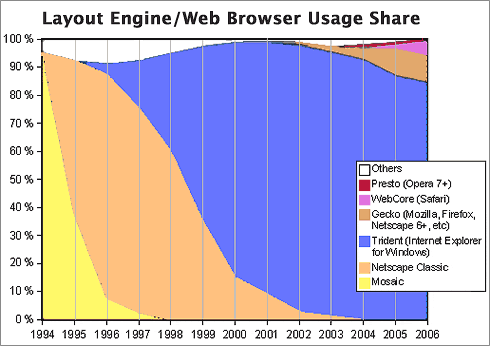
 You see, by 1994, a year or so before the World Wide Web became widely known through the Mosaic and Netscape browsers, Microsoft had already achieved dominance of the desktop computer market, having a market share of more than 90%. A year later, Windows 95 nailed the lid on the coffin of its only significant competitor, Apple’s Macintosh operating system, which in that year had only about 9% of corporate desktops. Netscape was the only remaining threat to a true computing monoculture, since as the company had recognized, the web browser was going to become the operating system of the future.
Microsoft’s hardball tactics in beating back Netscape led directly to the insecure computer desktops of the 2000 decade by ensuring that viruses written in “Windows DNA” would be easy to disseminate through Internet Explorer’s Active/X layer. Active/X basically let Microsoft’s legions of Visual Basic semi-developers write garbage programs that could run inside IE, and it became a simple matter to write garbage programs as Trojan Horses to infect a Windows PC. Active/X was a heckuva lot easier to write to than Netscape’s cross-platform plug-in API, which gave IE a huge advantage as developers sought to include Windows OS and MS Office functionality directly in the web browser.
A similar strategy was taking place on the server side of the web, as Microsoft’s web server, Internet Information Server (IIS), had similarly magical tie-in’s to everybody’s favorite desktop OS. Fortunately for the business world, the guys in IT who had the job of managing servers were always a little bit brighter than the ones who managed desktops. They understood the virtues of Unix systems, especially in the realm of security. IT managers weren’t willing to fight for Windows at the server end of the business once IIS was revealed to have so many security holes. As a result, Windows, and IIS, never achieved the dominance of the server market that Microsoft hoped for, although you can be sure that the company hasn’t given up on that quest.
The other major avenue for viruses and worms has been Microsoft Office. As noted, Melissa attacked Microsoft Word documents, but this was a fairly unsophisticated tactic compared with the opportunity presented by Microsoft’s email program, Outlook. Companies with Microsoft Exchange servers in the background and Outlook mail clients up front, which by the late 1990’s had become the dominant culture for email in corporate America, presented irresistable targets for hackers.
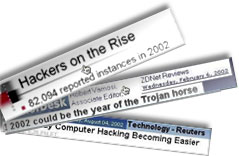 Through the web browser, the email program, the word processor, and the web server, the opportunities for cybermischief simply multiplied. Heck, you didn’t even have to be a particularly good programmer to take advantage of all the security holes Microsoft offered, which numbered at least as many as would be needed to fill the Albert Hall (I’m still not sure how many that is).
So… the answer to the question of why viruses and worms disproportionately took down Windows servers, networks, and desktops starting in 1999 isn’t that Microsoft was the biggest target… It was because Microsoft Windows was the easiest target.
And the answer to why viruses and worms proliferated so rapidly in the 2000’s and with them the Windows-hacker hordes is simply that hacking Microsoft Windows became a rite of passage on your way to programmer immortality. Why try to attack the really difficult targets in the Unix world, which had already erected mature defenses by the time the Web arrived, when you could wreak havoc for a day or a week by letting your creation loose at another clueless Microsoft-Windows-dominated company? Once everyone was using both Windows and IE, spreading malware became child’s play. You could just put your code in a web page! IE would happily swallow the goodie, and once inside, the host was defenseless.
Which leads me to the next question whose answer has been obscured in myth: Exactly why was the host defenseless? That is, why couldn’t Windows fight off viruses and worms that it encountered? It doesn’t take a physician to know the answer to that one, folks. When you encounter an organism in nature that keeps getting sick when others don’t, it’s a pretty good bet that there’s something wrong with its immune system.
The trusting computer
It’s not commonly known or understood outside of the computer security field that Windows represents a kind of security model called “trusted computing.” Although you’d think this model would have been thoroughly discredited by our collective experience with it over the last decade, it’s a model that Microsoft and its allies still believe in… and still plan to include in their future products such as Windows Vista. Trusted computing has a meaning that’s shifted over the years, but as embodied by Microsoft Windows variants since the beginning of the species, it means that the operating system trusts the software that gets installed on it by default, rather than being suspicious of unknown software by default.
That description is admittedly a simplification, but this debate needs to be simplified so people can understand the difference between Windows and the competition (to the extent that Windows has competition, I’m talking about Mac OS X and Linux). The difference, which clearly explains why Windows is unable to defend itself from attack by viruses and worms, stems from the way Windows handles user accounts, compared with the way Unix-like systems, such as Linux and Mac OS X, handle them. Once you understand this, I think it will be obvious why the virus plague has so lopsidedly affected Windows systems, and it will dispel another of the myths that have been spread around to explain it.
Windows has always been a single-user system, and to do anything meaningful in configuring Windows, you had to be set up as an administrator for the system. If you’ve ever worked at a company that tried to prevent its users from being administrators of their desktop PC’s, you already know how impossible it is. You might as well ask employees to voluntarily replace their personal computer with a dumb terminal. [Update 8/7/06: I think some readers rolled their eyes at this characterization (I saw you!). You must be one of the folks stuck at a company that has more power over its employees than the ones I've worked for in the last 20-odd years. Lucky you! I don't have data on whose experience is more common, but naturally I suspect it's not yours. No matter... this is certainly true for home users ....] And home users are always administrators by default… besides, there’s nothing in the setup of a Windows PC at home that would clearly inform the owner that they had an alternative to setting up their user accounts. (Update 8/7/06: Note to Microsoft fans who take umbrage at this characterization of their favorite operating system: Here’s Microsoft’s own explanation of the User Accounts options in Windows XP Professional.)
The Unix difference: “Don’t trust anyone!”
On Unix systems, which have always been multiuser systems, the system permissions of a Windows administrator are virtually the same as those granted to the “superuser,” or “root” user. In the Unix world, ordinary users grow up living in awe of the person who has root access to the system, since it’s typically only one or two system administrators. Root users can do anything, just as a Windows administrator can.
But here’s the huge difference: A root user can give administrator access to other users, granting them privileges that let them do the things a Windows administrator normally needs to do—system administration, configuration, software installing and testing, etc—but without giving them all the keys to the kingdom. A Unix user with administrator access can’t overwrite most of the key files that hackers like to fool with—passwords, system-level files that maintain the OS, files that establish trusted relationships with other computers in the network, and so on.
 Windows lacks this intermediate-level administrator account, as well as other finer-grained account types, primarily because Windows has always been designed as a single-user system. As a result, software that a Windows user installs is typically running with privileges equivalent to those of a Unix superuser, so it can do anything it wants on their system. A virus or worm that infects a Unix system, on the other hand, can only do damage to that user’s files and to the settings they have access to as a Unix administrator. It can’t touch the system files or the sensitive files that would help a virus replicate itself across the network.
This crucial difference is one of the main ways in which Mac OS X and Linux are inherently more secure than Windows is. On Mac OS X, the root user isn’t even activated by default. Therefore, there’s absolutely no chance that a hacker could log in as root: The root user exists only as a background-system entity until a Mac user deliberately instantiates her, and very few people ever do. I don’t think this is the case on Linux or other Unix OS’s, but it’s one of the things that makes Mac OS X one of the most secure operating systems available today.
There are many other mistakes Microsoft has made in designing its insecure operating system—things it could have learned from the Unix experience if it had wanted to. But this one is the doozy that all by itself puts to rest the notion that Microsoft Windows has been attacked more because people don’t like Microsoft, or because it’s the biggest target, or all the other excuses that have been promulgated.
The security awareness class
In response to the cybersecurity crisis, one of the steps our Nation’s IT cowards leaders have taken across the country is to purchase and customize computer security “training.” Such training is now mandatory in the Federal Government and is widely employed in the private sector. I have been forced to endure it for three years now, and I’ve had to pass a quiz at the end for the last two. As a Macintosh user, I naturally find the training offensive, because so much of it is irrelevant to me. It’s also offensive because it is the byproduct of decisions my organization’s IT management has made over the years that in my view are patently absurd. If the decisions had been mine, I would never have allowed my company to become completely dependent on the technological leadership of a single company, especially not one whose product was so difficult to maintain.
It’s a truism to me, and has been for several years now, that Windows computers should simply not be allowed to connect to the Internet. They are too hard to keep secure. Despite the millions that have been spent at my organization alone, does anybody actually believe that our Windows monoculture is free from worry about another worm- or virus-induced network meltdown? Of course not. And why not? Why, it’s because these same IT cowards leaders think such meltdowns are inevitable.
The inevitability of this century’s computer virus outbreaks is one of the implicit myths about their origin:
“Why switch to another operating system, since all operating systems are equally vulnerable? As soon as the alternative OS becomes dominant, viruses geared to that OS will simply return, and we’ll have to fight all over again in an unknown environment.”
My hope is that if you’ve been following my argument thus far, you now realize that this type of attitude is baseless, and simply an excuse to maintain the status quo.
Indeed, the same IT cowards leaders who actually believe this are feeding Microsoft propaganda about computer security to their frightened and techno-ignorant employees through “security awareness” courses such as this. Keep in mind that, as some of the notions point out, companies attempting to train their employees in computer security are doing so not only for their office PC, but for their home PC as well. The rise of telecommuting, another social upheaval caused by the Internet’s easy availability, means that the two are often the same nowadays. So the lessons American workers are learning are true only if they have Windows computers at home, and only if Windows computers are an inevitable and immutable technology in the corporate landscape, like desks and chairs.
Here are some of the things I learned from my organization’s “Computer Security Awareness” class:
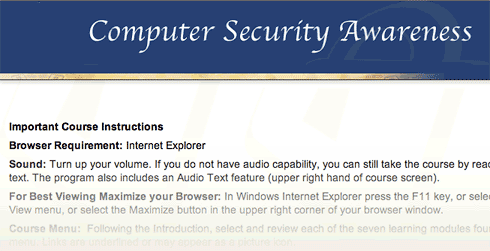
- Always use Internet Explorer when browsing the web.
How many times must employees beg their companies to use Firefox, merely because it’s faster and has better features, before they will listen? In the meantime, to ensure that as many viruses and worms can enter the organization as possible, so that the expensive antivirus software we’ve purchased has something to do, IT management makes sure that as many people continue using IE as possible. I’m being facetious here. The reason they do this is that it’s what the training vendor told them to say, and today’s Federal IT managers always do as instructed by their contractors.While you can find data on the web to support the view that IE is at least as secure as Firefox, common sense should guide your decisionmaking here rather than the questionable advice of dueling experts. The presence of Active/X in IE, all by itself, should be enough to make anyone in charge of an organization’s security jump up and down to keep IE from being the default browser. And that’s not even usually listed as a vulnerability, because it’s no longer “new”.
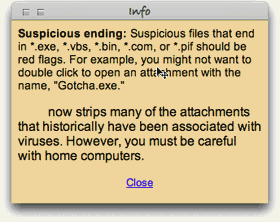 The “shootouts” that you read now and then pertain to new vulnerabilities that are found, and to the tally of vulnerabilities a given browser maker has “fixed”… not to inherent architectural vulnerabilities like Active/X and JScript (Microsoft’s proprietary extension to JavaScript).
 - Use Windows computers at home.
The belief among IT management in recent years is that if we can get everyone to use the same desktop “image” at work and at home, we can control the configuration and everything will be better. Um, no. Mac users don’t have any fear of these strange Windows file types, and organizations that encourage users to switch to Mac OS X or to Linux, instead of discouraging such switching, immediately improve their security posture. For example, here’s some recent advice from a security expert at Sophos:
“It seems likely that Macs will continue to be the safer place for computer users for some time to come.”
And from a top expert at Symantec comes this recent news:
Simply put, at the time of writing this article, there are no file-infecting viruses that can infect Mac OS X… From the 30,000 foot viewpoint of the current security landscape, … Mac OS X security threats are almost completely lost in the shadows cast by the rocky security mountains of other platforms.
- All computers on the Internet can be infected within 30 minutes if not protected.
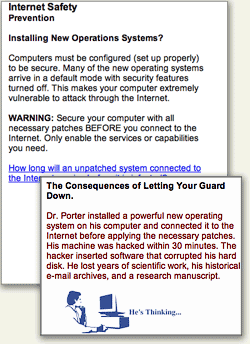 No… of all currently available operating systems, this is true only of Microsoft Windows. Mac OS X is an example of a Unix system that’s been designed to use the best security features of the Unix platform by default, and no user action or configuration is required to ensure this.
Here’s one of the URL’s (from the SANS Institute) that the course provided, which actually makes pretty clear that Windows systems are the most insecure computers you can give your employees today: Computer Survival History. - Spyware is a problem for all computers.
I imagine that spyware is the most crippling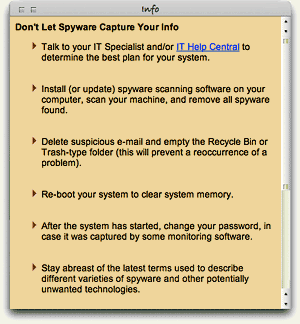 day-to-day aspect of using Windows. My son insisted on trying Virtual PC a couple of years ago, and on his own, his virtual Windows XP was completely unusable because of malware of various kinds within about 20 minutes. He was using Internet Explorer, of course, because that’s what he had on his computer. I installed Firefox for him, and his web surfing in Windows has been much smoother since then. He still has to run antivirus and antiadware software to keep the place “clean,” but needless to say, he has never asked to use IE again. This experience alone demonstrated what I had already read to be true: The web is not a safe place in the 21st century if you’re using Windows. This is one of the primary reasons I use Mac OS X: In all the 5 years I’ve used Mac OS X, I have never once encountered adware. And that has absolutely nothing to do with what websites I surf, or don’t surf, on the web. (And that’s all I’m going to say about it!)
 - Viruses are a threat to all home computers.
What I said previously about adware,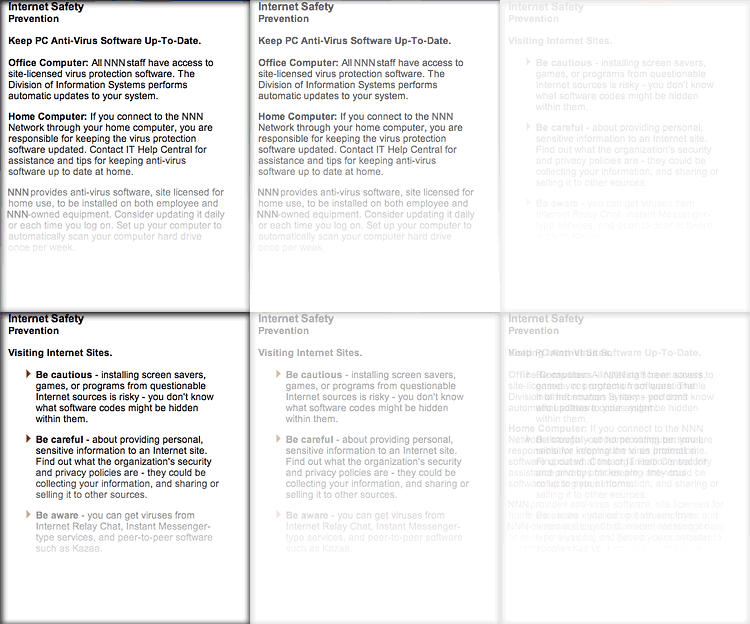 ditto for computer viruses. To this day, there is not a single virus that has successfully infected a Mac OS X machine. (The one you heard about earlier this year was a worm, not a virus, and it only affected a handful of Macs, doing very little damage in any case.) As even Apple will warn you, that doesn’t mean it’s impossible and will never happen. However, it does mean that if Macs rise up and take over the world, amateur virus writers will all have to retire, and you’ll cut the supply line of new virus hackers to the bone. Without Windows to hack, it simply won’t be fun anymore. No quick kills. No instant wins. Creating a successful virus for Mac OS X will take years, not days. Human nature being what it is, I just know there aren’t many hackers who would have the patience for that.
A huge side benefit for Mac users in not having to worry about viruses and worms is that you don’t have to run CPU-sucking antivirus software constantly. Scheduling it to run once a week wouldn’t be a bad idea, but you can do that when you’re sleeping and not have to suffer the annoying slowdowns that are a fact of PC users’ lives every time those antivirus hordes sally forth to fight the evil intruders. Or… you could disconnect your Windows PC from the Internet, and then you could turn that antivirus/antispyware thingy off for good.
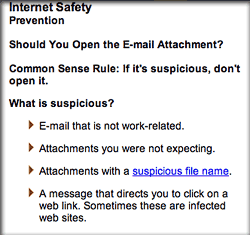 Malicious email attachments are a threat to all.
**Y A W N** Can we go home now?
Sometimes, I open evil Windows attachments just for the fun of it… to show that I can do so with impunity. Then I send them on to the Help Desk to study.:-) (Just kidding.)
Change resisters in charge
Other than Microsoft, why would anyone with a degree in computer science or otherwise holding the keys to a company’s IT resources want to promulgate such tales and ignore the truth behind the virus plague? That’s a simple one: They fear change.
To admit that Windows is fundamentally flawed and needs to be replaced or phased out in an organization is to face the gargantuan task of transitioning a company’s user base from one OS to another. In most companies, this has never been done, except to exorcise the stubborn Mac population. Although its operating system is to blame for the millions of dollars a company typically has had to spend in the name of IT security over the last 5 years, Microsoft represents a big security blanket for the IT managers and executives who must make that decision. Windows means the status quo… it means “business as usual”… it means understood support contracts and costs. All of these things are comforting to the typical IT exec, who would rather spend huge amounts of his organization’s money and endure sleepless nights worrying about the next virus outbreak than to seriously investigate the alternatives.
 Managers like this, who have a vested interest in protecting Microsoft’s monopoly, are the main source of the Windows security myths, and it’s a very expensive National embarrassment. The IT organization is simply no place for people who resist change, because change is the very essence of IT. And yet, the very nature of IT operations management has ensured that change-resisters predominate.
Note that I said IT operations. As a subject for a future article, I would very much like to elaborate on my increasingly firm belief that IT management should never be handed to the IT segment that’s responsible for operations—for “keeping the trains running.” Operations is an activity that likes routines, well defined processes, and known components. People who like operations work have a fondness for standard procedures. They like to know exactly which steps to take in a given situation, and they prefer that those steps be written down and well-thumbed.
By contrast, the developer side of the IT organization is where new ideas originate, where change is welcomed, where innovation occurs. Both sides of the operation are needed, but all too often the purse strings and decisionmaking reside with the operations group, which is always going to resist the new ideas generated by the other guys. In this particular situation, solutions can only come from the developer mindset, and organizations need to learn how to let the developer’s voice be heard above the fearful, warning voices of Operations.
Custer’s last stand… again
So please, Mr. or Ms. CIO, no more silly security training that teaches me how to [try to] keep secure an operating system I don’t use, one that I don’t want to use, and one that I wish to hell my organization wouldn’t use. Please don’t waste any more precious IT resources spreading myths about computer security to my fellow staffers, all the while ignoring every piece of advice you receive on how to make fundamental improvements to our network and desktop security, just because the advice contradicts what you “already know.”
It really is true that switching from Windows to a Unix-based OS will make our computers and network more secure. I recommend switching to Mac OS X only because it’s got the best designed, most usable interface to the complex and powerful computing platform that lies beneath its attractive surface. Hopefully, Linux variants like Ubuntu will continue to thrive and provide Apple a run for its money. The world would be a much safer place if the cowards leaders who make decisions about our computing desktop would wake up, get their heads out of the sand, smell the roses, and see Microsoft Windows for what it is: The worst thing to happen to computing since… well, … since ever!
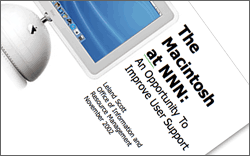 Before my recommendation is distorted beyond recognition, let me make clear that I don’t advocate ripping out all the Windows desktops in your company and replacing them with Macs. Although that’s an end-point that here, today seems like a worthy goal, it would be too disruptive to force users to switch, and you’d just end up with the kind of resentment that the Macintosh purges left behind as the 1990’s ended. Instead, I’ve always recommended a sane, transitional approach, such as this one from my November 2002 paper on the subject (note that names have been changed to protect the guilty):
Allow employees to choose a Macintosh for desktop computing at NNN. This option is particularly important for employees who come to NNN from an environment where Macintoshes are currently supported, as they typically are in academia. In an ideal environment, DITS would offer Macintoshes (I would recommend the flat-panel iMacs) as one of the options for desktop support at NNN. These users can perform all necessary functions for working at NNN without a Windows PC.
This approach simply opens the door to allow employees who want to use Macs to do so without feeling like pariah or second-class citizens.
As long ago as 2002, Mac OS X was able to navigate a Windows network with ease, and assuming your company already has a Citrix server in place, Mac users can access your legacy Windows client-server apps just as well as Windows clients can. This strategy will gradually lower security costs—and probably support costs as well—as the ratio of Windows PCs to Macs in your organization goes down, while lowering the risk of successful malware attacks. As a side benefit, I would expect this strategy to improve user satisfaction as well. Since the cost of Apple desktops today is roughly the same as big-brand PCs like Dell, the ongoing operational cost of buying new and replacement machines wouldn’t take a hit, as the IT mythmakers would have you believe. In fact, did you know that all new Apple computers come with built-in support for grid computing? Certainly! Flick a switch, and your organization can tap into all the Mac desktops you own to supplement the company’s gross computing power. What’s not to like? (My 2002 report didn’t cover grid computing — it was a new feature in Mac OS X 10.4 last year — but it did address all the issues, pros, and cons an organization would face in integrating Macs with PCs; however, it’s too large a subject to discuss further here.)
But how do you convince IT managers of this, when operating systems from Microsoft are the only kind they’ve ever known? I certainly had no luck with mine. Heck, I didn’t even gain an audience to discuss it, and my fellow mid-level IT managers were aghast that I had even broached the subject. After all, many of them were still smarting from the bruising—but successful—war against Mac users they had waged during 1994-96. The fact that in the meantime Apple had completely rewritten its operating system, abandoning the largely proprietary one it built for the original Macintosh and building a new, much more powerful one on top of the secure and open foundation of Unix made no difference to these folks whatsoever. It’s not that they disagreed with any of the points I was trying to make… they didn’t even want to hear the points in the first place!
A new approach for IT managers
 For the most part, the managers who, like “hear no evil” chimps, muffled their ears back in 2002 were in charge of IT operations. To them, change itself is evil, and the thought of changing your decision of 5 years ago for any reason was simply unthinkable. And yet… consider how much the computer landscape changes in a single year nowadays, let alone in 5 years. Individuals with good technical skills for operations management but no tolerance for change should simply not be allowed to participate in decisions that require objective analysis of the alternatives to current practice. And at the pace of change in today’s technology market, inquiry into alternatives needs to become an embedded component of IT management.
For what it’s worth, here are a few principles from the Martian Code of Conduct for IT management:
- Make decisions, and make them quickly.
- Decisions should always consider your escape route in case you make a bad choice
- Escape routes should enable quick recovery with as little disruption to users as possible
- Open source options should always be considered along with commercial ones.
- COTS doesn’t stand for “Choose Only The Software” Microsoft makes.
- Sometimes it’s better to build than to buy. Sometimes it’s better to buy than to build. A wise IT manager knows the difference.
- Reevaluate your decisions every year, to determine if improvements can be made.
- Don’t cling to past decisions just because they were yours.
- Never lock yourself in to one vendor’s solution. Always have an escape route. (Wait… I said that already, didn’t I?)
- Know thy enemy. Or at least know thy vendor’s enemy.
- Be prepared to throw out facts you’ve learned if new information proves them wrong.
- IT is a service function, not a police function. Remember that the purpose of the IT group is to skillfully deploy the power of information technology to improve productivity, communictions, and information management at your organization.
- Never let contractors make strategic IT decisions for your company.
- Never take the recommendation of a contractor who stands to gain if you do. (In other fields, this is called “conflict of interest.” In some IT shops I know, it’s called “standard practice.”)
- Don’t be afraid to consider new products and services. When you reject a technology or tool a customer inquires about, be sure you understand why, and be prepared to explain the pros and cons of that particular technology or tool in language the customer will understand.
- Make sure your IT organization has components to manage the following two primary activities on an ongoing basis, each of which has its requirements at the table when you compile budget requests for a given year:
- Application developers capable of handling a multitude of RAD tasks. This group should maintain an up-to-date laboratory where new technology and tools can be evaluated quickly.
- Operations group with subcomponents for dealing with networking, telecommunications, desktop management, security, data, and application/server maintenance.
- Always obtain independent estimates of whatever resource requirements the operations group tells you are needed to make significant changes in technology platforms at your organization, because an operations manager will always exaggerate the true costs.
- The success of your organization is measured not by the size of the desktop support group’s Help Desk, but rather by continued progress in reducing the number of requests and complaints that are referred to the Help Desk. A rise in Help Desk requests over time is a symptom that something is probably wrong—not a signal to ask for a larger Help Desk budget.
- Similarly, the percentage of a company’s budget that gets devoted to IT should become smaller over time if the IT group is successfully discharging its mission. Calls for larger IT budgets should be viewed skeptically by the COO, since it often symptomizes an IT group that is unable or unwilling to find better alternatives to current practice.
From the perspective of an IT manager who has never worked with anything but Windows desktops, the prospect of having to welcome Macintosh or Linux systems into your Windows-only network must be a frightening one indeed. If you know absolutely nothing about Mac OS X and your only experience with a Mac was a brief hour or two with OS 7 a decade ago, your brain will very likely shut down at such a thought, and your hands will plant themselves on your ears if a colleague begins speaking in that direction. This is entirely understandable, and it’s equally understandable that the vast majority of your existing Windows users will want to remain on the only computing platform they’ve ever known.
But don’t you see that this fear doesn’t mean a decision to support Mac OS X in your organization is wrong! Such fears should certainly be considered in a transition plan, but they shouldn’t be considered as a reason to oppose development of a transition plan. Fears like these, and the sometimes irrational attitudes they bring to bear in technology decisionmaking, is why we desperately need new blood in the Nation’s IT departments, and why applicants to the job whose only (or only recent) training has been in MCSE shops should be filtered out from the get-go. You often hear Macintosh users “accused” of being cultish, but from my perspective, steadfast Microsoft Windows partisans are much more likely to meet the following definition of “cultish” than the Mac users I’ve known:
A misplaced or excessive admiration for a particular person or thing.
By fostering the myths about malware threats, the cult of Microsoft has already poisoned the computing experience for millions of people and wasted billions of dollars trying to shore up the bad past decisions of its Microsoft-trained hordes.
It’s time to give some new ideas a shot. It’s time to begin a migration off of the Microsoft Windows platform in U.S. corporate and government offices. Only once we dismantle the Microsoft computing monoculture will we begin to beat back the malware plague. Until then, IT security will simply spin its wheels, implement security policies that punish the whole software development life cycle because of Microsoft’s sins,  and require Mac OS X users to take online security training that simply teaches all the things we have to fear from using Windows computers.
Addendum: A few articles for further reading:
Colophon
This article is the first time I’ve used a new, very useful JavaScript called Image Caption from the Arc90 lab site. Image Caption makes it easy to include text captions with the graphics you publish to illustrate your text. It includes a small JavaScript file and some sample CSS code. To implement, you simply add a class attribute to the images you want to caption, add the caption text as a “title” attribute, and include the script in the head of your HTML code.
I also had fun using the terrific JavaScript called simply Reflection.js. It’s recently shed about 30kb of file size and is down to only about 5kb, works great alongside Prototype/Script.aculo.us, and is childishly simple to execute. Besides adding a link to the JavaScript file, you add a class attribute to the images you want to reflect. For each reflection, you can tweak the reflection height and its opacity by adding specific measures in two additional class attributes. Unlike other reflection scripts I’ve tried, this one automatically reflows the text once the reflected image is added to the layout.
Sophos Expert Thinks Vista Won’t Be More Secure, Advises Switch to Mac
No Less Than Symantec Confirms Superior Security Features of Mac OS X
From the 30,000 foot viewpoint of the current security landscape, these Mac OS X security threats are almost completely lost in the shadows cast by the rocky security mountains of other platforms.
Well worth reading the entire article from Woodward's blog on the Symantec website.


