



News Posts With Tag Developer Tools
CocoaWget: Download Websites Using the Unix Utility wGet
 Originally downloaded April 23, 2007. You know, I've never understood why this software hasn't been made before. Or perhaps it has, but it's pretending to use some proprietary method of download web pages. I've used wget from the command line to fetch pages, and it's awesome... and awesomely fast. I'm quite interested to see how this open-source, Cocoa GUI freeware handles the task.
Version as tested: 2.6.2.
Update 8/14/12.
Peter Hosey Weblog: Musings of a Cocoa Developer
A Browser for Core Data

Compass: A New Concept for Managing CSS Styles
Atlas: Very Cool Developer UI for Capuccino
Classy: Unbelievably Cool Web Page Analysis
Classy is an online application that takes a URL and parses it into a very useful list of all the CSS classes and IDs on the page. It breaks the classes down to show what HTML elements they're tied to, and does the same with each ID. Besides using the website version, you can also add Classy to your browser toolbar and run it on any web page you happen across.
Classy isn't a replacement for tools like FireBug or WebInspector, but it's a highly useful supplemental tool that gives you a quick overview of a web page's CSS structure that you can't easily get with those tools.
Apple Weighs In To Web 2.0 With Sproutcore Framework
InfoWorld Article Dispels Many Enterprise Mac Myths
My only quibble is the author's assertion that enteprise reliance on Microsoft Office means unequal time for Macs. He points out that OpenOffice is a viable alternative but makes no mention of Apple's own terrific iWork suite, which is quite compatible with the basic aspects of Microsoft Office. Likewise, he fails to acknowledge Apple's effective collaboration suite in the form of iCal, Mail, iChat, and Address Book. Perhaps it's because those aren't cross-platform. However, even if that's the case, since they are able to interoperate with Office, they should be considered by businesses seeking to support their growing numbers of Mac users.
Apple Posts Major Update to Safari
Apple - Support - Downloads - Safari 3.1
This update brings in all the latest standards implementations and innovations in the open-source WebKit project, plus a few interface enhancements as well. The Windows version gets some important updates too. From Apple’s tech document on Safari 3.1:
Performance
- Improves JavaScript performance
Standards
- Adds support for CSS 3 web fonts
- Adds support for CSS transforms and transitions
- Adds support for HTML 5 <video> and <audio> elements
- Adds support for offline storage for Web applications in SQL databases
- Adds support for SVG images in <img> elements and CSS images
- Adds support for SVG advanced textÂ
Developer
- Adds option in Safari preferences to turn on the new Develop menu which contains various web development features
- Allows access to Web Inspector
- Allows access to Network Timeline
- Allows editing CSS in the Web InspectorÂ
- Allows custom user agent string
- Improves snippet editor
Other
- Double clicking on the Tab Bar opens new tab
- Includes URL metadata when images are dragged or saved from browser
- Opens Download and Activity window in current Space
- Supports trackpad gestures for back, forward, and magnify on MacBook Air and compatible MacBook Pro computers
- Shows Caps Lock icon in password fields
Safari 3.0’s Hidden Jewels
By the way, before any defensive Firebug fans (I love Firebug, too, by the way) start a reflexive reply, you should know that in a recent podcast for Ajaxian, Firebug developer Joe Hewitt made clear he's now working on iPhone development and has been won over by WebKit from Firefox. He now thinks WebKit/Safari is the best platform for web development out there. I'd say his opinion is pretty significant! I see he's also built an early version of Firebug for the iPhone.
PeekIt: Geeks Gotta Love It! A Free Hex Editor… and Much More
 Originally downloaded March 28, 2007. OK, so it hasn’t got much of an icon, and it’s appeal is admittedly quite limited. But if you are brave enough and curious enough to use this freeware to peek inside your files outside of their native application, I suspect PeekIt will prove a worthy draw.
Update 10/11/07. I actually made this decision a few months ago, but I’m running behind in posting stuff. Peekit is a great tool for taking a look inside binary files, especially those that aren’t mach-o executables. It’s relatively easy to extract or modify text in such files. I used this to figure out how to modify FastOrSlow’s icon to be white instead of black for Crystal Clear. Horrible icon, but hey, not everyone’s an artist. It’s just that usually they aren’t Mac users.
Version as tested: 2.5.4.
Araelium Edit: New Web Development Tool for Mac OS X in the Works
 Originally downloaded July 29, 2007. Araelium Edit is a new web development tool that’s in the works now. No price has yet been set. From what I can see in a quick run-through the preview site, this editor is designed strictly for web-based application development and incorporates a project manager, document editor, and application preview. Looks interesting!
Version as tested: Preview 5.
Update 8/12/12 Software is no longer available. Obsolete.
Open Source Mac OS X Code Library, Organized by Author
F-Script Tutorial for Cocoa Fiends
Komodo Edit: Freeware Version of Komodo IDE Supports Ajax, PHP, Perl, Python, Ruby
 Originally downloaded April 4, 2007. I think I'd looked at Komodo briefly last year, but didn't download it because it was so expensive. I've also become leery of some cross-platform software, because it's generally designed for Windows in Java and then has an Aqua interface tacked on. Not my idea of good Mac software. But today I realized that Komodo also has a freeware version of its developer IDE, which covers the same range of languages that I'm interested in. As long as it's free, I'm definitely game for a tryout! I'm also impressed by the fact that ActiveState, the company that makes Komodo, has an open beta program for the next point release (4.1) already available as well... for both the editor and the full $300 IDE.
Version as tested: 4.0.
AppHack: Incredibly Useful and Versatile App Developer Freeware
 Originally downloaded March 28, 2007. I've been using AppHack off and on for 2 years now, since its initial release in February 2005, and it's always amazed me it can do so much. Now that I'm actually starting to hack my own Mac software, I expect it'll come in even handier. The developer released an upgrade to AppHack last week, and I'm taking the opportunity to renew my acquaintance with it.
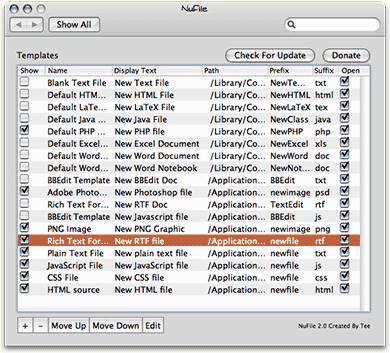
Besides opening up applications and peeking around, AppHack can also perform some theming duties... for example, it can replace icon sets. And here's a developer who clearly doesn't mind having his own medicine eaten: AppHack is distributed not only as freeware, but as open-source freeware, so you can take a look at its code to see how it does what it does. Great stuff... highly recommended for your inner (or even outer) geek!
Version as tested: 1.1.
Adobe’s WebKit-Driven Apollo Desktop Now Available in Alpha Release
 I was too busy last week to report this in a timely manner, but it's potentially big news: Last October, Adobe announced that it would use Apple's open-source WebKit code (on which Safari is based) for a new web application runtime for desktop software, and it's now fulfilled that promise. Apollo can be downloaded in first-release alpha form from Adobe's Labs website, and there's one example application built on the platform that you can also try. Apollo installs as a framework on Mac OS X, and it's also available for Windows. Adobe intends Apollo to be a framework for building web-based applications for the desktop, and I don't know too much more at the moment, but do intend to find out. It sure seems odd to peer into the Apollo framework folder and find the WebCore and JavaScriptCore frameworks, which are the heart of WebKit itself!
 Jedit X: Advanced Text/HTML Editor
Jedit X: Powerful Text Editor Based on Cocoa
 Originally downloaded 10/15/06. I’m sure I’ve been ignoring Jedit X because I thought it was the same as jEdit, a java-based programmer’s editor that runs on most platforms. Frankly, I’d say Jedit X is unfortunately named, and I don’t really “get” what the name means. But having two Jedit text editors for Mac OS X can’t be a good thing. I’m downloading jEdit today, too, since it’s been at least 2 years since I’ve tried it, and presumably it’s much faster now than it used to be. Like Jedit, jEdit has a plethora of plugins and add-ons to extend its usefulness. Of course, the fact that Jedit X is based on Cocoa automatically gives it an advantage in my book, but I’m curious now to try them both. Unlike jEdit, which is an open-source editor, Jedit X is $28 shareware.
Update 3/22/07. So, I finally get around to giving Jedit X a serious try last night. I was immediately impressed by the software’s overall design, and its Cocoa base meant nearly all the components were where I thought they’d be, and worked the way they should. It’s always a mixed blessing when software provides a wealth of preference options, and Jedit provides much more than most. It would be interesting to compare the number of settings you can configure in Jedit X with those in, say, BBEdit or TextMate. For some reason, text editors tend to pile the configuration options on… probably to satisfy customer requests. Philosophically, I side with Apple’s designers in thinking that the fewer options a user has to consider when opening a new piece of software, the better. On the other hand, I’ve often felt that Apple skimps too much in that direction. Fortunately, Jedit X’s preferences are well designed and logically arranged.
Sadly, I didn’t get much further than the 15-20 minutes I spent considering all of the preferences settings I could tweak. As soon as I downloaded a PHP file to see how well it handles typical editing and coding operations, I realized I’d have to say “bye bye” to Jedit X.
Everyone has a few “must have” requirements when it comes to software, and one of mine for a programmers editor is tabs. I have been using a tabbed editor for a long time now, beginning with BBEdit and for the last year or so, Smultron. I’ll never go back to single windows for each document. I often open 10-15 files at a time when I’m programming, and the desktop just gets too cluttered! No matter how good Jedit X is in other ways, this is one feature I simply can’t live without. I miss it when I’m in TextEdit, too, but I don’t spend nearly as much time there as in Smultron. A really cool widget-building app that I’ve used in the past, Widgetarium, didn’t have tabs either, and it drove me nuts trying to keep “tabs” of all the open files. Unfortunately, Apple’s new Dashcode software for widget making is missing tabs as well.
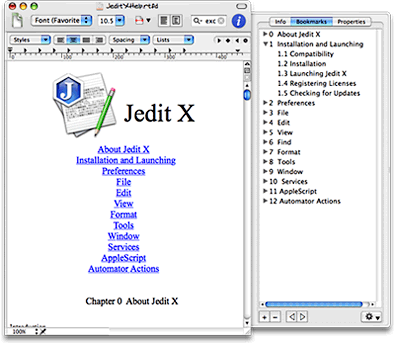
If you’re programming habits don’t require a tabbed editor, you should definitely give Jedit X a look. it handles a wide variety of syntaxes and appears to be particularly strong in HTML. From what I saw, Jedit X would also make a very nice RTF-style editor like TextEdit… it has a lot of features geared to plain old writing, as opposed to programming. For documentation purposes, it has some nifty tools such as the “bookmarks” tab in its drawer… the accompanying screenshot is a Jedit X document containing the Jedit X Help file, showing the linked navigation in the form of bookmarks. Sounds like PDF, right? There’s much more to Jedit X, but I didn’t get any farther than this. Still, that was far enough to see that at only $29, it’s a great value… If …
Version as tested: 1.39.


